



Charlie Ngo
•
Last updated: 23 October, 2026
Shopify Smart Collections: Setup, Conditions & 8 Examples (2026 Updated)
Shopify smart collections add and remove products for you based on rules, such as a tag, a price, or...
How To Set Up International Shipping On Shopify: A Step-By-Step Guide (2026)

Marketing Manager
Summarize this post with AI
Shopify international shipping lets you sell and ship orders to customers in other countries by controlling where you ship, what you charge, and how duties and taxes are handled. Most problems come from three areas: destination setup, shipping rates, and customs information. If one is wrong, customers may see no rate at checkout, face unexpected duties, or have their package delayed at customs.
This guide walks through each setup step, how to price international shipping, and how to make cross-border checkout clearer for shoppers. I’m Charlie Ngo, an eCommerce expert at BOGOS with 11 years of experience helping Shopify stores increase sales, grow average order value, and improve conversion rates.
To start shipping internationally, you need to set up six things in the right order: destinations, shipping rates, product customs data, duties, labels, and testing.
Work through these steps one by one. Missing even one can lead to no shipping rate at checkout, incorrect duty calculations, or packages being delayed at customs.
Start by telling Shopify where you want to sell and ship. If your store uses Shopify Markets:
Markets let you manage currency, language, duties, and shipping settings for each region in one place. For the tax and carrier specifics of a single market, see a country guide such as our Shopify shipping to Australia walkthrough.
If your store does not use Markets:
One rule matters most: the destination must belong to an active market or shipping zone. Otherwise, customers there may not be able to check out even if you have already created a rate.
Open the relevant shipping zone and click Add shipping option. Shopify supports four main international shipping rate types:
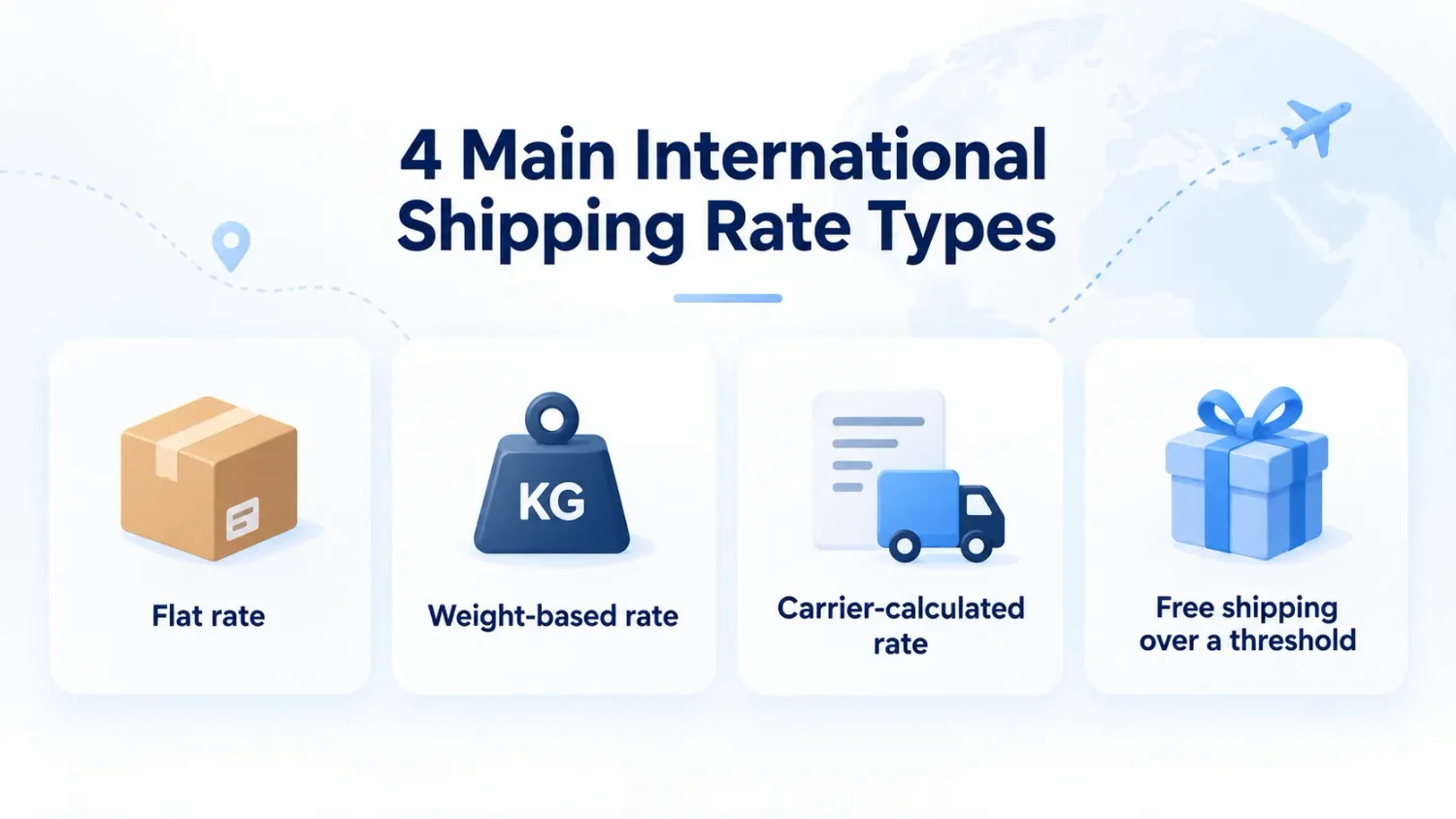
Each option works differently depending on your products, destinations, and shipping costs. For a detailed comparison of these four Shopify shipping rate types, see our guide to Shopify shipping rates.
International labels and duty calculations require a Harmonized System (HS) code, a standardized six-digit number used worldwide to classify traded products for customs and international shipping, so the correct duty rate can be applied.
To add it, follow these steps:
If you have a large catalog, update these fields in bulk with a CSV instead of editing every product manually.
Go to Settings → Taxes and duties, open Duties and import taxes, and click Set up.
Select the countries you want to cover, or manage them by market if you use Shopify Markets.
DDP (Delivered Duty Paid) and DAP (Delivered at Place) are official international shipping rules from the International Chamber of Commerce known as Incoterms that divide transport costs and legal duties between buyers and sellers.
Simply put, the main difference between the two is who pays the import duties and taxes. Here is how they compare:
| DDP (Delivered Duty Paid) | Duties are collected at checkout, so shoppers see the full landed cost upfront and avoid an extra bill on deliveryShopify charges a duty calculation fee of 0.85% with Shopify Payments or 1.5% with other payment gateways |
| DAP (Delivered at Place) | Duties are collected by the carrier when the parcel arrives. It is simpler upfront, but customers may face unexpected charges or refuse the delivery |
Show them as a separate line item or select duties included in the price. Either way, the goal is to show shoppers the full landed cost before they place the order.
Every international parcel needs a customs form. This is the document that tells customs what is inside, how much it is worth, and where it was made. Shopify creates that form for you when you buy the shipping label.
Here is how to buy it correctly:
One important thing to check: if you collect duties at checkout using DDP, you need a carrier that supports DDP labels.
Through Shopify’s own carrier accounts, this currently includes Canada Post for US destinations only and DHL Express for shipments to the US and Canada. Canada has its own duty thresholds, GST/HST, and CUSMA rules, which our guide to Shopify shipping to Canada walks through. For other carriers, you may need to buy the DDP label through a third-party app or ship using DAP instead.
See Shopify’s guide to buying DDP labels for the latest supported carrier list.
Do not wait for a real international customer to uncover a setup issue. Place a test order first:
If no shipping rate appears, check whether the destination country is included in an active market and shipping zone. For the full process, see Shopify’s guide to placing a test order.
International shipping can range from around $15 for a small parcel to a nearby country to $60 or more for heavier or long-distance shipments. Your final cost depends on several factors, so there is no single rate that works for every order.
There are six main factors that can change the final cost:
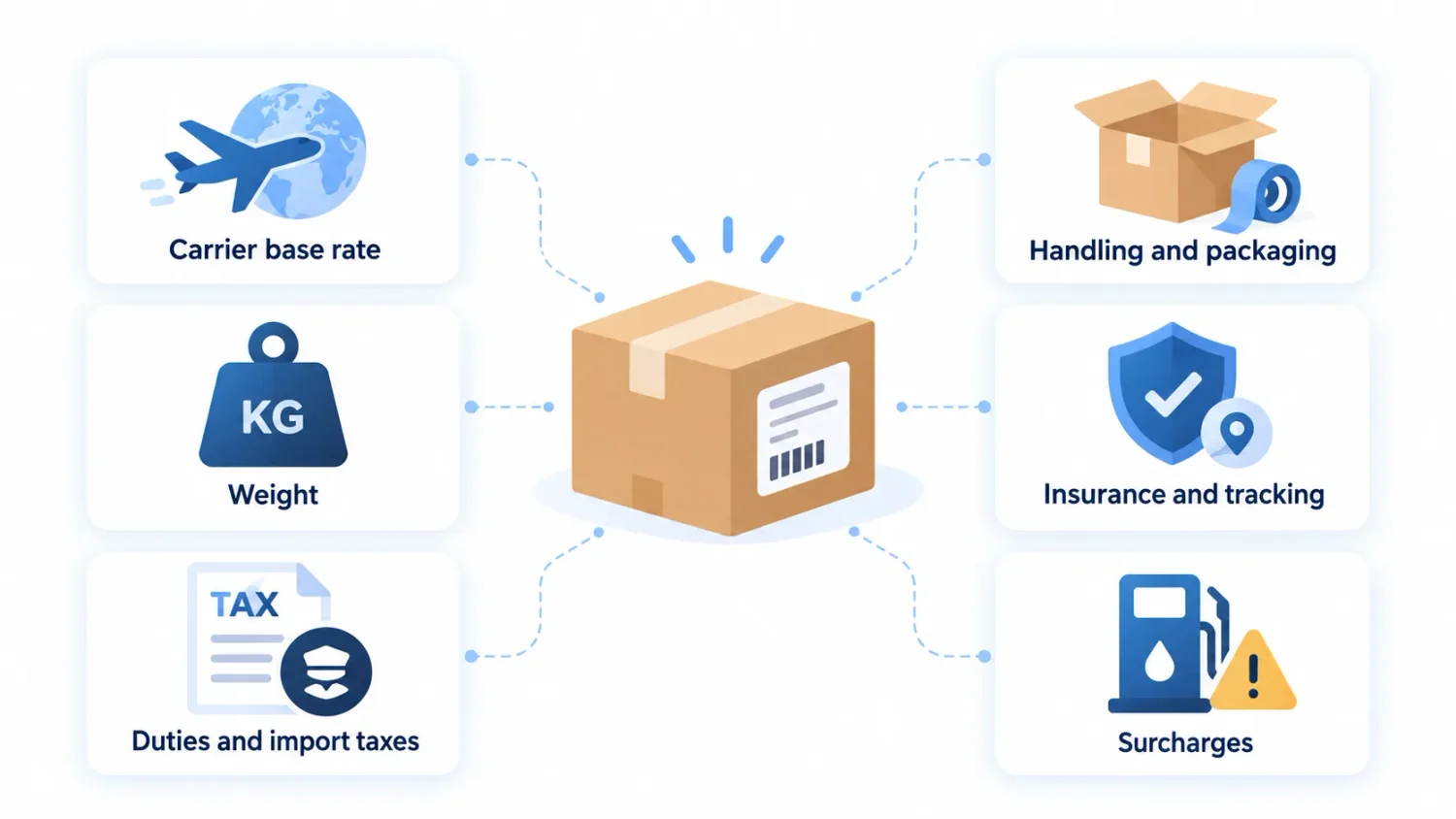
| Factor | What drives it |
|---|---|
| Carrier base rate | Destination country or zone, plus service level (economy vs express) |
| Weight | The greater of actual or dimensional (volumetric) weight |
| Duties and import taxes | Product category (HS code), order value, and the destination’s de minimis threshold |
| Handling and packaging | Your box, materials, and pick-and-pack |
| Insurance and tracking | Optional add-ons |
| Surcharges | Fuel, remote-area, and oversized or overweight fees |
This is why one international flat rate can be difficult to manage. Set it too low and heavy orders hurt your margin. Set it too high and smaller orders become less attractive to international shoppers.
Shopify does not have a separate public international shipping calculator, but you can get shipping estimates in a few ways.
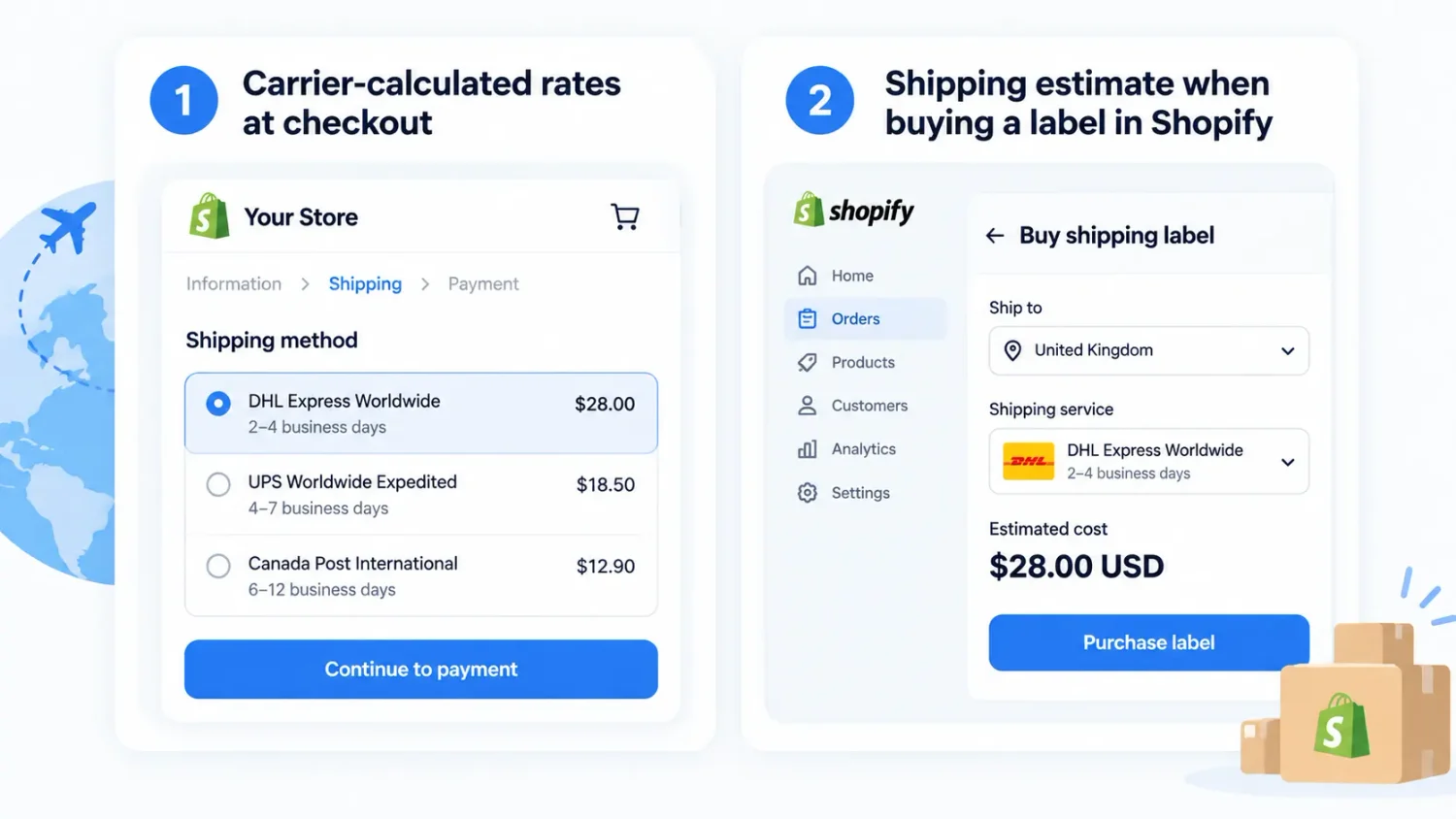
For planning before an order exists, use the carrier’s own shipping calculator or a third-party shipping platform. Whichever method you use, accurate product weights, package dimensions, and customs data are important for getting a useful estimate. Show those costs as clearly as possible. According to the Baymard Institute, 48% of shoppers who abandoned during checkout cited extra costs such as shipping, tax, and fees as a reason.
Since 2025, customs rules have changed significantly for low-value cross-border shipments.
For merchants, the practical response is straightforward: review your HS codes, recheck duty collection, review your international pricing, and make sure new import costs are not quietly eating into your margin. Individual markets have their own thresholds too: the UK, for example, has merchants collect VAT at checkout on consignments of £135 or less. Our guide to Shopify shipping to the UK walks through that setup end to end.
International shipping can feel expensive, so a free-shipping threshold gives shoppers a clear way to remove that cost by increasing their cart value.
Shopify lets you create a free-shipping threshold natively, but it applies sitewide rather than to specific products or collections. Also, it does not include a built-in progress bar showing shoppers how much more they need to spend to unlock free shipping.
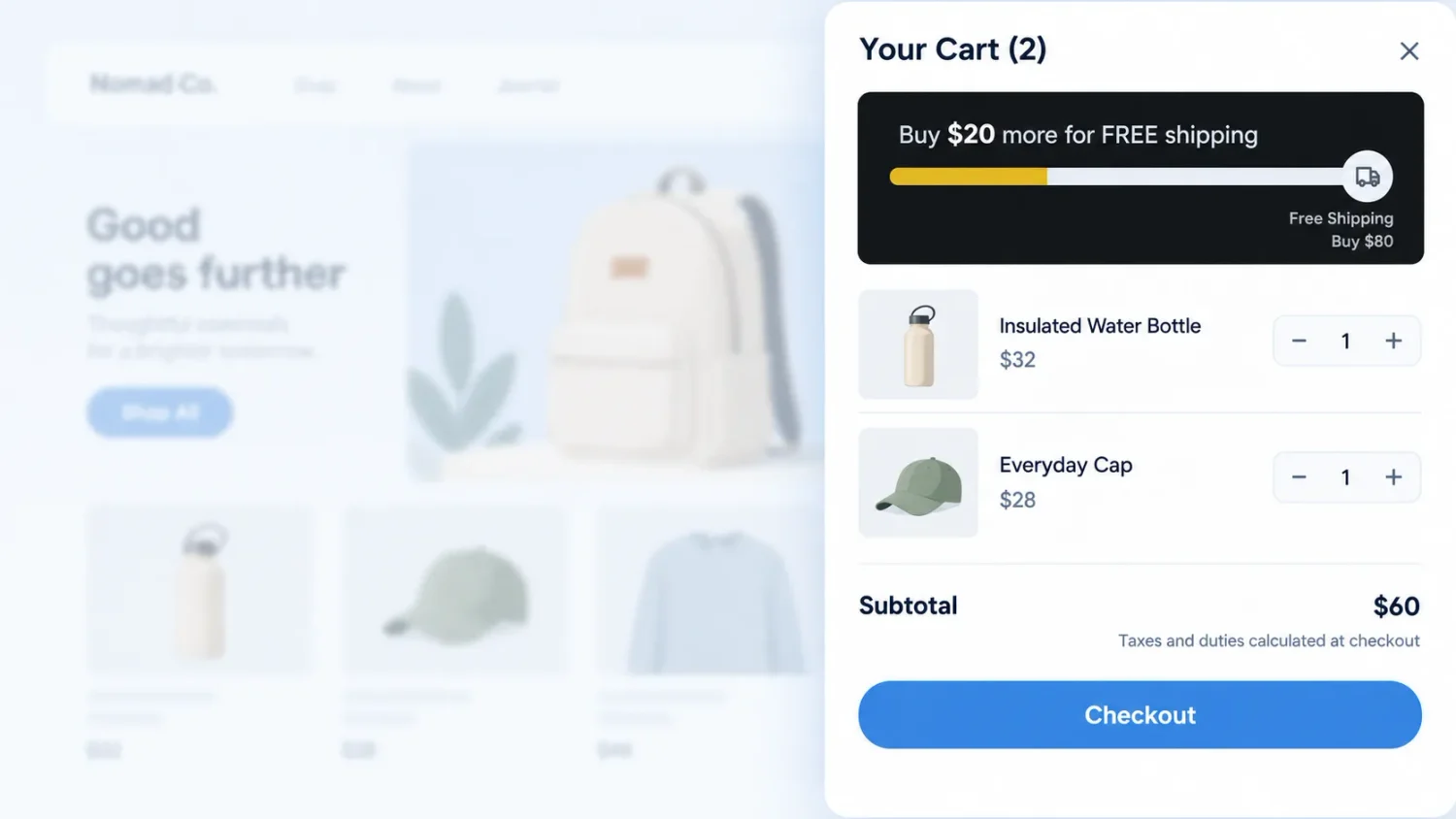
BOGOS: Free Gift Bundle Upsell fills both gaps from one dashboard. You can set free shipping as a gift, then control exactly when it unlocks based on conditions such as product, collection, vendor, customer location, or Shopify Market.
You can also promote the same offer directly on the storefront with a progress bar that shows “You’re $20 away from free shipping” in the cart drawer, encouraging shoppers to add more.
Shipping cost is not the only concern international customers have. Returns can also feel risky. Sending an item back across borders can take longer, cost more, and delay the refund.
Make your return process clear before the customer buys by explaining these components clearly:
For more detail, see our guides to writing a Shopify return policy and setting up a refund policy.
Native Shopify handles most international setups. Reach for carrier-calculated rates or a third-party app when you need live rates on a lower plan, guaranteed duties, multi-carrier label buying, or DDP with a carrier Shopify does not support natively.
If you need more than native rates, there are three apps that cover the common gaps:
| App | Rating & reviews | Features | Pricing | Best for |
|---|---|---|---|---|
| Easyship – All in One Shipping | 4.1 / 5 from 392 reviews | • 550+ carrier services• Discounted international rates• Live rates at checkout• Duties and tax calculation• DDP/DDU support• Customs documents and labels• Tracking, returns, and shipping automation | • Free plan available• Paid plans start from $29/month | Stores that want an all-in-one shipping platform |
| Zonos Duty and Tax | 4.4 / 5 from 159 reviews | • Guaranteed landed-cost calculation• Duties and tax collection at checkout• VAT remittance• HS classification• International labels and customs paperwork• Carrier connections• Coverage for duty/tax discrepancies | • Free plan not available• Paid plans start from $2,500/year | Established cross-border stores focused on DDP and duty compliance |
| Passport Shipping | 4.4 / 5 from 35 reviews | • Shipping to 220+ markets• Prepaid duties and taxes• DDP international shipping• Automated export/import documents• International shipping rates• Order management• Door-to-door tracking | • Free to install • Paid: Usage-based shipping charges by weight and destination | US-based DTC brands that want a managed international shipping solution |
For the domestic side of your rate setup, our guides on Shopify shipping rates and real-time carrier-calculated rates cover the mechanics, so this article can stay on the international parts.
Most international shipping issues come from a few setup mistakes. Use this table to find the likely cause quickly:
| Problem | How to fix it |
|---|---|
| “No shipping rates available” for an international address | Make sure the country belongs to an active market and shipping zone with a valid rate. |
| Orders above your highest tier have no rate | Check whether the top weight or price tier has a maximum. Leave the final maximum open so larger orders still qualify. |
| You cannot buy an international or DDP label | Your carrier may not support the required DDP label through Shopify. Switch carriers or use DAP. |
| Duties are missing or look incorrect | Check that every product has the correct HS code and country of origin. |
| The customer is charged duties twice | Confirm that the shipment was correctly marked as duties prepaid and coordinate with the carrier if it collected duties again. |
International shipping is not really a logistics problem; it is a conversion problem. Every setting in this guide exists to remove a reason a global buyer would quit: a missing rate, a surprise customs fee, a held package. Get the countries, rates, HS codes, and duties right, and the checkout stops leaking.
Do this next: add your first market, set a rate, add HS codes to your best-selling products, and place one test order to a duties-enabled country. Then treat free shipping as the lever it is, a direct answer to the extra-cost objection behind most abandoned carts. That is how international shipping turns into real conversion rate growth and more Shopify sales, instead of a support headache.
Yes. Shopify manages international shipping through Markets or shipping zones, and it supports duties, HS codes, and DDP labels natively. There is no separate charge to ship internationally, though a small calculation fee applies when you collect duties at checkout, and carrier and duty costs are their own bills.
Yes. HS codes and country of origin are required for Shopify to calculate duties, and some carriers will not print an international label without them. Add both on each product’s Shipping section, or bulk-update by CSV for a large catalog.
Use DDP for most orders. It collects duties at checkout, so the customer sees one final price and gets no surprise bill, which means fewer refused deliveries. Keep DAP only for occasional low-volume orders, and warn the buyer they will owe duties on delivery.

Shopify smart collections add and remove products for you based on rules, such as a tag, a price, or...

Shopify collections decide how shoppers find your products, yet many guides still describe a setup Shopify is now replacing....

A Shopify announcement bar is the thin strip at the top of your store that tells shoppers about shipping,...
