



Charlie Ngo
•
Last updated: 20 October, 2026
Shopify Collections: How To Create & Organize Them (2026)
Shopify collections decide how shoppers find your products, yet many guides still describe a setup Shopify is now replacing....
Shopify AOV: What It Is, 2026 Benchmarks, and 13 Ways to Increase It

Marketing Manager
Summarize this post with AI
If your Shopify store gets steady traffic but order totals stay small, the problem usually is not your products. It is your average order value. This article explains what Shopify AOV is, how to calculate it, what counts as a good number in 2026, and 13 proven tactics to lift it without spending more on ads. The data, benchmarks, and tactics below are pulled from current Shopify research and the patterns our team sees across 87,000+ Shopify merchants running gift, bundle, and upsell campaigns using our BOGOS app
Average order value, or AOV, is the average amount a customer spends in one order on your Shopify store. It is one of the first metrics merchants look at when they want to grow revenue without finding new customers.
A higher AOV means each visitor you already pay to attract becomes more profitable. A lower AOV means you are leaving money on the table at checkout.
The formula is simple. Divide your total revenue by your total number of orders for the same period.
AOV = Total revenue ÷ Number of orders
Here is a real example. If your store made $20,000 from 250 orders last month, your AOV is $80. That single number tells you what an average customer is worth at the cart.
Track it the same way every time. Most merchants use a 30-day window so they can compare month over month.
Shopify calculates AOV as gross sales minus discounts, divided by the number of orders. Taxes, shipping charges, and changes made after the order, such as returns, edits, and exchanges, are left out. That is the definition in Shopify’s Help Center.
Shopify has used this definition since January 2023. Before that, AOV was based on total sales, which includes taxes and shipping. Shopify’s changelog confirms the new definition also applies to historical data.
Here is Shopify’s own worked example. A store has 10 orders in December:
The AOV is ($1,000 − $200) ÷ 10 = $80. Taxes and shipping do not count.
This is why a manual calculation often does not match the dashboard. If you divide your “Total sales” figure by orders, you include taxes, shipping, and returns, so your number will be off.
Avoid these 4 tracking mistakes:
Shopify already calculates AOV for you. You do not need a separate app to see it.
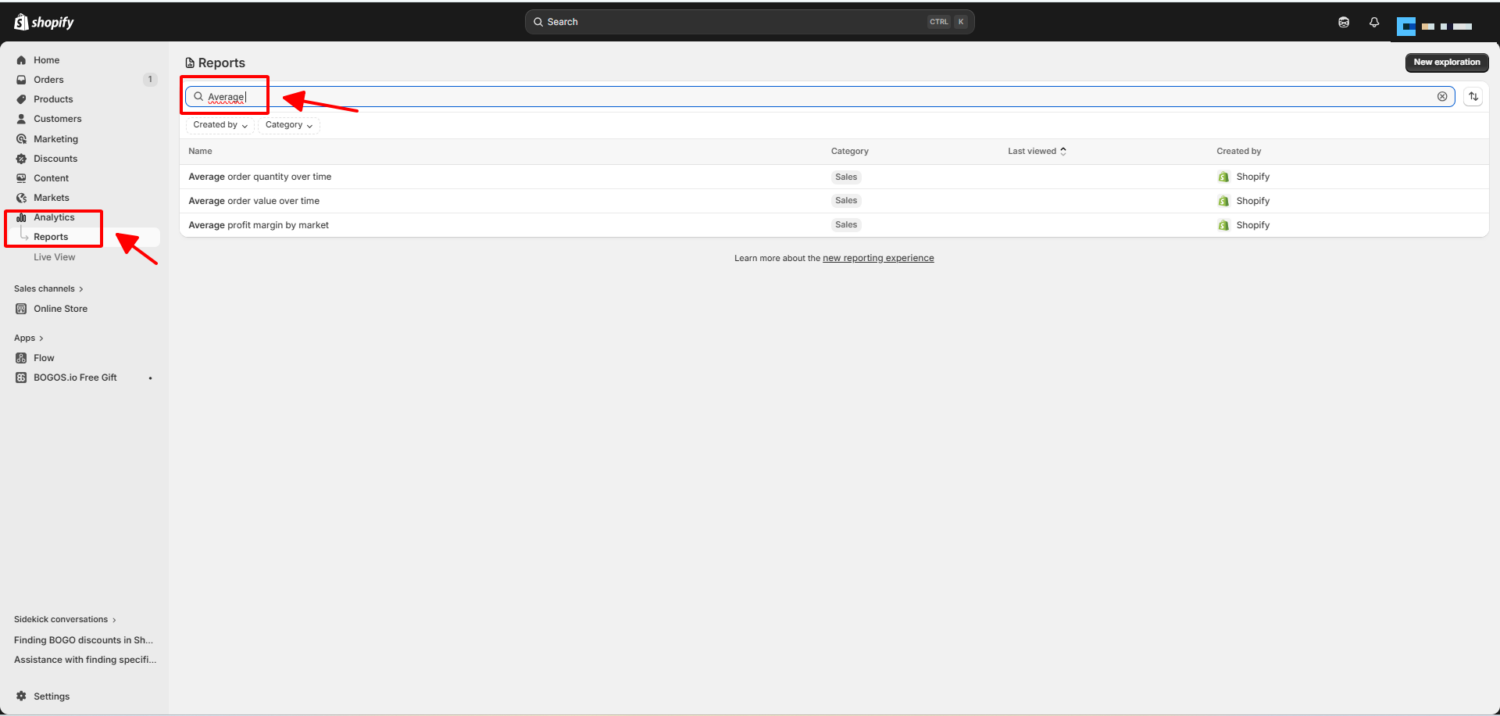
Open your Shopify admin, then go to Analytics → Reports → Average order value. You can filter by date, sales channel, or customer location.
Check it weekly during a campaign. Check it monthly the rest of the time.
Shopify can benchmark your AOV against stores like yours. Open the Average order value over time report, click the Compare menu, and select Benchmarks.
The chart then shows 3 numbers from a group of similar stores:
Shopify’s Help Center explains that the group is built from stores with a similar order volume and the same primary market country. The benchmark does not appear if there are not enough similar stores. It shows in charts only, not in data tables.
This is the most useful benchmark you have. It compares you with stores of your size in your market, not with a global average.
AOV is one of the fastest levers you have. Lifting it 15% lifts your revenue 15% from the same traffic, with zero new ad spend.
That is why many of our customers now put AOV ahead of acquisition on their 2026 roadmaps. Acquisition keeps getting more expensive. AOV is free to grow once you know the right tactics.
Think of it this way. A store with a 2% conversion rate and a $45 AOV needs to double its traffic to add $45 of revenue per 100 visitors. The same store can lift AOV to $68 and earn the same extra revenue with no new traffic at all.
One change. Same result. Much smaller cost.
Raising AOV is only useful if it raises profit too. A 20% AOV jump with a 15% margin loss is often worse than no change at all.
The healthiest AOV growth comes from tactics that add value, not discounts that cut into margin. Bundles, gifts, and upsells fit that goal. Sitewide percentage-off coupons usually do not.
AOV also pairs well with retention. Repeat customers spend roughly 4.8x more per order than first-time buyers, so the lift compounds over a customer’s lifetime.
The honest answer: it depends on what you sell. A $90 AOV is excellent for a beauty brand and underwhelming for a furniture store.
For a useful baseline, the Littledata Shopify benchmark puts the average Shopify AOV at $85, with the top 20% of stores above $192 and the top 10% above $311. Redstag Fulfillment’s analysis of the same data puts the most common range across stores at $85 to $92, with top performers exceeding $120 per transaction.
The global ecommerce AOV across all platforms is $172, based on Dynamic Yield’s rolling 12-month benchmark across 400+ enterprise brands. That figure includes high-ticket categories that pull the average up, which is why most Shopify stores sit well below it.
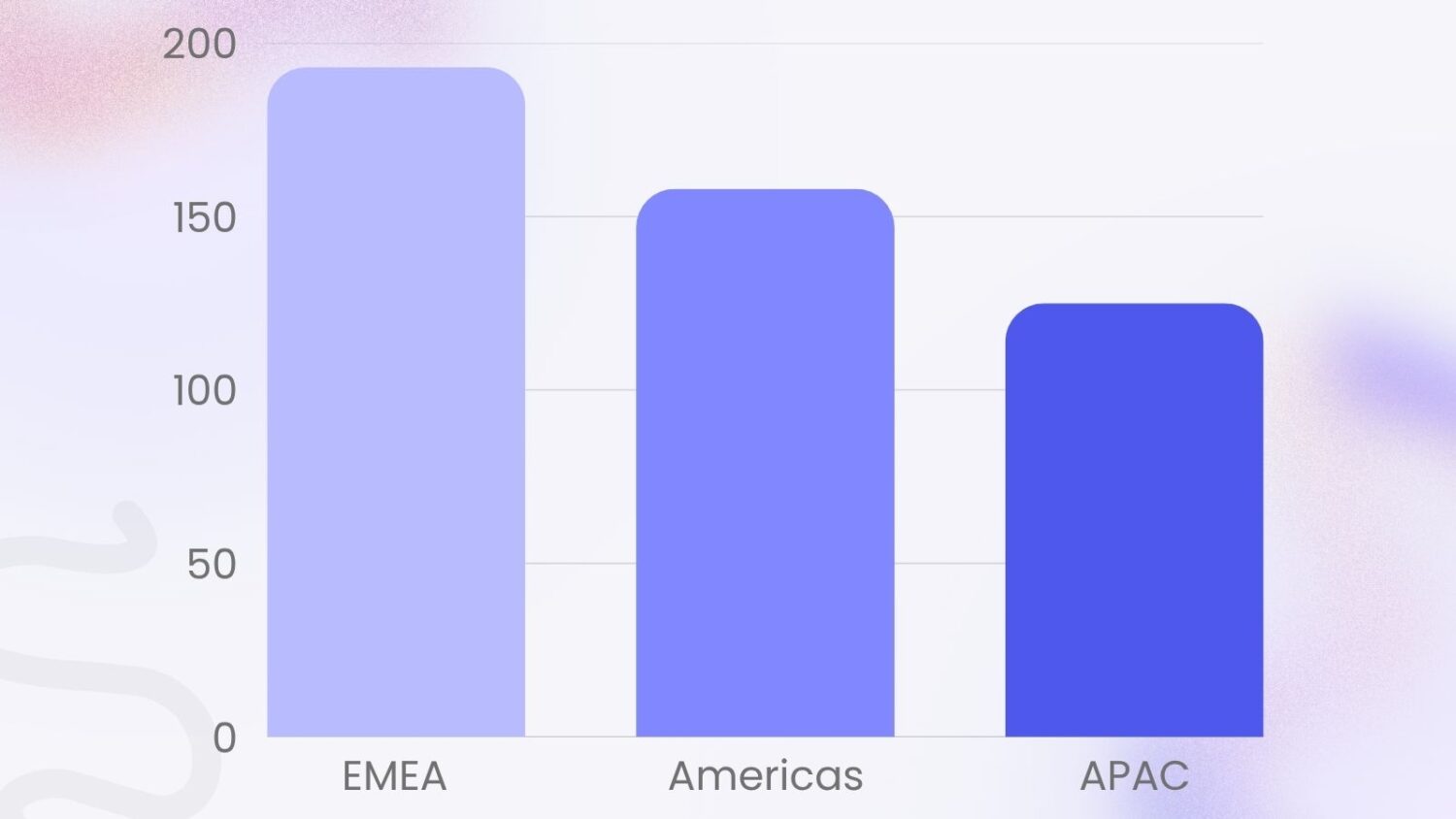
Where your customers live matters too. According to Dynamic Yield’s ecommerce benchmarks:
If you sell mainly into EMEA, your benchmark is higher than a store targeting APAC shoppers. Adjust your targets accordingly before deciding whether your AOV is healthy.
Vertical matters more than platform. Here is how AOV breaks down across common ecommerce categories, drawing on Triple Whale’s 2025 industry benchmarks and Dynamic Yield’s 12-month rolling data:
| Industry | Average order value |
|---|---|
| Luxury & Jewelry | $310 – $350+ |
| Home & Furniture | $264 |
| Consumer Goods | $296 – $418 (seasonal) |
| Fashion & Apparel | $90 – $190 |
| Health & Beauty | $72 – $151 |
| Pet Care & Veterinary | $66 – $68 |
| Food & Beverage | $69 – $90 |
Use the row that matches your store. Benchmarking a supplement brand against luxury furniture only sets you up to feel behind.
A note on the wider ranges: AOV inside a single category swings hard by region, season, and brand positioning. Consumer Goods spiked 25% in a single month, jumping from $325 in March to $418 in April, which shows how much seasonal demand can move the number even within a stable category.
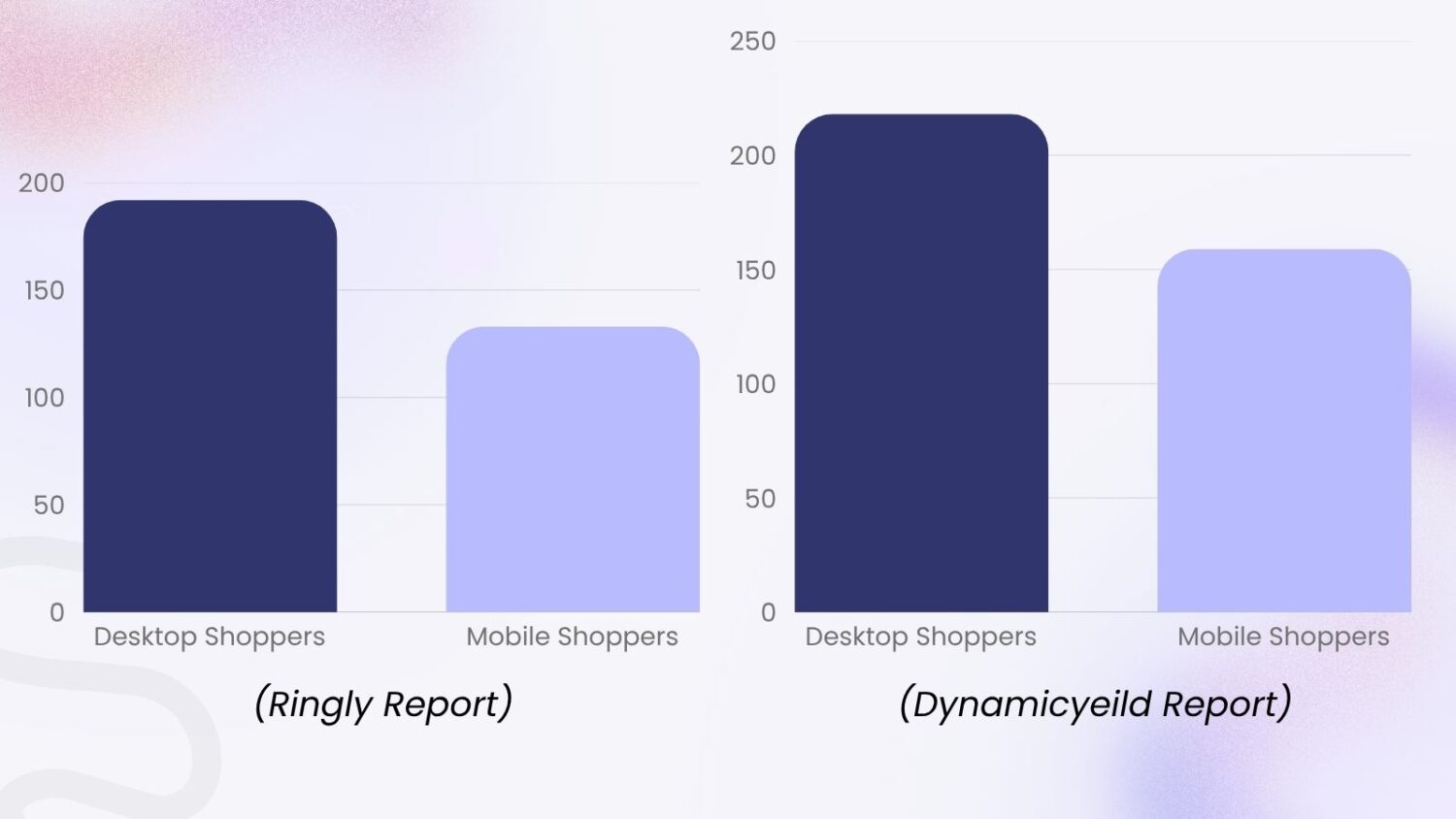
Device matters too. Desktop shoppers still spend more: $192 per order vs $133 on mobile. Dynamic Yield’s benchmarks show a similar pattern, with desktop AOV at $218, mobile at $159, and tablet at $154.
That gap is rarely about intent. It is usually about UX, and a heat map of the mobile cart shows which UX issue is costing you. Mobile carts that hide upsells, bury free shipping progress, or force a tiny “edit cart” tap will lose order value every day.
If most of your traffic is mobile, fixing that experience is one of the highest-return projects you can do.
Pick a number 10% to 20% above your current AOV for the next 90 days. That gap is big enough to be worth the work and small enough to be reachable.
Then track month over month. Growth in the trend matters more than hitting any single benchmark.
Your AOV is a mean, and a few large orders can pull it far above what a typical customer spends. That matters, because most AOV tactics should target the typical order, not the average one.
There are 3 ways to measure a “typical” order:
Shopify’s demo store shows the gap. In Shopify’s AOV guide, the Kinda Hot Sauce store has a mean order value of $24, but its most common order is only $15. A few big orders lift the average.
If that store set free shipping at $35 based on its $24 average, most $15 shoppers would face a goal more than double their cart. The threshold would feel out of reach.
Shopify’s AOV report shows the mean only. You can find the mode in 4 steps:
Use this number when you set free shipping thresholds, gift tiers, and minimum order rules. A small push on your most common order moves more carts than a big push on your largest ones.
You do not need to run all 11 of these at once. Pick the 2 or 3 that fit your products best, run them for 30 days, then measure.
The tactics below come from real Shopify campaigns, BOGOS merchant case studies, and current benchmark research. They focus on order value only, while our guide on how to increase sales on Shopify covers traffic and conversion tactics too.
A free gift turns a normal cart into a small reward. Customers add one more item, hit the spend threshold, and feel like they won something.
Each tier nudges the cart up. You can also tie the gift to a product instead of a spend amount, which turns it into a buy X get Y offer. For a deeper walkthrough of every format, see our free gift with purchase guide.
The simplest setup is a single tier: “Spend $80, get a free travel-size product.” More advanced merchants run tiered gift ladders, like spend $60 get Gift A, spend $100 get Gift B, spend $250 get Gift C. Each tier nudges the cart up. For a deeper walkthrough of setting these up on Shopify, see our free gift with purchase guide.
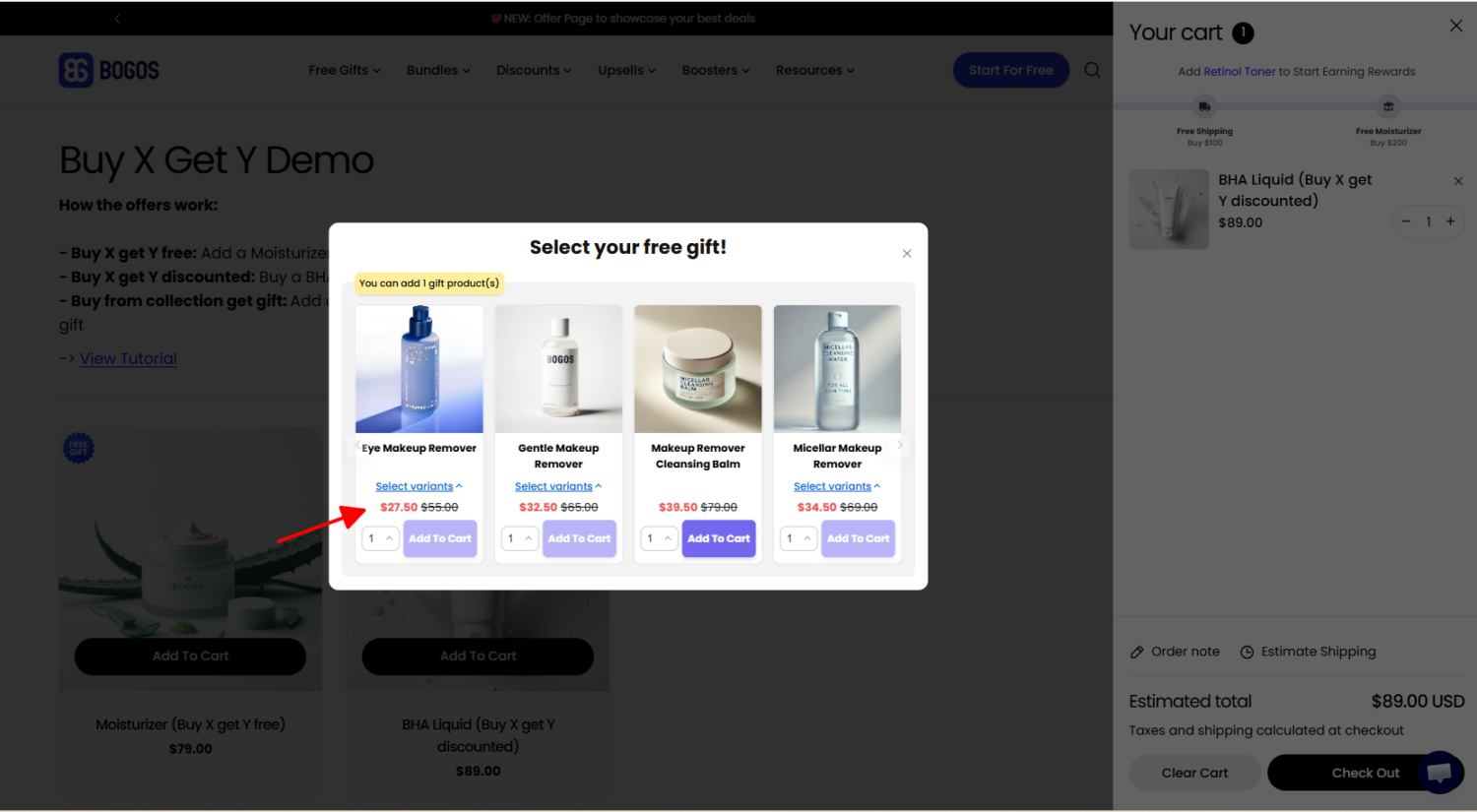
This is one of the cleanest ways to lift AOV without slashing prices. The customer pays full price for the items they wanted. You give away a low-cost item that feels high-value to them.
UK beauty retailer Face The Future shows how far this can go. The brand ran a different gift offer for each product line through BOGOS. One offer gave a £23 Percy & Reed hair primer on £25 of Percy & Reed spend. Another gave a free FUL hair mask worth £32 when customers bought 2 FUL products. In under 30 days, AOV rose from £70 to £151, a 115% increase, according to the Face The Future case study.
Our BOGOS handles both single-tier and multi-tier gift ladders. It can add the free gift to the cart automatically or show a gift slider, so customers see the reward as soon as they qualify.
Bundles group several items into one offer at a slightly better total price. They lift AOV because the customer buys 3 things instead of 1, even with the bundle discount.
The numbers back this up. Bundling increases AOV by 20-30% for most stores, with best-in-class setups landing in the 25-35% range. Bundles work because they shift the shopper from comparing one item to choosing how many to add, which is a much easier “yes” at checkout.
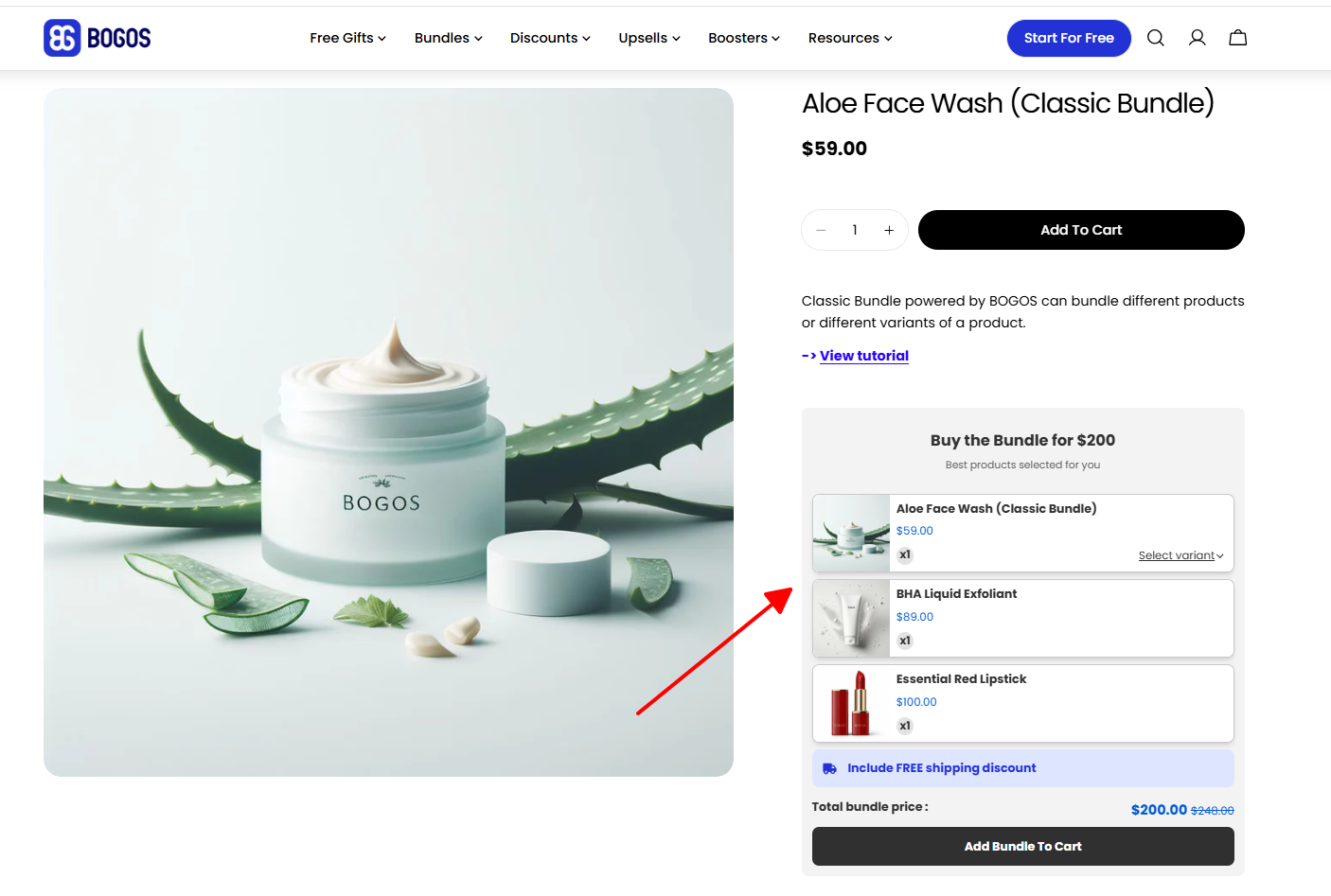
Three bundle types work especially well on Shopify:
Vesync Japan used a mix-and-match bundle for its COSORI air fryer. Shoppers could add an accessory set and parchment liners, each priced 3 to 5 times lower than the fryer, to unlock a cart discount. Small add-ons next to a big main item feel like an easy yes, according to the Vesync Japan case study.
Build-a-box is great for skincare, snacks, and supplements. Classic bundles work better for tech, kitchen, and home. For a full breakdown of which bundle type fits which catalog, check our Shopify product bundle guide. You can also see how mix and match bundles work in practice or learn how to set up a build your own bundle on Shopify. BOGOS supports all three bundle formats inside the same app, so you can run a classic bundle on one product line and a mix-and-match on another without juggling tools.
Free shipping is the single most requested incentive in ecommerce. Baymard Institute’s checkout usability research shows extra costs like shipping are the top reason shoppers abandon carts, at 48% of cases, and a majority of shoppers will add items to qualify for free shipping when a threshold is in reach.
The trick is setting the right threshold. Too low and you give it away to orders that would have cleared anyway. Too high and the goal feels impossible.
A common rule of thumb is to set the threshold 15% to 30% above your current AOV. Marketing consultant Aaron Zakowski, quoted in Shopify’s AOV guide, suggests about 30%. The same guide adds that your most common order value is a better starting point than the average. If your most common order is $65, set the threshold around $80 to $85, then surface it in an announcement bar so every visitor sees the goal before they reach the cart. Round to a clean number so it sticks in the customer’s head
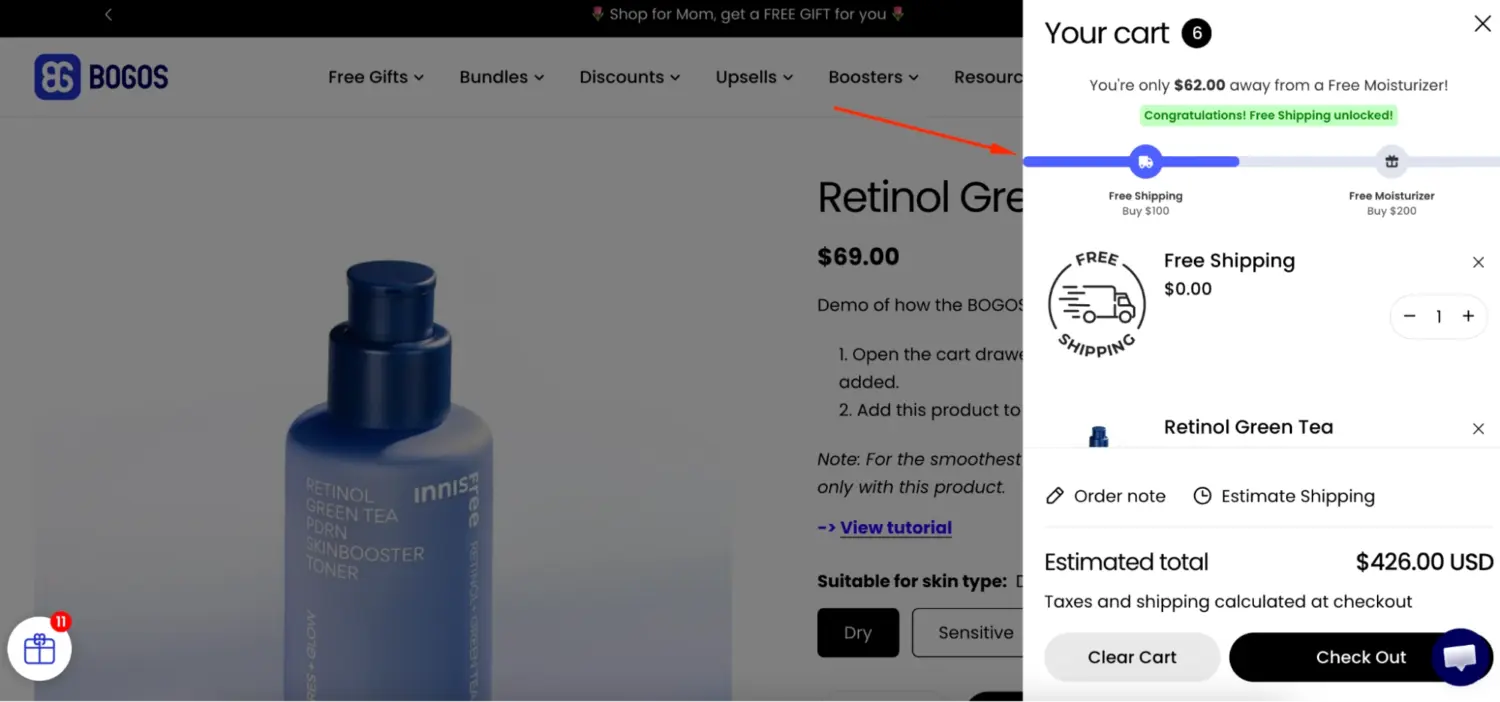
Shopify can apply free shipping over a set amount natively, and our guide to Shopify free shipping over amount walks through the setup. BOGOS can also give free shipping as the reward once a cart reaches the threshold, so it runs next to your gift offers.
Upsells and cross-sells are different tools for the same goal.
Both work. Upsells lift order value through size or quality. Cross-sells lift it through related products the customer was likely to want anyway, and cross-selling on Shopify works best when the pairing is obvious.
The data is strong. McKinsey found that cross-selling and category-penetration techniques yield a 20% jump in sales and a 30% increase in profits in case work with a leading online retailer. The best placements for these tactics on Shopify are the product page, the cart drawer, and the post-purchase thank you page. A live chat agent is another, recommending the right add-on in conversation while the shopper is deciding.
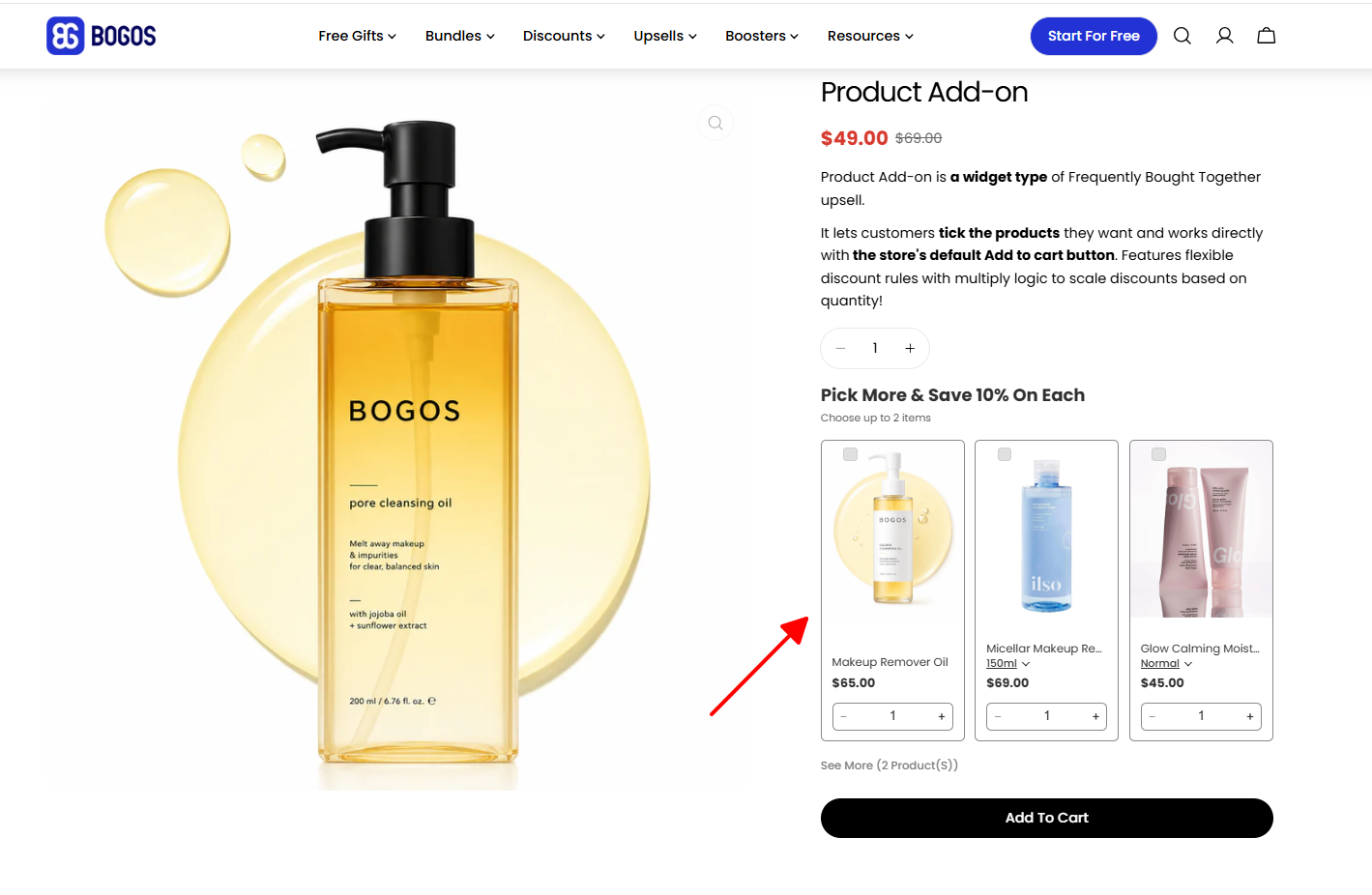
For Shopify Plus stores, checkout upsells matter most. They appear after the customer has already decided to buy, so the offer feels helpful, not pushy. Learn more in our Shopify upsell strategy guide. BOGOS supports product page, cart, thank-you-page, and checkout upsells for Shopify Plus stores in one dashboard, with targeting by collection, customer tag, or order history.
Volume discounts reward customers who buy more units. They are perfect for consumables, refills, and gift-giving categories.
The format: “Buy 2, save 10%. Buy 3, save 15%.” The discount feels earned, not begged for, and the customer often jumps a tier just to feel the win. A buy one get one offer is the simplest version of the same idea.
Tiered spend ladders work the same way for mixed carts:
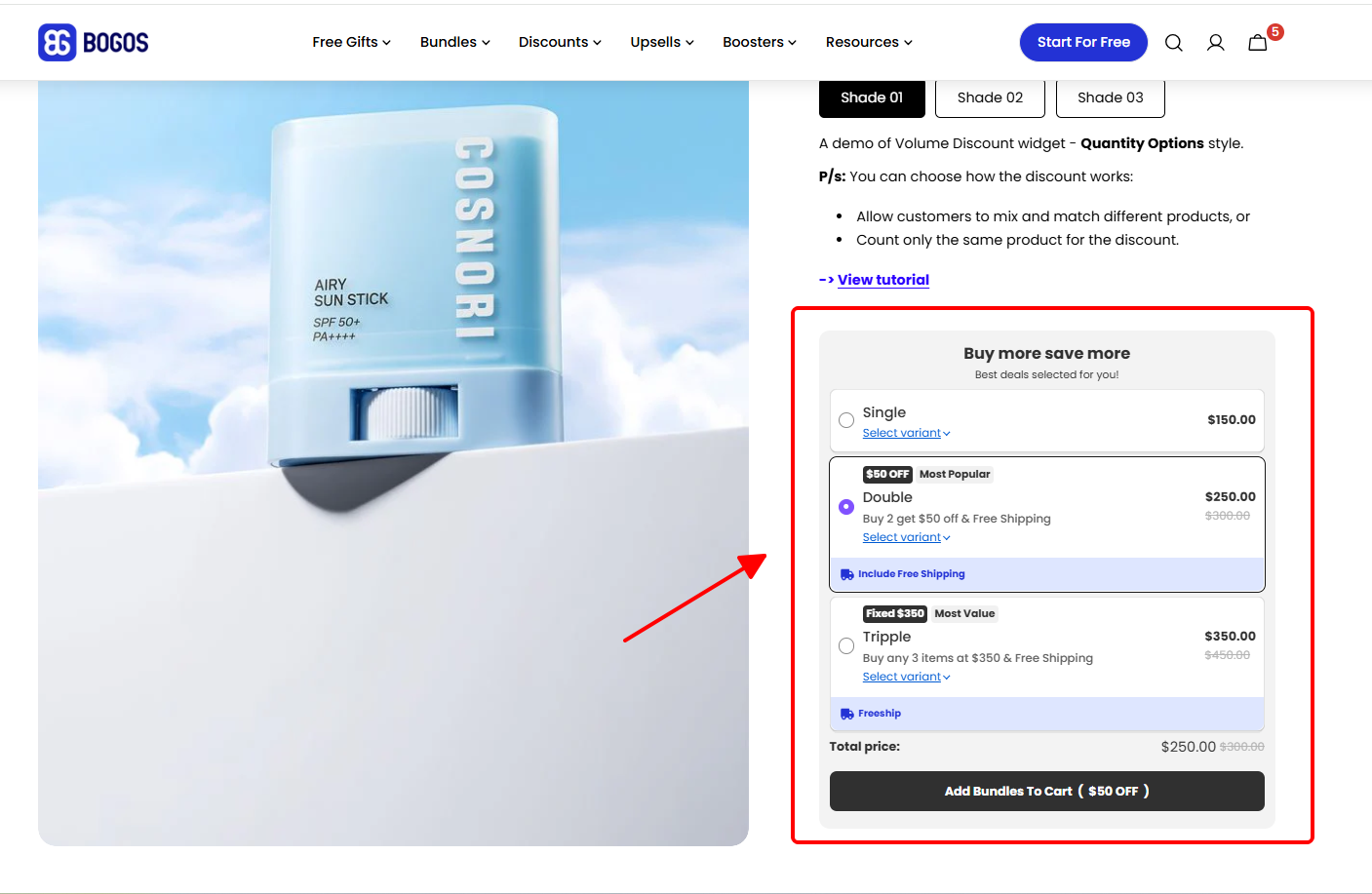
Each tier is a small bridge. Most customers will cross at least one. The most effective ladders usually have 3 tiers, spaced about 50% apart. BOGOS supports volume discounts, tiered spend rules, and cheapest-item or most-expensive-item discount logic in one place, so you can layer them with other offers without conflict. For setup details, see our Shopify volume discount guide.
A progress bar shows customers how close they are to their next reward, whether that is free shipping, a gift, or a discount.
The reason it works is simple. People hate seeing an unfinished bar. A shopper at $62 with a $75 threshold sees “Add $13 more for free shipping” and almost always adds the smallest item they can find.
Pair the progress bar with whichever threshold tactic you already run. Free shipping plus a progress bar is a natural pairing, because the bar tells shoppers exactly how far they are from the reward.
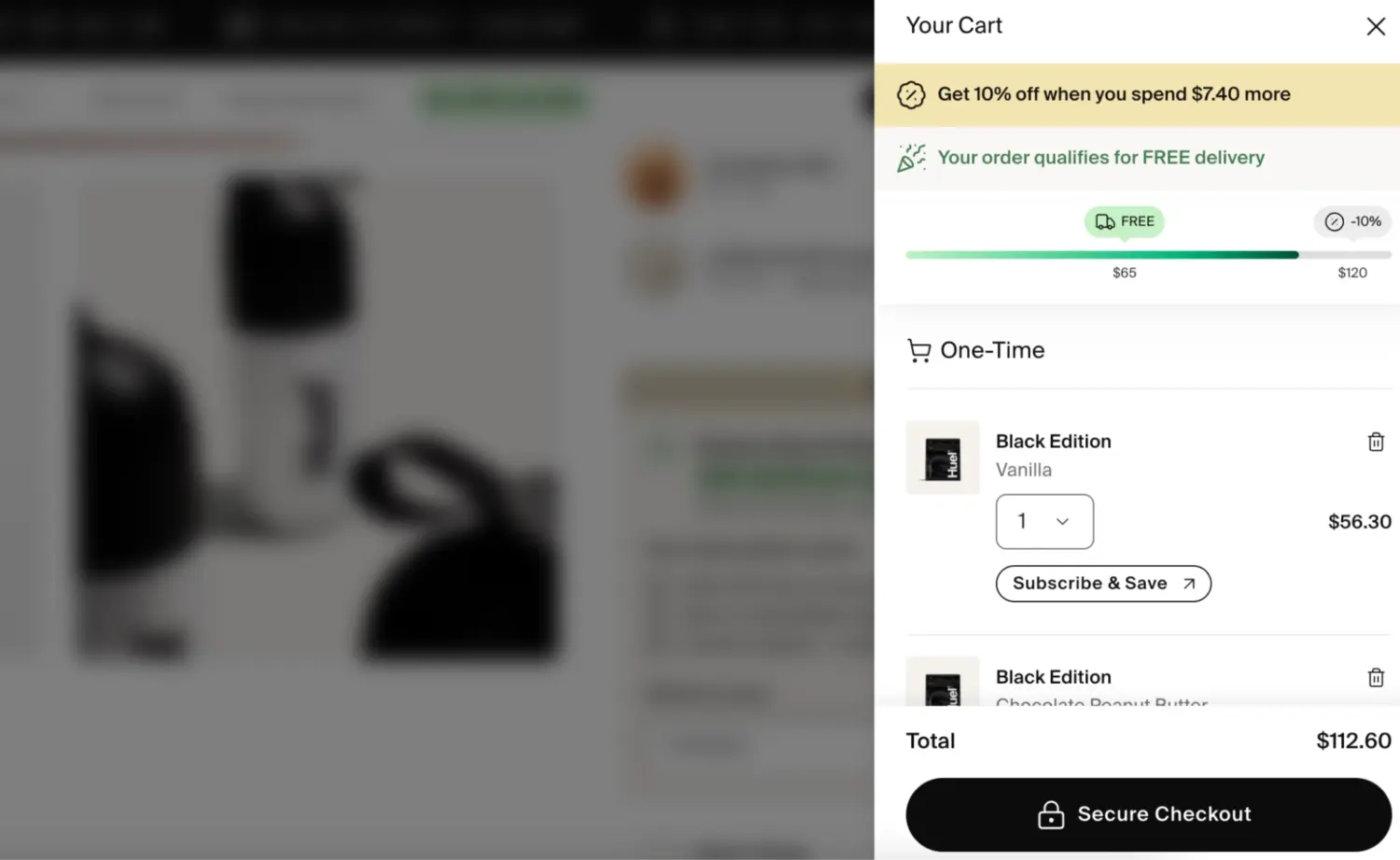
Keep the message short. “$13 to free shipping” beats “You are $13 away from qualifying for our free shipping promotion.” If you are looking for a way to add a progress bar to your Shopify store, read our Shopify Progress Bar guide.
Amazon made this format famous, and it works just as well on Shopify. Intelligent product suggestions, including bundle recommendations, now account for 10 to 30% of total ecommerce revenue.
The placement matters. The strongest spots are:
Keep recommendations relevant. A shopper buying a moisturizer wants to see a serum or eye cream, not a body wash. Irrelevant suggestions feel like ads and get ignored.
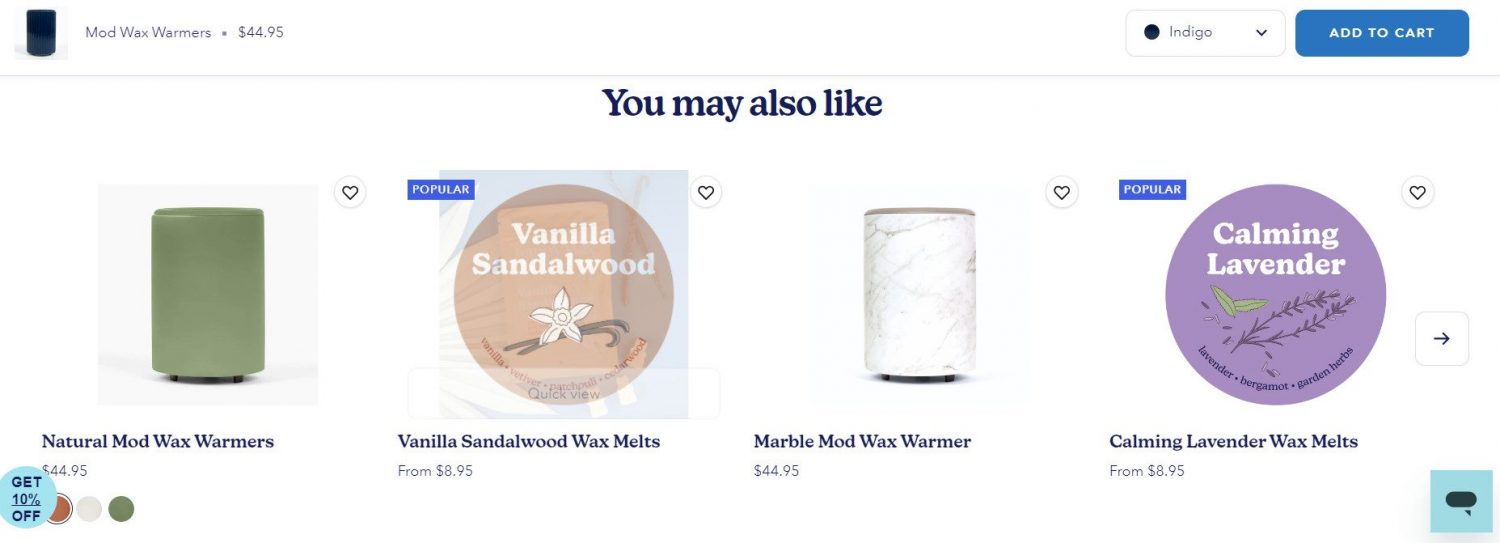
Most merchants set these up through a Shopify app rather than coding them by hand. BOGOS includes a frequently bought together widget that pulls from your real order data, so suggestions improve as you sell more.
Most Shopify stores have offers scattered across the site. The customer never sees half of them.
A dedicated offer page solves this. It is a single landing page where every active gift, bundle, and discount lives. Customers land there from menu links, banner ads, or email campaigns.
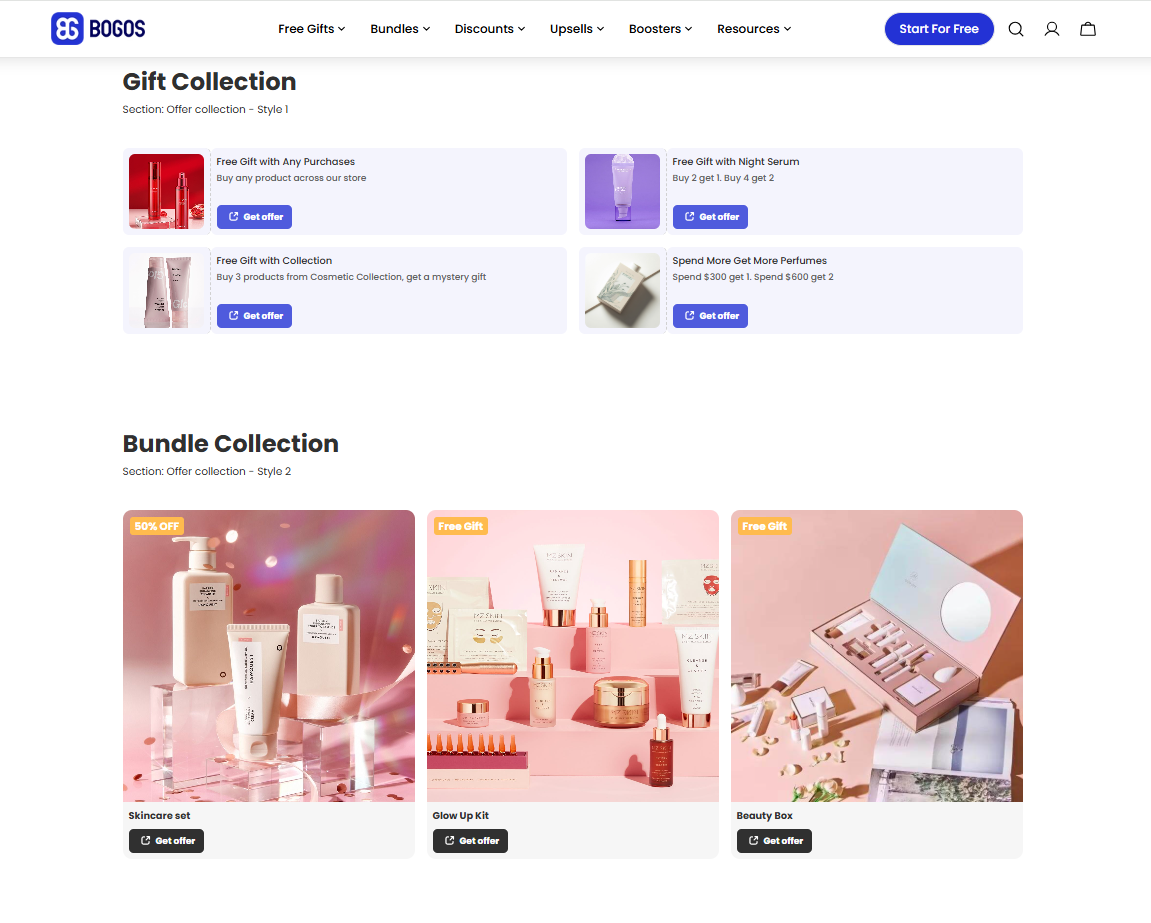
The benefit is twofold. Shoppers find more offers, which lifts the chance they hit a higher tier. Merchants get a clean URL to send paid traffic to during seasonal campaigns.
This is especially powerful during BFCM, Mother’s Day, and product launches, when you may have 6 to 10 offers running at once.
Seasonal campaigns are when AOV tactics earn their biggest returns. Customers already plan to spend more. Your job is to give them a clear reason to spend a little extra. Pairing the offer with a countdown timer makes the deadline visible and pushes hesitant shoppers to act before it ends.
The scale is enormous. Shopify merchants generated a record $14.6 billion in sales over BFCM 2025, up 27% year over year, with an average cart price of $114.70 — well above the typical $85 median Shopify AOV. Seasonal moments do not just lift order volume; they lift order value too.
A 3-tier gift ladder during BFCM might look like this:
The key is making sure multiple promotions can run together without breaking each other. Conflict between a sitewide discount and a tiered gift offer is one of the most common BFCM problems merchants come to BOGOS with.
Plan campaigns 3 to 4 weeks in advance. Test the cart flow on both desktop and mobile before launch day. For a full seasonal planning workflow, see our Black Friday marketing ideas guide.
Loyalty programs lift AOV in two ways at once. They reward bigger orders today, and they pull customers back for more orders later.
The retention math is the strongest argument. Repeat customers spend roughly 4.8x more per order than first-time buyers, so any program that turns a one-time buyer into a returning one compounds AOV over time.
Three loyalty formats work especially well on Shopify:
The trick is connecting the loyalty program to your other AOV tactics. A “double points on orders over $100” campaign sits perfectly next to a free shipping threshold at the same level. Customers get two reasons to push the cart higher instead of one.
Most Shopify loyalty apps integrate with promotion apps like BOGOS, so a free gift offer and a points-earning rule can fire on the same order without conflict.
Minimum order rules raise AOV from the other direction. Instead of rewarding customers for spending more, they require a small threshold to be met before checkout or before a specific offer applies.
There are two formats, and they work for very different stores.
The retail use of MOV is where most Shopify merchants see AOV gains. Instead of blocking checkout, you tie the minimum to a reward: “Spend $60 to qualify for a free gift,” or “Orders over $80 get free shipping.” The minimum becomes a goal the customer wants to hit, not a wall they bump into.
A practical rule of thumb: set the minimum 20% to 30% above your current AOV for soft incentive triggers, and round to a clean number. For hard checkout minimums, base the number on your shipping and fulfillment cost floor, not on AOV.
BOGOS supports incentive-based minimum order rules through gift, bundle, and discount triggers, so the minimum acts as a carrot rather than a checkout block.
A post-purchase upsell appears on the thank-you page, after the customer has already paid. The first order is safe, so the offer cannot hurt your conversion rate.
Shopify’s AOV guide calls this a low-risk way to test offers. The customer already said yes once, so a small, relevant add-on is an easy second yes.
Keep the offer small and related to what the customer just bought. A shopper who ordered a skincare set might see a matching serum or a travel-size version. Post-purchase data also shows which products customers buy together, which helps you build better bundles before checkout.
BOGOS includes a thank-you page upsell that can trigger by cart value, item quantity, product, or collection. Unlike checkout upsells, it does not need Shopify Plus. For email follow-ups and other channels, the Shopify post-purchase upsell guide covers each option step by step.
Live chat lifts order value by answering the question that stops a big purchase. A shopper unsure about sizing, compatibility, or delivery often leaves instead of adding more.
Jaime Schmidt, founder of Schmidt’s Naturals, describes live chat as an underused way to raise AOV in Shopify’s AOV guide. It helps most on high-ticket products like furniture and mattresses, where shoppers need reassurance before they commit.
Live chat also gives your team a chance to suggest a matching add-on in the same conversation. Shopify’s free Inbox app is one starting point, and our comparison of the best Shopify live chat apps covers 8 top picks.
AOV only tells you how much each buyer spends. Track it next to 7 other metrics so a higher order value does not hide a loss somewhere else:
| Metric | What it measures | Why it matters for AOV |
|---|---|---|
| Conversion rate | % of visitors who place an order | Shows whether a threshold or upsell is scaring buyers off |
| Revenue per visitor (RPV) | Revenue ÷ visitors, which equals conversion rate × AOV | Combines AOV and conversion rate into one number |
| Profit per order | Order revenue minus product cost, shipping, and discounts | Confirms a bigger order also earns more |
| Units per order | Average number of items in each order | Shows whether bundles and cross-sells add items |
| Customer lifetime value (CLV) | Total revenue from one customer over time | Shows whether higher AOV carries into repeat orders |
| Repeat purchase rate | % of customers who order more than once | A big one-time order is worth less if the customer never returns |
| Customer acquisition cost (CAC) | Marketing spend ÷ new customers | Shows how much of each order goes to winning the customer |
Fix the one that is further below its benchmark. Revenue per visitor treats both levers equally, so the weaker one gives you the easier win.
Here is an example. A store converts 2% of visitors with a $50 AOV, so it earns $1.00 per visitor.
The math is equal, so let benchmarks decide. Littledata’s benchmark puts the average Shopify conversion rate at 1.4%, with the top 20% of stores above 3.2%. If your conversion rate sits near 1%, start with conversion fixes, such as clearer product pages or a fast search bar that sends shoppers straight to what they want. The Shopify conversion rate guide walks through the rest.
If your conversion rate is healthy but orders are small, start with the AOV tactics above.
Most AOV problems are not about missing tactics. They come from running tactics the wrong way.
Most tactics in this guide need an app. You can cover them with 1 promotion app plus 1 or 2 specialist tools:
| App | Best for | Tactics it covers |
|---|---|---|
| BOGOS | All-in-one promotions | Free gifts, BOGO, bundles, volume discounts, frequently bought together, progress bar, offer page, thank-you page upsells, checkout upsells (Shopify Plus) |
| Shopify Search & Discovery | Free product recommendations | Related and complementary products on product pages |
| ReConvert | Post-purchase offers | Thank-you page upsells |
| LoyaltyLion | Loyalty programs | Points, tiers, and rewards for repeat buyers |
| Shopify Inbox | Free live chat | Answering questions before checkout |
BOGOS fits stores that want several of these tactics in one app. It runs gifts, bundles, discounts, and upsells from one dashboard, so offers do not conflict at checkout. BOGOS has 5.0 stars from 4,419 reviews on the Shopify App Store (September 2026), and the free plan covers your first 30 orders.
If you want to compare more tools for one tactic, our list of the best Shopify upsell apps ranks options for cart and post-purchase offers.
Bundle-focused stores can also check our Shopify bundles app comparison before choosing.
Shopify AOV is the simplest growth lever most stores have. It costs nothing to track, it compounds with retention, and a 15% lift turns into a 15% revenue increase from the same traffic.
The fastest wins usually come from pairing two tactics, not chasing all 13. A free shipping threshold plus a cart progress bar is a great starting combination for almost any store. A gift-with-purchase ladder plus a loyalty program works well for beauty, supplements, and fashion. Bundles plus volume discounts fit consumables and refills.
Pick a starting combination this week. Measure for 30 days. Then layer the next tactic on top. That is how stores quietly move from a $60 AOV to a $90 AOV without ever raising their ad budget.
The median Shopify AOV is around $85 across more than 3,000 stores tracked by Littledata. The top 20% of stores earn above $120, and the bottom 20% sit under $50. The global ecommerce AOV across all platforms is $172, but that includes high-ticket categories. What counts as “good” depends on your industry and region. Home goods stores often see AOV above $250, while food and beverage stores average closer to $70. EMEA stores benchmark at $193, Americas at $158, and APAC at $125.
Divide your total revenue by your total number of orders for the same time period. Shopify also calculates this for you automatically in the Average order value over time report under Analytics → Reports. Shopify’s version uses gross sales minus discounts, so taxes, shipping, and later returns are left out. Use a consistent time window, usually 30 days, so you can compare month over month.
Most AOV tactics show results within 2 to 4 weeks. Free shipping thresholds and product bundles tend to move the number fastest because they nudge every cart, not just some. Upsells, gift-with-purchase, and loyalty campaigns build more gradually but stack well with other tactics over time.
AOV measures the average order value per purchase. Revenue per visitor (RPV) measures the average revenue earned per site visitor, whether they buy or not. The formulas show the gap: AOV = total revenue ÷ number of orders, while RPV = total revenue ÷ number of visitors. RPV blends AOV with conversion rate into a single number, which makes it a better measure of overall store health. AOV is more useful when you want to isolate how much each buyer spends.
Desktop shoppers consistently spend more per order than mobile shoppers. Industry benchmarks put desktop AOV at $192 vs $133 on mobile, and Dynamic Yield’s data shows a similar pattern at $218 desktop vs $159 mobile and $154 tablet. The gap is rarely about intent. It usually comes from mobile UX issues like hidden upsells, buried free shipping progress bars, and small tap targets. If most of your traffic is mobile, optimizing the cart drawer and product page for small screens is one of the fastest AOV wins available.
A 5% to 10% lift in 30 days is realistic when you launch one or two new tactics. A 15% lift is possible with the right combination, like a free shipping threshold paired with a cart progress bar. Stores chasing 25%+ lifts in a single month usually rely on aggressive discounting, which lifts AOV temporarily but hurts margin. Sustainable AOV growth comes from layering tactics over 3 to 6 months, not from one large swing.
It can, in either direction. Done well, AOV tactics lift order value without hurting conversion. A free gift offer or a relevant upsell rarely scares buyers off and often encourages them to complete checkout. Done poorly, AOV tactics can drop conversion rate. A free shipping threshold set too high makes carts feel unreachable. An irrelevant upsell can break trust at the worst possible moment. Always track AOV and conversion rate side by side so you spot trade-offs early.

Shopify collections decide how shoppers find your products, yet many guides still describe a setup Shopify is now replacing....

A Shopify announcement bar is the thin strip at the top of your store that tells shoppers about shipping,...
Australia is one of the first markets many Shopify stores expand into. It is large, English-speaking, and home to...
