



Charlie Ngo
•
Last updated: 30 October, 2026
Shopify Featured Collections: How To Add & Customize (2026 Guide)
A featured collection is often the first group of products a shopper sees on a Shopify store, yet the...
Shipping to Canada on Shopify in 2026: Everything Merchants Need to Know

Marketing Manager
Summarize this post with AI
Canada is a promising international market for Shopify merchants, especially those shipping from the US. But reaching Canadian shoppers takes more than adding a shipping zone on your store.
Unexpected customs duties, sales taxes, and carrier fees can turn a completed order into a refused delivery. To avoid these problems, you need to understand Canada’s import rules and show customers their shipping costs upfront.
In this blog post, I’ll walk you through how to set up Shopify shipping to Canada, calculate duties and taxes, choose the right carriers, and the best Shopify shipping apps to uplift your shipments to this market.
To ship to Canadian customers, you need an active Canadian market, suitable shipping rates, accurate customs information, and the correct tax settings.
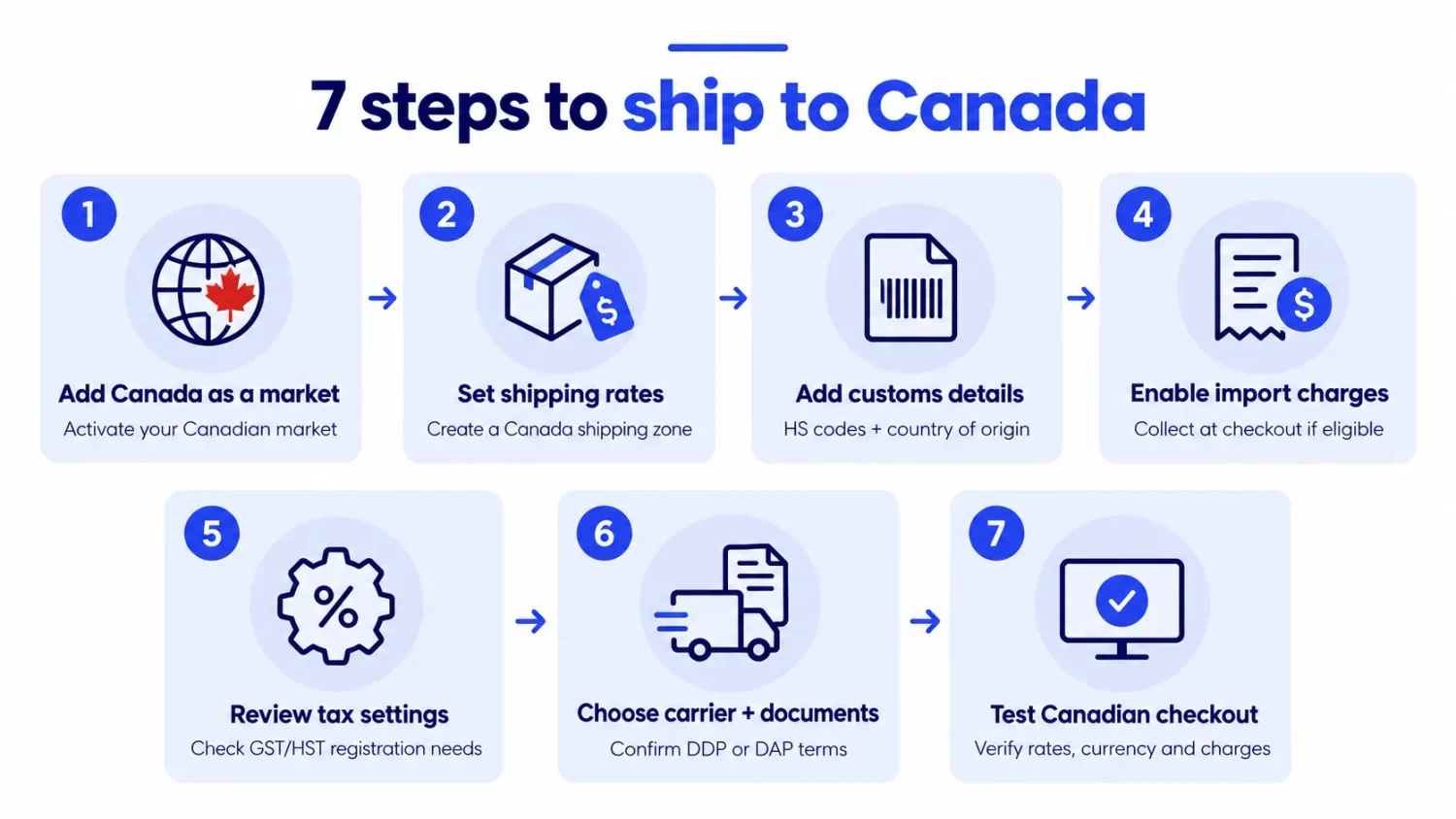
Here’s how to configure everything in Shopify:
Go to Settings → Markets in your Shopify admin and create or edit a market that includes Canada. Make sure the market is active. Otherwise, Canadian customers may be unable to complete checkout, even if you’ve configured shipping rates.
For a better shopping experience, consider displaying prices in Canadian dollars (CAD). Remember that Markets and shipping zones work together. You’ll also need a shipping zone that covers Canadian delivery addresses.
Go to Settings → Shipping and delivery and open the shipping profile you want to configure.
Add Canada to the appropriate shipping zone, then choose how you’ll charge customers.
| Shipping rate | How it works | Example |
|---|---|---|
| Flat rate | Charges one fixed shipping fee | $15 standard delivery |
| Weight-based | Adjusts rates based on package weight | $12 for 0–1 lb; $22 for 1–5 lb |
| Price-based | Changes shipping fees based on cart value | Free shipping over $90 |
| Carrier-calculated | Displays eligible carrier rates at checkout | Live UPS or DHL rates |
Remember that carriers may calculate shipping costs using dimensional weight instead of actual weight. Large, lightweight packages can therefore cost more than expected. For more details, read our guide to Shopify shipping rates.
International shipments need accurate customs information.
In Shopify, open each product and update its customs details:
You can update these fields individually or in bulk.
Both details are important for calculating import duties. Missing or incorrect information can lead to inaccurate estimates, customs delays, or unexpected charges.
If your store is eligible, Shopify can calculate and collect import duties and taxes during checkout.
Go to Settings → Taxes and duties and find the duties and import taxes settings. Follow the setup process to enable collection for Canada.
Before activating the feature, confirm that:
You can then review how the estimated import charges appear to customers.
Shopify may charge a transaction fee for calculating duties and import taxes. Check the current fee in your Shopify admin before enabling the feature.
Open Settings → Taxes and duties and review your Canadian tax configuration.
Whether you need to collect GST/HST depends on how your business operates.
For example, a merchant shipping products from a US warehouse directly to Canadian customers may have different obligations from a merchant storing inventory in a Canadian fulfillment center.
Don’t enable GST/HST collection simply because you sell to Canadian customers. First, determine whether your business needs to register.
We’ll explain these requirements in the tax section below.
Choose an international carrier that delivers to Canada, such as USPS, UPS, FedEx, or DHL Express.
Your shipment will need accurate customs documentation. Depending on the service, this may include a customs declaration and commercial invoice.
Make sure the paperwork includes the correct product descriptions, quantities, declared values, HS codes, and countries of origin.
You should also confirm the shipment’s delivery terms:
If you’ve collected import charges at checkout, use a DDP-compatible service so customers aren’t billed for those charges again.
For the label setup, see our guide on how to print a Shopify shipping label.
Before opening your store to Canadian shoppers, test checkout using a Canadian delivery address.
Check that:
You can also review the order’s available duty and customs details in Shopify.
Once everything works, your store is ready to accept Canadian orders.
When customers order products from outside Canada, they may have to pay three types of charges.
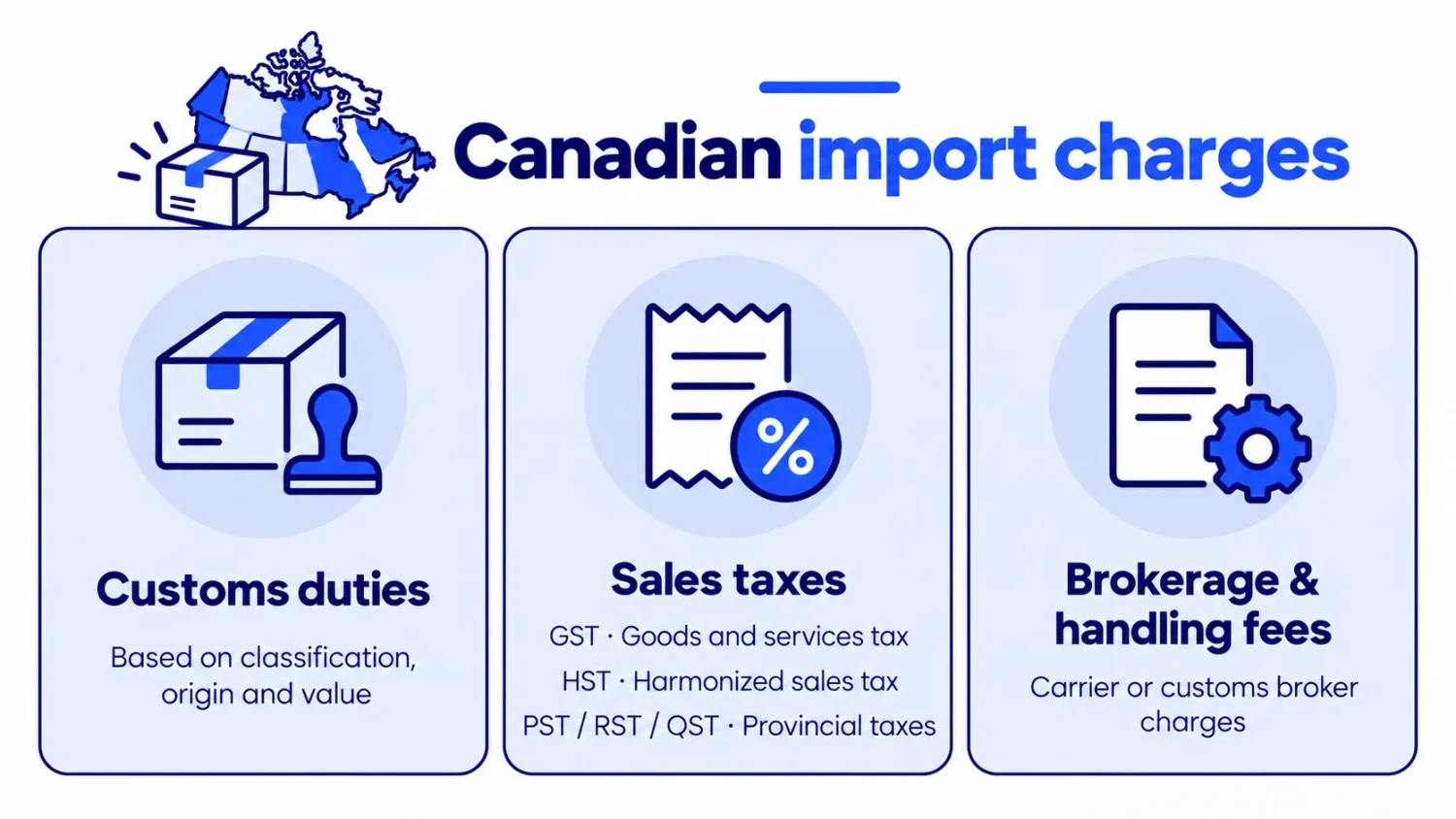
These costs aren’t always included in the original shipping price. Understanding when they apply helps you choose the right shipping service and prevent unexpected delivery charges.
Canada applies different duty and tax exemptions depending on the shipment’s origin and transportation method.
| Shipment method | Customs value | Duty | Import tax |
|---|---|---|---|
| Qualifying courier shipment from the US or Mexico | Up to CAD $40 | Exempt | Exempt |
| Qualifying courier shipment from the US or Mexico | Above CAD $40 to $150 | Exempt | Generally applies |
| Qualifying courier shipment from the US or Mexico | Above CAD $150 | May apply | Generally applies |
| Postal shipment or courier from other countries | Up to CAD $20 | Generally exempt | Generally exempt |
| Postal shipment or courier from other countries | Above CAD $20 | May apply | Generally applies |
When shipping to Canada, customs looks at two things:
For example, imagine you sell a jacket made in China but stored in a US warehouse:
The same rule applies to products made in the US, Mexico, or Canada. They must meet CUSMA’s rules of origin to qualify for preferential duty rates.
That’s why you have to enter the correct country of origin and HS code for your products and keep supplier documents to support any preferential duty claims and avoid customs delays or unexpected charges.
Canada doesn’t have one sales tax rate for the entire country. Instead, the tax depends on the province or territory where your customer receives their order.
There are three main types of sales tax:
Here’s a breakdown of the general sales tax rates across Canada:
| Tax type | Province or territory | General sales tax rate |
|---|---|---|
| GST only | Alberta, Northwest Territories, Nunavut, Yukon | 5% |
| HST | Ontario | 13% |
| HST | Nova Scotia | 14% |
| HST | New Brunswick, Newfoundland and Labrador, Prince Edward Island | 15% |
| GST + PST | British Columbia | 5% GST + 7% PST = 12% |
| GST + PST | Saskatchewan | 5% GST + 6% PST = 11% |
| GST + RST | Manitoba | 5% GST + 7% RST = 12% |
| GST + QST | Quebec | 5% GST + 9.975% QST (approximately 14.975% combined) |
Here’s an example to make it clearer: For a CAD $100 product, a customer in Ontario would pay CAD $13 in HST (13%), while a customer in Alberta would pay only CAD $5 in GST (5%).
Keep in mind that import taxes may differ depending on the product, customs exemptions, and provincial rules. For the latest rates, you can take a look at the Canada Revenue Agency’s official GST/HST guide.
Not every Shopify merchant shipping to Canada needs to register for GST/HST. It depends on where you operate, where you store inventory, and what you sell.
Here are three common scenarios:
Besides duties and taxes, customers may face extra brokerage or handling fees when their packages clear Canadian customs. These charges vary by carrier, shipping service, and shipment value.
Customers may not discover these fees until delivery, leading to complaints or refused packages. To avoid surprises, check your carrier’s brokerage fees and clearly explain any potential extra charges before checkout.
When shipping to Canada, you need to decide who pays the import duties and taxes: you or your customer. There are two shipping options:
DDP is usually the better option. It helps prevent surprise charges, refused deliveries, and customer complaints. DAP is simpler to set up, but customers may face unexpected costs.
Here’s how to handle both options correctly.
DAP can work for occasional or low-value shipments, especially if you don’t collect import duties at checkout. However, customers must know they may need to pay additional fees before receiving their orders.
Add a clear notice at checkout and in your shipping policy explaining that customers may be responsible for import duties, taxes, and brokerage fees. This helps customers understand the potential costs and reduces the risk of refused deliveries.
Alternatively, if you choose DDP, the first step is to collect duties and taxes at checkout. Below is how to set it up.
As explained in Step 4, Shopify lets eligible merchants collect duties and import taxes at checkout. However, Shopify charges a transaction fee whenever it calculates these charges.
According to Shopify’s current documentation:
The fee applies even when Shopify calculates $0 in duties or import taxes. It doesn’t apply to domestic orders or abandoned checkouts. Before enabling duty collection, make sure your products have HS codes, your shipping carrier supports DDP labels, and your store doesn’t use Shopify Fulfillment Network.
Collecting duties and import taxes at checkout isn’t enough. You also need to ship the order using a DDP-compatible service. If you collect import charges at checkout but use a standard shipping label, customers may be charged again when their package arrives.
To avoid this mistake:
If managing international duties, taxes, and customs becomes time-consuming, consider Shopify Managed Markets. This service uses Global-e as the merchant of record to handle several aspects of cross-border selling, including:
This can help you manage international orders without handling every customs requirement yourself. However, Managed Markets charges additional transaction and currency conversion fees and has carrier and eligibility restrictions. It’s worth considering if you process a high volume of international orders and want to simplify cross-border fulfillment.
The best shipping carrier depends on your fulfillment location, package size, budget, and delivery expectations.
Express couriers typically offer faster delivery and more comprehensive customs services. Postal shipping is often more affordable for lightweight packages, although delivery can take longer.
Here’s how common options compare:
| Carrier name | Speed | Cost tier | Brokerage fees | DDP | Best for |
|---|---|---|---|---|---|
| DHL Express | 1 to 3 days | Highest | No separate broker bill on DDP | Yes | Time-sensitive, higher-value orders |
| UPS | 1 to 6 days | High | Bills the recipient unless prepaid | Yes | Express and B2B parcels |
| FedEx | 1 to 6 days | High | Bills recipient entry and clearance fees | Yes | Guaranteed transit times |
| USPS to Canada Post | 6 to 10 days | Lowest | Small handling fee, around CAD $9.95 | Usually DAP | Light, low-value parcels on a budget |
When choosing a carrier, don’t just compare shipping rates. Check for extra costs like customs handling and brokerage fees. Also consider delivery speed, tracking, insurance, and whether the carrier supports DDP.
For example, shipping a CAD $100 order from the US to Canada may cost more with UPS or FedEx than with USPS. However, qualifying courier shipments worth CAD $150 or less are exempt from customs duties, while postal shipments only have a CAD $20 exemption. This means UPS or FedEx could save you money on customs duties, making the total shipping cost lower.
Shopify’s built-in shipping features are enough for most stores selling to Canada. Shopify Shipping, carrier-calculated rates, and the duty settings you configured in Step 4 cover the essentials.
If you need more advanced shipping features, for example:
The five apps below are worth considering for shipping to Canada. Each supports Canadian carriers, international shipping, or cross-border customs management.
Here’s the copy-friendly table. You can copy and paste it directly into Google Docs or your blog editor.
| App name | Key features | Pricing | Rating & reviews | Best for |
|---|---|---|---|---|
| Easyship ‑ All in One Shipping | • Carrier comparisons• Customs automation• Duties and tax calculations• Shipment tracking | Free plan; paid from $29/month | 4.1/5 across 391 reviews | International shipping and DDP |
| Shippo ‑ Simplified Shipping | • Discounted carrier rates• Bulk label printing• Customs forms• Shipment tracking | Free plan; paid from $19/month | 4.2/5 across 283 reviews | Small stores looking for affordable labels |
| ShipStation Orders & Inventory | • Shipping automation• Carrier comparisons• Bulk fulfillment• Order management | From $14.99/month | 4.2/5 across 700 reviews | Multichannel sellers with high shipping volumes |
| netParcel | • UPS, Purolator, and Canada Post rates• Shipping label printing• Real-time shipping quotes | Free to install | 4.9/5 across 177 reviews | Comparing Canadian carrier rates |
| PH MultiCarrier Shipping Label | • Live checkout rates • Bulk label printing • Shipping rules • Shipment tracking | From $9/month | 4.9/5 across 647 reviews | Stores managing multiple carriers |
The best choice depends on where your orders ship from, which carriers you use, and whether you need prepaid duty support. Expanding to another market? Our guide to shipping to Australia covers its GST and Australia Post setup. For broader international shipping advice, read our Shopify international shipping guide.
Unexpected shipping costs can cause shoppers to abandon their carts, especially when duties and taxes increase the final price. A free shipping threshold helps reduce these by giving shoppers a clear incentive when they spend a little more.
With Shopify’s native discount, you can set up a basic free shipping threshold, but you can’t target specific product collections, which may affect your profit margins.
BOGOS: Free Gift Bundle Upsell offers a more flexible solution. You can set up targeted free shipping offers based on cart value, item quantity, specific product collections, or customer location. The app also lets you promote these offers through in-cart progress bars and upsells. These promotional features will nudge shoppers toward adding more when their purchase intent is highest, right before the checkout stage.
Best of all, you can manage all these features from one dashboard without needing multiple apps, reducing the risk of app conflicts.
Shipping to Canada with Shopify becomes easier when you know how to set up your store correctly and handle Canadian import duties and taxes. Most importantly, make shipping costs clear before customers reach checkout to avoid unexpected charges.
Once your shipping setup is ready, take it further with a free shipping offer. An app like BOGOS: Free Gift Bundle Upsell can help you target the right shoppers and encourage them to spend more to unlock free shipping. A well-planned shipping strategy does more than simplify fulfillment. It creates a smoother shopping experience, helps improve conversion rates, and increases your AOV
Not always. If you ship products directly from outside Canada and don’t carry on business there, you may not need to register for GST/HST. However, your obligations can change if you store products in Canada, carry on business there, or sell certain digital products or services.
Calculate and collect applicable duties and import taxes at checkout when your Shopify setup supports it. Then use a DDP-compatible shipping service to arrange payment of those charges. Also verify whether your carrier charges additional customs clearance or handling fees.
For lightweight, low-value parcels shipped from the US, USPS with Canada Post final delivery is often a cost-effective option. However, a courier may be more competitive for certain orders because qualifying shipments from the US or Mexico benefit from higher import duty thresholds..

A featured collection is often the first group of products a shopper sees on a Shopify store, yet the...
Most Shopify stores need a best sellers page, but Shopify can’t build one that updates by itself. In this...

Shopify smart collections add and remove products for you based on rules, such as a tag, a price, or...
