


Charlie Ngo
•
Last updated: 23 October, 2026
Shopify Smart Collections: Setup, Conditions & 8 Examples (2026 Updated)
Shopify smart collections add and remove products for you based on rules, such as a tag, a price, or...
Shopify Exit Intent Popup: Setup, Apps & Best Practices (2026)

Marketing Manager
Summarize this post with AI
A Shopify exit intent popup is a message that appears the moment a visitor moves to leave your store, giving you one last chance to save the sale or capture an email. This guide explains what exit intent popups are, whether they actually work, how to add one to Shopify with or without an app, what to offer inside it, real examples from Shopify stores, and whether they hurt your SEO. I’m Charlie Ngo, Marketing Manager at BOGOS, and I wrote this based on my experience helping Shopify merchants run promotions, using AI to gather and organize the research, and reviewing every part myself.
An exit intent popup is a message that appears only when a visitor shows signs of leaving your store. It stays hidden while people browse, then shows up once at the moment of exit.
On desktop, the popup reads the mouse. When the cursor moves up and out of the top of the page toward the address bar or the back button, the store treats that as an intent to leave and shows the popup.
On mobile, there is no mouse, so the popup uses different signals; exit intent is triggered by rapid upward scrolling, tapping the browser’s address bar, switching tabs, or a long period of inactivity.
An exit intent popup is different from a welcome popup or a timed popup. A welcome popup fires when the page loads. A timed popup fires after a set number of seconds. An add to cart popup fires the instant a shopper adds an item. An exit intent popup waits and interrupts no one, because it only appears once the visitor has already decided to go.
Exit intent popups work because most shoppers leave without buying, and a popup gives you one more chance to reach them. The average documented cart abandonment rate is 70.22%, based on Baymard Institute’s analysis of 50 studies, so roughly 7 in 10 shoppers add an item and leave without paying.
Baymard found the top reason is extra costs that are too high (40%), such as shipping and tax at checkout. An exit popup can answer that exact objection with free shipping.
Exit intent popups convert about 3.94% of the visitors who see them, based on Wisepops’ analysis of more than one billion displays. That rate is lower than other Shopify popup types, but the value is different: an exit popup catches people who were leaving with nothing, so almost every conversion is revenue you would have lost. Targeting the popup to the cart page can lift conversions by up to 163% (Source: Wisepops)
Exit intent popups are one of the cheapest conversion rate optimization tactics for this reason. You recover visitors you already paid to attract, without spending more on traffic.
Shopify does not have a built-in exit intent popup, so you have two ways to add one. The free Shopify Forms app can show a basic email popup, but it does not include an exit-intent trigger. To fire a popup on exit, you either install a popup app or add code to your theme.
A popup app is the fastest route and needs no coding. You pick a template, set the trigger to exit intent, add your offer, and publish, all inside the app. The right app depends on whether you also want email marketing, advanced targeting, or the lowest cost.
| App | Best for | Free plan | Email and SMS built in | Standout features |
|---|---|---|---|---|
| Omnisend | Stores that want popups and email in one tool | Yes, up to 250 contacts | Yes | Prebuilt cart-recovery emails, segmentation, A/B testing |
| OptiMonk | Stores focused on targeting and testing | Yes, up to 10,000 pageviews | No | 30+ triggers, personalization, A/B testing, spin-to-win |
| Privy | Small stores and first-time popup users | Limited | Yes, email | Simple editor, cart saver, autoresponders |
| Poptin | Budget-conscious stores | Yes, up to 1,000 visitors | No | Drag-and-drop editor, advanced triggers, analytics |
| Wisepops | Traffic-heavy and mobile-first stores | Trial only | No | Strong mobile exit intent, advanced targeting |
| Popupsmart | Beginners building a first popup | Yes, up to 5,000 pageviews | No | No-code AI builder, templates, GDPR-ready |
Most paid plans start between $15 and $30 per month and scale with your traffic, so check each app’s current pricing before you commit. If you already send email campaigns, a tool like Omnisend keeps popups and email in one place. If you only need the popup, a free-friendly builder like Poptin or Popupsmart is enough to start.
An exit intent popup is a small amount of theme code if you or a developer are comfortable editing your theme. It has three parts: an exit detector, the popup itself, and a rule that limits how often it shows.
The desktop detector listens for the cursor leaving the top of the page.
javascript
document.addEventListener("mouseleave", (event) => {
  // clientY <= 0 means the cursor exited past the top edge
  if (event.clientY <= 0) {
    showExitPopup();
  }
});
The frequency rule stores a flag in the browser so the popup fires once and respects a close.
javascript
const SEEN_KEY = "exit_popup_seen";

function showExitPopup() {
  if (localStorage.getItem(SEEN_KEY)) return; // already shown, do nothing
  openModal();
  localStorage.setItem(SEEN_KEY, "1");
}
Mobile needs a fallback because there is no mouse. The common approach is to watch for a back-button tap, which is the closest signal to real exit intent. The trade-off with code is that you own the details yourself, including the close button, keyboard support, and screen-reader labels.
The offer inside the popup is what converts, not the popup itself. A weak offer with a beautiful design still fails, so match the offer to why the visitor is leaving.
Free shipping is the strongest general offer because it answers the top reason for cart abandonment. When surprise costs are the number-one reason people leave, “we’ll cover shipping” removes that exact objection.
Here are the offers that work best, and when to use each one:
The offer inside the popup is a separate job from the popup app. A popup app displays the message, but the deal itself is set up somewhere else. You can set up the gift, a buy one get one deal, or a product bundle with a promotion app like BOGOS, then show that offer through your popup tool. This split keeps the offer honest and easy to manage. For a gamified exit offer, an exit-intent spin the wheel converts higher than a static discount, and our guide covers the setup.
Real Shopify stores use exit intent popups in different ways, and their choices show how to match an offer to a goal. Here are four examples, why each one works, and what to copy.
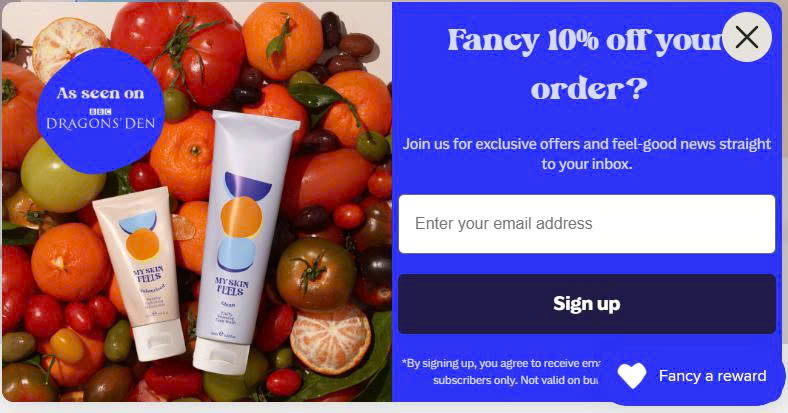
My Skin Feels offers 10% off a first order in exchange for an email address, shown next to a clean product image. The popup keeps one field and one button, so nothing distracts from the trade.
This works because a first-time visitor who is leaving has low commitment, and a small discount for an email is a low-risk swap. Copy the single-field design when your main goal is list growth, and keep the discount modest so shoppers do not come to expect a code on every visit.
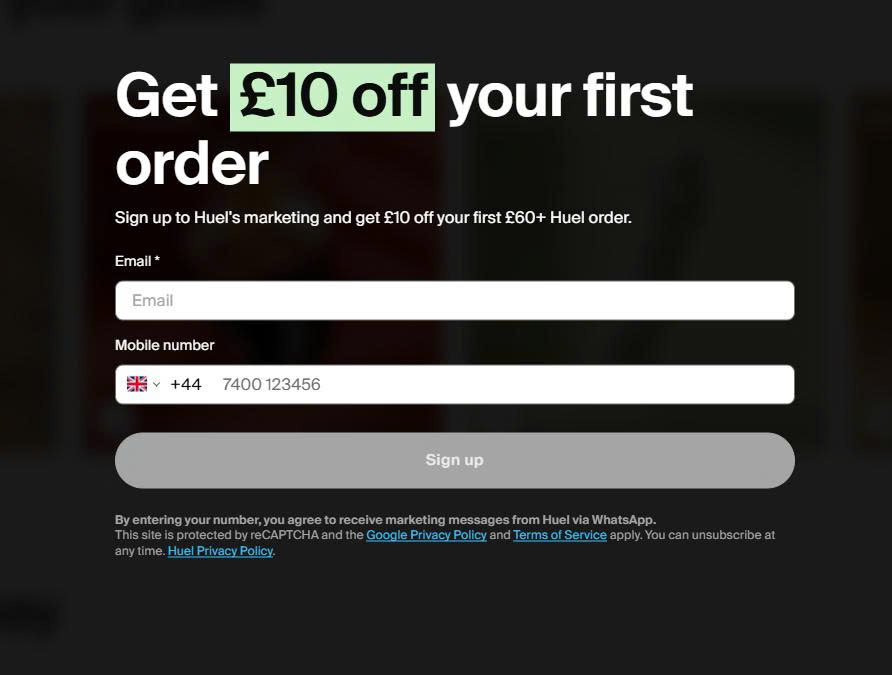
Huel offers £10 off orders over £60 and collects both an email and a phone number in the same popup. A phone number captured with clear opt-in consent opens a second channel, and our guide to SMS marketing shows how to turn those numbers into recovered sales. The £60 threshold sits above the price of a single product, so the deal only unlocks when the shopper adds more.
The minimum order turns the popup into an average order value tool, because shoppers add items to reach the threshold. A common approach is to set the threshold just above your current average order, high enough to lift the cart but low enough to feel reachable.
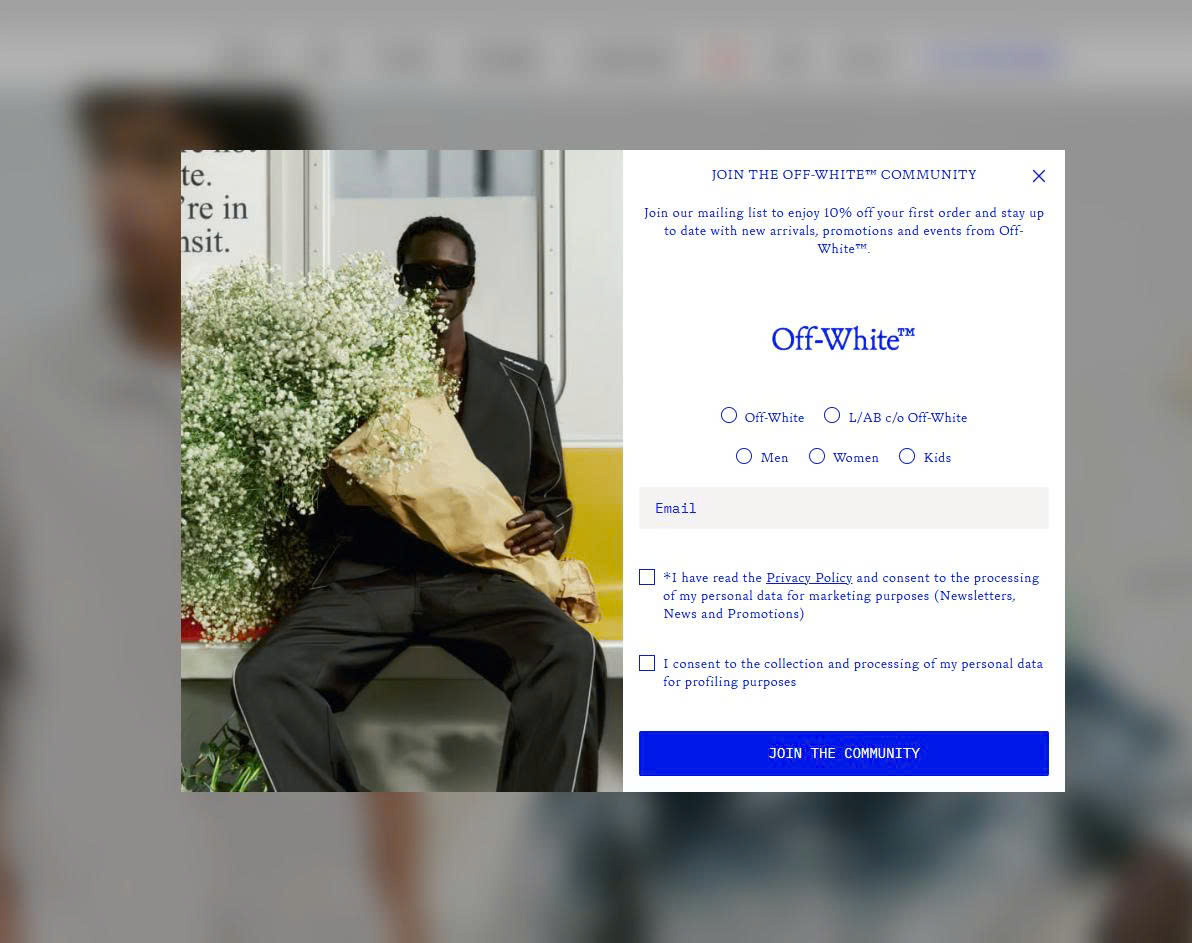
Off-White adds category checkboxes for womenswear, menswear, and kids next to a 10% first-order discount. A shopper picks a category before entering an email, so the store learns an interest at the first touch.
This works because the preference makes every later email more relevant, and relevant emails get opened more often. Copy the checkbox idea if you sell across distinct categories, but keep it to one question so the extra step does not slow the signup.
Each popup fits the store’s own goal. Copy the tactic that matches your goal, not the exact offer, and test it against your own audience.
Exit intent popups convert best when they respect the shopper. A helpful last offer wins subscribers, while a pushy one earns a fast exit. Follow these rules to stay on the right side of that line.
Testing the offer is also where you can lift your average order value. Instead of a flat discount, try an upsell or a cross-sell in the exit popup, such as a related product or a bundle at a special price. A promotion app like BOGOS can handle that offer logic while your popup app handles the display.
Exit intent popups are generally safe for SEO, and they are lower risk than most other popups. Google’s guidance on this targets a specific behavior, not popups in general.
In its 2016 Search Central blog post, Google explained that pages may rank lower when an intrusive popup covers the main content right as a visitor arrives from a mobile search result. The rule is about the entry page from search, not about every popup on your site.
An exit intent popup fires as the visitor is leaving, not as they arrive, so it does not block the content the way the guidance describes. Google also lists safe cases, including banners that use a reasonable amount of space and are easy to dismiss.
The one real risk is a popup that covers content on mobile the instant someone lands from search. Keep your popup exit-triggered and easy to close, and you stay well within the rules. There is no published penalty percentage, so be skeptical of any guide that quotes one.
An exit intent popup on Shopify is a low-cost way to recover shoppers who were already leaving. Shopify has no native exit-intent feature, so you add one with a popup app or theme code, then match the offer to why people leave. Free shipping answers the top reason for cart abandonment, and offers like a free gift or a bundle can lift your order value while you save the sale. Keep the popup exit-triggered, easy to close, and capped in frequency, and it will help you increase sales on Shopify without hurting the shopping experience or your rankings.
No. Shopify’s free Forms app can show a basic email popup, but it does not include an exit-intent trigger. To fire a popup on exit, you need a popup app from the Shopify App Store or custom theme code.
Yes, but they use different signals. Because a phone has no cursor, mobile exit intent relies on rapid upward scrolling, a back-button tap, tab switching, or inactivity. Mobile conversion is usually a little lower than desktop, so test your mobile popup on its own.
A good exit intent popup converts around 3% to 5% of the visitors who see it, and the average sits near 3.94%. Cart-page popups that show a real offer tend to perform above that range, while generic “don’t go” popups perform below it.

Shopify smart collections add and remove products for you based on rules, such as a tag, a price, or...

Shopify collections decide how shoppers find your products, yet many guides still describe a setup Shopify is now replacing....

A Shopify announcement bar is the thin strip at the top of your store that tells shoppers about shipping,...
