



Charlie Ngo
•
Last updated: 23 October, 2026
Shopify Smart Collections: Setup, Conditions & 8 Examples (2026 Updated)
Shopify smart collections add and remove products for you based on rules, such as a tag, a price, or...
![[2026] Shopify Testimonials: 3 Ways To Add Them + Best Apps](https://bogos.io/wp-content/uploads/2026/10/Shopify-Testimonials.jpg)
[2026] Shopify Testimonials: 3 Ways To Add Them + Best Apps

Marketing Manager
Summarize this post with AI
Shopify testimonials help new visitors trust a store they have never bought from. Most guides stop at “install an app,” so I wrote this one to cover the full job: what counts as a testimonial, 3 ways to add one, how to collect quotes that sound real, and the FTC and Google rules that apply. I’m Charlie Ngo, Marketing Manager at BOGOS. I reviewed the 5 top-ranking guides on this topic and checked every claim against Shopify, FTC, and Google documentation.
A Shopify testimonial is a customer’s own words about your product or store that you choose to display, such as a quote, a photo, or a video. You decide which testimonials appear and where they appear.
The FTC defines a consumer testimonial as an advertising or promotional message that people are likely to believe reflects the real experience of a customer. This means a testimonial is a form of advertising, and advertising rules apply to it.
Testimonials are one type of social proof on Shopify, which is the habit of following what other people choose when we feel unsure.
The main difference between testimonials and reviews is control. You choose which testimonials to show, while reviews come from any buyer and appear whether they are good or bad.
| Testimonial | Review | |
|---|---|---|
| Who writes it | A customer you ask or select | Any buyer who wants to leave feedback |
| Who decides what shows | The store | The review app shows all reviews, and the store cannot hide negative ones |
| Typical format | A short quote, photo, video, or story | A star rating with text |
| Where it appears | Homepage, product pages, landing pages, ads, and emails | The review widget on product pages |
| Main rules | FTC rules on fake and undisclosed testimonials | FTC rules on fake reviews, bought reviews, and hiding negative reviews |
The line between the two moves when you reward a customer. According to the FTC’s staff Q&A on the rule, a review that you pay for or reward with an incentive also counts as a testimonial.
A review also becomes a testimonial when you feature it in your marketing, such as a homepage banner or an ad. At that point, you are responsible for making sure it is true.
Testimonials help sales because they answer the question every new visitor has: did people like me buy this and feel glad they did?
The clearest evidence comes from a controlled A/B test. In VWO’s WikiJob case study, the UK jobs site WikiJob added 3 lines of customer testimonials to its aptitude test page, and purchases rose by 34%.
Two details from that test matter for Shopify stores. First, WikiJob described its testimonials as sober, not excited marketing copy. Second, an earlier test that placed the same testimonials lower on the page had no clear effect.
Shoppers are also more careful about proof on brand websites. In Clutch’s February 2026 survey of 400 US consumers, 73% trusted reviews on Amazon and 65% trusted reviews on Google, but only 46% trusted reviews on brand-owned sites.
The same survey found that only 15% of shoppers trust star ratings alone. It also found that 72% of shoppers trust a review less when they suspect AI wrote it.
This means testimonials on your own store must look verifiable to work. A real name, a photo, and a specific detail show a visitor that a real person wrote the quote.
If you are working to raise your Shopify conversion rate, testimonials are a low-cost place to start, because your customers write the content for you.
The 6 main types of Shopify testimonials are quote, photo, video, before-and-after, expert or influencer, and social media testimonials.
| Type | What it looks like | Best for |
|---|---|---|
| Quote | 1 to 3 sentences with the customer’s name and city | Every store, on the homepage and product pages |
| Photo | A quote with the customer’s photo or a photo of the product in use | Fashion, home decor, and beauty stores |
| Video | A 15- to 60-second clip of a customer talking about the product | Higher-priced products and products that need a demonstration |
| Before-and-after | A short story with a clear result | Skincare, hair care, fitness, and cleaning products |
| Expert or influencer | A quote from a trainer, stylist, dermatologist, or creator | New stores with few customer testimonials |
| Social media post | An Instagram or TikTok post where a customer tags your brand | Brands with an active social audience |
Video testimonials are the hardest type to collect and often the most persuasive. Wyzowl’s 2026 survey found that 85% of people have been convinced to buy something after watching a video, although that figure covers all video, not only testimonials.
Short customer clips also work well next to your Shopify product videos, because the product video shows the features and the customer clip shows a real result.
Before-and-after testimonials need extra care. Under the FTC’s Endorsement Guides, if a testimonial shows a result that most customers will not get, you must clearly state the result people can generally expect. A short line like “results not typical” is not enough.
Expert and influencer testimonials must disclose any payment, free product, or other connection to your brand.
Social media posts belong to the customers who made them, so ask for permission before you show them in your store. Our Shopify UGC guide explains how to ask for that permission and keep a record of it.
You can add testimonials to Shopify in 3 ways: a testimonial section in your theme, a block built by Shopify’s AI, or a testimonial app or widget.
| Method | Cost | Best for | Main limitation |
|---|---|---|---|
| Theme section | Free | Stores with 3 to 10 hand-picked quotes | You add and update each quote by hand |
| Shopify AI block | Free | Stores whose theme has no testimonial section | You must check the design and page speed yourself |
| App or widget | Free to $15/month for the apps in this guide | Stores that want imports, video, or a collection form | You add another app to manage and pay for |
Many Shopify themes include a testimonial section, so check your theme before you install anything. Follow these 6 steps:
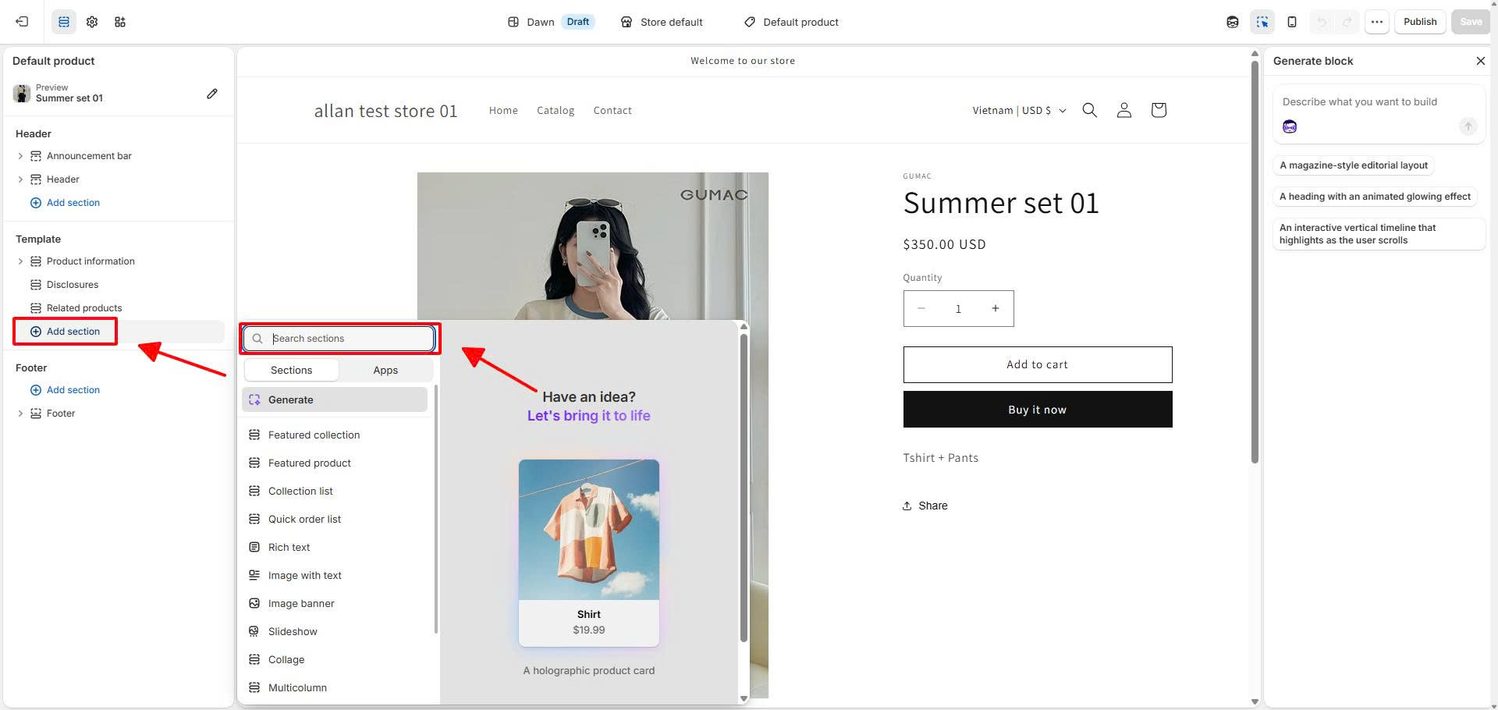
Dawn, Shopify’s long-time free theme, has no dedicated testimonial section. Shopify merchants use Dawn’s Multicolumn section instead, with one quote, one customer photo, and one name in each column.
Put your strongest testimonial close to the buying decision. On a product page, place it near the Add to Cart button, not at the bottom of the page.
WikiJob’s testimonials had no effect when they sat lower on the page, so placement matters as much as wording. Moving proof closer to the button is one of the quick wins in Shopify product page optimization.
Shopify’s AI can build a custom testimonial block from a plain-language description, with no code. Shopify’s changelog confirms that since December 10, 2025, AI block generation, powered by Sidekick, works with every theme in the Shopify Theme Store.
Follow these 5 steps:
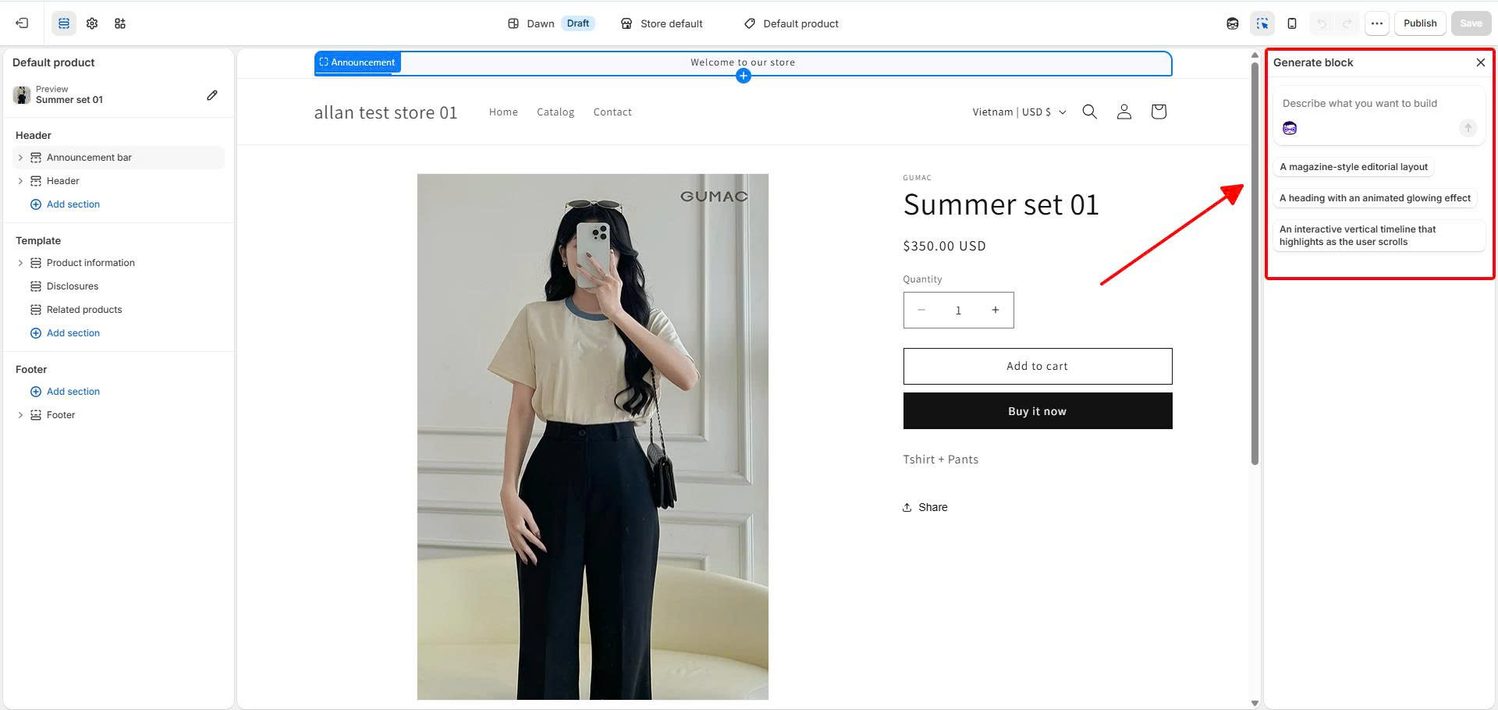
AI blocks still need a human check. Test the block on a phone, confirm that the page still loads quickly, and remember that you update each quote by hand.
A testimonial app is the best choice when you want to import testimonials from Google, Facebook, or Yelp, show video, or collect new testimonials through a form.
Apps from the Shopify App Store usually add a block that you place in the theme editor. Widgets from outside the App Store give you an embed code that you paste into a Custom Liquid section in the theme editor.
The 4 testimonial apps worth comparing in 2026 are Testimonial Master, TestimonialHub, Reputon Testimonials Slider, and Judge.me. I checked each listing on the Shopify App Store in October 2026, and prices and ratings can change.
| App | Rating | Free plan | Paid plans | Best for |
|---|---|---|---|---|
| Testimonial Master | 4.9 (52 reviews), Built for Shopify | Up to 5 testimonials in a grid | $3.99/month for 50 testimonials and a slider; $7.99/month for unlimited testimonials and import/export | Simple quote sections on a small budget |
| TestimonialHub | 4.9 (105 reviews) | Yes, with limited display options | $2.99/month for more templates and slider styles | Showing your Google, Facebook, and Yelp reviews |
| Reputon Testimonials Slider | 4.9 (162 reviews) | Up to 4 testimonials | $5.99/month for up to 150 testimonials plus YouTube and TikTok video | Video testimonials and imports from other platforms |
| Judge.me | 5.0 (48,000+ reviews) | Yes | $15/month (Awesome plan) | Stores that also need product reviews |
Check each App Store listing for the price, the number of reviews, and recent reviews before you install. Every new app adds code to your store, so check your page speed after you add one.
A dedicated testimonials page puts your best testimonials on one URL that you can link from your menu, emails, and social profiles. Follow these 4 steps:
Group the testimonials on this page by the worries your buyers have, such as sizing, durability, or delivery time. A visitor who worries about sizing can then jump straight to the quotes about fit.
The same grouping works on a campaign page. If you are building a Shopify landing page for one product, use 2 or 3 testimonials that answer that product’s most common doubts.
Real-sounding testimonials come from 5 habits: asking your best customers, asking at the right time, asking specific questions, getting permission, and rewarding honestly.
Your best testimonials usually come from repeat buyers, top spenders, and long-time customers, because they already like your store. In Shopify, you can find them by filtering your customer list by number of orders or amount spent, then saving that filter as a segment.
Picture a small candle shop with 400 past customers. Instead of emailing all 400, the owner emails the 30 customers who ordered 3 or more times. These customers have burned the candles many times, so they can describe how long one lasts and how strong the scent is.
Send your testimonial request after the customer has used the product. Shopify’s blog suggests an automated email 5 to 7 days after delivery.
One follow-up email makes a large difference. Growave’s 2026 data from 227 Shopify stores shows that 75% of stores send a review request, but only 35% send a second reminder. Stores that send both collect a median of 86% more reviews. This is vendor data, so treat it as a benchmark, not a promise.
Shopify also asks for feedback on your behalf. The Shop app notifies customers to review products they bought, and Shopify’s Help Center explains where those reviews and their conversion rate appear in your admin.
Specific questions produce specific testimonials. Shoppers value detail: in the Clutch survey, buyers felt most confident when ratings came with written feedback (43%) or photos (34%).
Use questions like these in your request:
Always get written permission before you publish a testimonial, and ask the customer how they want to be named. A first name, last initial, city, and photo make a quote more believable than a first name alone.
You can shorten a testimonial or fix a typo. You must not change its meaning or combine sentences to make a stronger claim than the customer made.
You can reward customers for sharing feedback, but the reward must not depend on the feedback being positive, and you must disclose it. The FTC rule bans buying positive or negative reviews, and the FTC treats any rewarded review as a testimonial that must be true.
Google added a matching rule in July 2026. Its review snippet guidelines now say pages should not include reviews given in exchange for money, discounts, vouchers, or free products unless the reward is clearly and prominently disclosed.
An honest request reads like this: “Share an honest review, good or bad, and get a free travel-size gift with your next order.”
If your reward is a free gift, a gift app can handle the delivery for you. For example, BOGOS integrates with Judge.me and Trustoo, so gift items sent through BOGOS can still trigger review requests, and star ratings can show inside BOGOS gift and bundle widgets. The same tools let you run a free gift with purchase offer for your regular customers. BOGOS is free to install for the first 30 orders; you can install BOGOS using this link.
Two sets of rules apply to Shopify testimonials: the FTC’s rules for US advertising and Google’s rules for review stars in search results.
The FTC’s Rule on the Use of Consumer Reviews and Testimonials has applied since October 21, 2024. Follow these 5 points:
Google’s rules affect how testimonials appear in search:
I’m not a lawyer, so speak with a legal advisor if your testimonials make health, weight loss, or income claims.
The 7 most common testimonial mistakes are vague praise, anonymous quotes, overly polished wording, outdated quotes, poor placement, heavy widgets, and false expectations about Google stars.
Shopify testimonials work best when they are real, specific, and placed where shoppers make their buying decision.
Start with 5 testimonials from your most loyal customers. Add them near the Add to Cart button on your best-selling product, then compare that product’s conversion rate after 30 days.
Testimonials are one of several ways to increase sales on Shopify. Once your store looks trustworthy, offers like free gifts, bundles, and upsells give those visitors a reason to buy more.
Testimonials and reviews are different. A testimonial is a customer quote that you choose to display, while a review is feedback that any buyer can leave in a review widget. A review becomes a testimonial when you reward the customer for it or feature it in your marketing.
You can add testimonials to Shopify without an app. Use your theme’s testimonial section, or ask Shopify’s AI to generate a testimonial block. If you use Dawn, build your testimonials with the Multicolumn section.
You can offer a reward for a testimonial if the reward does not depend on positive feedback and you clearly disclose it. A free gift for any honest review is allowed. A discount only for 5-star reviews breaks the FTC rule.

Shopify smart collections add and remove products for you based on rules, such as a tag, a price, or...

Shopify collections decide how shoppers find your products, yet many guides still describe a setup Shopify is now replacing....

A Shopify announcement bar is the thin strip at the top of your store that tells shoppers about shipping,...
