



Charlie Ngo
•
Last updated: 30 October, 2026
Shopify Featured Collections: How To Add & Customize (2026 Guide)
A featured collection is often the first group of products a shopper sees on a Shopify store, yet the...
Shopify Shipping Insurance: What’s Included, What It Costs, and How to Claim (2026)

Marketing Manager
Summarize this post with AI
A lost package can cost you more than the order itself. You may need to refund or replace it, spend time handling the claim, and risk losing the customer. Shopify shipping insurance helps protect you from that financial hit by covering eligible lost, damaged, or stolen shipments.
In this guide, I’ll break down what Shopify covers for free, what additional coverage costs, how to add Shopify shipping insurance and file a claim, and when it makes sense to offer shipping protection to customers. I’m Charlie Ngo, an eCommerce expert at BOGOS with 11 years of experience helping Shopify merchants increase sales, lift AOV, and improve conversion rates.
Shopify shipping insurance and Shopify shipping protection may sound similar, but they usually solve different problems. Here’s the difference at a glance:
| Shopify shipping insurance | Shipping protection app | |
|---|---|---|
| Who it protects | Your business against shipping loss | The customer’s order |
| Who pays | Merchant, unless coverage is included | Usually the customer at cart or checkout |
| Main purpose | Recover eligible shipping losses | Give shoppers optional order protection |
| How claims work | Claims are handled through Shipsurance for Shopify insurance | Depends on the app: merchant-managed or third-party |
If you ship from the US and want to protect your own parcels, the next sections cover Shopify’s built-in shipping insurance, including eligibility, cost, and claims. If you want to offer protection as an optional checkout add-on instead, skip ahead to the Shopify shipping protection section.
Either way, get your Shopify shipping rates right first. Accurate rates keep checkout predictable before you add another shipping-related charge or protection option.
Shopify shipping insurance is administered by Shipsurance rather than Shopify itself. It can reimburse you when an eligible shipment is lost, damaged, or stolen in transit, and some policies may also cover porch theft or “delivered but not received” cases.
That protection matters because package theft is becoming increasingly expensive for online retailers. In 2025, nearly one in three US households (29.7%) reported having a package stolen, while retailers absorbed an estimated $7.9 billion in refunds and replacements, according to Omnisend’s 2025 porch piracy report. The impact can continue after the refund. The same report found that 23% of theft victims shop online less often afterward.
The good news is that some Shopify merchants already get a level of shipping insurance at no extra cost. Let’s look at what’s included free and who qualifies for the free $200 coverage.
Eligible Shopify shipping labels can include up to $200 USD of insurance coverage at no extra cost. This limit applies per shipment and does not stack across multiple services.
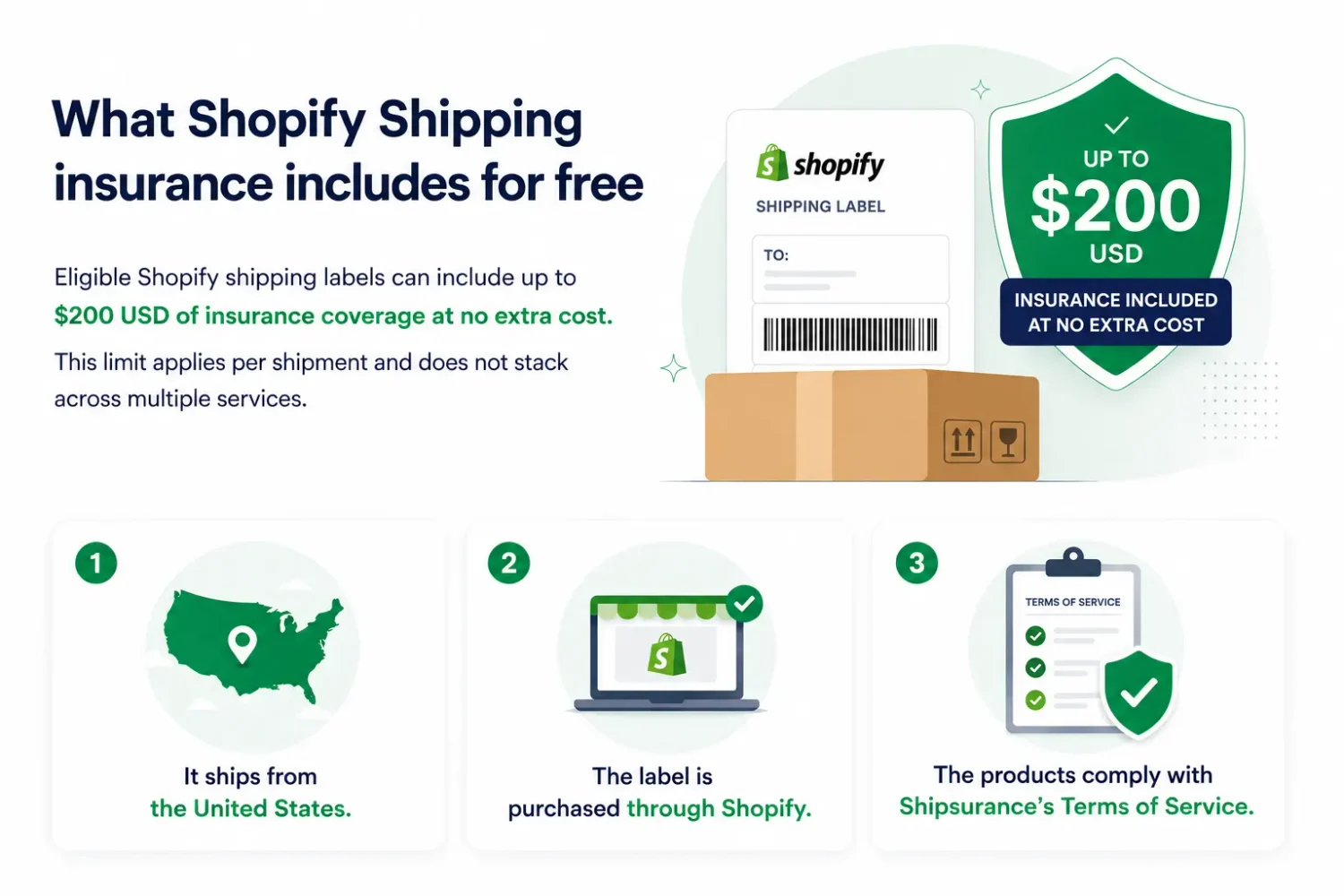
According to Shopify’s shipping insurance documentation, a shipment must meet three basic conditions to qualify for insurance:
To receive the free $200 coverage, you also need Shopify Payments enabled and a store on the Grow, Advanced, or Plus plan. The same free coverage applies to eligible Managed Markets labels on those plans. Basic stores do not get the $200 coverage for free, but they can still purchase insurance separately.
Before buying extra insurance, check what your carrier already includes:
The important part is that carrier coverage and Shopify’s Shipsurance coverage do not stack. If a shipment is covered through Shipsurance, you file the claim with Shipsurance rather than adding the carrier’s coverage on top.
The other major difference is the claim window. If you rely only on carrier coverage, each carrier has its own deadlines for lost and damaged packages:
| Included coverage | Lost package deadline | Damage / missing contents deadline | |
|---|---|---|---|
| USPS | Up to $100 on eligible services | Usually 15–60 days from mailing; Express has different timing | Within 60 days of mailing |
| UPS | $100 default declared value | Within 9 months for domestic shipments | Within 60 days of delivery |
| FedEx | $100 default declared value | Within 9 months of the ship date | Within 60 days of the ship date for US shipments |
| Shopify insurance (Shipsurance) | Up to $200 free; additional paid coverage available | 24 hours to 120 days from the ship date | 24 hours to 120 days from the ship date |
The free $200 covers many lower-value orders, but once an order exceeds that amount, the remaining value is still at risk. Paid coverage closes that gap, letting you insure up to $5,000 per shipment for higher-value orders.
Adding it is simple because insurance is selected while you purchase the shipping label. Before walking through the steps, here’s what the extra coverage costs.
Additional insurance scales with the value of the shipment. Shopify charges $0.89 per $100 of coverage for domestic shipments and $1.29 per $100 for international shipments, in $100 increments up to $5,000 per shipment.
For example, if you insure $250 of goods plus $20.50 in international shipping, Shopify rounds the covered amount up to $300. At $1.29 per $100, the total insurance cost is $3.87.
You do this directly on the label purchase screen, so no separate app or settings page is involved.
Once you buy the label, the insurance is tied to that specific shipment and appears on the order. If the parcel is lost or damaged in transit, you can file a claim instead of absorbing the full cost yourself.
If you no longer need the label, you can void the shipping label within 30 days. For unused labels, the insurance premium is credited toward future insurance purchases.
If an insured shipment is lost or damaged, you can file a claim directly from the affected order in your Shopify admin. For Shopify shipping insurance claims, Shipsurance reviews the claim and handles the payout. You can also start a claim from the Shopify mobile app.
After filing, you receive a claim ID and a link to the Shipsurance portal so you can track its status. From there, the payout goes to the method you chose, so a clean claim turns a lost parcel back into recovered revenue rather than a swallowed cost.
Before filing, keep these rules in mind:
Good documentation can make the claims process much smoother. For higher-value shipments, photograph the package before dispatch, keep invoices and proof of value accessible, and save any customer messages or photos showing loss or damage.
If a support teammate handles order issues, make sure they know the 120-day window, because a claim should never lapse just because a ticket sat in a queue. When a claim ends in a refund, our guide on how to refund shipping on Shopify covers the mechanics.
So far, we’ve focused on insurance that you pay for to protect your shipments.
Shopify also offers a different approach through shipping protection apps. These let you add an optional protection fee at checkout that customers can choose to pay. If they do, you collect those fees as add-on revenue and handle eligible claims yourself.
If protection fees stay higher than your replacement and refund costs, the difference becomes additional revenue. The trade-off is that you fund the claims, so a spike in lost, damaged, or stolen orders can quickly eat into that margin.
If you want to run this type of merchant-managed protection, these three Shopify shipping protection apps are strong options to compare:
| App | Rating | Pricing | Key features | Best for |
|---|---|---|---|---|
| Navidium Shipping Protection | 4.8 ⭐ (331 reviews) | Free for up to 50 orders/month; paid from $29.99/month | – Custom protection pricing and branding claims portal and automation – 1-click refunds/reorders, reporting – 100% of protection fees kept by merchant | Higher-volume stores that want advanced claims tools with no revenue share |
| Simply Shipping Protection | 4.6 ⭐ (120 reviews) | Free to install with 10% fee on protection sales; paid from $4.99/month | – Fixed or percentage pricing – Cart / checkout / post-purchase placement – Customer claim widget – Refunds, reorders or store credit – Detailed analytics | Smaller stores that want a low-cost entry point and flexible widget placement |
| Captain Shipping Protection | 4.9 ⭐ (277 reviews) | From $11/month + 3.99% protection fee; 14-day trial | – Customizable cart widget – Dynamic pricing – Claims portal with email updates – Multilingual support – No theme-code injection | Stores that want a simple no-code setup with multilingual support |
Shipping protection already gives average order value a small lift by adding a paid line item to the cart. You can make that fee work harder by placing your next reward, whether it is a free gift, a free-shipping threshold, or a tiered discount, just above the typical protected cart value.
For example, if a protected order usually lands around $72, set the next reward at $80. The shopper is now only $8 away from unlocking something extra, and adding one more item feels like a smart move rather than extra spending.
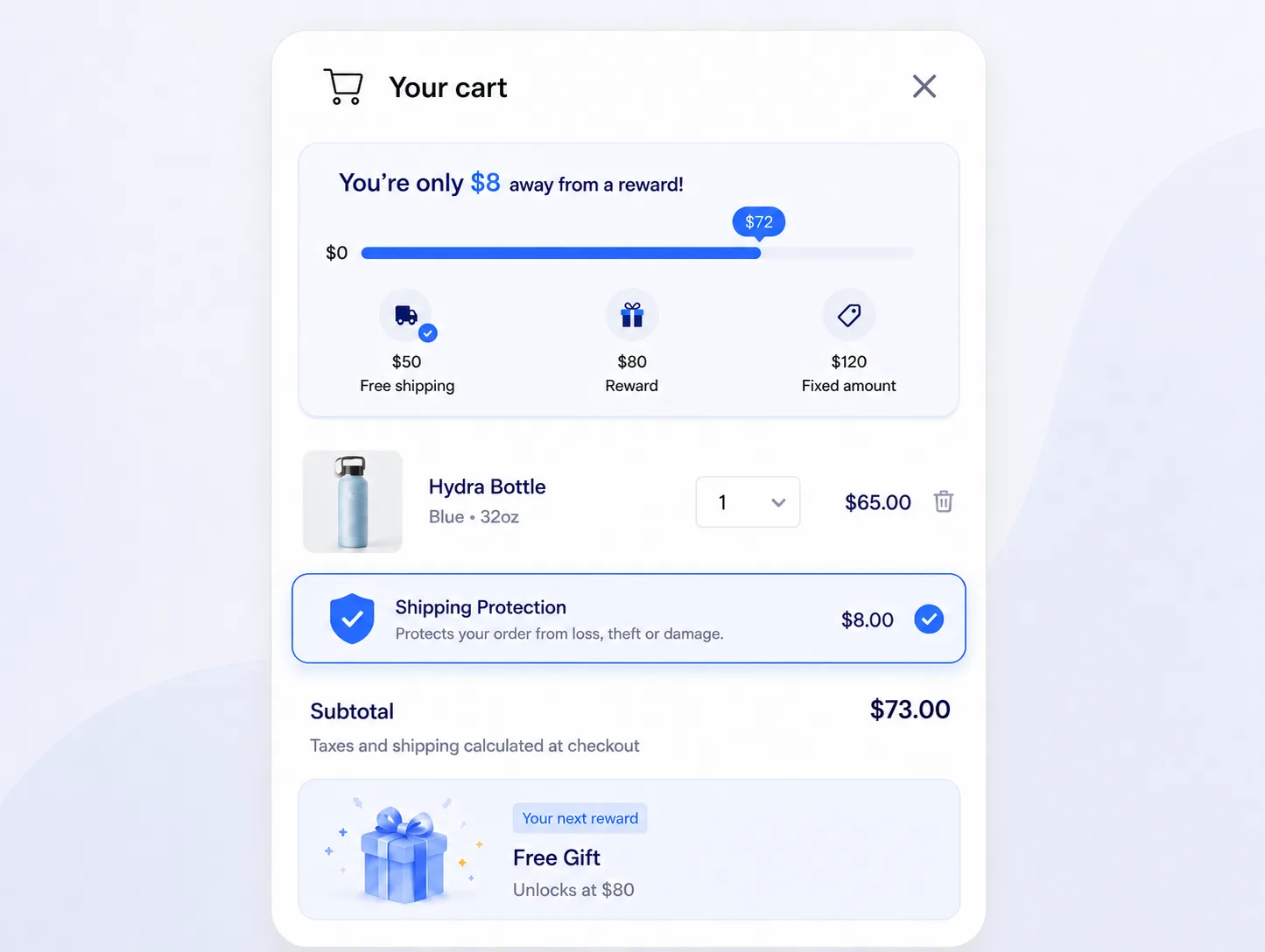
With BOGOS: Free Gift Bundle Upsell, you can set these spend-based rewards and make the next threshold visible through a Progress Bar in the cart drawer. A message like “You’re only $8 away from a free gift” shows shoppers exactly what they need to spend next. The protection fee moves them closer to the threshold, and the reward gives them a reason to cross it.
To go deeper on how spend thresholds drive larger carts, see our guide to average order value and post-purchase upsell flows.
Shipping insurance defends your margin, and selling protection can grow it. Both point toward the same goal, which is protecting the revenue you have already earned along with the repeat purchase that follows a clean delivery.
The best place to start is simple. Check your plan and Shopify Payments status in admin to confirm your free $200, then choose to buy, sell, or self-insure using the exposure math above. From there, it helps to treat the checkout as more than a place to guard orders. It is where you can protect revenue and grow it in the very same click.
Yes, it does. Coverage through Shipsurance includes theft in transit, including packages marked delivered but never received. You file the claim in your admin within the 120-day window, and Shipsurance handles the payout.
Your shipment must originate in the US to qualify. The free $200 requires Shopify Payments and a Grow, Advanced, or Plus plan. Basic-plan stores on Managed Markets do not receive it for free, but they can still purchase coverage.
USPS First Class Mail is not eligible, and UPS shipments to Puerto Rico are not eligible either. Insurance you add does not combine with carrier coverage, and claims on branded packaging that advertised the contents can be denied.

A featured collection is often the first group of products a shopper sees on a Shopify store, yet the...
Most Shopify stores need a best sellers page, but Shopify can’t build one that updates by itself. In this...

Shopify smart collections add and remove products for you based on rules, such as a tag, a price, or...
