



Charlie Ngo
•
Last updated: 23 October, 2026
Shopify Smart Collections: Setup, Conditions & 8 Examples (2026 Updated)
Shopify smart collections add and remove products for you based on rules, such as a tag, a price, or...
How to Issue a Shopify Partial Refund?

Marketing Manager
Summarize this post with AI
Returns and refunds have a bigger impact on Shopify revenue than many merchants realize. Shoppers are expected to return about $849.9 billion in goods in 2025, and around 93% review a store’s return policy before buying. This means the way you handle refunds can affect sales, not just customer support. A Shopify partial refund is one piece of that picture: you return part of an order’s value while the customer keeps the remaining items. It helps resolve the issue without giving up the entire sale.
I am Charlie Ngo, an eCommerce expert at BOGOS, and I make these calls the way any store owner has to. In this blog post, I’ll explain what a partial refund is, when to use one, how to issue it in Shopify, and how to reduce avoidable refunds.
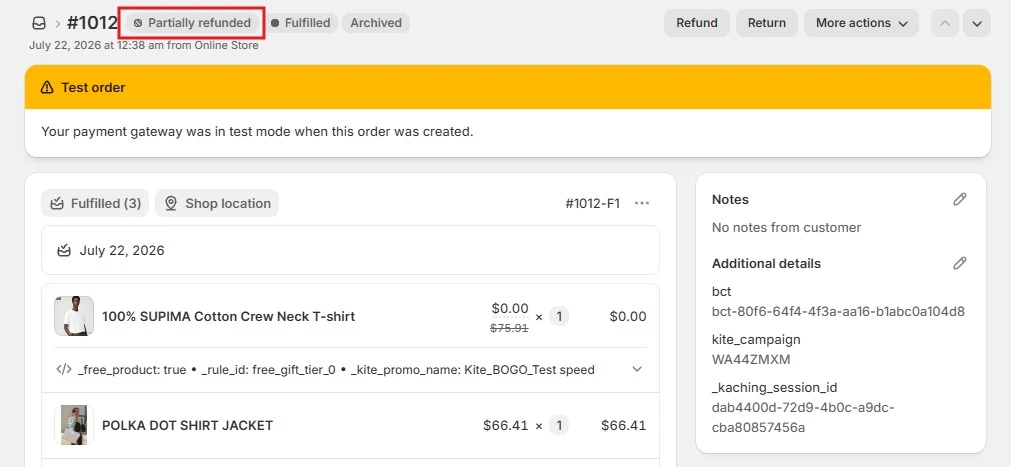
A partial refund returns part of an order’s value instead of the whole thing. The customer keeps what they want, you keep the rest of the sale, and the order status changes from “Paid” to “Partially refunded.”
Here is what a partial refund lets you do:
A full refund and a partial refund work differently. A full refund sends back the entire payment and closes the order, so you cannot refund it again. A partial refund sends back only the amount you choose and keeps the order open. The table below shows the difference at a glance:
| Full refund | Partial refund | |
|---|---|---|
| Amount returned | Entire order | A portion of the money |
| Use case | -Out-of-stock items-Full returns-Cancellations | -Minor damage-Delays-Price adjustments-Partial returns |
| Item status | Refunded | Partially refunded |
| Shipping & taxes | Full fees | Fees adjusted based on the refund amount |
| Transaction fees | -Shopify Payments: not returned-Third-party gateway: 100% credited back | -Shopify Payments: not returned-Third-party gateway: credited in proportion to the amount refunded |
The table shows how a partial refund affects the order, but customers usually care more about what happens afterward. This process is explained later in the guide.
Understanding how partial refunds work is only the first step. Knowing why customers request them helps you prevent repeat issues and protect more revenue.
Partial refunds are common because not every problem requires a full return. In 2025, shoppers are expected to return about 15.8% of all retail purchases and 19.3% of online orders. Many of these cases can be resolved with a fair adjustment instead of refunding the entire order.
Here are the most common situations, along with practical refund amounts you can use as a starting point.
Handled well, a partial refund is more than a support cost. It can protect customer trust, support long-term conversion rate optimization, and increase the chance of another purchase.
How you resolve the issue often determines whether the customer shops with you again. Around 15% of checkout abandonment is linked to return-policy concerns, while Route reports that roughly 93% of shoppers review a store’s return policy before buying.
A quick, fair refund protects average order value over a customer’s lifetime, because the refund you give today often returns as the next order. Back it with a polished Shopify refund policy template so customers see clear terms before they buy.
Issuing a partial refund takes a couple of minutes from your Shopify admin. This guide covers partial refunds. For a full refund walkthrough, see our guide to refunding an order on Shopify.
Here is the flow.
Go to Orders, click the order you want to refund, then click Refund at the top.

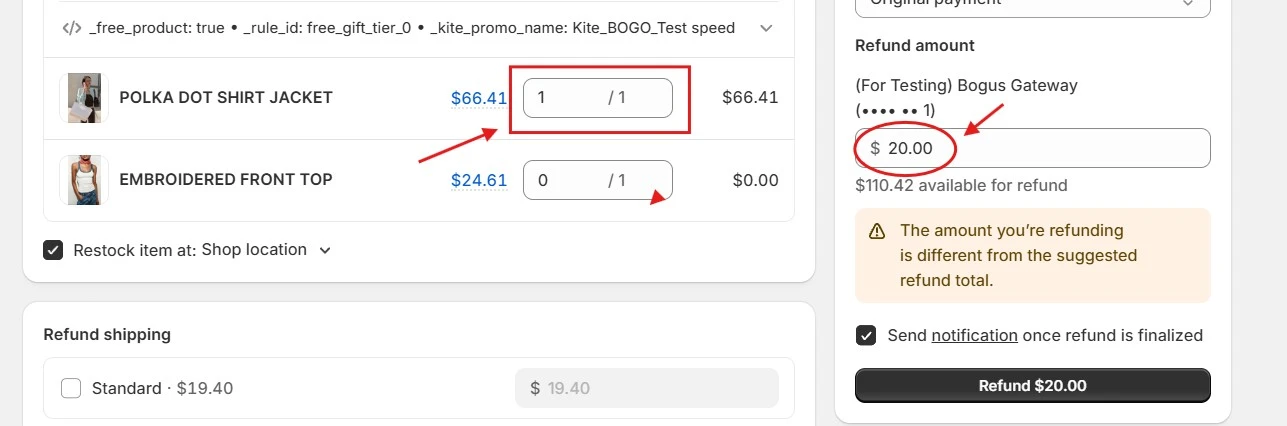
On the refund screen, enter the quantity for each item you are refunding, and leave zero for the items not refunded.
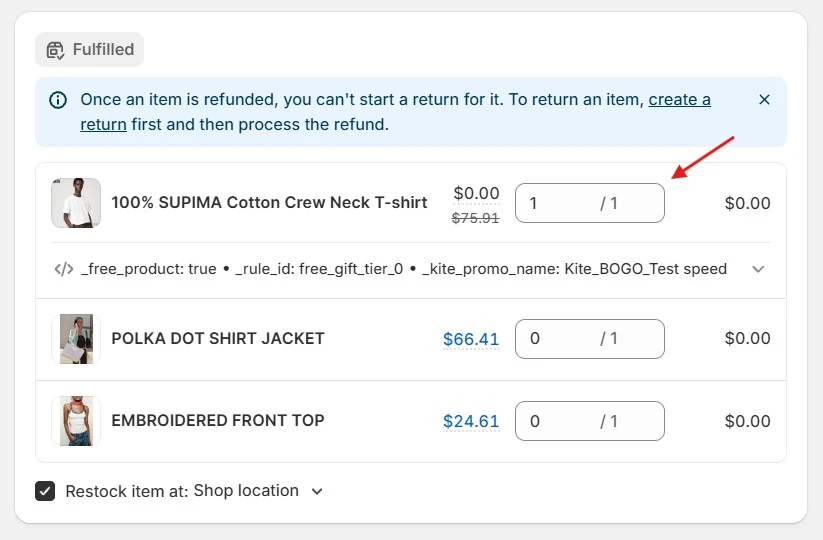
In case you want to refund only part of an item’s cost, keep the quantity as is and edit the Refund amount field for a custom sum.
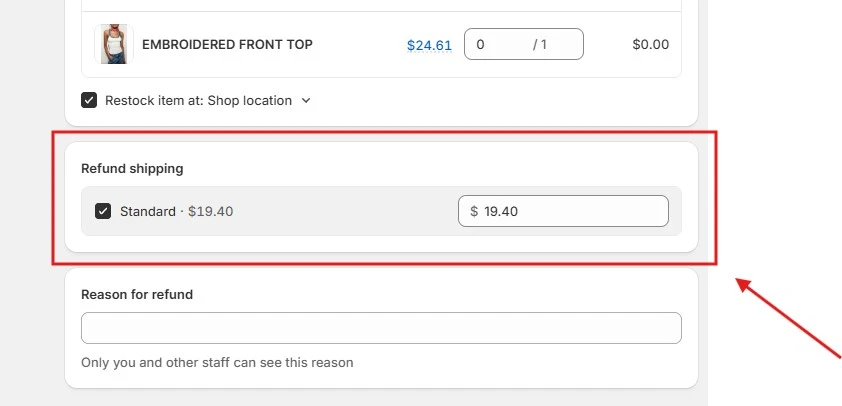
Shipping and tax math trips up a lot of merchants, so in the next section, I’ll break down exactly how Shopify calculates both on a partial refund.
Enter a Reason for the refund. This is only for internal management and is not shown to the customer.
The customer notification email is on by default. Leave it on unless you have a reason to turn it off.
Review the details in the Summary panel carefully, as the refund cannot be reversed once it is issued.
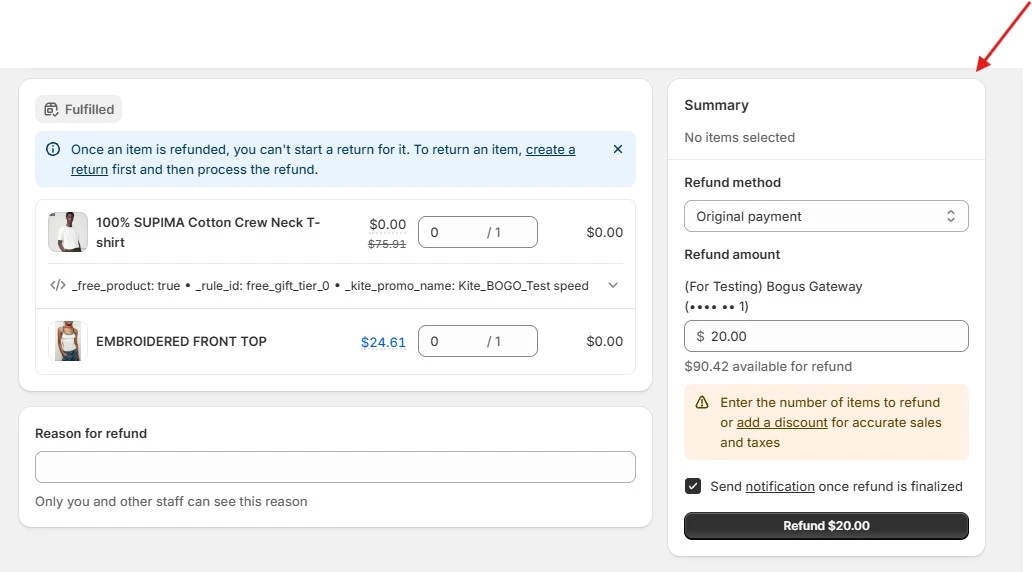
If everything is correct, click Refund. The order status will then change to Partially refunded.
You can find the full steps in the Shopify Help Center guide to refunding orders.
Important: some third-party payment providers require partial refunds to be processed in their own dashboard. If so, issue the refund there and make sure the Shopify order record stays accurate.
When you refund an item or part of an item, the tax tied to that amount is included in the refund automatically through the Shopify system. You do not need to work out the tax by hand, which keeps your reports clean.
A partial refund does not end when you click Refund. Here is what changes on both sides.
Customers usually want to know when and where their money will arrive. A refund can go to the original payment method, store credit, or a combination of both. The timing depends on the method:
Every partial refund solves a problem, but the better win is fewer problems to solve. Most avoidable refunds trace back to a handful of causes you can fix.
Refund reasons are valuable customer feedback. If “wrong size” appears repeatedly, your size chart or product details may be unclear. Track the reason for every refund, identify repeated patterns, and fix the underlying issue.
Focus on the three areas that cause many avoidable refunds:
Small improvements in these areas can prevent entire groups of refund requests.
Speed and clarity decide whether a complaint ends in a refund or a relationship. Agree on the fix before you process anything. A short message like “I can refund $20 for the shipping delay, does that work for you?” prevents surprises and often settles the issue for less than a full refund.
To keep that consistent, give your team simple internal guidelines:
Clear rules build trust and speed up every reply, and they usually cost less than the alternative, since a small refund beats paying return shipping and losing the whole sale.
Even after fixing the main causes of refunds, some problems will still happen. Your best chance to save the sale is before the customer submits a refund request.
Make it easy for customers to report an issue first. A thank-you card inside the package or a post-purchase email can encourage them to contact your support team if something goes wrong. For minor problems, consider offering a small incentive instead of a full cash refund. A gift with purchase, gift card, or store credit may resolve the issue at a lower cost while giving the customer a reason to shop with you again.
The challenge is delivering the right gift to one specific customer at the right moment. Shopify’s native Buy X Get Y discounts can target a customer segment, but the shopper still has to add the gift manually, and there is no built-in popup for choosing a reward.
For a one-time recovery offer, these extra steps can weaken the surprise and make the gesture less effective. That gap is exactly what our own app, BOGOS, closes:
The unhappy customer gets a personalized surprise gift with no coding or manual steps, which rebuilds goodwill and turns a likely refund into another Shopify sale.
A partial refund may be a small tool, but it can solve a complaint, protect most of the sale, and show the customer that your store is fair. Handled well, it can also increase the chance of another purchase.
Keep three points in mind. You can issue a partial refund from the Orders page in just a few steps. Shopify Payments does not return the original card processing fees, so include that cost in your decision. Finally, track every refund reason, because repeated issues show you what needs to be fixed.
You can also go beyond the refund itself. Pair a fast and fair resolution with a recovery offer, such as store credit, a discount, or a surprise gift on the next order. This turns a refund from a simple loss into an opportunity to rebuild trust, retain the customer, and support future Shopify sales. Shopify partial refund is one piece.
Yes. You can process a partial refund directly through the Shopify admin by changing the item quantity, editing the specific refund amount, or refunding shipping costs.
Yes. On the refund screen, leave the item quantity unchanged and edit the Refund amount field to the exact figure you want.
Open the order, click Refund, and in the Summary section, divide the value across the original payment method, store credit, or both, editing each amount up to what is available. If a gift card was used, Shopify refunds it first.

Shopify smart collections add and remove products for you based on rules, such as a tag, a price, or...

Shopify collections decide how shoppers find your products, yet many guides still describe a setup Shopify is now replacing....

A Shopify announcement bar is the thin strip at the top of your store that tells shoppers about shipping,...
