



Charlie Ngo
•
Last updated: 20 October, 2026
Shopify Collections: How To Create & Organize Them (2026)
Shopify collections decide how shoppers find your products, yet many guides still describe a setup Shopify is now replacing....
![[2026] Shopify Refund to Store Credit: A Complete Guide](https://bogos.io/wp-content/uploads/2026/07/Shopify-Refund-to-Store-Credit.jpg)
[2026] Shopify Refund to Store Credit: A Complete Guide

Marketing Manager
Summarize this post with AI
Returns are a normal part of e-commerce. In 2025, U.S. shoppers are expected to return around $890 billion in merchandise, equal to nearly 16.9% of total retail sales (According to NRF). For Shopify merchants, the key question is: how can you keep more of that value in your store?
The standard option is to refund the customer through their original payment method. The money leaves your business, and the sale is lost. A store credit refund offers another path. Instead of returning cash, you give the customer an account-linked balance they can use on a future purchase, helping you retain the revenue and encourage them to shop again.
This guide walks you through what a Shopify store credit refund is, when it makes sense to use it instead of a standard refund, and how to issue one step by step directly from your Shopify admin.
A Shopify store credit refund returns the value of a canceled order or returned product to the customer’s account balance instead of their original payment method. The customer can use this digital balance for a future purchase, helping you keep the revenue in your store.
You can issue store credit:
Store credit works like money in your store, but it is different from both a standard refund and a gift card. The table below compares the key differences side by side:
| Store credit refund | Cash refund | Gift card | |
|---|---|---|---|
| Where the money goes | On the customer’s account | Back to the customer’s payment method: card, PayPal, or Shop Pay | Held in store as a discount code |
| Where it can be spent | Only in your store | Anywhere | Only in your store |
| How it is redeemed | Applied automatically at checkout when signed in | Not applicable | Customer enters the code at checkout |
| Transferable | Tied to one account, cannot be shared | Not applicable | Anyone with the code |
| When it fits | Change-of-mind, late, or final-sale returns | Broken items or standard in-window returns | Gifting and promotions |
| Business impact | Keeps revenue in your store | Takes cash out of your store | Keeps revenue in your business |
U.S. retailers were expected to receive around $890 billion in returns in 2025, equal to nearly 16.9% of total sales. Returns take real money out of any Shopify business, and winning a new customer to replace lost sales costs around five times more than keeping an existing one, according to a Shopify report.
Every refund sent back to a card is money gone and a customer with no reason to return. Store credit changes both:
Another emerging concern is AI-generated damage photos, where dishonest customers may create fake images showing an item as damaged to support a refund claim.
Store credit will not suit every return. The next section explains when it works best and when a refund to the original payment method is the better choice.
Nearly every return can be steered toward store credit. It works best in two cases:
In both cases, the shopper still likes your brand. Offering credit instead of cash keeps that revenue in your store and gives them a reason to accept it quickly.
A store-credit-only policy, on the other hand, works against you in a few clear cases:
The right approach is flexible, not fixed. Default to store credit for low-risk returns like size, fit, or a change of mind, and especially for repeat buyers who will spend the balance soon. Keep a cash refund ready for damaged goods and the other cases above. Making this clear in your Shopify refund policy keeps the process smooth for you and the customer.
Store credit brings clear benefits, but it comes with constraints you should keep in mind before making it your default. Two problems in particular show up as your volume grows, and both are worth planning for.
Shopify handles store credit natively, so you can issue it straight from the order without any extra app. Before you start, three things need to be in place:
Store credit works across the four refund types Shopify supports: an entire order, a partial order, a returned item, and a canceled order. Here is how to issue one.
Step 1: Open the order
From your Shopify admin, go to Orders and select the order you want to refund.
Step 2: Start the refund
Click Refund, then select the items and quantities you want to refund.

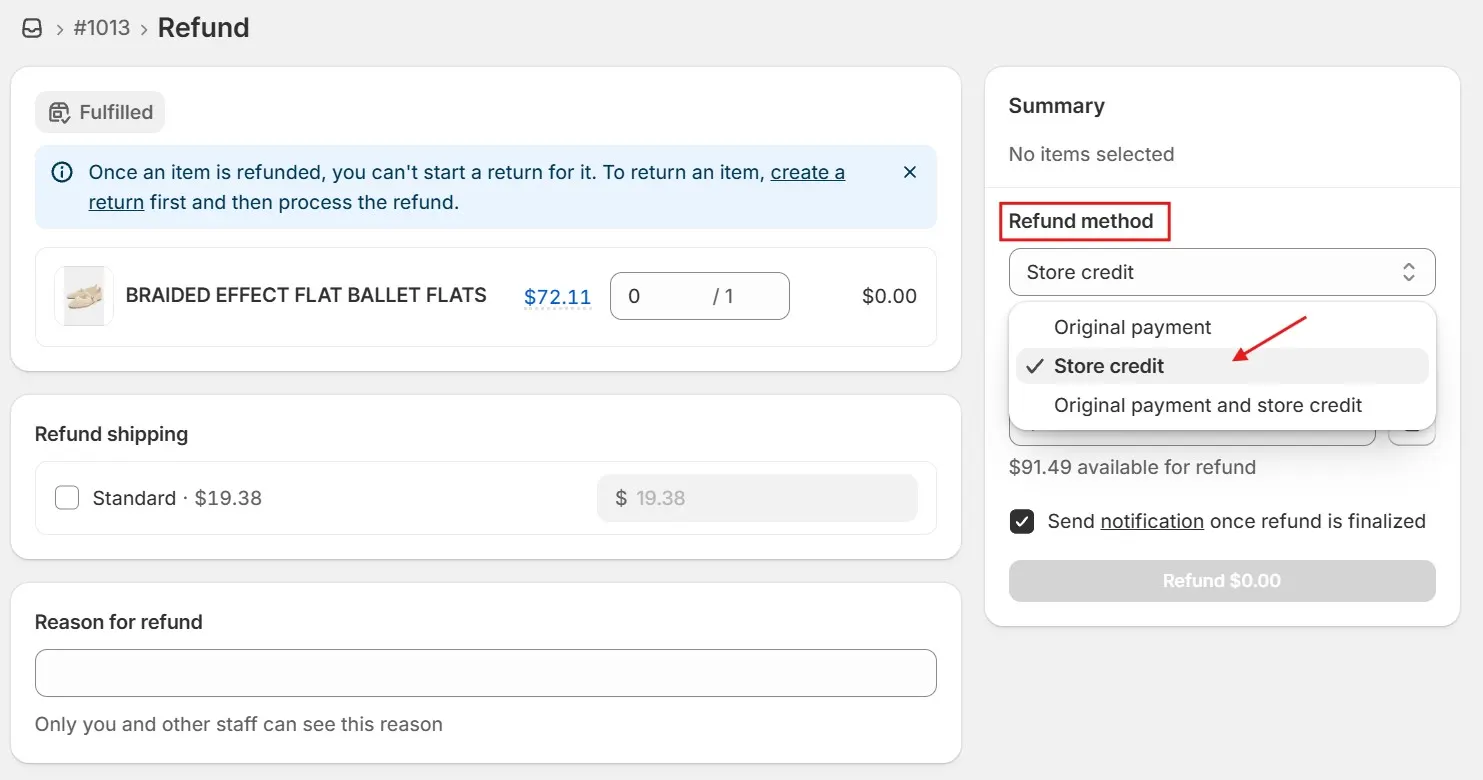
Step 3: Choose store credit as the method
Under the refund method, select Store credit.
You can issue the full amount as store credit or split the refund between store credit and the original payment method.
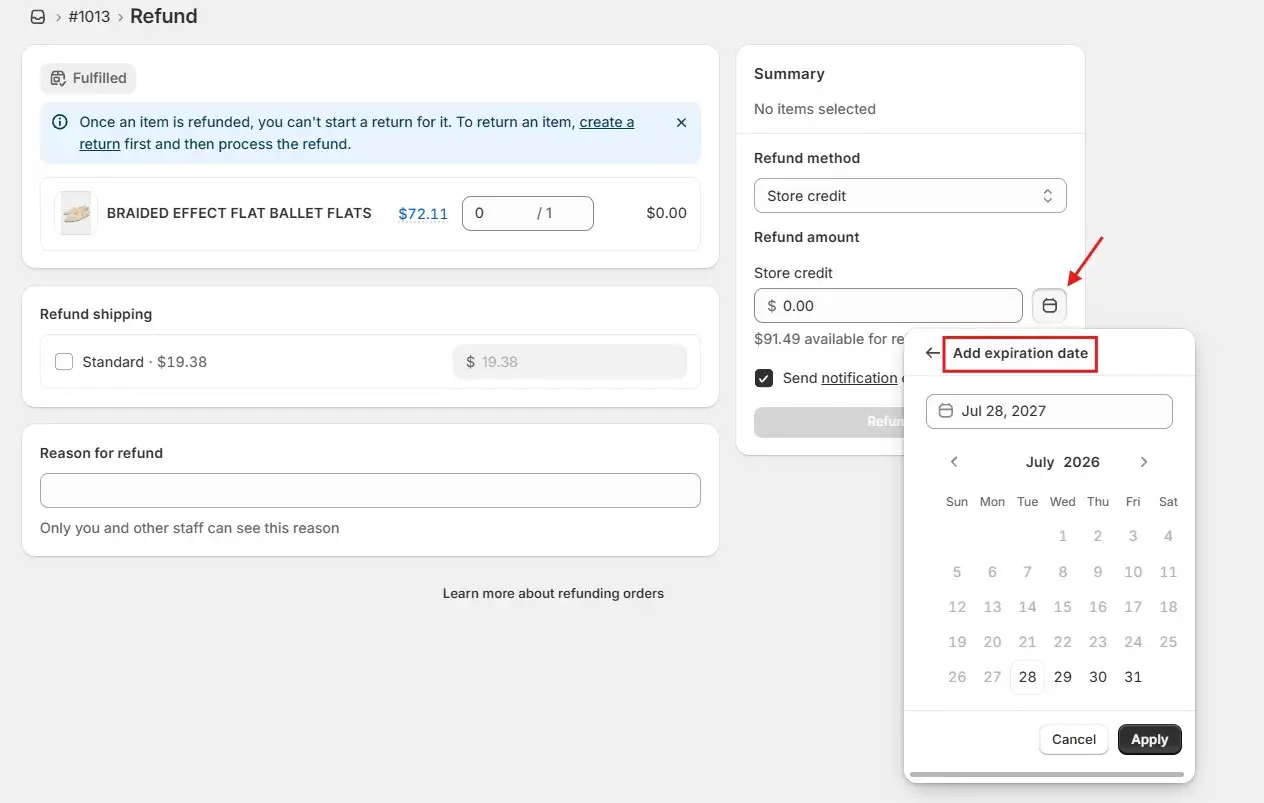
Step 4: Add an expiration date
You can add an expiration date to the store credit if your policy allows it. Check the laws in your market first, as some regions restrict or prohibit store credit expiry.
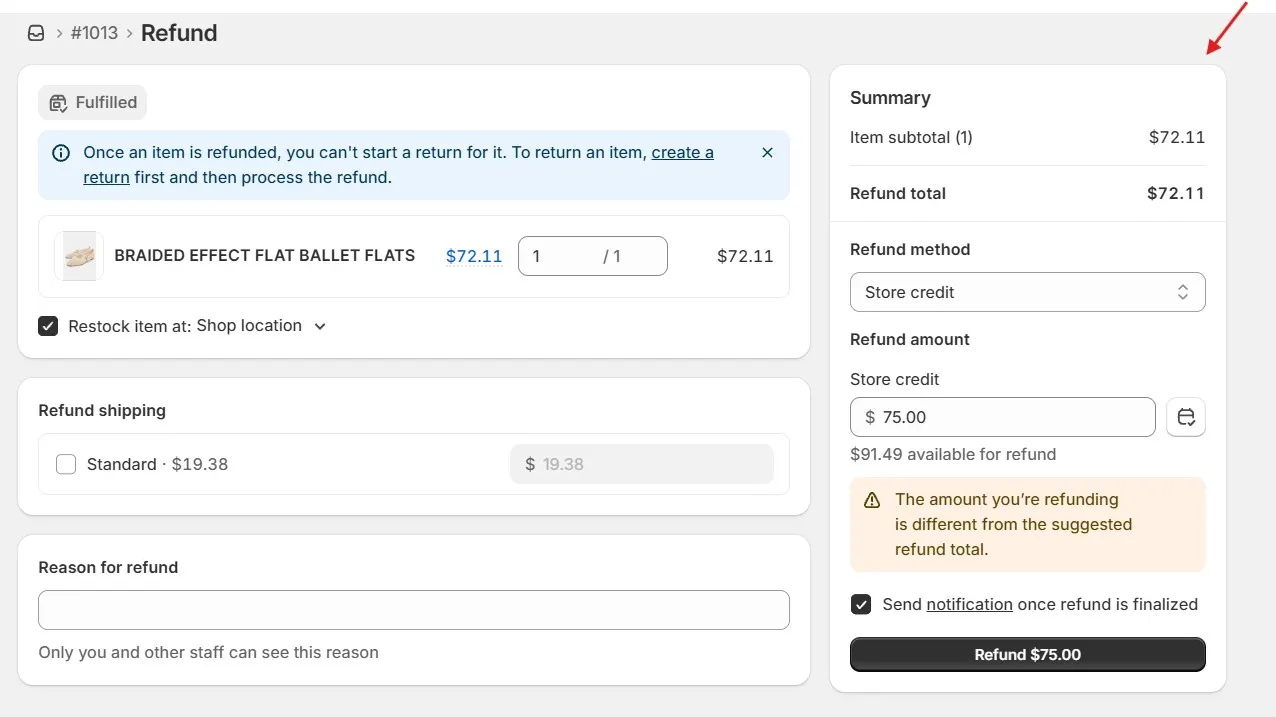
Step 5: Confirm the refund
Check the refund method and amount in the Summary section. Choose whether to notify the customer, then click Refund.
Sometimes, a customer who received store credit later asks for the refund to go back to their original payment method. Shopify allows and handles this through an over-refund, which sends an additional refund to the original payment method.
However, it does not automatically remove the store credit already issued. If the credit stays on the account while you refund the card, the customer keeps both. Return fraud runs on exactly that gap.
You can avoid it with two habits:
Once you are set up to do it safely, the flow itself is quick:
Step 1: Reopen the order
Open the order that was previously refunded to store credit, then click Refund.
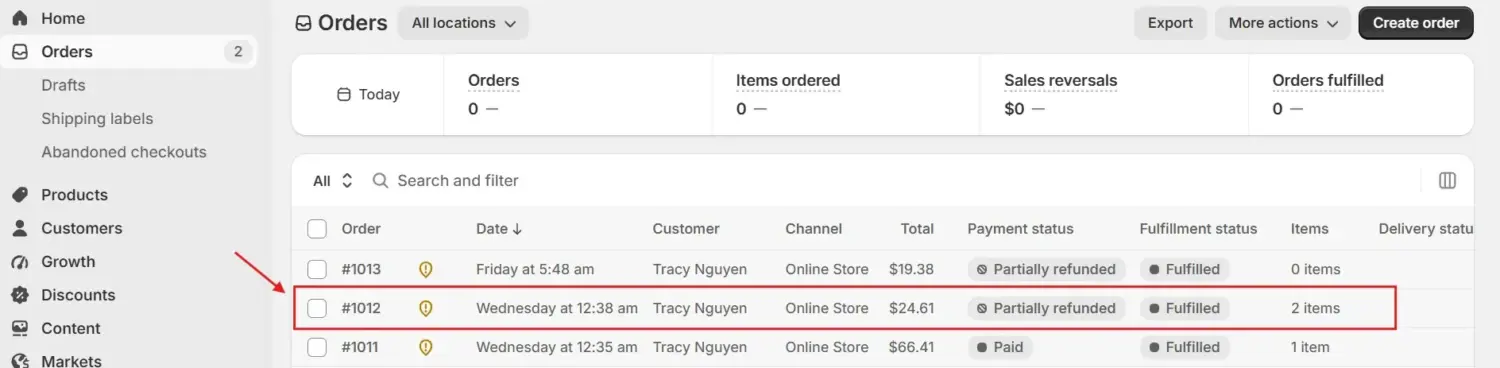
Step 2: Unlock the original payment method
In the Summary section, click the Refund method, then select the Original payment.
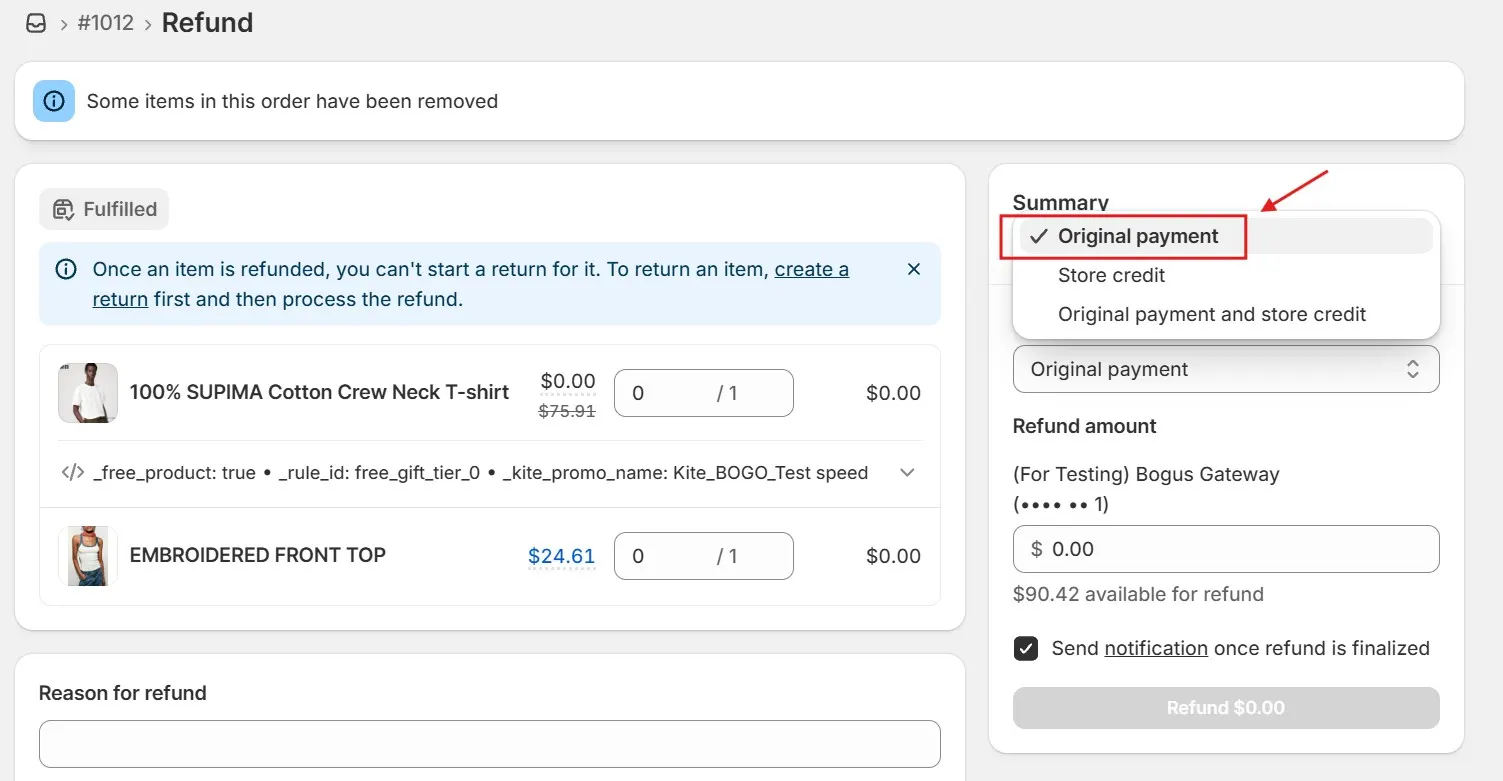
Step 3: Enter the amount
Enter the amount you want to send back to the customer’s original payment method.
Step 4: Confirm the refund
Review the details, choose whether to notify the customer, and click Refund.
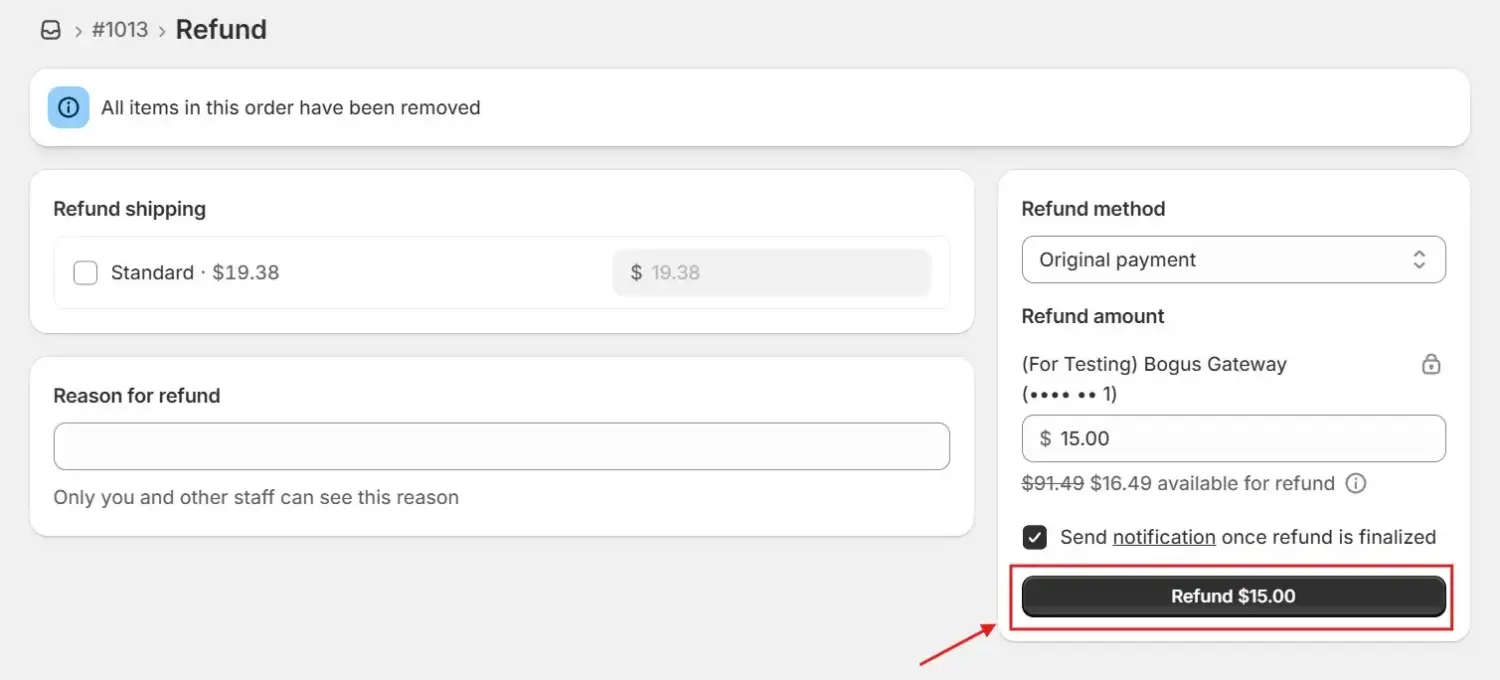
A Shopify self-serve returns portal can front this whole process, letting customers start the return themselves while you keep control of how each refund is issued.
Store credit gives customers a strong reason to return. Since they already have a balance ready to spend, your goal should be to increase the value of their next order, not simply recover the original sale.
Tiered rewards can encourage that extra spending. With BOGOS, you can create targeted spending thresholds that guide returning customers toward a larger cart.
Pairing store credit with a well-timed gift-with-purchase offer is a practical way to increase Shopify sales without relying on sitewide discounts.
Shopify’s native store credit works well for stores with a manageable return volume. As returns increase, however, its limits can create extra work and friction. Knowing these limits helps you decide when Shopify’s built-in tools are enough and when a returns app may be useful.
These limits may be manageable for smaller stores. As return volume grows, a dedicated returns app can reduce manual work with self-service returns, automatic store credit, and bonus-credit incentives. Consider using one when returns become a regular part of your daily workload.
A refund does not always have to mean lost revenue. Store credit keeps the value in your business and gives the customer a reason to shop again, making it a useful tool for protecting average order value and supporting future Shopify sales.
The best approach is to offer store credit for low-risk returns involving size, fit, or a change of mind, especially when the customer already trusts your brand. The setup is simple: enable store credit under Settings > Customer accounts, clearly explain when each refund option applies in your policy, and add tiered gift-with-purchase rewards to encourage returning customers to build a larger cart.
With these steps in place, a return becomes more than a lost sale. It becomes an opportunity to retain the customer and grow their next order.
Yes. Shopify issues store credit as a built-in refund method, available to stores globally with no third-party app required. You turn it on under Settings > Customer accounts.
No. Shopify applies the full store credit balance at checkout. If their cart is larger than the balance, they cover the difference with another payment method.
Yes. You can refund to store credit regardless of how the customer originally paid, including credit card, PayPal, or Shop Pay. You can also split a single refund between store credit and the original payment method.

Shopify collections decide how shoppers find your products, yet many guides still describe a setup Shopify is now replacing....

A Shopify announcement bar is the thin strip at the top of your store that tells shoppers about shipping,...

Australia is one of the first markets many Shopify stores expand into. It is large, English-speaking, and home to...
