



Charlie Ngo
•
Last updated: 7 October, 2026
Shopify Product Configurator: 2D vs 3D, Best Apps & Costs (2026)
Shoppers hesitate to buy a $1,200 sofa or a custom ring when they can’t see the exact version they’re...
![[2026] Shopify Custom Checkout Guide: What You Can & Can’t Do](https://bogos.io/wp-content/uploads/2026/06/Shopify-Custom-Checkout-Guide.jpg)
[2026] Shopify Custom Checkout Guide: What You Can & Can’t Do

Marketing Manager
Summarize this post with AI
Your checkout is the last step before a sale. A Shopify custom checkout lets you match your brand, add the right fields, and place offers that lift your average order value, all inside Shopify’s rules. This guide explains what you can change, what you can’t, which plan you need, and how to do it step by step. I’m Charlie, and I’m BOGOS’s Marketing Manager. I work with Shopify promotions and checkout offers every day, so I’ll keep this practical and honest, with no fluff.
You can customize your Shopify checkout, but you can’t rebuild it from scratch on the hosted plans. Basic branding, checkout settings, and express payments work on every plan. Deeper control, like custom fields, in-checkout upsells, and custom logic, needs Shopify Plus. Everything now runs through Checkout Extensibility, since the old checkout.liquid file is being retired.
A default checkout works, but it treats every shopper the same. Customizing it helps you in three clear ways: fewer abandoned carts, higher order values, and more trust. Let me show you the numbers behind each one.
Most shoppers who reach checkout still leave. The average cart abandonment rate sits at about 70%, based on Baymard Institute’s review of 50 studies. That means 7 in 10 ready buyers walk away.
The good news is that much of this is fixable. Baymard found that better checkout design alone can lift conversion by up to 35% for large stores. A smoother checkout is one of the fastest ways to recover abandoned carts and improve your store’s conversion rate.
Checkout is your last chance to sell more. A shopper who is ready to pay is far more likely to add one more item than a first-time visitor.
This is where a customized checkout earns its keep. You can show an upsell, a cross-sell, or a free gift right when intent is highest. Small, relevant offers at this stage are one of the simplest ways to raise average order value.
Trust decides many sales at the final step. About 19% of shoppers abandon a checkout because they don’t trust the site with their card details, Baymard reports.
A branded checkout closes that gap. When a customer clicks from your colorful store to a plain, generic checkout, the visual jump creates doubt. Matching your logo, colors, and fonts tells the buyer they are in the right place.
Before we split by plan, you need to understand the one framework that powers all of it. This part applies whether you’re on Basic or Plus.
Shopify changed how checkout customization works. The old method used a code file called checkout.liquid, which only Shopify Plus stores could edit. The new method is called Checkout Extensibility, and it is app-based, upgrade-safe, and works with Shop Pay.
Checkout Extensibility is not Plus-only. Both standard and Plus stores use it, and Plus just unlocks an advanced layer on top. I’ll break down exactly what each plan can customize in the next section.
The switch comes with deadlines you should not ignore. Shopify Plus stores had to move off checkout.liquid in August 2024 and August 2025, so those dates have passed. Standard plans must upgrade their thank-you and order-status pages by August 2026. Automatic upgrades began in January 2026, and Shopify Scripts are being retired on June 30, 2026, replaced by Shopify Functions.
The migration also changed how tracking works. Shopify removed the old “Additional Scripts” box where many merchants pasted their analytics code.
The replacement is web pixels and custom pixels. You now add your Google Analytics, Meta, or TikTok tracking through pixels, which run in a safe, separate space. If you used Additional Scripts before, plan to rebuild that tracking with pixels so you don’t lose data.
There is one way to get total control of your checkout: going headless. With a headless setup, you build your own storefront and connect it to Shopify through its APIs.
This route is powerful but heavy. It needs developers, ongoing maintenance, and a bigger budget. For most merchants, the hosted checkout with Checkout Extensibility gives enough control without the cost, so headless is best left to large brands with special needs.
Your plan decides how much you can change. The two lists below show what each plan can customize, so you know where you stand before you start.
On a standard plan (Basic, Grow, or Advanced), you can shape how the checkout looks and behaves at a high level. You can’t edit the inner checkout steps with custom blocks or fields. Here’s what you get:
Shopify Plus gives you everything above, plus deep control of the information, shipping, and payment steps. This is the full custom checkout on Shopify Plus. Here’s what Plus adds:
The table below sums it up at a glance.
| Feature | Standard Shopify | Shopify Plus |
|---|---|---|
| Logo, colors, basic fonts, background | Yes | Yes |
| Checkout settings (accounts, guest checkout, tipping, order notes) | Yes | Yes |
| Express checkout (Shop Pay, Apple Pay, Google Pay) | Yes | Yes |
| Post-purchase apps (thank-you and order-status pages) | Yes | Yes |
| Custom fonts and deep layout control | No | Yes |
| Drag-and-drop blocks on the info, shipping, and payment steps | No | Yes |
| Custom fields on the checkout steps | No | Yes |
| Branding API | No | Yes |
| Custom-built Shopify Functions | No | Yes |
| Custom shipping and payment logic | No | Yes |
| Checkout A/B testing | No | Yes |
| B2B checkout rules | No | Yes |
Source: Shopify Help Center. One note on apps: standard plans can add checkout apps mainly to the thank-you and order-status pages, while Plus can place them across every checkout step.
You can do plenty without Shopify Plus. This part covers Basic, Grow, and Advanced plans. Here you can brand the checkout, set it up the way you want, add express payments, and run post-purchase offers.
Branding is the first thing to fix, and it takes no code. Here is the path:
That’s it. This is the core of checkout page customization on a standard plan, and it removes the jarring gap between your store and your checkout.
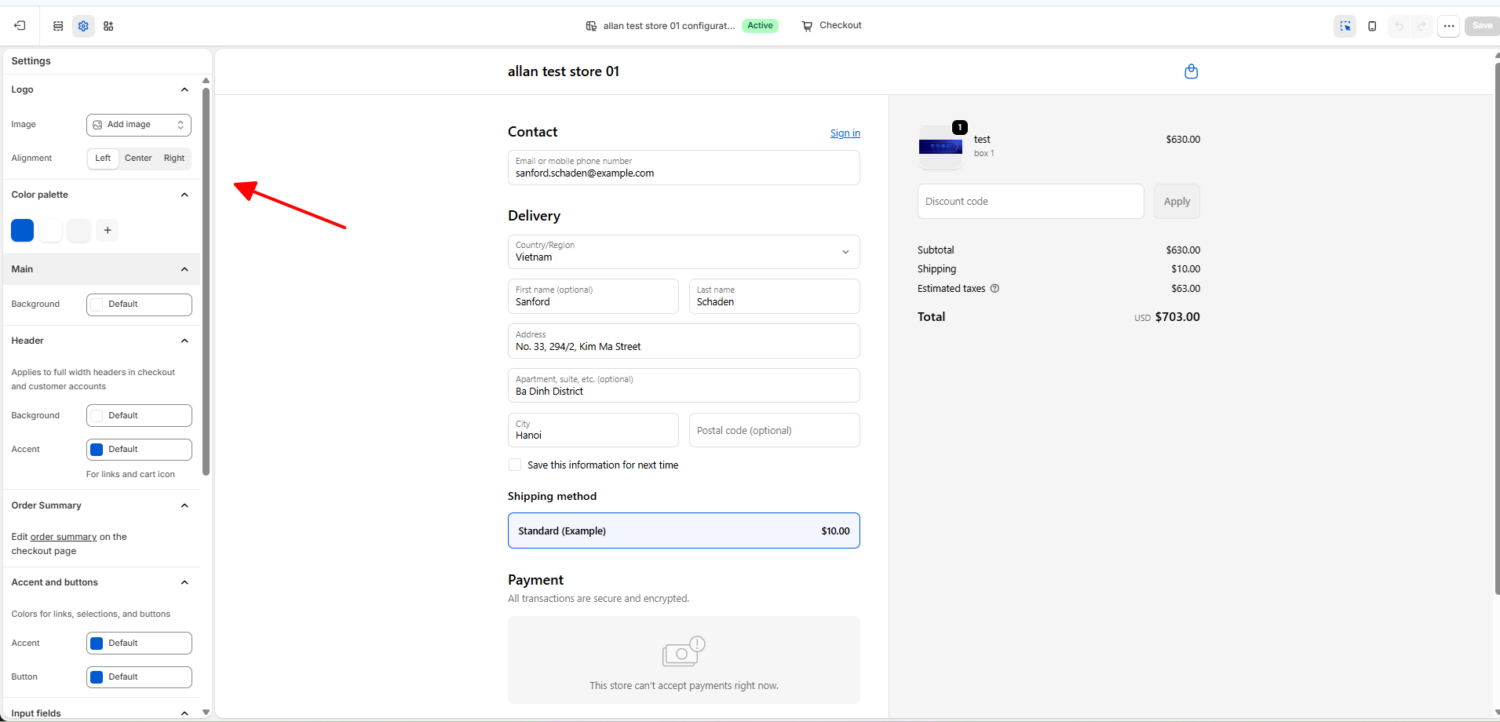
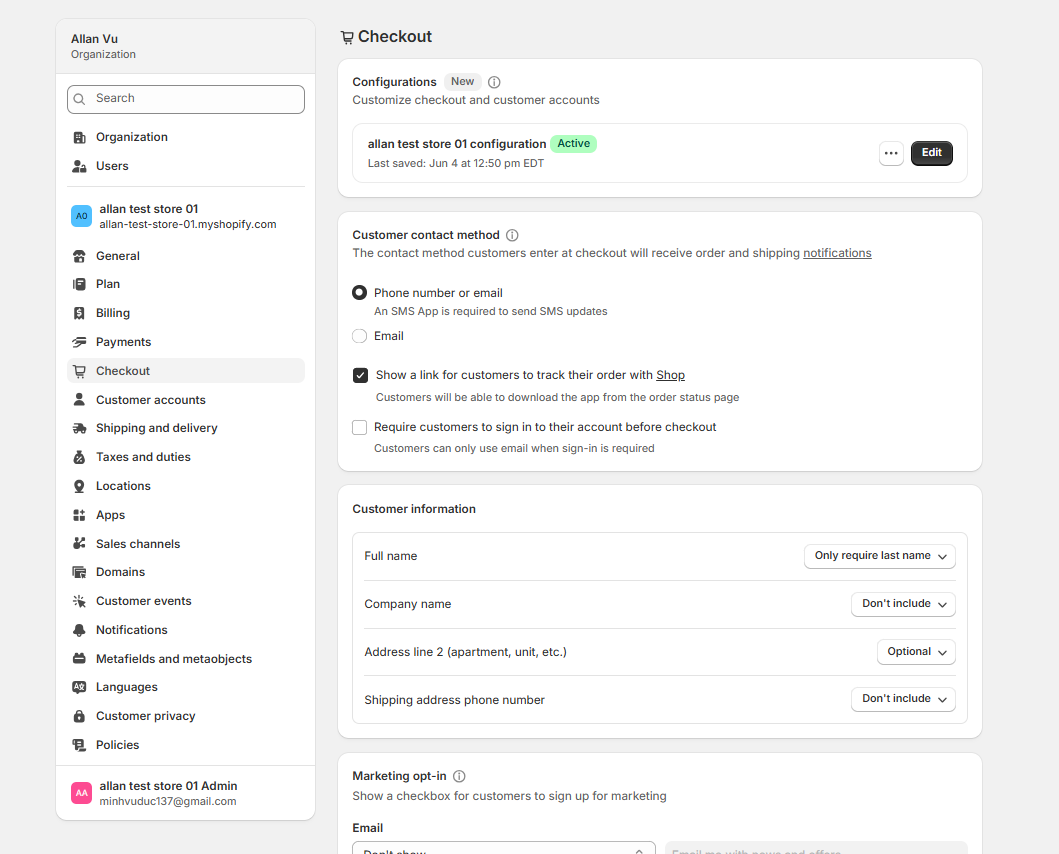
Your settings decide how smooth the checkout feels. In the same Checkout settings page, you control the rules that shape the buyer’s path.
You can let people buy without an account, which is a big one. Forced account creation is a top reason shoppers quit, so offering guest checkout keeps first-time buyers moving. You can also turn tipping on or off, allow order notes, and set how customer accounts work.
Express payment buttons are the easiest conversion win you have. They let returning shoppers pay in one tap, with no forms to fill.
Turn on Shop Pay, Apple Pay, and Google Pay in your payment settings. Shopify’s own data shows Shop Pay can lift conversion by up to 50% compared to guest checkout, and it checks out about 4 times faster. Pairing express payments with a one-page checkout cuts friction even further.
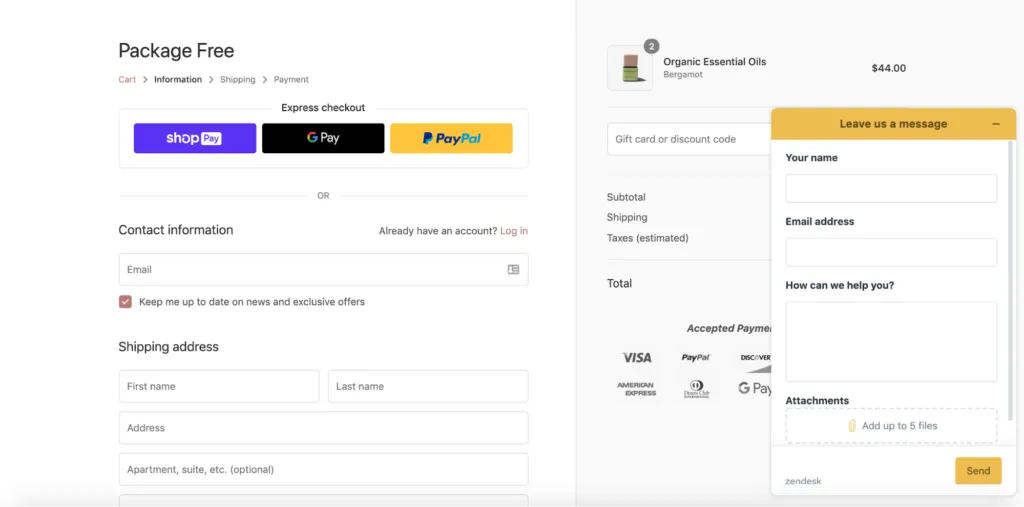
Apps extend your checkout without code. On a standard plan, most of your app power lives on the thank-you and order-status pages, which shoppers see right after they pay.
There you can add post-purchase upsells, review requests, and referral links. For example, a quick “15% off your next order” offer on the thank-you page brings buyers back with no ad spend. Our app, BOGOS, lets you run upsell offers that nudge shoppers toward a bigger order directly on the thank-you page.
A standard plan covers most stores, but some needs point straight to Plus. Consider upgrading when you need to:
Shopify Plus opens the full toolbox. You get everything standard plans have, plus deep control of the information, shipping, and payment steps. Plus removes the walls around the inner checkout, so you can add blocks, collect extra information, place offers, and change the logic behind discounts and shipping. The rest of this part walks through each option.
For brands planning these advanced checkout changes, Folio3 Ecommerce is often considered in the context of Shopify plus development services that align custom fields, checkout logic, and upsell experiences with Shopify Plus capabilities.
Plus gives you two levels of branding. The first is the visual Checkout Editor, where you drag and drop blocks and styles onto the checkout with no code.
The second is the Branding API, which gives pixel-level control. With it, you can set a favicon, control the exact corner radius on buttons, and fine-tune every color and font. This level needs a developer, but it lets your checkout match your design system exactly.
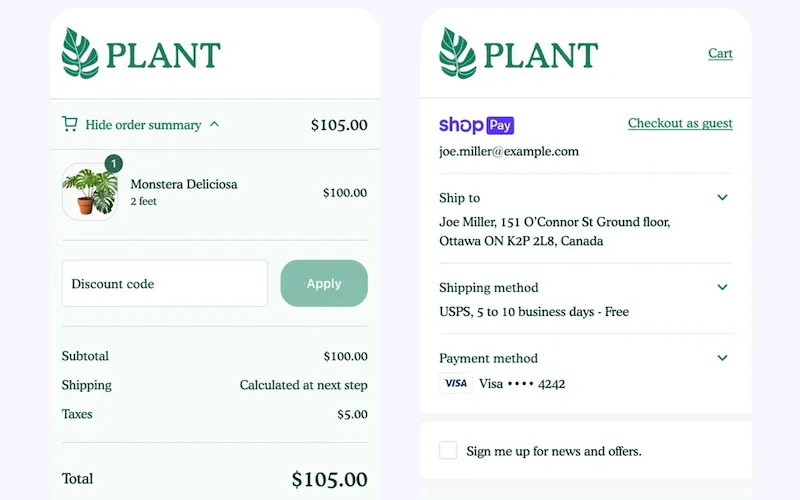
Sometimes you need more than a name and address. Shopify Plus lets you add custom fields and content blocks right on the checkout steps.
Think about a florist who needs a delivery-date picker, or a gift shop that wants a message box. A B2B store can add a purchase-order field. You can also drop in a banner, like a note that you don’t ship to PO boxes. These small touches make the checkout feel built for your buyer.
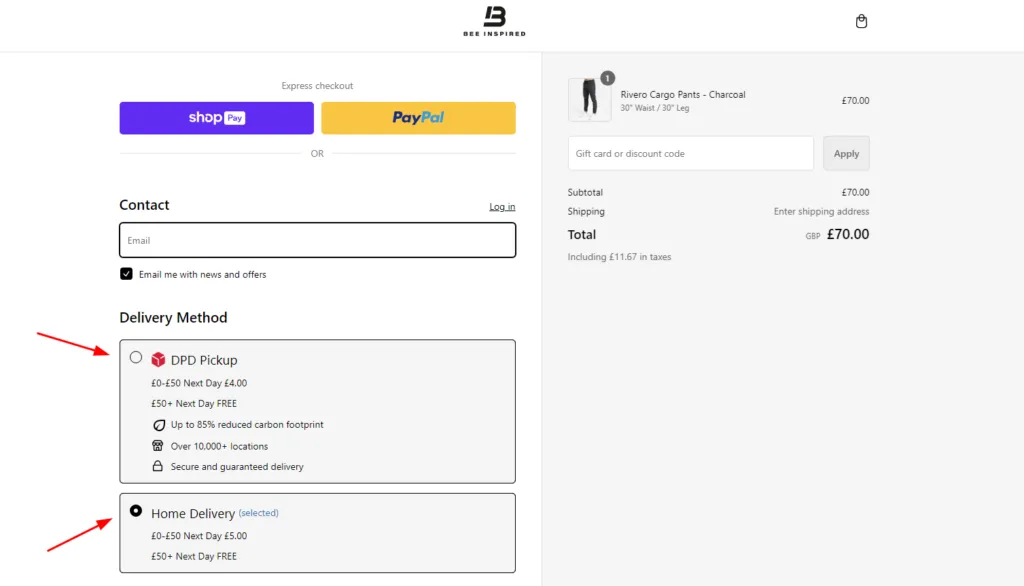
This is the highest-value part of a Plus checkout. You can show offers inside the checkout, at the exact moment a shopper is ready to pay.
The main moves here are a checkout upsell, a cross-sell, a free gift, and a progress bar toward a reward. A skincare brand can offer a travel-size as an upsell. A supplement store can suggest a matching product as a cross-sell. A free gift at a spend threshold pushes carts higher, and a progress bar shows shoppers how close they are to earning it. These offers are a direct lever on average order value.
This is also where our app earns its place. With BOGOS, you can add gifts, bundles, and upsells to the checkout, though the in-checkout upsell feature requires Shopify Plus.
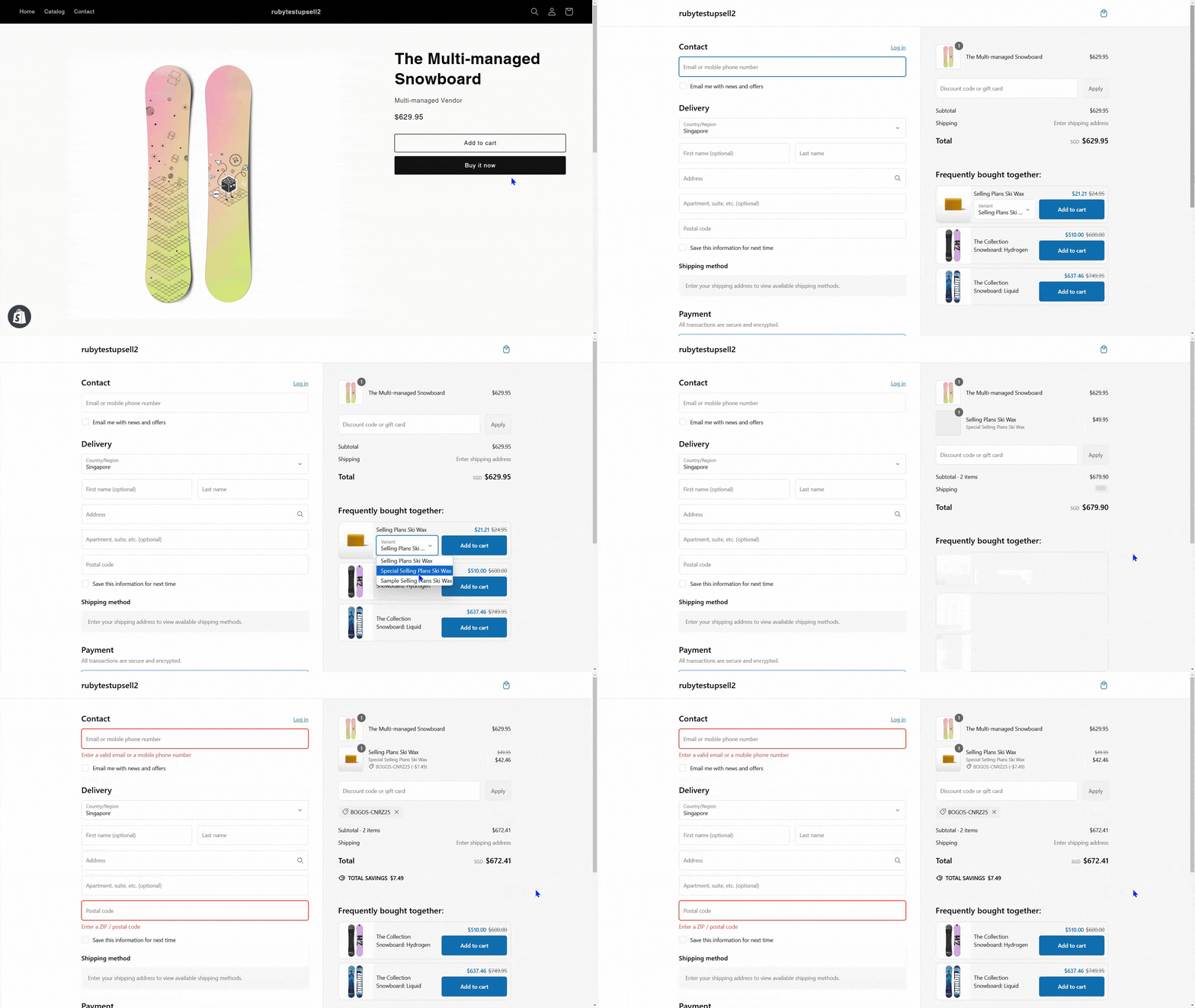
Functions let you change how checkout behaves, not just how it looks. They run server-side and replaced the old Shopify Scripts.
With Functions, you can build custom discount rules, hide or rename shipping options, and control payment methods. For example, you can hide cash on delivery for international orders, or apply a loyalty discount once a cart passes a set total. Apps built on Functions install on any plan, but building your own custom Functions is a Plus feature.
Plus lets you prove what works before you commit. You can create more than one checkout version and split your traffic between them.
This means you can test a new layout, a different upsell, or a fresh trust message against your current setup. Watch the checkout completion rate and average order value to pick the winner. Testing turns guesses into decisions.
Plus also serves business and global sellers. You can set rules that fit wholesale buyers and different markets.
For B2B, you can show company-specific pricing, manage tax fields, and offer payment terms. For global stores, you can adjust payment methods and shipping by location. This makes the checkout feel purpose-built instead of generic.
A custom checkout helps only when you keep it clean. I see the same mistakes hurt stores again and again. Avoid these:
Customization is only worth it if the numbers move. Don’t rely on a gut feeling.
Track two metrics above all: checkout completion rate and average order value. Completion rate tells you if friction went down, and order value tells you if your offers worked. On Plus, use built-in A/B testing to compare versions; on any plan, watch your conversion rate before and after each change. If a change doesn’t help your checkout numbers, roll it back.
A Shopify custom checkout is one of the highest-value projects you can take on, because it sits at the exact point where sales are won or lost. Start with what your plan allows. On a standard plan, brand the checkout, fix your settings, and turn on express payments. On Shopify Plus, go further with custom fields, in-checkout upsells, and custom logic.
Whatever your plan, focus on changes that cut friction and lift order value, and migrate off checkout.liquid before the deadline. Do that, and your checkout becomes a quiet engine for more Shopify sales. When you’re ready to add gifts, bundles, and upsells to that checkout, our app is built to help.
Yes, to a point. On any plan, you can add your logo, set brand colors and fonts, configure checkout settings, turn on express payments, and install approved apps. For custom fields on the checkout steps, in-checkout upsells, or custom logic, you need Shopify Plus.
No, checkout.liquid is being retired. Checkout Extensibility replaced it for everyone. Plus stores already migrated, and standard plans must move their thank-you and order-status pages by August 2026. All new customization should use the checkout editor, apps, and Shopify Functions.
No, when you use Checkout Extensibility. Customizations built on this framework run inside Shopify’s secure, PCI-compliant infrastructure. This is one reason Shopify moved away from open code editing: the new system keeps your checkout fast and safe.

Shoppers hesitate to buy a $1,200 sofa or a custom ring when they can’t see the exact version they’re...
Selling personalized products on Shopify gets hard the moment a shopper needs to type a name or choose a...

The UK is the largest eCommerce market in Europe and the third-largest in the world. For international Shopify stores,...
