


Charlie Ngo
•
Last updated: 9 October, 2026
Shopify Shipping To Australia: The Complete 2026 Guide
Australia is one of the first markets many Shopify stores expand into. It is large, English-speaking, and home to...
Shopify Guest Checkout: Setup, Fixes, and Best Practices

Marketing Manager
Summarize this post with AI
You paid to bring a shopper to your cart. Then a forced sign-up screen makes them leave. That is the exact problem Shopify guest checkout solves. This guide covers what guest checkout is, who it helps most, how to switch it on, how to fix it when the option goes missing, and how to keep customer data without adding friction. I’m Charlie Ngo – BOGOS’s Marketing Manager. I help Shopify merchants set up promotions and checkout flows every day, so these steps and fixes come from real stores.
Guest checkout is a way for customers to buy without creating an account. It is sometimes called anonymous checkout.
A guest enters only what the order needs: contact details, a shipping address, and payment. Your store keeps the order record and the email. It does not save a customer profile or a password.
Account checkout works the other way. The shopper signs in first, and the store saves their details for next time. That speeds up repeat orders and supports personalized marketing. The downside is a slower first purchase. This table shows the two side by side.
| Feature | Guest checkout | Customer account |
|---|---|---|
| Sign-in required | No | Yes |
| Saves order history and address | No | Yes |
| First-purchase speed | Faster | Slower |
| Repeat purchase | Re-enter details | One-click reorder |
| Data for marketing | Email only | Full profile |
Guest checkout helps shoppers but costs you some data. It helps three groups most: first-time buyers who don’t trust you yet, one-time and gift buyers who won’t return soon, and mobile shoppers who don’t want to type a password on a phone. Two-thirds of shoppers expect to check out in four minutes or less (Shopify), and guest checkout helps you hit that bar. Here is the honest split so you can decide.
The biggest benefit is fewer abandoned checkout. 19% of shoppers leave because a store wants them to create an account, according to Baymard Institute’s latest data. Guest checkout removes that barrier outright.
The problem is large. The average cart abandonment rate is 70.22% across 50 studies tracked by Baymard. When you remove friction, you keep more of the sales you already paid to get, which is why a smooth checkout is a key part of improving your conversion rate.
Shoppers want it, too. Nearly half of online shoppers say they prefer to check out as a guest, mainly because it feels faster (Capterra).
The benefits in short:
The drawbacks affect you, not the shopper. Each one is fixable.
I’ll show how to recover almost all of this data further down, without slowing the sale.
Guest checkout is built in. You switch it on with a setting, not an app.
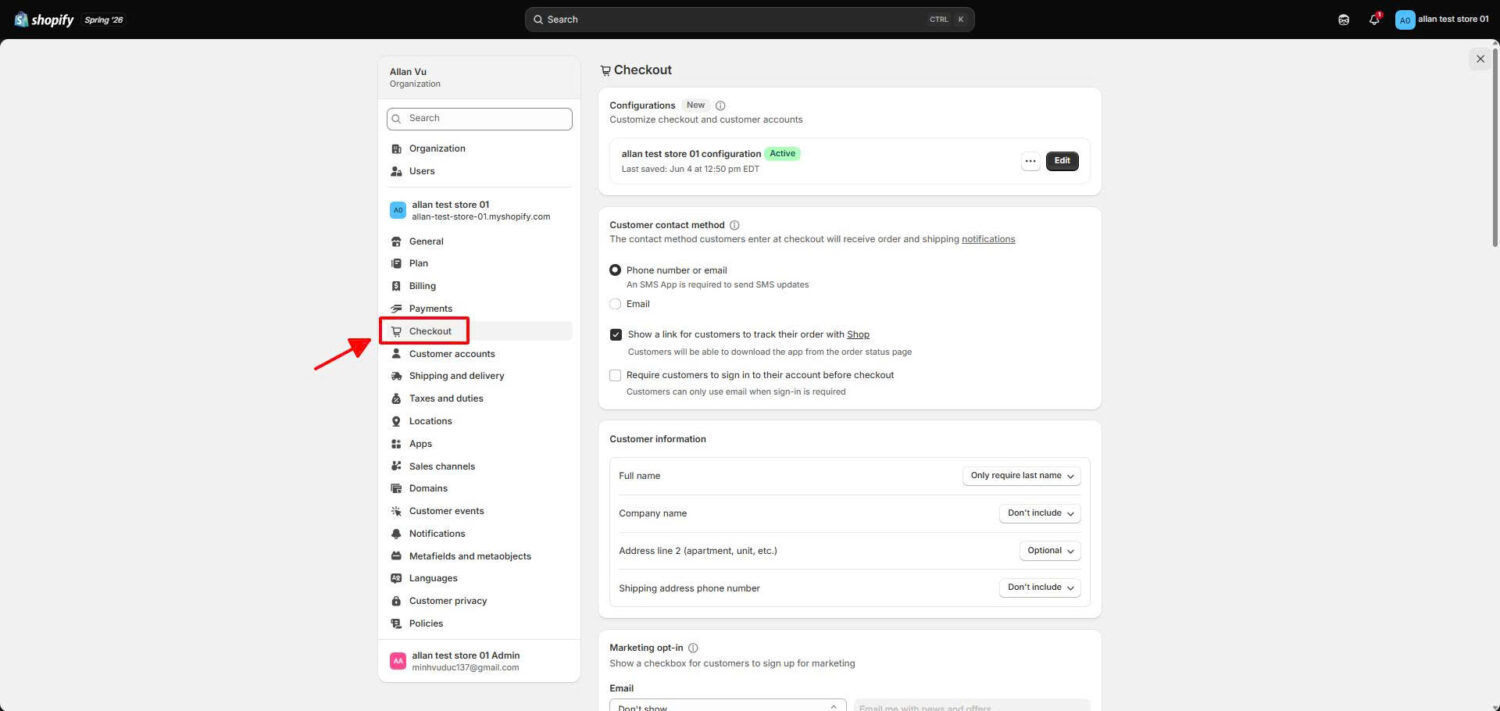
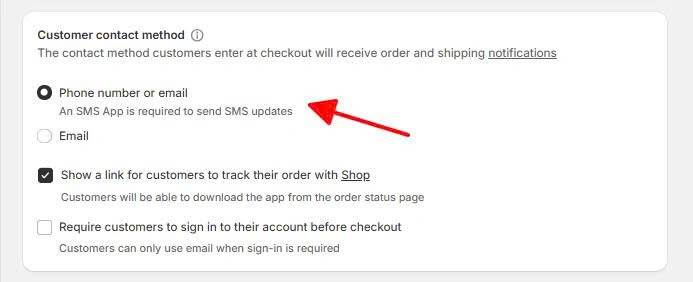
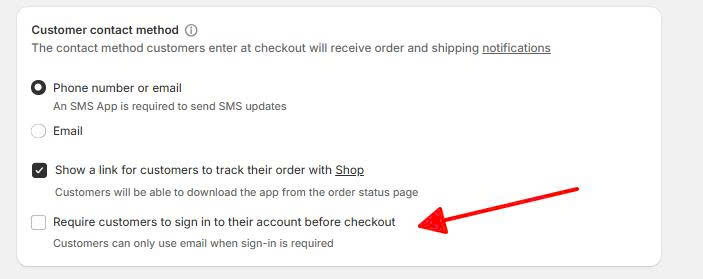
Shoppers can now buy without an account.
Guest checkout and customer accounts can work together, so you don’t have to pick one. A second setting, Customer accounts, controls this. Go to Settings → Customer accounts, where you’ll find three options (Shopify Help Center).
If you do choose Required, Shopify’s newer sign-in method reduces the friction. These accounts are passwordless. Instead of creating a password, a shopper signs in with their email and a 6-digit code that Shopify emails them. This helps most when a customer forgets a password, which used to cost you the sale. With a code, there is no password to forget, so even a required account stays fast.
Sometimes the guest option vanishes, and the cause is almost always a setting. Run this quick checklist.
One note worth knowing: when you require sign-in, Shopify hides accelerated buttons like Apple Pay in the cart, so shoppers can’t skip the login (Shopify Help Center). If your express buttons disappeared, this setting is the likely reason.
Guest checkout removes the account requirement, but you can make checkout even faster with accelerated checkout buttons.
Accelerated checkouts are one-tap payment buttons like Shop Pay, Apple Pay, and Google Pay. A returning shopper taps one, and their saved shipping and payment details fill in on their own. There are no forms to type.
The data shows a clear benefit. Shop Pay lifts conversion by up to 50% over guest checkout and is 4x faster (Shopify). Even when a shopper doesn’t tap it, the button’s presence alone adds about 5%.
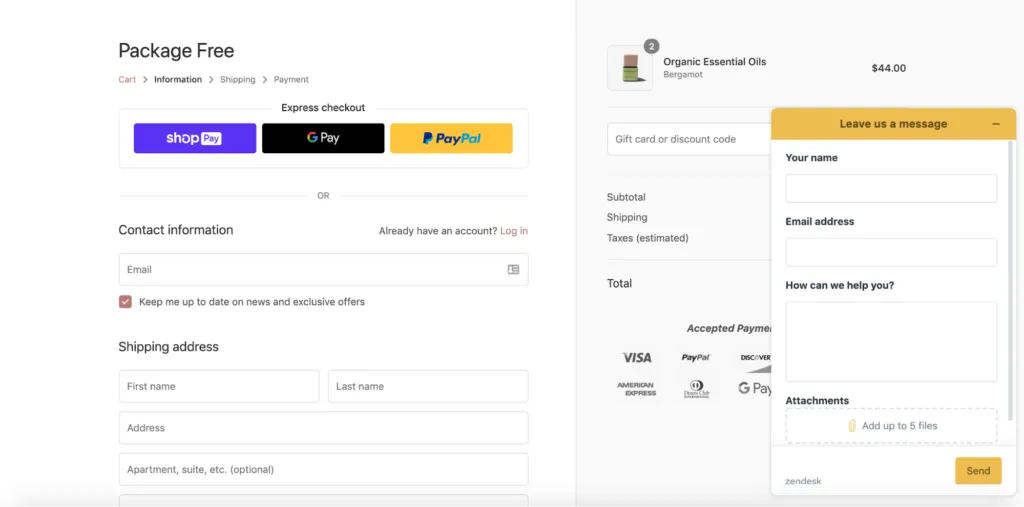
So offer both. Show the guest option and the accelerated buttons side by side. The one mistake to avoid is forcing sign-in, which hides these buttons in the cart, as explained above. When you keep them visible, you serve both returning shoppers who want speed and first-time shoppers who want a guest checkout.
You don’t have to choose between conversions and data. You can have both.
The method is simple. Keep guest checkout as the default, then invite the shopper to create an account after they pay. You already have their name, email, and address, so it takes one tap, and with no password to set, the sign-up is quick.
You also keep one thing from every guest order: the email. You can use it for order updates first, then for promotions once the buyer opts in.
Our app helps here. With BOGOS, you can create a magic link – a unique URL that gives a discount only to the shoppers who open it. Put that link in a follow-up email, and the deal reaches the exact guests you want to bring back. This strategy works especially well on seasonal sales like Christmas or BFCM.
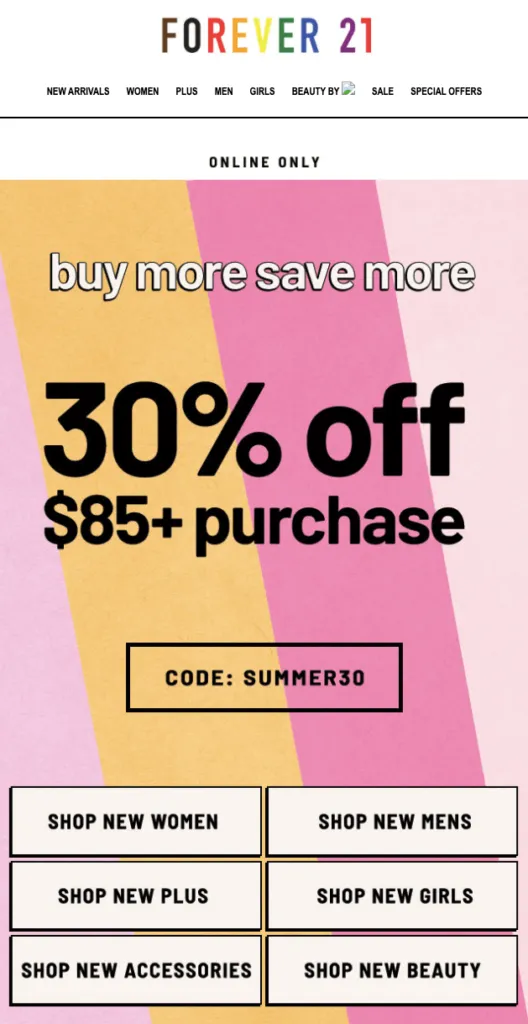
When a guest does create an account, you can reward them by name: tag those customers, and BOGOS can run incentives like free gifts, discounts that only the tagged group receives. A one-time guest becomes a repeat buyer, which raises both loyalty and your average order value.
One edge case: if you sell subscriptions, a guest must create an account later to manage their plan. Tell them how in the order confirmation email, and you avoid support tickets.
Turning guest checkout on is step one. These habits make it convert.
For more details on the full flow, our guide to checkout optimization covers each step from cart to confirmation.
Shopify guest checkout removes one of the biggest reasons shoppers quit, since 19% leave when a store forces an account. You can turn it on in four clicks, and you can fix a missing option by checking two settings.
The best stores do more than that. They keep guest checkout on, pair it with accelerated checkout, and invite an account after the sale. This keeps both the sale and the customer, and it is one of the most reliable ways to make more Shopify sales.
Yes. Guest checkout works on every Shopify plan, from Basic to Plus. What changes by tier is how much you can customize the checkout. Higher plans add more control, and Shopify Plus unlocks the advanced Checkout Extensibility layer for deeper changes, which you can read about in our custom checkout guide.
Go to Settings → Checkout. In the Customer contact method section, turn on “Require customers to log in to their account before checkout,” then click Save. An account is now required to buy.
You keep the order record and the email from every guest sale. You lose the stored profile and marketing permission unless the shopper opts in or makes an account. Post-purchase prompts and a newsletter sign-up popup win most of that data back.

Australia is one of the first markets many Shopify stores expand into. It is large, English-speaking, and home to...
Canada is a promising international market for Shopify merchants, especially those shipping from the US. But reaching Canadian shoppers...
![[2026] Shopify Testimonials: 3 Ways To Add Them + Best Apps](https://bogos.io/wp-content/uploads/2026/10/Shopify-Testimonials-400x225.jpg)
Shopify testimonials help new visitors trust a store they have never bought from. Most guides stop at “install an...
