



Charlie Ngo
•
Last updated: 23 October, 2026
Shopify Smart Collections: Setup, Conditions & 8 Examples (2026 Updated)
Shopify smart collections add and remove products for you based on rules, such as a tag, a price, or...
Shopify A/B Testing: The Complete 2026 Guide

Marketing Manager
Summarize this post with AI
A/B testing is the most reliable way to grow a Shopify store without buying more traffic, yet most merchants still change their store based on a guess. This guide explains what Shopify A/B testing is, what you can test, how to run a test correctly, how long to run it, and which tools fit your store in 2026. I am Charlie Ngo, Marketing Manager at BOGOS, and I have spent years running promotion and conversion tests for Shopify merchants, so everything below comes from real testing work rather than theory.
Shopify A/B testing is a method for comparing two versions of the same store element to see which one produces more conversions. You show version A (the control, your current version) to one half of visitors and version B (the variant, your new idea) to the other half. Software splits your traffic randomly and measures how each version performs.
The goal is to make decisions with data instead of opinion. If version B earns more revenue per visitor and the result is statistically valid, you keep version B. If it does not, you keep your control and learn something for the next test.
A/B testing is also called split testing. Both terms describe the same process of splitting live traffic between two versions and measuring the difference.
A/B testing compares two full versions that differ by one change. Multivariate testing compares many combinations of several changes at once, for example three headlines paired with two images and two buttons, which creates 12 combinations.
Choose A/B testing for almost every Shopify store. Multivariate testing needs a very high volume of traffic to reach a valid result, because it splits your visitors across many combinations. Most stores do not have enough traffic to finish a multivariate test in a reasonable time, so a single-variable A/B test is the practical choice.
A/B testing matters because Shopify conversion rates are low, so every visitor is expensive to earn and easy to lose. The average Shopify store converts 1.4% of its visitors into buyers, according to Littledata’s benchmark of 2,800 stores. The top 10% of stores convert more than 4.7%, which shows how much room most stores have to improve.
The problem continues at checkout. The average Shopify checkout completion rate is 45%, per the same Littledata benchmark, and the documented average cart abandonment rate across ecommerce is 70.22%, based on Baymard Institute’s review of 50 studies. More than two-thirds of shoppers who add an item leave before paying.
Small tested improvements compound into real money. If your store converts 1.4% and a tested change lifts it to 1.6%, that is a 14% increase in sales from the same traffic. This is why A/B testing sits at the center of Shopify conversion rate optimization, and why it directly supports efforts to increase sales on Shopify without spending more on ads.
Shopify added native A/B testing in the Winter ’26 Edition, through a feature called Rollouts. The official Editions page confirms you can “A/B test with Rollouts, built directly into the admin,” and Convert’s analysis of the launch explains how it lets you schedule, test, and ship storefront changes without a third-party app.
Rollouts runs server-side, which means the traffic split happens before the page loads for your visitor. This design gives you zero page-speed impact and no flickering, where a visitor briefly sees the old version before the new one appears. Shopify expanded Rollouts in June 2026 to cover whole themes, checkout, and customer-account configurations.
Follow these five steps to set up a Rollouts experiment inside your Shopify admin.
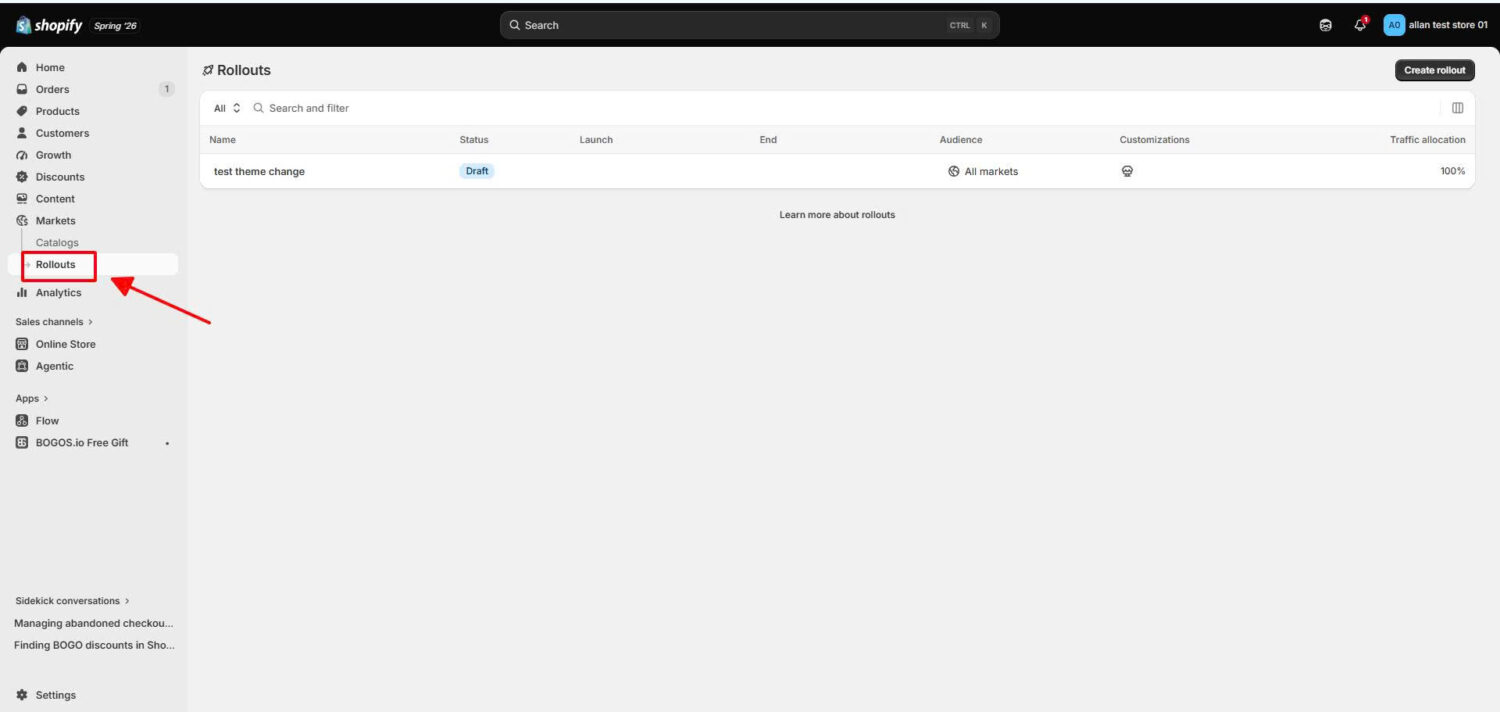
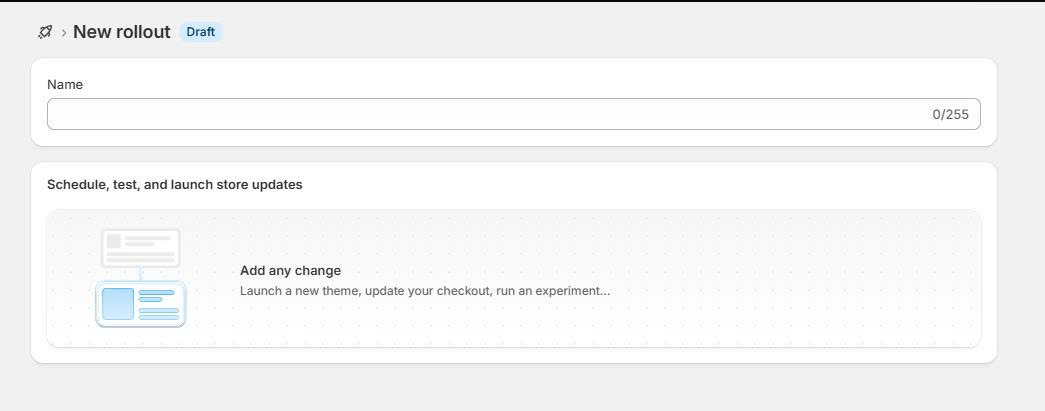
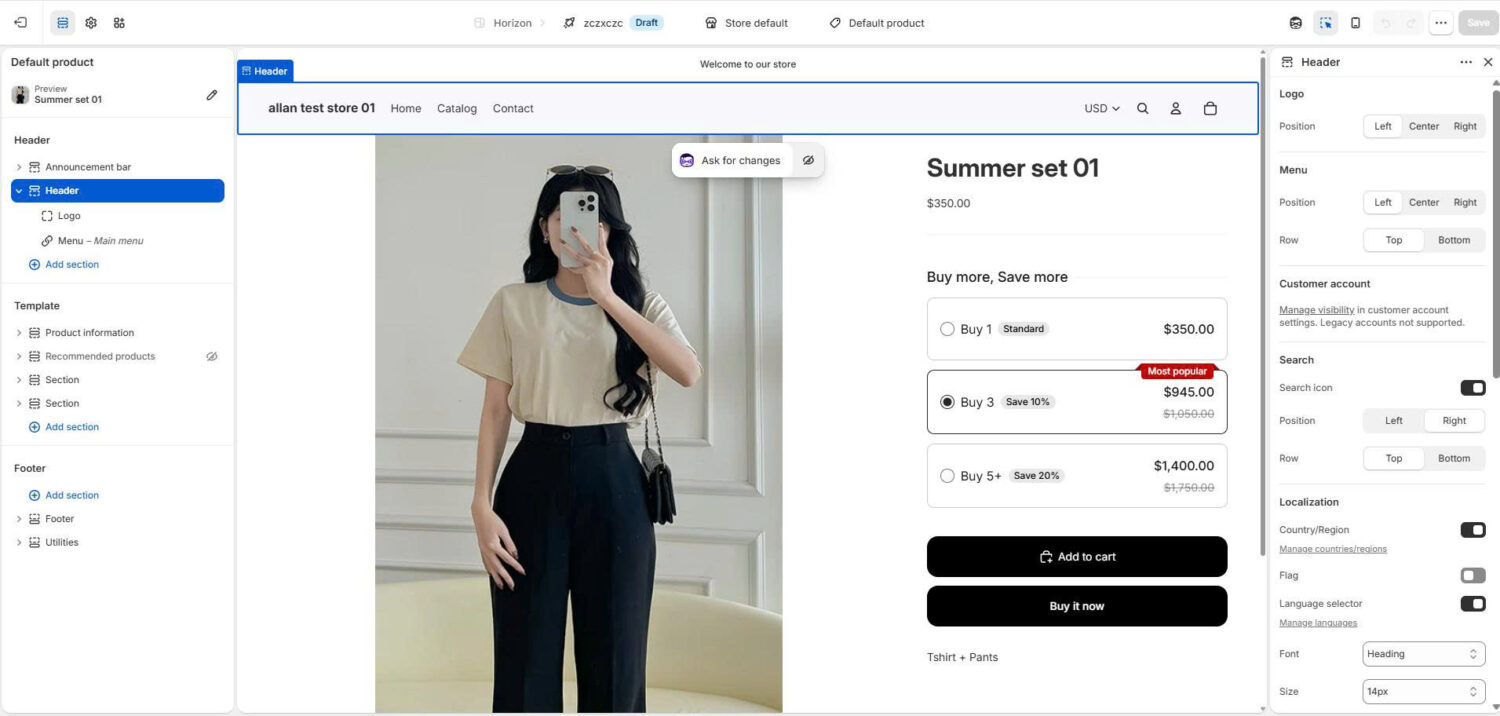
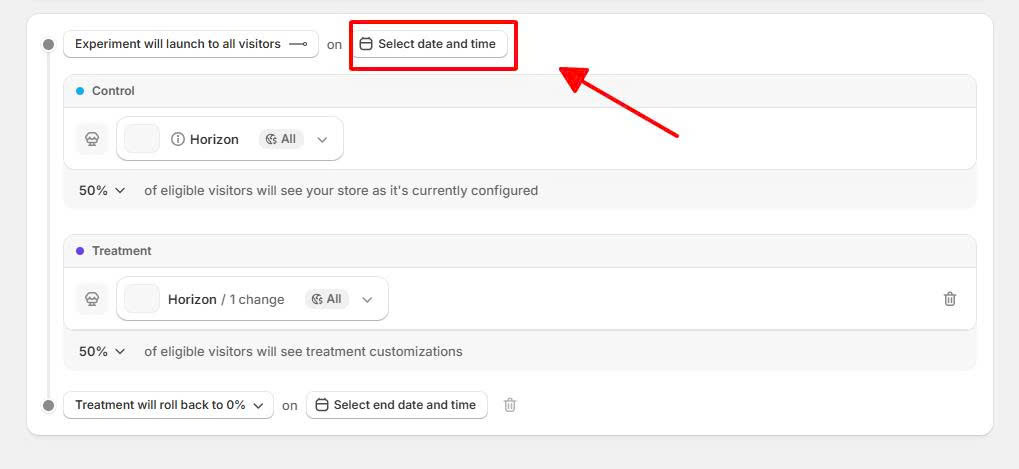
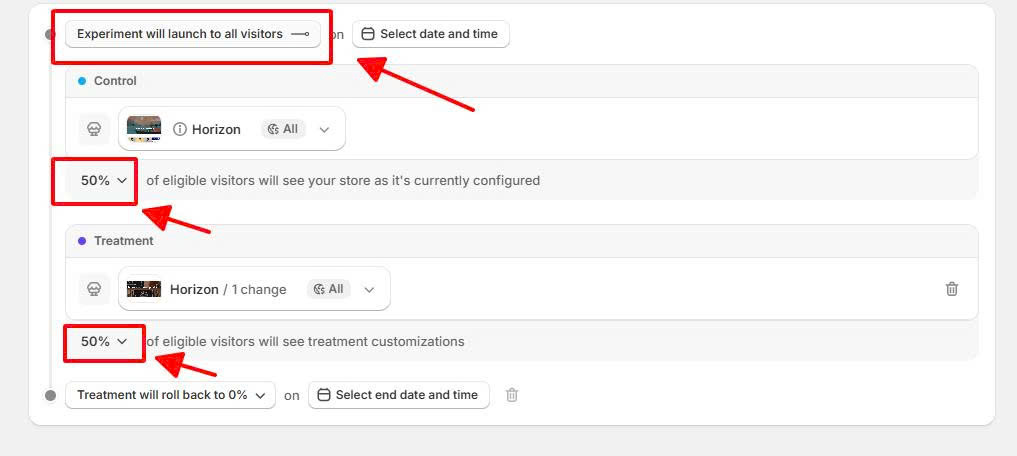
Rollouts has requirements. It needs the new version of Shopify Markets active on your store, and the traffic-split experiment, the actual A/B part, requires a higher-tier plan. Check Shopify’s official Rollouts help doc for the current plan requirements, because they have shifted as Shopify expanded the feature.
Rollouts is strongest for theme, template, and page tests. You will still want a specialized app when you need advanced price testing, offer testing, deep segmentation, or detailed profit reporting. Dedicated tools were built for those jobs and still go further than the native feature today.
You can A/B test any element that influences a purchase decision. The highest-impact tests for most Shopify stores fall into these areas:
Offer testing is often the fastest path to higher revenue per visitor. You can test whether a free gift with purchase beats a straight discount, whether a product bundle lifts average order value, or whether an upsell at the cart converts. Testing these offers is one of the clearest ways to grow Shopify average order value. An app such as BOGOS lets you run these gift, bundle, and upsell offers as variants so you can measure which promotion your customers respond to.
Follow these seven steps to run a valid A/B test.
Run each test for a minimum of 2 weeks, and ideally 2 to 4 weeks, so it covers full weekly cycles and catches weekday and weekend behavior. A shorter test measures noise instead of a real difference.
Statistical significance tells you the result is real and not luck. The standard settings are a 95% confidence level, which means only a 5% chance the difference happened by chance, and 80% statistical power. Most testing tools calculate this for you and tell you when the test is done.
Your traffic decides how long a test takes, because smaller true differences need far more visitors to prove. Detecting a small relative lift, such as +5%, can require hundreds of thousands of visitors per variant, while a large lift of +30% may need only tens of thousands. Before you launch, enter your current conversion rate and the lift you want to detect into a free sample-size calculator to get the exact number for your store.
The most common and most damaging mistake is peeking and stopping early. If you check a running test many times and stop the moment it looks significant, you will call false winners often. Decide your sample size and end date before you start, then wait for them.
Low-traffic stores still have options. Test bigger, bolder changes, because large differences need fewer visitors to prove. Test high-traffic pages like your homepage and best-selling product page first, and test elements close to the purchase, such as offers and the add-to-cart button, where effects are larger.
The right tool depends on your store size and what you want to test. The table below compares the main options in 2026.
| Tool | Best for | Notes |
|---|---|---|
| Shopify Rollouts (native) | Theme, template, and page tests | Built in, server-side, no speed or flicker impact. Needs Grow plan or higher for the A/B split. |
| Intelligems | Price, content, and offer testing | Strong for profit and revenue-per-visitor testing. |
| Shoplift | Theme and product-page tests | Launches tests inside the theme customizer. |
| ABConvert | Price, shipping, theme, and page tests | All-in-one testing app for Shopify. |
| Optimizely / VWO | Large and enterprise stores | Advanced statistics and segmentation, higher cost. |
Start with Shopify Rollouts if you are on the Grow plan or higher and mainly want to test pages and themes. Move to a specialized app when you need advanced price testing, offer testing, or detailed reporting; our roundup of the best Shopify A/B testing app options compares the top six by price and features. For testing promotions specifically, a promotion app like BOGOS lets you set up gift, bundle, and discount variants without custom code.
Avoid these mistakes, because each one turns a test into wasted time or a wrong decision.
Expect most of your tests to not win, because that is normal. At Microsoft, only about one-third of tested ideas improved the metric they targeted, while one-third were flat and one-third made things worse, according to a Harvard Business Review analysis of those experiments. A flat or losing test is not a failure. It is information.
Treat a losing test as a saved mistake. It stopped you from shipping a change that would have cost sales. Read why it lost, form a new hypothesis, and test again. The stores that win over time are the ones that keep testing and keep learning, not the ones that expect every idea to succeed.
Shopify A/B testing turns store changes from guesses into decisions backed by real data. Start with one clear hypothesis on a high-traffic page, change a single variable, run the test for 2 to 4 weeks until it reaches statistical significance, and keep the version that earns more revenue per visitor. Use Shopify Rollouts if you are on the Grow plan or higher, or a specialized app when you need advanced price or offer testing.
Expect most tests to not win, and keep testing anyway, because a steady program of small proven gains is how stores grow their conversion rate over time. If you want to test offers such as free gifts, bundles, and upsells, an app like BOGOS is one option that lets you run those promotions as variants and measure which one your customers prefer.
A/B testing does not hurt SEO or site speed when you use a proper tool. Shopify Rollouts runs server-side, so it adds no page-speed cost and shows no flicker. Google supports A/B testing and asks only that you avoid cloaking, which means do not show search engines a different version than the one you show visitors.
You do not need a lot of traffic to start, but low traffic means tests take longer and you should test bigger changes. Focus on your highest-traffic pages and on changes close to the purchase, such as offers and the add-to-cart button, where effects are large enough to prove faster.
Shopify’s native A/B testing through Rollouts is part of your Shopify plan, so there is no extra app cost. The traffic-split experiment does require a higher-tier plan and the new version of Shopify Markets, so check Shopify’s official Rollouts help doc for the current plan requirements.

Shopify smart collections add and remove products for you based on rules, such as a tag, a price, or...

Shopify collections decide how shoppers find your products, yet many guides still describe a setup Shopify is now replacing....

A Shopify announcement bar is the thin strip at the top of your store that tells shoppers about shipping,...
