


Charlie Ngo
•
Last updated: 7 October, 2026
Shopify Product Configurator: 2D vs 3D, Best Apps & Costs (2026)
Shoppers hesitate to buy a $1,200 sofa or a custom ring when they can’t see the exact version they’re...
![[2026] How to Recover Shopify Abandoned Checkouts?](https://bogos.io/wp-content/uploads/2026/06/shopify-abandoned-checkout.jpg)
[2026] How to Recover Shopify Abandoned Checkouts?

Marketing Manager
Summarize this post with AI
An abandoned checkout is a sale that almost happened. The shopper chose your products, started checkout, typed their email, and then left without paying. On Shopify, you can recover many of these shoppers. This guide covers two things in plain steps: how to recover an abandoned checkout after it happens, and how to reduce your checkout abandonment rate before it happens. I’m Charlie from the BOGOS team. I work with Shopify merchants on promotions and conversion, and abandoned checkouts come up in almost every store I look at.
An abandoned checkout is a checkout that a shopper started but did not finish. Shopify records it only after the shopper has entered their email or contact details. Shopify marks a checkout as abandoned when it stays incomplete for about 10 minutes after the email is provided.
Shopify keeps these in your admin under “Orders”, then “Abandoned checkouts“, and stores them for the last 30 days.
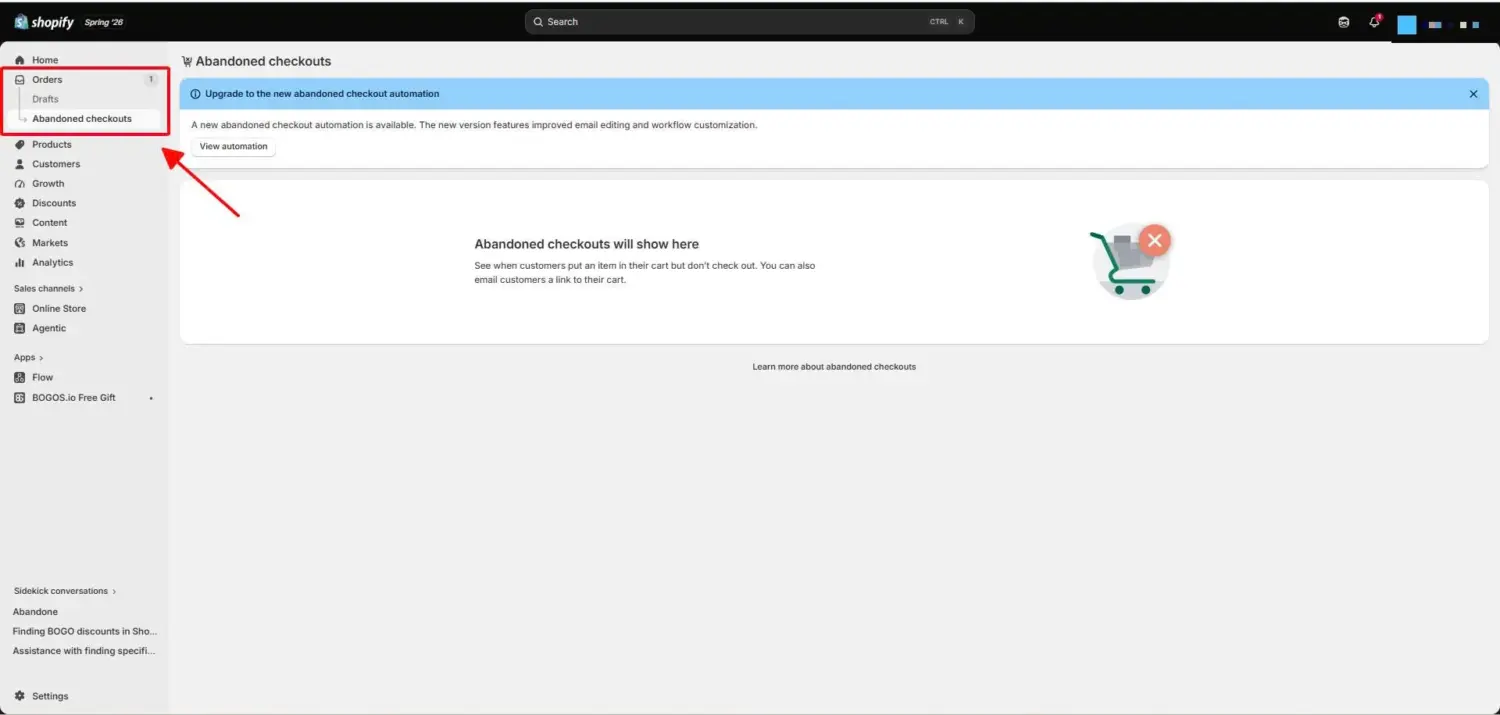
This matters because the shopper left you their email. That single detail is what makes recovery possible. You cannot email an anonymous browser. You can email someone who started checkout.
An abandoned cart and an abandoned checkout are not the same thing, and the difference changes what you can do.
An abandoned cart is when a shopper adds a product to their cart and never starts checkout. You usually have no contact details, so you cannot send a direct reminder. An abandoned checkout is when a shopper starts checkout, enters their email, and does not pay. You have their email, so you can reach them.
On Shopify, the term in your admin is “abandoned checkout,” and it is the one tied to a recoverable email. The rest of this guide builds on that difference. Here is a side-by-side view:
| Abandoned cart | Abandoned checkout | |
|---|---|---|
| What happened | Shopper added an item but never started checkout | Shopper started checkout and entered an email, then left without paying |
| Do you have contact details? | Usually no | Yes, at least an email |
| Can you send a direct reminder? | No | Yes |
| Where Shopify shows it | Not stored as a separate record | Orders > Abandoned checkouts |
| Main way to act | Fix the product page and store experience | Send a recovery email, and fix checkout friction |
Before you fix abandonment, you need to know why it happens. Most abandonment is friction you can remove, not lost interest.
Baymard Institute asked shoppers why they abandon. Setting aside people who were only browsing and never meant to buy, here are the reasons that point to a checkout problem:
Look at that list again. Almost every reason is a checkout problem you can fix with a change to your store. That is the key point of this whole guide. You can recover some lost checkouts, but you can prevent even more by removing these causes. If you want the full method behind diagnosing and fixing drop-off, see our pillar guide on Shopify conversion rate optimization.
You recover an abandoned checkout by bringing the shopper back to finish paying. These shoppers already showed strong intent. They picked products and started checkout. A good reminder often is enough.
Recovery emails are worth the setup. Klaviyo studied more than 143,000 abandoned cart flows and found they convert better than any other automated email, with a placed-order rate of 3.33% and the highest revenue per recipient of any flow type. So this is the one automation to get right first.
Speed is the most important part. Send your first reminder soon, while the product is still in the shopper’s mind. The widely used sequence is three emails sent within about 72 hours:
Recovery value sits in the first day or two and drops sharply after 48 to 72 hours. By then, the shopper has usually bought elsewhere or moved on. Shopify’s older default waited 10 hours before the first email. Sending the first reminder within the first hour or two, instead of waiting, captures more of that early intent.
Shopify includes a free recovery email, so you do not need an app to start. Shopify is moving this feature into its Messaging app. Here is how to turn it on:
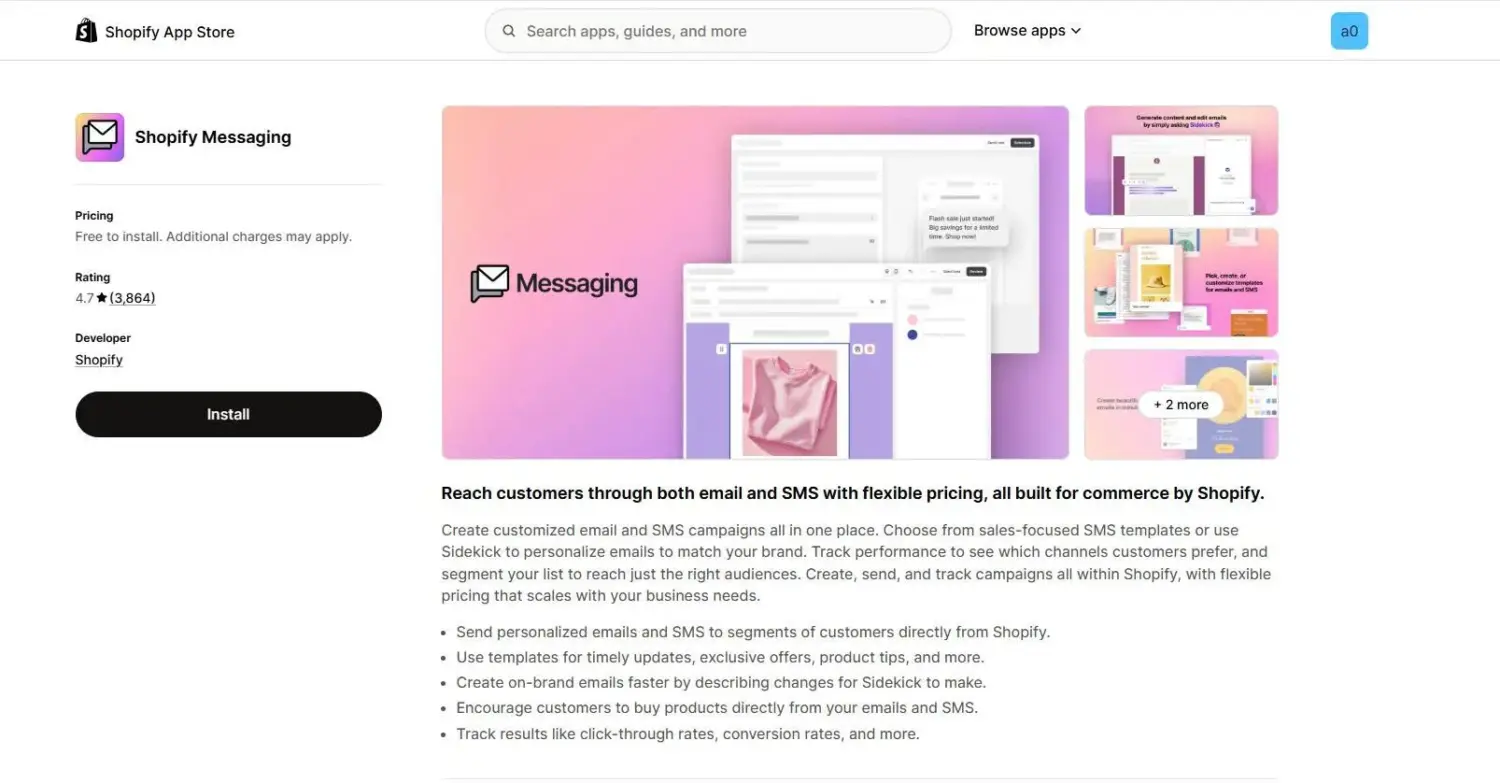
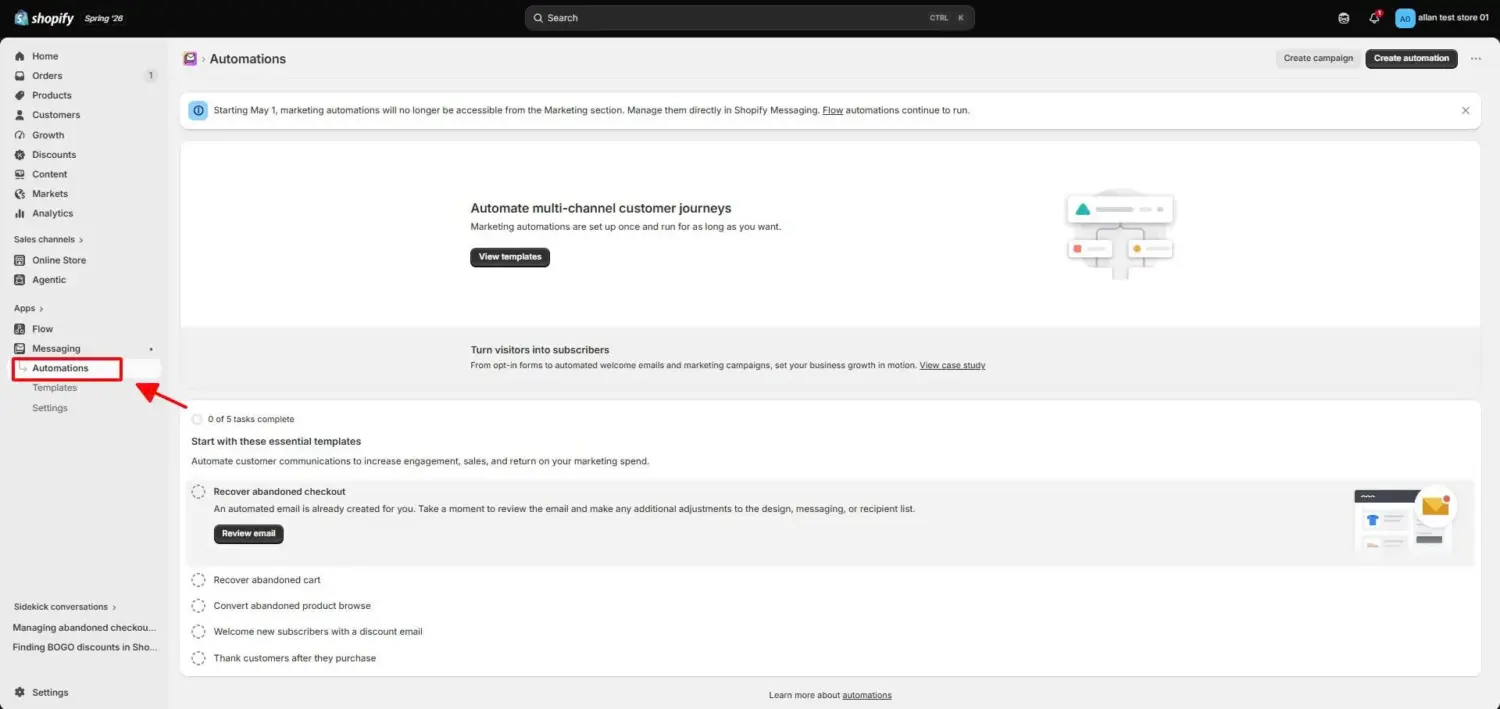
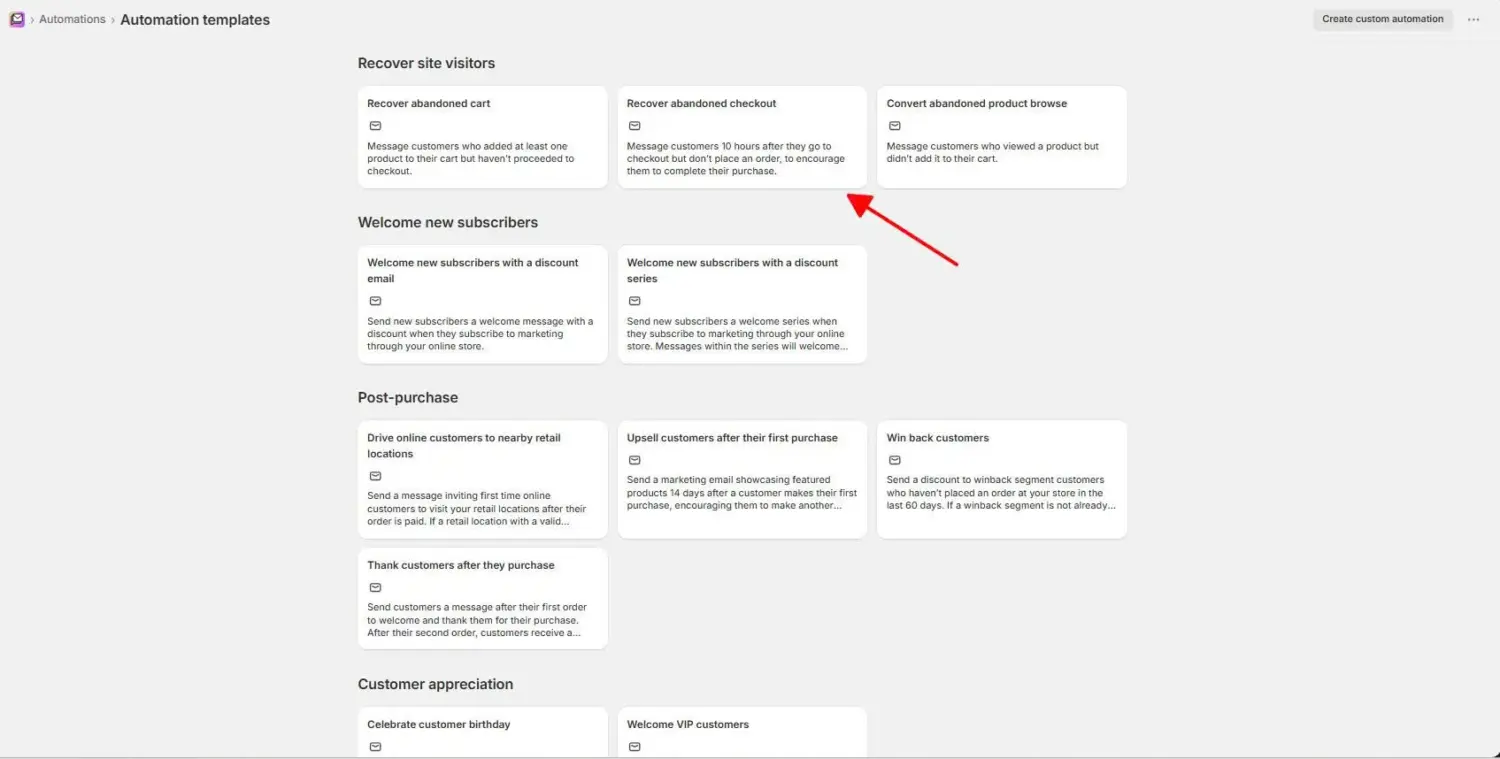
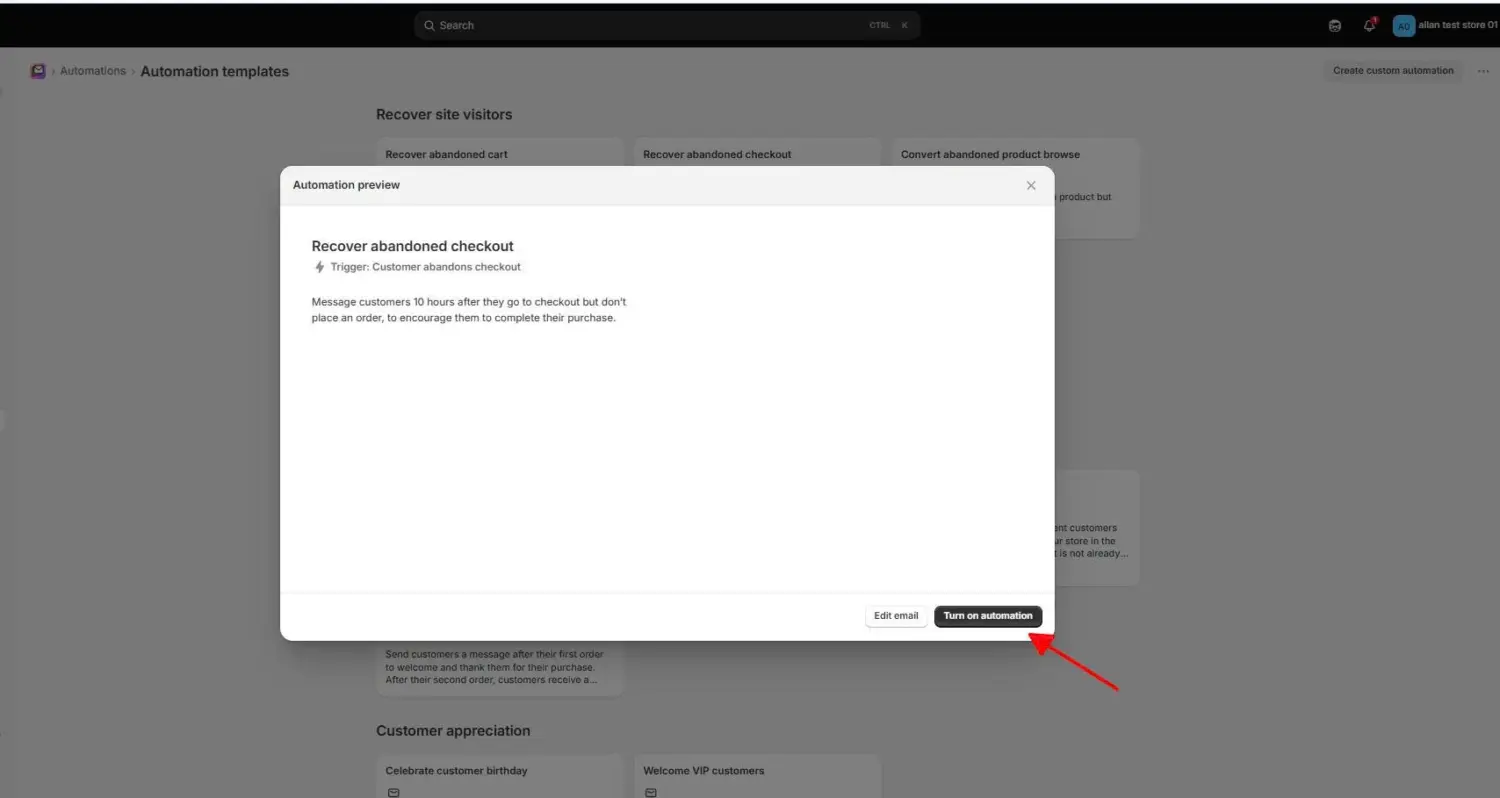
One detail catches many merchants out. Shopify’s automation does not send to every abandoner. It skips shoppers who have never bought from you before and are not subscribed to your marketing. If you think recovery emails are not working, this rule is often why.
Note one more limit. Recovery emails work only for the Online Store and Buy Button sales channels. Checkouts on Shopify POS or other channels do not get these emails.
You can also send a recovery email by hand, and this is worth doing for large carts. A repeat customer who left a $400 order is worth 90 seconds of your time.
A manual email beats the automation in three cases:
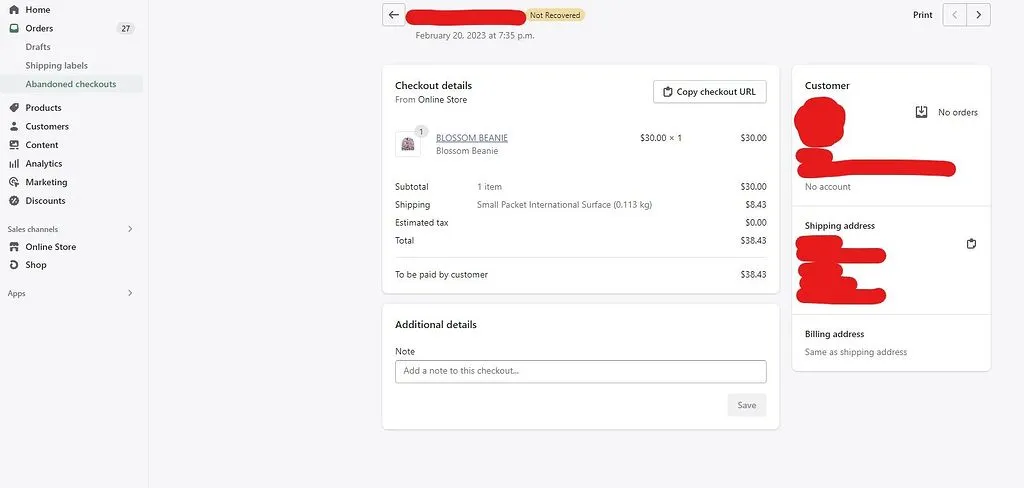
Here is how to send one. Go to Orders, then Abandoned checkouts. Click the checkout you want to recover. Click the shopper’s email address, and Shopify opens a message that already contains a link back to their checkout. Send it. If they finish their order through that link, the status on the page changes to “recovered.”
A recovery email works best when it removes doubt and makes finishing easy. Include these parts:
Shopify’s single email is a fine start, but it is limited. It sends one message, and it does not segment by cart value or build multi-step sequences.
You need more when your store grows or when you want higher recovery. Tools like Klaviyo and Omnisend add multi-step email sequences, SMS reminders, and segmentation. You can also run retargeting ads with the Meta Pixel and Google Ads to reach shoppers who left no email. Text messages are especially strong for recovery because they are read within minutes, so our guide to SMS marketing covers the consent rules and the reminder automations that win back the most checkouts.
Here is what recovery rates tend to look like. These are ranges reported by recovery-tool providers, and they vary by store, product, and traffic quality:
| Recovery setup | Typical recovery rate |
|---|---|
| Single basic email | about 3% to 8% |
| Optimized email sequence | about 10% to 15% |
| Advanced email plus SMS or segmentation | about 15% to 20% |
Recovery is real money, but notice the ceiling. Even an advanced setup brings back a minority of lost checkouts. That is why the next section matters more.
Prevention beats recovery, and the reason is simple. A recovery email cannot fix the problem that caused the shopper to leave. A $12 surprise shipping fee that made someone abandon is still $12 when the reminder email arrives. Fix the cause, and the shopper never leaves in the first place.
Here is how to remove the top causes from the Baymard list above.
Unexpected extra costs are the number one reason shoppers leave, at 39%. So show costs before the final step, not after.
Display your shipping cost and policy on the product page, not only at checkout. If a shopper sees the full price early, the total at checkout holds no surprise. This single change removes the most common cause of abandonment.
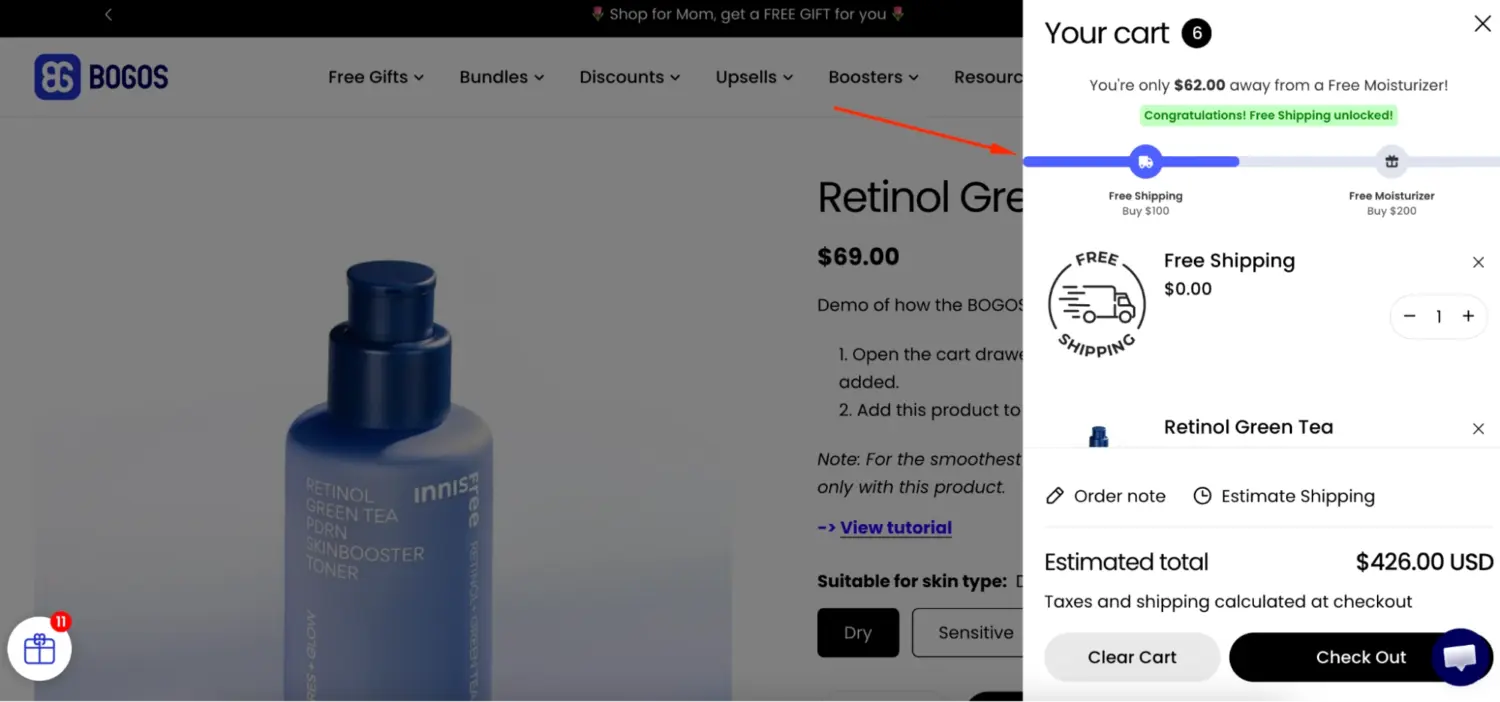
A free shipping threshold goes one step further. You set a cart total that unlocks free shipping, such as “Free shipping over $50.” This does two jobs at once. It removes the shipping fee that drives people away, and it gives shoppers a reason to add more to their cart. A cart progress bar showing “You are $8 away from free shipping” makes the goal clear and motivates the shopper to reach it.
This is where our app helps directly. The BOGOS Progress Bar shows shoppers how close they are to a free shipping reward and nudges them toward the threshold. We treat this as a conversion lever first, because removing the shipping surprise keeps shoppers in checkout, and a higher cart value is the bonus. You can read more about setting the number itself in our guide to the free shipping threshold.
Forcing shoppers to create an account makes 19% of them leave. So let them check out as guests.
Shopify allows guest checkout by default, but some stores turn it off by accident. Check your setting. Go to Settings, then Checkout, then Customer accounts. Set accounts to optional, not required. A shopper who wants to buy should never be forced to make an account first. Our guide to Shopify guest checkout walks through this setting in full.
A long or complicated checkout makes 18% of shoppers leave. So cut your checkout down to the fields you truly need.
Baymard found that the average checkout shows 23.48 form elements, while an ideal checkout needs only 12 to 14. Every extra field is a chance for the shopper to stop. Remove fields you do not need to fulfill the order. Use a single name field instead of separate first and last name fields where you can. A one-page checkout also helps, because the shopper sees the whole task at once instead of clicking through steps. For the wider set of fixes, our conversion rate optimization guide covers checkout length in more depth.
Doubt at the payment step drives shoppers away. 19% leave because they do not trust the site with their card, and 10% leave because their payment method is missing.
Add trust signals near the payment button. Show security badges so shoppers know the page is safe. Show a clear returns policy so the purchase feels low-risk. Offer enough payment options, including digital wallets and “buy now, pay later,” so shoppers can pay the way they prefer. Each of these removes one reason to stop. A live answer helps too, and our guide on how to add live chat shows how to let a hesitant shopper ask the one question holding them back.
Some shoppers stall because they are unsure, not because of a fault in your store. A small, well-timed offer can move them to finish.
A gift with purchase or a bundle deal gives an undecided shopper a clear reason to buy now instead of later. Picture a shopper with $45 of skincare in their cart who is not sure they need it today. A “spend $50, get a free travel-size cleanser” offer often tips that decision into a completed order.
BOGOS lets you set free gift and bundle offers that appear at the right moment in the buying flow. Used well, an offer like this lifts both completed checkouts and average order value, and you can pair it with product bundles for a similar push.
You cannot improve what you do not measure. So track two numbers: how many checkouts you lose, and how many you recover.
Calculate your checkout abandonment rate with this formula:
Abandonment rate = (started checkouts − completed checkouts) ÷ started checkouts × 100
For context, the documented average across e-commerce is 70.22%, based on Baymard’s review of 50 studies. So a rate near 70% is normal. Mobile shoppers abandon more often than desktop shoppers, so a mobile-heavy store often sits higher than average. If your rate is far above 70%, look for a specific problem in your checkout, such as a hidden fee or a broken step.
Then track your recovery rate, which is the share of abandoned checkouts that turn into orders after a reminder. Use Shopify’s abandoned checkouts report to see sends, recovered orders, and patterns over time. If your recovery rate sits under 5% with emails turned on, your setup likely needs work, such as faster timing or a better email. Better checkout design can lift conversion by as much as 35.26% according to Baymard, so the fixes in this guide pay back across your whole store, not only at recovery. For the broader picture of turning these fixes into revenue, see our guide on how to increase sales on Shopify.
An abandoned checkout is not a lost cause. It is a shopper who came close and needs a small push or a removed barrier. Recover the checkouts you can, mostly with fast, clear reminder emails. But put more effort into prevention, because that is where the bigger gain sits. Show your costs early, offer free shipping over a threshold, keep guest checkout on, shorten your forms, and build trust at payment. Do that, and fewer shoppers leave, more orders complete, and your recovery emails have less work to do. Start with the one cause that moves the most sales, which is unexpected costs, and build from there.
A rate near 70% is normal, because the documented ecommerce average is 70.22%. There is no single “good” number, since it varies by industry and device. Mobile-heavy stores run higher. Focus less on hitting a perfect rate and more on lowering your own rate over time by removing the causes in this guide.
Shopify can send one automatic recovery email once you turn the automation on. It does not send to shoppers who have never bought from you and are not subscribed to marketing. For multiple reminders, SMS, or segmentation, you need a tool like Klaviyo or Omnisend, or Shopify Flow.
Your Shopify admin shows abandoned checkouts from the last 30 days under Orders, then Abandoned checkouts. Because recovery value drops sharply after 48 to 72 hours, the most useful window for action is the first day or two, not the full 30.

Shoppers hesitate to buy a $1,200 sofa or a custom ring when they can’t see the exact version they’re...
Selling personalized products on Shopify gets hard the moment a shopper needs to type a name or choose a...
The UK is the largest eCommerce market in Europe and the third-largest in the world. For international Shopify stores,...
