

Charlie Ngo
•
Last updated: 14 October, 2026
How To Add a Shopify Announcement Bar (Free Themes & Apps)
A Shopify announcement bar is the thin strip at the top of your store that tells shoppers about shipping,...
![[2026] Shopify Minimum Order Value: 4 Ways to Set One & Grow Your AOV](https://bogos.io/wp-content/uploads/2026/06/Shopify-MINIMUM-ORDER-value.jpg)
[2026] Shopify Minimum Order Value: 4 Ways to Set One & Grow Your AOV

Digital Marketing Specialist
Summarize this post with AI
If you searched “Shopify minimum order value,” you want one of two things. Either you want to stop tiny orders that lose you money, or you want to nudge shoppers to spend a little more. This guide covers both paths, the exact setup steps, and how to pick your number. A minimum order value (MOV) is simply a dollar threshold a cart must reach. It is not the same as a minimum order quantity (MOQ), which counts units, not dollars. And it works in two ways: as a hard block at checkout, or as a reward that unlocks free shipping, a gift, or a discount. I’m Allan, part of the team at BOGOS, where we help Shopify merchants run gift, bundle, and discount promotions every day, so I’ll show you both sides and where each one fits.
A minimum order value is a dollar amount a cart must hit. You can use it two ways.
Shopify has no single native “minimum order value” button for every store. The right method depends on your goal:
Most stores should reward, not block. Blocking checkout adds friction, and friction costs sales. The rest of this guide shows you how to do each one, and how to set the number.
A minimum order value is a tool. Used well, it grows your sales. Used badly, it sends shoppers away. The first question is whether you should block orders or reward them.
Some stores lose money on small orders. Picking, packing, and shipping a $6 order can cost more than the order is worth.
A hard minimum fits these cases:
In these stores, a minimum protects your margin. It says, in effect, “we only fulfill orders that pay for themselves.”
Most retail and DTC stores should not block checkout. Blocking adds friction at the worst possible moment.
The data backs this up. The average Shopify cart abandonment rate sits near 70%, and about 48% of that abandonment comes from unexpected costs at checkout (Red Stag Fulfillment, 2025). A hard “you can’t check out yet” message is one more reason to leave.
An incentive flips the script. Instead of blocking a $40 cart, you offer free shipping at $50. The shopper adds one more item by choice. You get a bigger order, and they feel like they won.
This is the path that grows average order value without hurting your conversion rate. For most merchants, it is the better play.
There are four reliable methods. Two reward shoppers. Two block them. Here is each one, step by step.
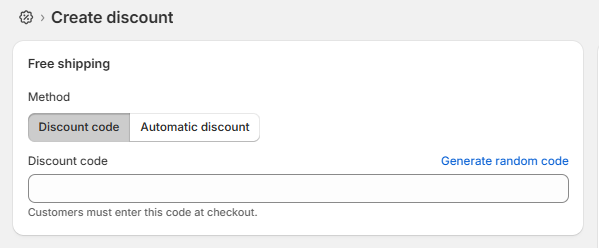
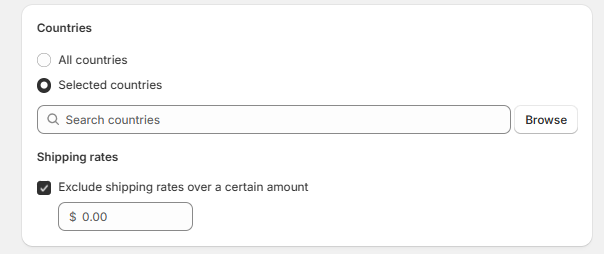
This is the most popular minimum, and it rewards rather than blocks. You set a cart value that unlocks free shipping.
It works because shoppers love free shipping. Free shipping can raise average order value by roughly 15–30%, and about 58% of shoppers add extra items just to reach the threshold (DontPayFull, 2026).
Here is how to set it up:
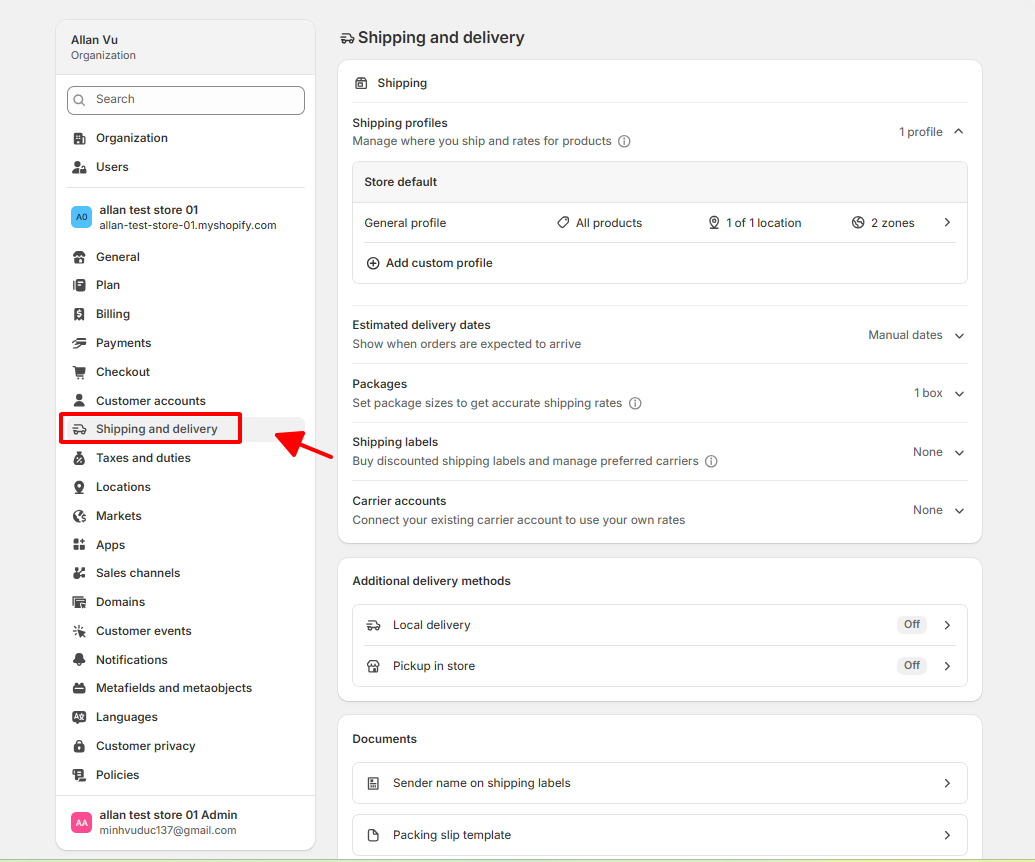
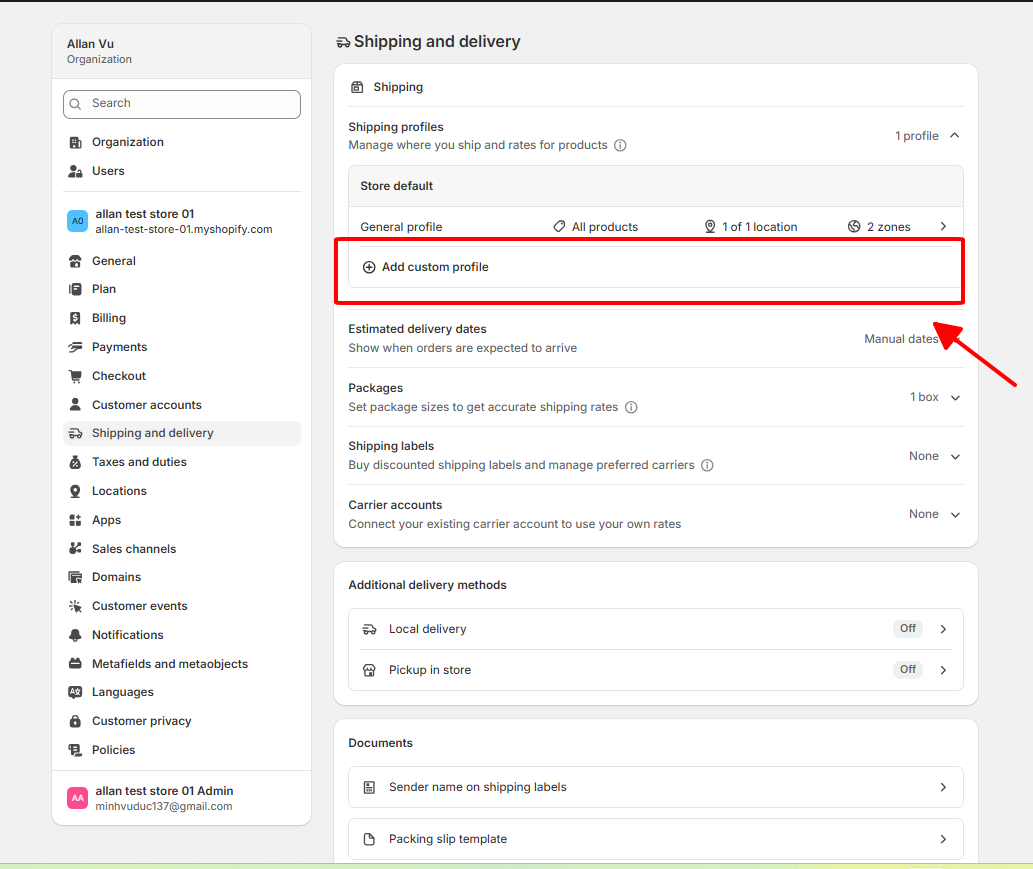
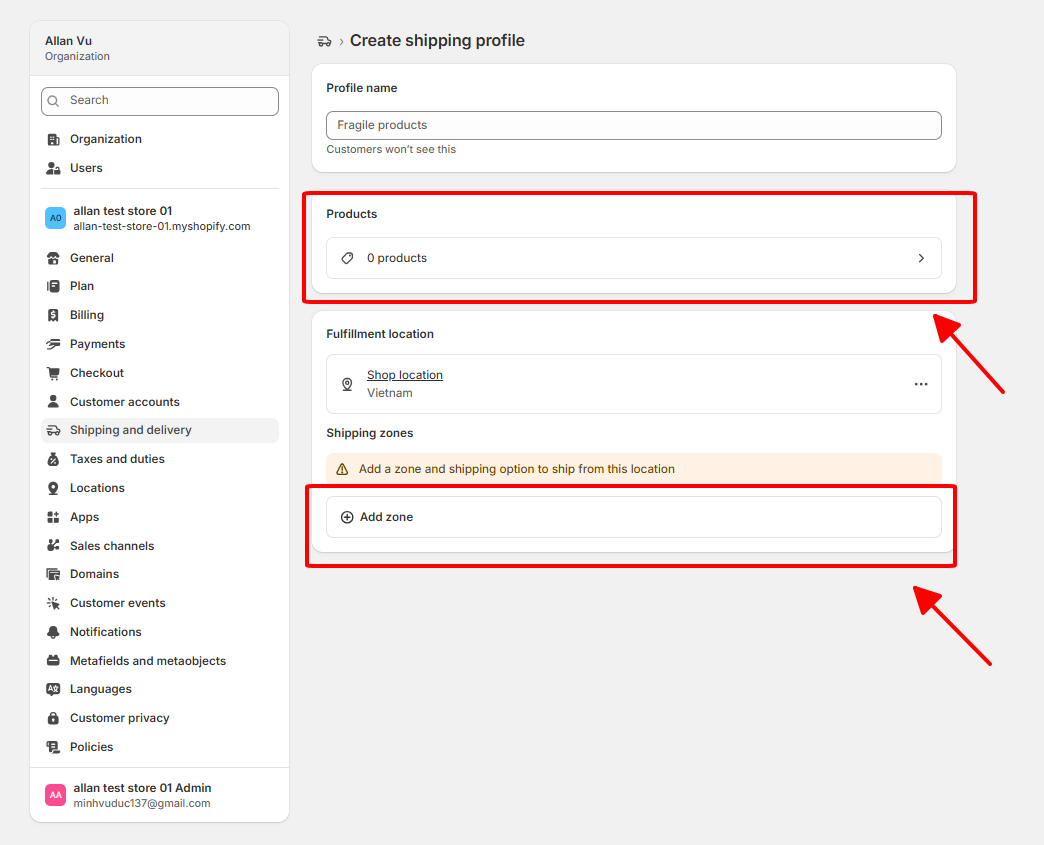
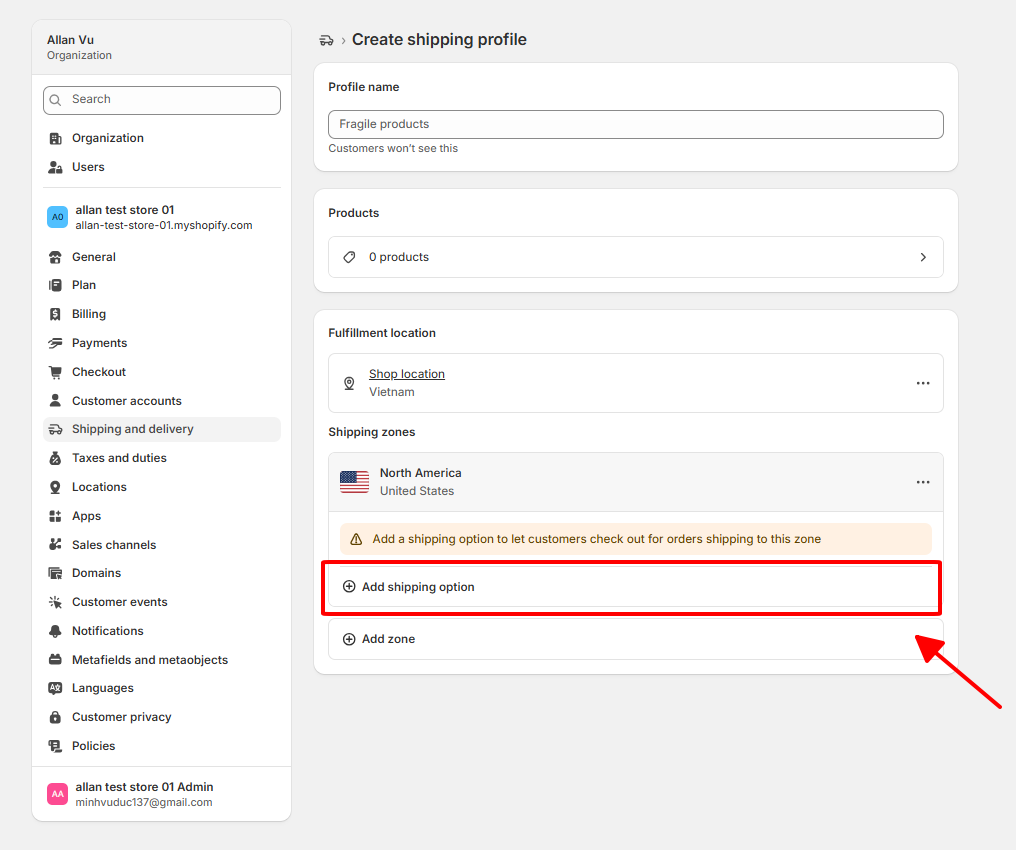
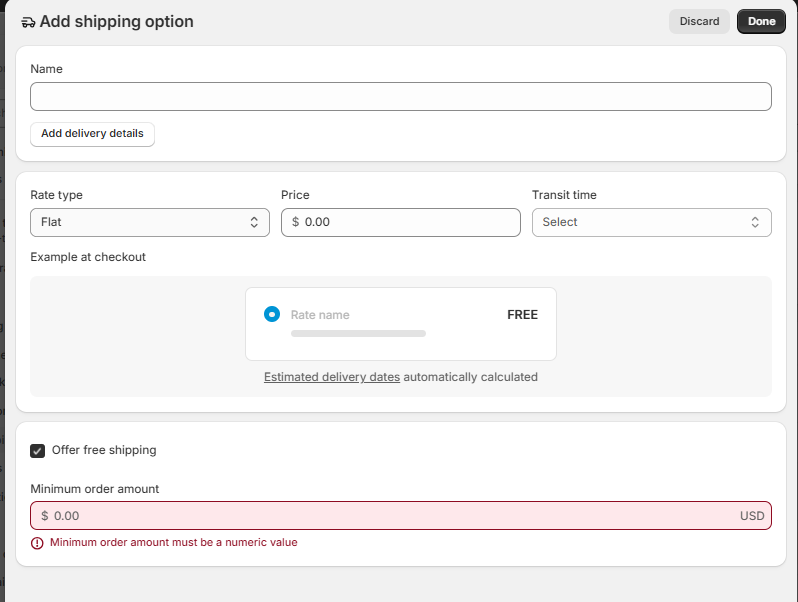
Carts below your threshold pay the normal rate. Carts above it ship free.
This method rewards a minimum spend with a discount. Think “spend $75, get 15% off.” Shopify builds this in for free.
Follow these steps:
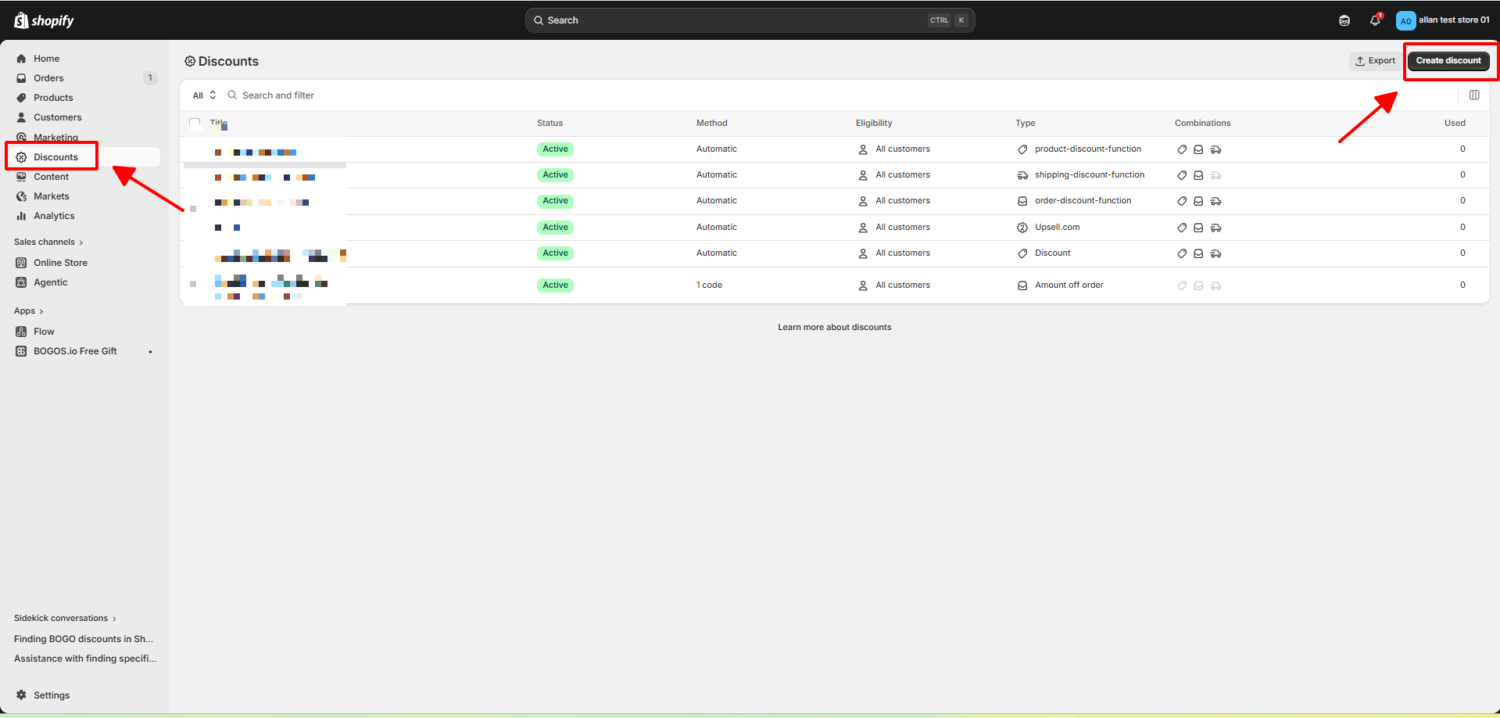
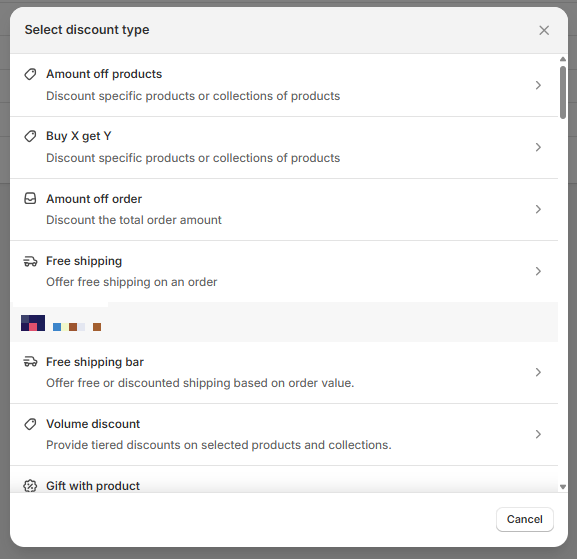
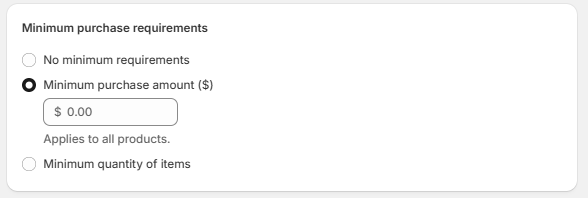
Now every shopper who reaches your threshold gets the reward without a code.
If you truly need to block small orders, use Shopify’s native validation, not old code tricks.
Shopify’s Checkout Blocks app can set order value limits powered by Shopify Functions. You can set a minimum and a maximum, and apply the rule to all customers or only to B2B.
Here is the basic setup:
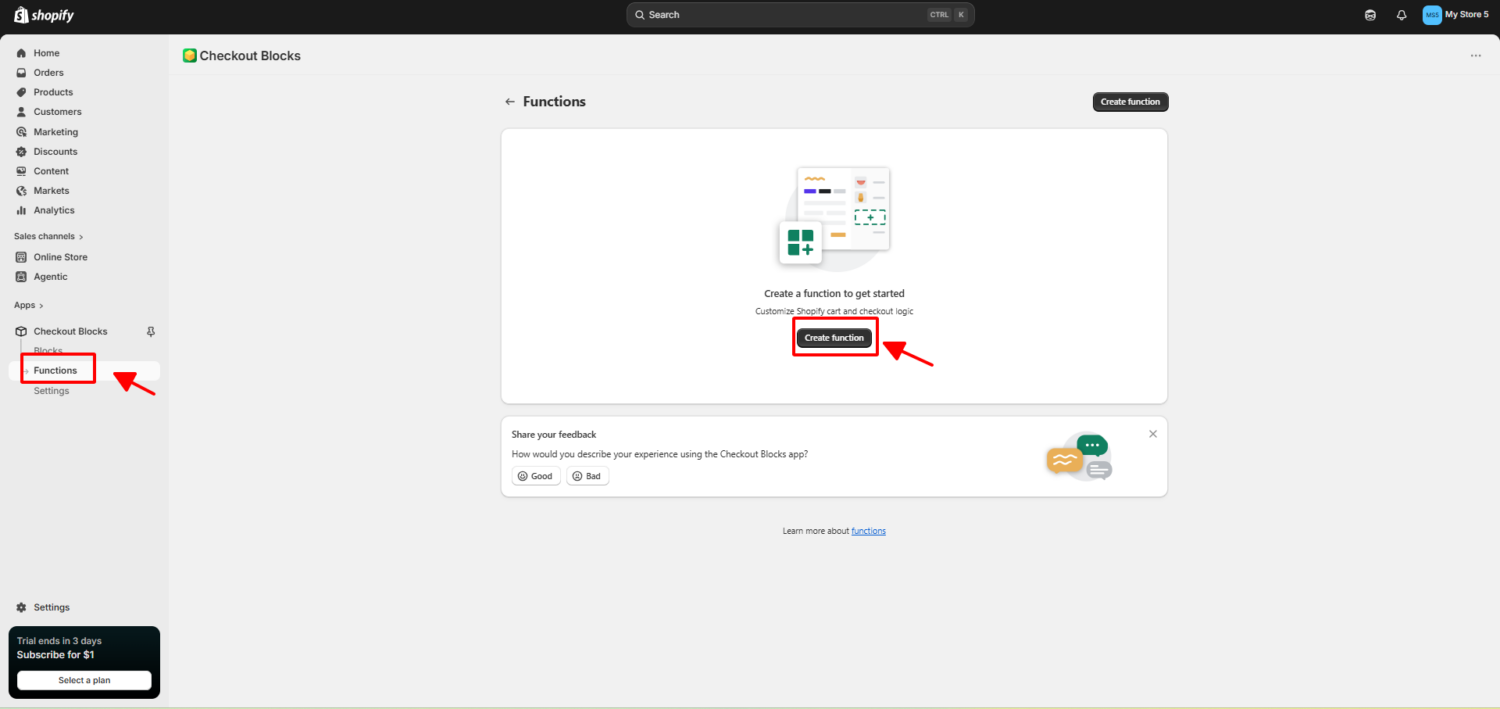
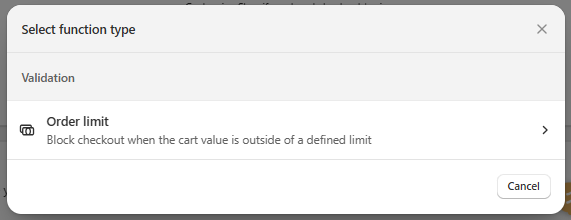
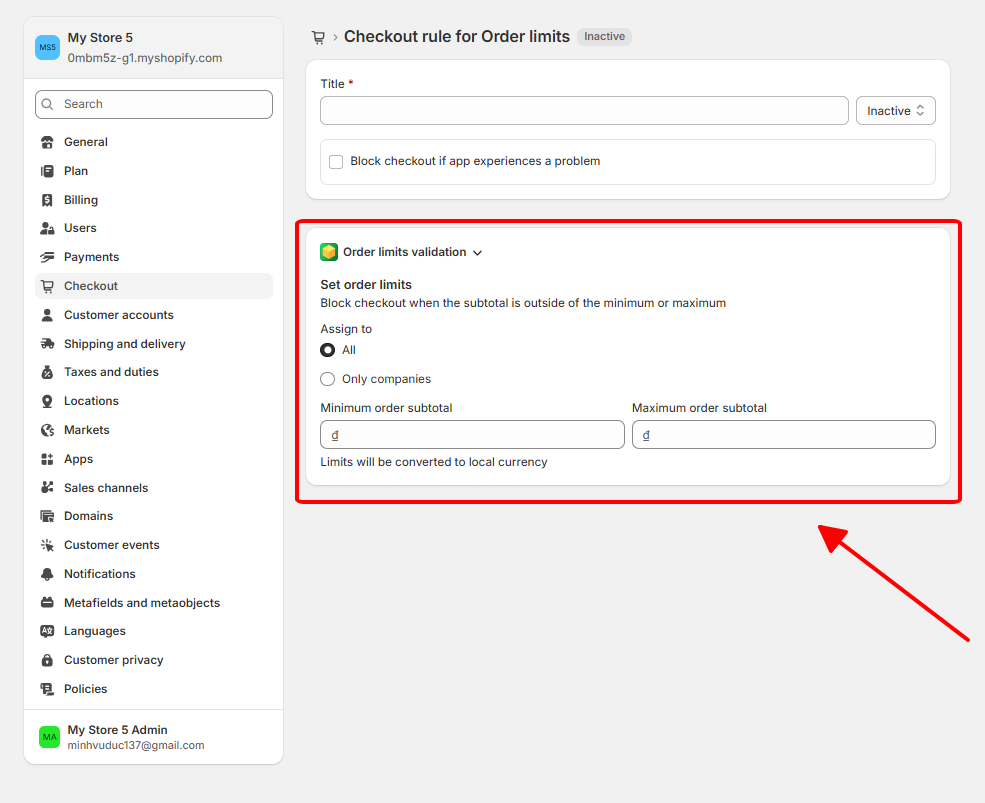
Orders outside your limits cannot check out. The block runs server-side, so it holds across Shop Pay, Apple Pay, and other express checkouts.
If you sell wholesale through Shopify B2B, you do not need an app or code. Shopify has this built in.
Shopify B2B quantity rules and volume pricing let you set minimum order values and minimum or maximum quantities, with no third-party apps or coding (Shopify set up guide).
To use it, set quantity rules and order minimums on your B2B catalog inside your admin. The rule then enforces your threshold for company buyers at checkout.
| Method | Best for | Blocks or rewards | Coding needed | Cost |
|---|---|---|---|---|
| Free shipping threshold | Retail and DTC growing AOV | Rewards | No | Free |
| Automatic discount (spend $X) | Promotions and AOV | Rewards | No | Free |
| Checkout Blocks order limit | Stores needing a hard floor | Blocks | No (app UI) | Free app |
| Shopify B2B quantity rules | Wholesale and B2B | Blocks | No | B2B-enabled plan |
Picking the right number matters. Set it too low and you give away margin. Set it too high and shoppers ignore it.
A simple starting point is to take your current average order value and add about 30%.
If your AOV is $65, set your threshold near $85. If your AOV is $50, set it near $65. Round to a clean number like $75 or $100 so it is easy to remember (Growth Suite, 2026).
The gap should feel reachable. A shopper with $55 in the cart will add a $20 item to hit $75. A shopper with $55 will not chase a $200 threshold.
For context, the median free shipping threshold across US retailers sits around $64 (DontPayFull, 2026). Use that as a sanity check, not a rule.
Your first number is a guess. Test it.
Watch three numbers together:
Adjust in small steps of $10 to $15. Most stores find their best number within a few tests.
Blocking orders protects you. Rewarding orders grows you. This is where a promotion app like BOGOS fits, because it lives on the reward side of the line.
BOGOS is not a checkout blocker. It lets you set a spend threshold that unlocks a reward, then shows that offer across your store. Spend $100, get a free gift. Spend $150, get a bigger one.
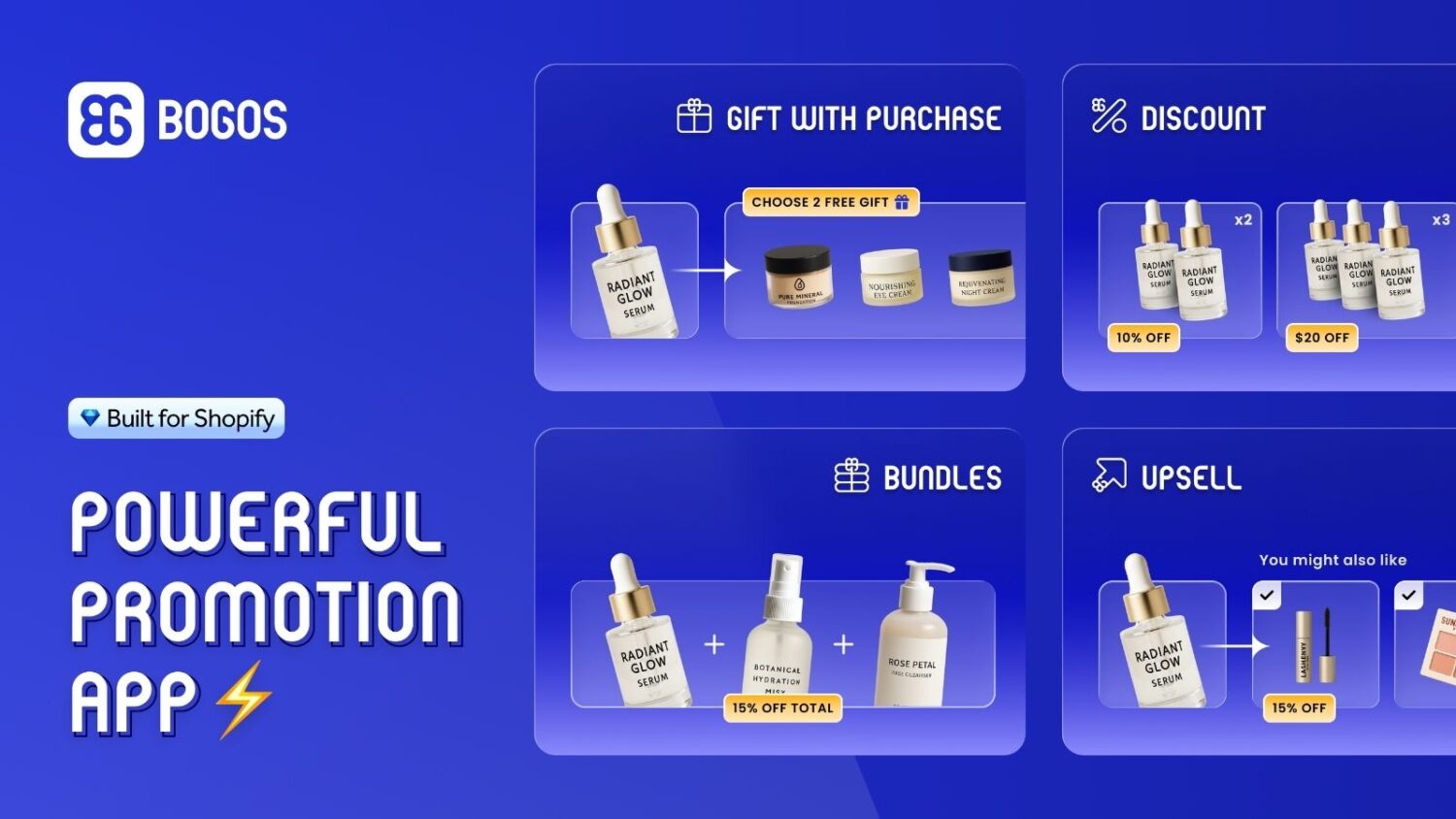
A spend-and-get offer ties a reward to cart value. It pulls the cart up toward your target without forcing anyone.
With BOGOS, you set a minimum (and optional maximum) cart value, then attach the reward. For example, “Spend $100 to get a free gift,” or “Spend $199–$299 in this collection to unlock a premium gift.”
The reward can be a free gift, a discount, or free shipping. You can also stack tiers, so bigger carts earn bigger rewards.
A progress bar shows shoppers how close they are to the next reward. “You’re $12 away from a free gift” is a strong, friendly push.
Progress bars work. Free shipping progress messages can cut cart abandonment by 15–23% while lifting order value (Growth Engines, 2026). The bar turns a silent threshold into an active goal.
Missing Pen, a stationery retailer, wanted a higher AOV without slashing prices. They used BOGOS to reward high-value carts with a same-brand gift, like Kaweco ink-free with a Kaweco pen.
The gift cost scaled with the order. A €1.66 ink came with an €11 pen, around 14% of the price. A €67 accessory set came with a €330 order, around 20%. Each gift felt generous but cost little.
The result: running four targeted offers, Missing Pen generated over €36,000 in extra revenue and a 19% AOV lift, all without a storewide discount.
Setup takes a few minutes:
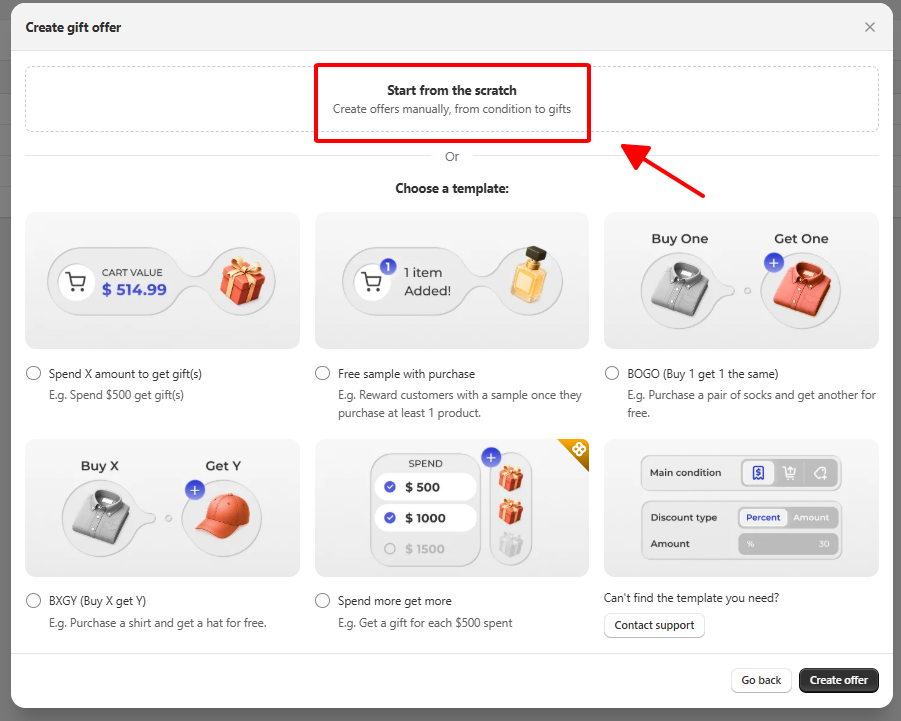
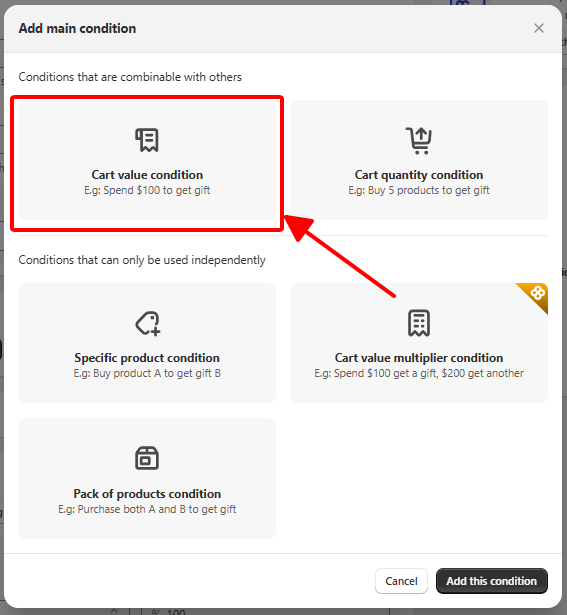
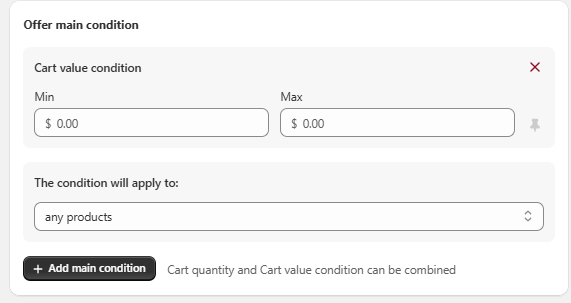
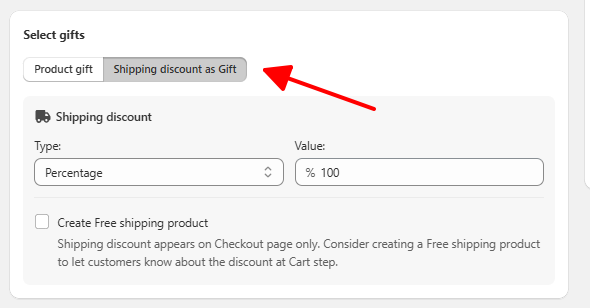
Your offer now runs automatically and nudges every eligible cart toward the threshold.
A minimum only works if shoppers know about it early. Surprises at checkout drive people away.
Show your threshold up front. Put it in an announcement bar at the top of your store. Repeat it in the cart with a progress message. State free shipping or gift terms clearly on product pages.
The goal is no surprises. When a shopper sees “free shipping over $50” the moment they land, the threshold feels like a deal, not a wall. That is the difference between a minimum that grows sales and one that loses them.
A minimum order value sits on a spectrum. On one end, it blocks small orders to protect your margin. On the other, it rewards bigger carts to grow your sales.
Wholesale and low-margin stores often need the block. Most retail and DTC stores do better with the reward, because blocking checkout fights the very conversions you want.
Whichever side you land on, set your number with care, communicate it early, and measure the results. If you want to grow average order value the friendly way, a spend-and-get offer with a progress bar is one of the simplest tools to start with, and it is exactly what BOGOS is built to do.
There is no single button for every store. For a hard limit, use Checkout Blocks with Shopify Functions, or Shopify B2B quantity rules for wholesale. For a reward-based minimum, use shipping settings or an automatic discount, both built in and free.
A hard block can. Unexpected costs and friction at checkout cause about 48% of cart abandonment (Red Stag Fulfillment, 2025). An incentive-based minimum, like free shipping or a free gift at a threshold, usually lifts both order value and conversion because shoppers choose to add more.
Minimum order value is a dollar amount, such as “$50 to check out.” Minimum order quantity counts units, such as “6 items minimum.” Value controls how much is spent; quantity controls how many items are bought. You can learn more in our guide to Shopify minimum order quantity.

A Shopify announcement bar is the thin strip at the top of your store that tells shoppers about shipping,...
Australia is one of the first markets many Shopify stores expand into. It is large, English-speaking, and home to...
Canada is a promising international market for Shopify merchants, especially those shipping from the US. But reaching Canadian shoppers...
