

Charlie Ngo
•
Last updated: 7 October, 2026
Shopify Product Configurator: 2D vs 3D, Best Apps & Costs (2026)
Shoppers hesitate to buy a $1,200 sofa or a custom ring when they can’t see the exact version they’re...
Shopify Bundle Inventory: How to Track Component Stock and Avoid Overselling

Digital Marketing Specialist
Summarize this post with AI
Selling product bundles on Shopify creates a problem most merchants don’t see coming: when a customer buys a bundle, Shopify doesn’t automatically deduct stock from the individual component products. That means you can sell a “Skincare Starter Kit” and still show full stock for the cleanser, toner, and moisturizer inside it, until you oversell and can’t fulfill the order.
This guide covers why Shopify’s default inventory tracking breaks down with bundles, four methods to fix it (from free manual tracking to AI-powered forecasting), and how to choose the right approach based on your bundle types and volume. If you’re new to bundling on Shopify, start with our “Shopify Product Bundle Complete Guide” for an overview of bundle types and pricing strategies.
TL;DR
Shopify tracks inventory at the individual product or variant level. Each product has its own SKU, its own stock count, and its own inventory history. There is no built-in concept of a “bundle” as a group of linked components that share inventory.
That means when you create a bundle, whether it’s a manual product listing, a variant-based package, or a collection-based deal, Shopify treats it as a standalone item. Selling one unit of the bundle does not automatically reduce stock for the products inside it.
Here’s what that looks like in practice. Say you sell a “Morning Routine Kit” that includes a cleanser (50 units in stock), a toner (30 units), and a moisturizer (40 units). You create the bundle as a new product listing and set its inventory to 30 (matching your lowest-stock component). A customer buys the kit. Shopify deducts 1 from the bundle’s inventory, now showing 29 kits available. But the cleanser still shows 50, the toner still shows 30, and the moisturizer still shows 40. If someone buys the toner individually, your actual toner stock is now 29, but the bundle still shows 29 kits available, even though you can only fulfill 28.
At low volume, you might catch this with a spreadsheet. At higher volume, especially during a sale event like BFCM, this mismatch leads to overselling, canceled orders, and fulfillment headaches.
The root cause is simple: Shopify doesn’t link bundle products to their components at the inventory level. Every method in this guide exists to solve that gap, either by syncing stock automatically, forecasting when components will run out, or both.
👉 Read more: Shopify AOV: What It Is, 2026 Benchmarks, and 10 Ways to Increase It
There are four approaches to keeping bundle inventory accurate, ranging from free manual tracking to dedicated apps with AI forecasting. Each one fits a different stage of bundle complexity and sales volume.
The simplest approach is calculating your available bundle inventory yourself, based on the lowest-stock component, and updating it manually after each sale.
How it works:
Example: A coffee brand sells a “Brewing Starter Kit” containing a pour-over dripper (80 units), 250g beans (45 units), and paper filters (200 units). The bottleneck is beans at 45 units, so the kit inventory is set to 45.
| 👍 Pros | 👎 Cons |
|---|---|
| Free, no app or subscription | Doesn’t scale past a handful of bundles |
| Works on any Shopify plan | Error-prone at higher order volume |
| No technical setup required | Requires daily manual updates |
| Full control over inventory logic | Easy to forget after a busy sales day |
Best for: Stores testing 1–3 fixed bundles at low volume, where the component products are not also sold individually.
⚠️ Watch out: If you sell the same products both individually and in bundles, manual tracking becomes unreliable fast. Every individual sale changes the bundle ceiling, and every bundle sale changes the component stock. Keeping both in sync by hand is a full-time job at anything above a few orders per day.
If your bundles are converting and order volume is growing, switch to an automated method. The Shopify Bundles app (Method 2) is the free next step.
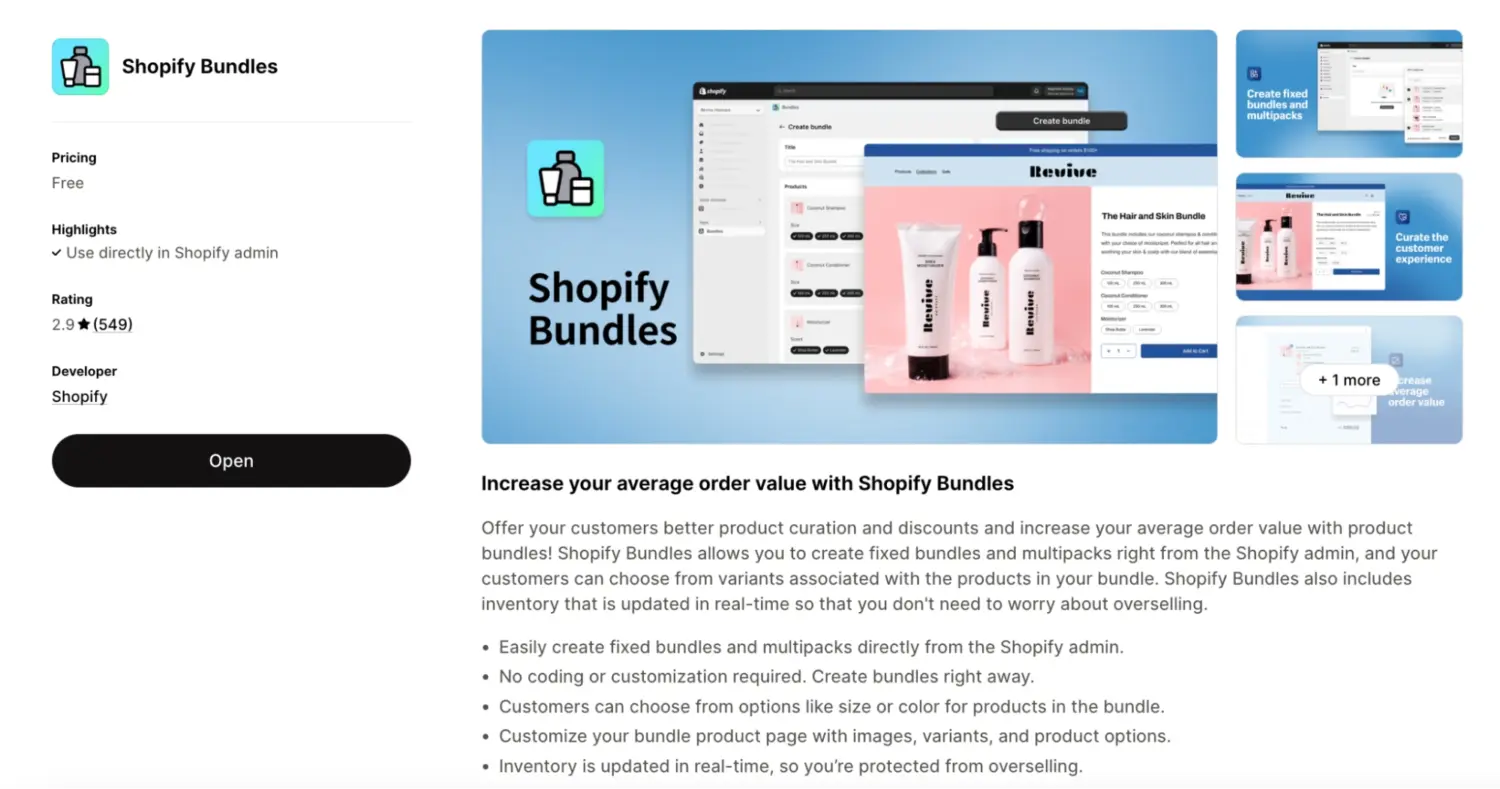
Shopify offers a free native app called “Shopify Bundles“ that automatically syncs component inventory when a bundle sells. It’s the simplest way to solve the inventory gap without paying for a third-party tool.
How it works:
When you create a bundle using the Shopify Bundles app, you select the component products. The app creates a new product listing in your catalog and links it to those components at the inventory level. When a customer purchases the bundle, the app automatically deducts one unit from each component product’s stock. No manual tracking needed.
How to set it up:
| 👍 Pros | 👎 Cons |
|---|---|
| Free, built and maintained by Shopify | Fixed bundles and multipacks only |
| Automatic component inventory sync | No mix and match, BYOB, or bundle builder |
| Creates a real product listing in your catalog | No demand forecasting or restock alerts |
| No third-party dependency | No reporting on component consumption rates |
Best for: Merchants selling straightforward fixed bundles who need reliable inventory sync and don’t need a customer-facing bundle builder or advanced pricing rules.
⚠️ The limitation: The Shopify Bundles app solves the sync problem. It deducts component stock after a sale. But it doesn’t help you plan. You won’t get alerts when a component is running low, you won’t see which components are being consumed fastest across all your bundles, and you won’t know when to place your next purchase order based on bundle sales velocity.
For stores where bundles are a side offer (a few curated kits alongside your main catalog), this is enough. But if bundles are a meaningful revenue channel, or if you share components across multiple bundles, knowing current stock levels isn’t enough. You need to know the stock trajectory: how fast are components moving, when will they run out, and what do you need to reorder today so they don’t.
That’s where an inventory management app fills the gap.
👉 For a detailed review of Shopify official bundles app, read this guide: Shopify Official Bundles App Review: What it does, Limitations, and When You Need More
The Shopify Bundles app tells you what happened: the stock went down. An inventory management app like Prediko tells you what’s going to happen: which components will run out, when to reorder, and how bundle sales velocity affects your purchasing timeline.
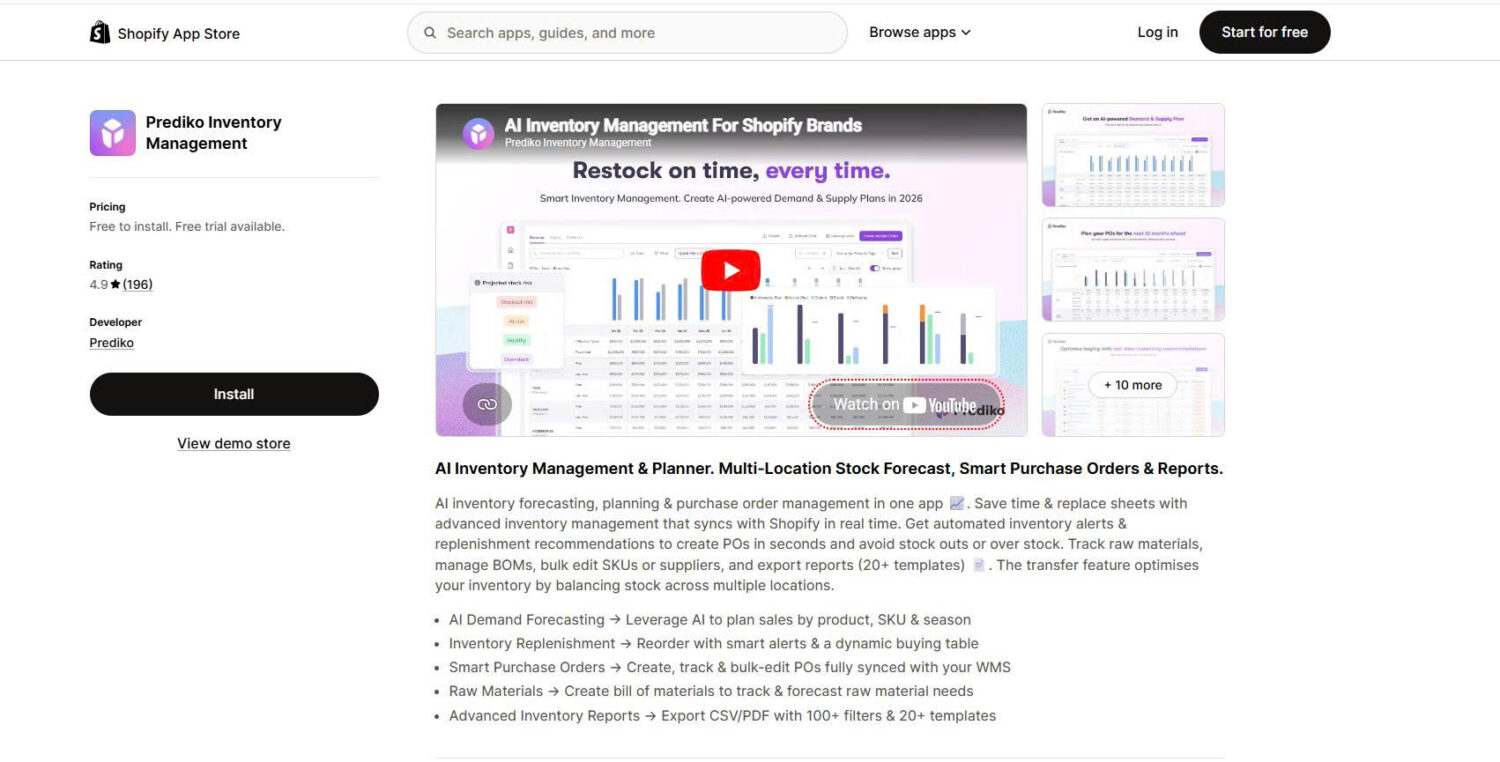
Why go beyond basic sync: When a single component (say, your best-selling toner) appears in three different bundles and sells individually, its consumption rate is unpredictable from a simple stock count. You need a tool that aggregates demand across all channels (individual sales, bundle sales, and even subscription orders) and translates that into a restock plan.
What Prediko does:
Rating: 4.9 ⭐ on the Shopify App Store | Pricing: From $49/month (14-day free trial, all plans include unlimited SKUs) | Integrates with: Shopify Basic, Advanced, and Plus plans; Shopify POS; 70+ WMS and 3PL integrations
| 👍 Pros | 👎 Cons |
|---|---|
| AI-powered demand forecasting based on real sales data | Starts at $49/month, not for early-stage stores |
| Restock alerts with lead time calculations | Doesn’t create the bundle itself (no bundle builder UI) |
| Component-level consumption tracking across bundles | Requires historical sales data for accurate forecasting |
| One-click purchase order creation | Learning curve for advanced features |
| Multi-location inventory management |
When to use Prediko over Method 2: When you sell components both individually and in bundles. When you have multiple bundles sharing the same components. When stockouts are costing you real revenue and you need to reorder based on projected demand, not just current stock. When your supply chain involves lead times that require advance planning.
Key distinction: Prediko handles inventory planning and forecasting. You can use Prediko to create fixed, classic bundles by selecting SKUs within the app. However, if you need more advanced bundle strategies, such as a mix-and-match widget or a build-your-own bundle page, you’ll need a third-party bundle app. Prediko works alongside your bundle setup as the inventory intelligence layer.
If you need both advanced bundle types and inventory sync in a single tool without adding a separate inventory app, the next method covers that.
If you need advanced bundle types like mix and match, build-your-own, or volume bundles with a customer-facing builder UI, a dedicated bundle app is the way to go. These apps handle the entire bundle experience (selection flow, pricing rules, storefront widgets) and include automatic component inventory sync as a built-in feature.
Bundle apps give you far more flexibility in how you create and display bundles compared to Methods 1 and 2. However, they focus on bundle setup and stock deduction, not inventory planning. You won’t get demand forecasting, restock recommendations, or purchase order automation. For stores that need both the bundle experience and long-term inventory planning, pairing a bundle app with Prediko (Method 3) gives you the most complete setup.
How app-level sync works: When a customer completes a bundle purchase, the app intercepts the order and deducts each component product’s inventory individually. Because the app knows exactly which products the customer selected (even in a mix and match scenario where selections vary), it syncs the correct components every time.
Here are four well-rated bundle apps with built-in inventory sync:
For detailed reviews, feature comparisons, and pricing breakdowns of these and other bundle apps, see our “Best Shopify Bundle Apps” guide.
| Method | When to Use | Recommended? |
|---|---|---|
| Manual tracking | Testing 1–3 fixed bundles at low volume; components not sold individually | ⚠️ Starting point only. Switch to automated sync as soon as bundles convert |
| Shopify Bundles app | Simple fixed bundles or multipacks where you need free, reliable component sync | ✅ Best free option for fixed bundles |
| Prediko | Scaling store with multiple bundles sharing components; need demand forecasting, restock alerts, and purchase order planning | ✅ Highly recommended as a planning layer alongside any bundle method |
| Third-party bundle app (BOGOS, Fast Bundle) | Need mix and match, BYOB, volume bundles, or advanced pricing rules with built-in component sync | ✅ Highly recommended for any store beyond basic fixed bundles |
| Bundle app + Prediko | High-volume store with complex supply chain; components shared across bundles and individual sales; lead times require advance ordering | ✅✅ Strongest setup. Covers both the customer experience and inventory planning |
Even with automated sync, bundle inventory can go wrong. Here are the most common issues and what to do about each one.
Tip: Before launching any bundle, run a full test cycle. Add the bundle to cart, complete a test purchase, then check every component product’s stock in Shopify admin. Verify that each one decreased by one unit. Do this again after purchasing a component individually to make sure the bundle’s available inventory adjusts. Five minutes of testing prevents the most common inventory problems.
Bundle inventory doesn’t have to be complicated, but ignoring it will cost you. Overselling a component because your bundle listing wasn’t synced is one of the most preventable problems on Shopify, and it only gets worse as order volume grows.
If you’re just getting started with bundles, pick the simplest method that matches your setup. The Shopify Bundles app is free and handles fixed bundle sync out of the box. That alone eliminates the most common inventory headaches.
As your bundle strategy grows, so should your inventory approach. When you start sharing components across multiple bundles, selling those same products individually, or managing stock across locations, layer in a planning tool like Prediko to forecast demand and automate restock decisions. If you need advanced bundle types like mix and match or BYOB, a third-party bundle app like BOGOS gives you both the customer experience and the inventory sync in one tool.
The goal is simple: every bundle sale should deduct the right stock from the right products, and you should always know when to reorder before a component runs out. Start with sync, then scale to forecasting.
No, not by default. Shopify tracks inventory at the individual product/variant level. If you create a bundle as a manual product listing, selling the bundle does not deduct stock from its component products. To get automatic component inventory sync, use the Shopify Bundles app (free, fixed bundles only) or a third-party bundle app like BOGOS or Fast Bundle.
It depends on your setup. With manual tracking, nothing happens automatically. The bundle stays listed as “in stock” until you update it yourself. With the Shopify Bundles app or a third-party bundle app, the bundle’s availability is typically tied to component stock, so if any component hits zero, the bundle shows as unavailable. Always test this with your specific app to confirm the behavior.
No. The Shopify Bundles app supports fixed bundles and multipacks only. It does not support mix and match, build-your-own, or any bundle type where the customer selects items. For those, you need a third-party app like BOGOS, Fast Bundle, or BundleSuite that includes both a customer-facing bundle builder and component inventory sync.
Yes, but not all methods support it. Manual tracking doesn’t distinguish between locations. The Shopify Bundles app syncs at the component level but has limited multi-location controls. Third-party apps like BOGOS and Fast Bundle support multi-location sync. For full multi-location visibility with demand forecasting, Prediko provides a centralized dashboard across all warehouses and storefronts.

Shoppers hesitate to buy a $1,200 sofa or a custom ring when they can’t see the exact version they’re...
Selling personalized products on Shopify gets hard the moment a shopper needs to type a name or choose a...

The UK is the largest eCommerce market in Europe and the third-largest in the world. For international Shopify stores,...
