Allan Vu is a Digital Marketing expert and the driving force behind BOGOS’s blog content. With a deep understanding of eCommerce and Shopify promotions, he is passionate about helping merchants unlock the full potential of their stores.
At BOGOS, Allan creates valuable, practical content focused on strategies like Free Gifts, Buy X Get Y, product bundles, and upsell offers to empower Shopify sellers to grow their businesses effectively.
Known for his clear, insightful writing, Allan is dedicated to delivering actionable advice that makes a real difference for BOGOS’s readers.
Bundles are one of the most reliable ways to increase Average Order Value (AOV) on Shopify. But “run a bundle” is vague advice — because not all bundles work the same way.
A Fixed Bundle and a Volume Discount both qualify as “bundles,” but they target different customer behaviors, require different setups, and produce very different results. Choosing the wrong type can lead to poor conversion, unnecessary margin loss, or inventory headaches that aren’t worth the effort.
This article breaks down six bundle types you can run on Shopify, explains the pros and cons of each, and helps you decide which one fits your store’s goals, catalog, and margins. (If you’re new to Shopify bundles entirely, start with our Shopify Product Bundle Comprehensive Guide for the full overview — then come back here to choose your bundle type.)
Who this is for: Shopify merchants planning a bundle promotion who want to choose the right bundle structure before investing time in setup.
Why the Type of Bundle You Choose Matters
Many merchants launch a bundle without thinking about the structure behind it. They group a few products together, add a discount, and hope it works.
The problem is that each bundle type influences customer behavior differently. A Fixed Bundle pushes customers toward a curated set. A Mix & Match Bundle gives them control. A Volume Discount rewards them for buying more units. Each structure attracts different purchase patterns — and each one affects your AOV, margin, and inventory in different ways.
Choosing the wrong bundle type usually shows up in one of three ways:
Low conversion — the bundle doesn’t match how your customers actually shop.
Margin erosion — the discount structure gives away more than necessary.
Operational friction — inventory tracking, fulfillment, or variant management becomes a headache.
The rest of this article walks through each bundle type in detail so you can match the right structure to the right goal.
1. Fixed Bundle
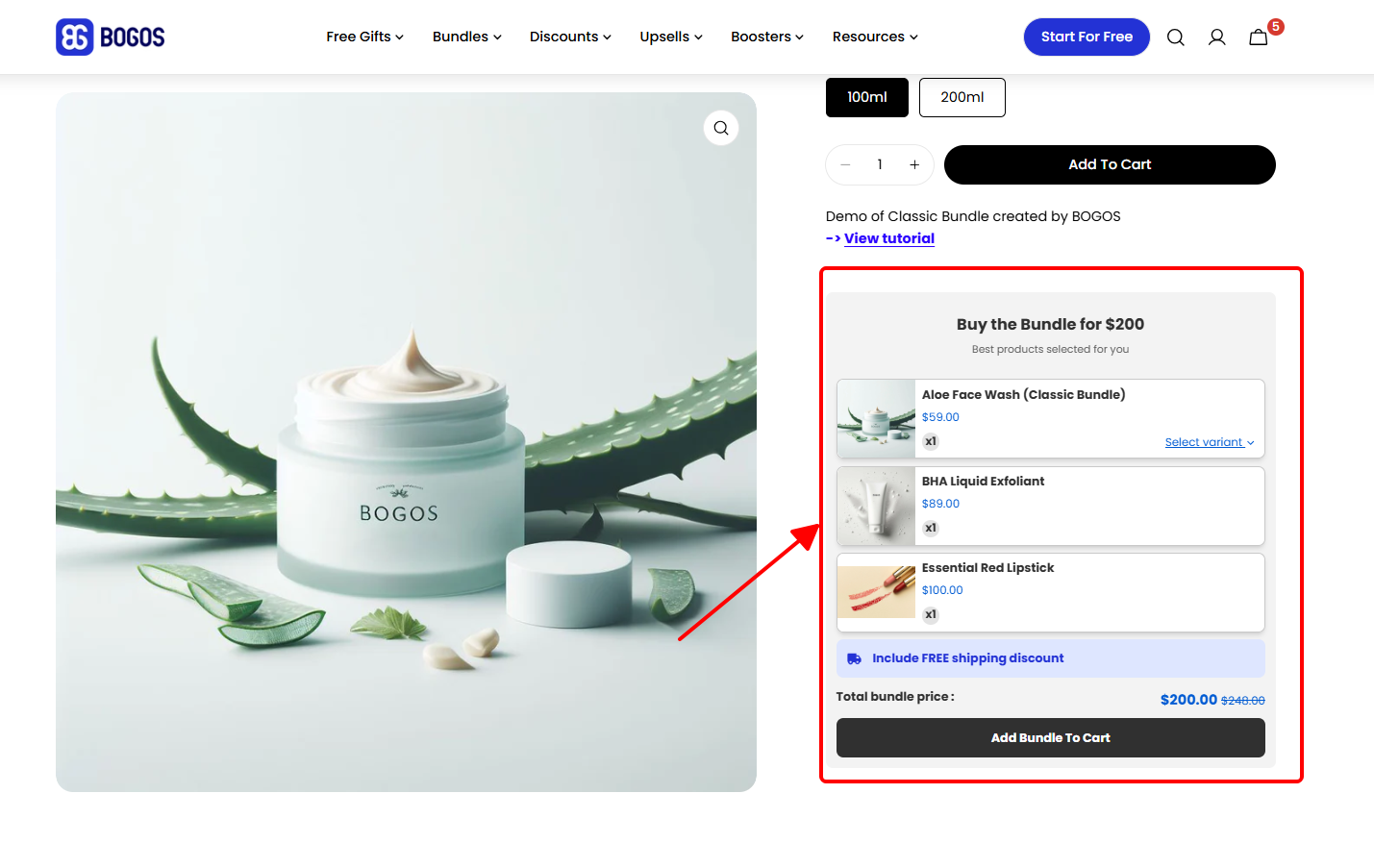
A Fixed Bundle is a pre-curated set of specific products sold together at a set price. The customer buys the bundle as-is — no customization, no substitution.
Example: A skincare brand sells a “Complete Routine Kit” containing a cleanser, a serum, and a moisturizer for $75 instead of $90 if purchased separately.
How It Works
You select the exact products included in the bundle and set one price for the entire set. The customer either buys the whole bundle or doesn’t — there’s no option to swap items.
On Shopify, you can implement a Fixed Bundle in two ways. The first is creating a single product listing that represents the bundle (you handle fulfillment of individual items internally). The second is using a bundle app that groups individual SKUs together while keeping inventory synced.
The single-listing approach is simpler but makes inventory tracking harder. A bundle app adds a step to setup but keeps each product’s stock accurate. For a step-by-step walkthrough of both approaches, see our guide on how to create bundles on Shopify without an app.
Fixed bundle widget on product page
Pros
Simple to set up and communicate. One price, one offer. Customers understand it immediately.
Full control over product pairing. You decide exactly which products go together, which is useful for strategic grouping — like pairing a bestseller with a lesser-known product.
Predictable margins. You know the exact cost of goods in every bundle sold, so there are no surprises on profitability.
Good for storytelling. Fixed Bundles work well as themed sets — “Morning Routine,” “Starter Kit,” “Travel Essentials” — which makes them easy to market.
Cons
No flexibility for the customer. If a customer doesn’t want one product in the bundle, they’ll likely skip the entire offer instead of buying the rest.
Requires relevant product pairing. A bundle with products that don’t logically go together feels forced and converts poorly. The products need a clear “reason to be together.”
Inventory coordination. All SKUs in the bundle need to be in stock at the same time. If one item runs out, the entire bundle becomes unavailable unless you adjust it.
When to Use a Fixed Bundle
Fixed Bundles work best when the product pairing is obvious, and the customer doesn’t need a choice.
Use this type when you’re selling complementary products that naturally go together (e.g., a camera + memory card + case), creating starter kits for new customers, or bundling a popular product with a slower-moving one to increase product discovery.
Stores with a small, focused catalog tend to get the best results with Fixed Bundles because the product pairings feel natural rather than arbitrary.
Tip: Price your Fixed Bundle at 10–20% below the total individual price. That’s enough to feel like a deal without cutting deep into your margin. If the bundle includes a product the customer wouldn’t have bought individually, the discount is effectively paying for product discovery — not just revenue loss.
2. Mix & Match Bundle
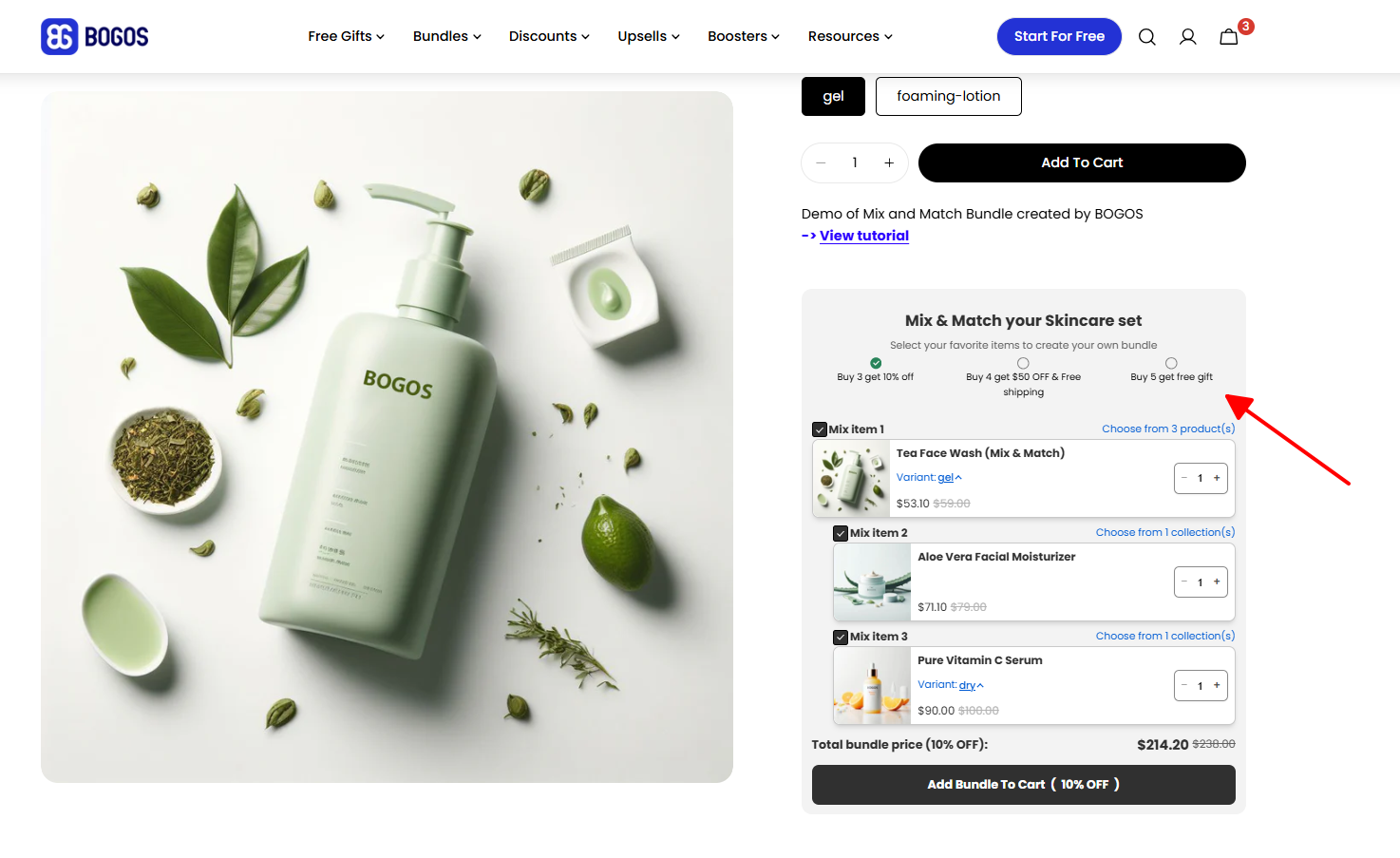
A Mix & Match Bundle lets the customer pick a set number of items from a single defined collection to receive a discount. You set the rules — the customer makes the choices.
Example: A gourmet snack store offers “Pick any 5 snacks for $40” from a collection of 20+ options that would cost $10–$12 each individually.
How It Works
You define one pool of eligible products and the bundle conditions (e.g., “pick 3,” “pick 5”). The customer browses the eligible collection, selects their preferred items, and the discount applies automatically once the conditions are met.
Mix & Match requires a bundle app — Shopify doesn’t support this logic natively. Most bundle apps display the eligible products in a dedicated bundle page or widget where the customer can add items until they reach the required quantity.
There is another workaround where you can use a Shopify Collection to create a Mix-and-Match bundle, but there will be trade-offs. To learn more about the step-by-step process, read this article: How to do a mix-n-match bundle using Shopify collection.
Mix n match bundle widget on product page
Pros
High customer engagement. Customers feel in control of what they’re buying, which increases the likelihood they’ll complete the purchase.
Works well with large catalogs. If you sell 20+ products in a similar category, Mix & Match lets you include them all without forcing specific combinations.
Encourages product exploration. Customers often discover new products while building their bundle — items they wouldn’t have found browsing your store normally.
Reduces decision fatigue. The structure frames the decision as “pick 3 from these” rather than “browse our entire store,” which simplifies the shopping experience.
Cons
App required. You need a third-party bundle app to run Mix & Match on Shopify. This adds cost and a dependency on the app’s reliability.
Variable margins. Because the customer chooses the products, some combinations will be more profitable than others. If your product costs vary significantly within the eligible collection, you’ll need to price carefully.
Potential inventory imbalances. A few popular products may get picked far more often than others, creating stock issues for bestsellers while slower items sit.
When to Use a Mix & Match Bundle
Mix & Match is the right choice when your customers want variety and your catalog supports it.
This works especially well for stores selling products in the same category at similar price points — snacks, socks, candles, beauty samples, greeting cards. The more similar the products are in type and cost, the easier it is to set a bundle price that protects your margin regardless of what the customer picks.
Avoid Mix & Match if your eligible products have wildly different costs. A customer who picks the five most expensive items in a “Pick 5 for $40” deal can turn your bundle into a losing offer.
Watch out: Calculate your margin for the worst-case combination — the most expensive possible selection a customer could make. If that combination still hits an acceptable margin, your pricing is safe. If not, either narrow the eligible product pool or adjust the bundle price.
3. Build Your Own Bundle
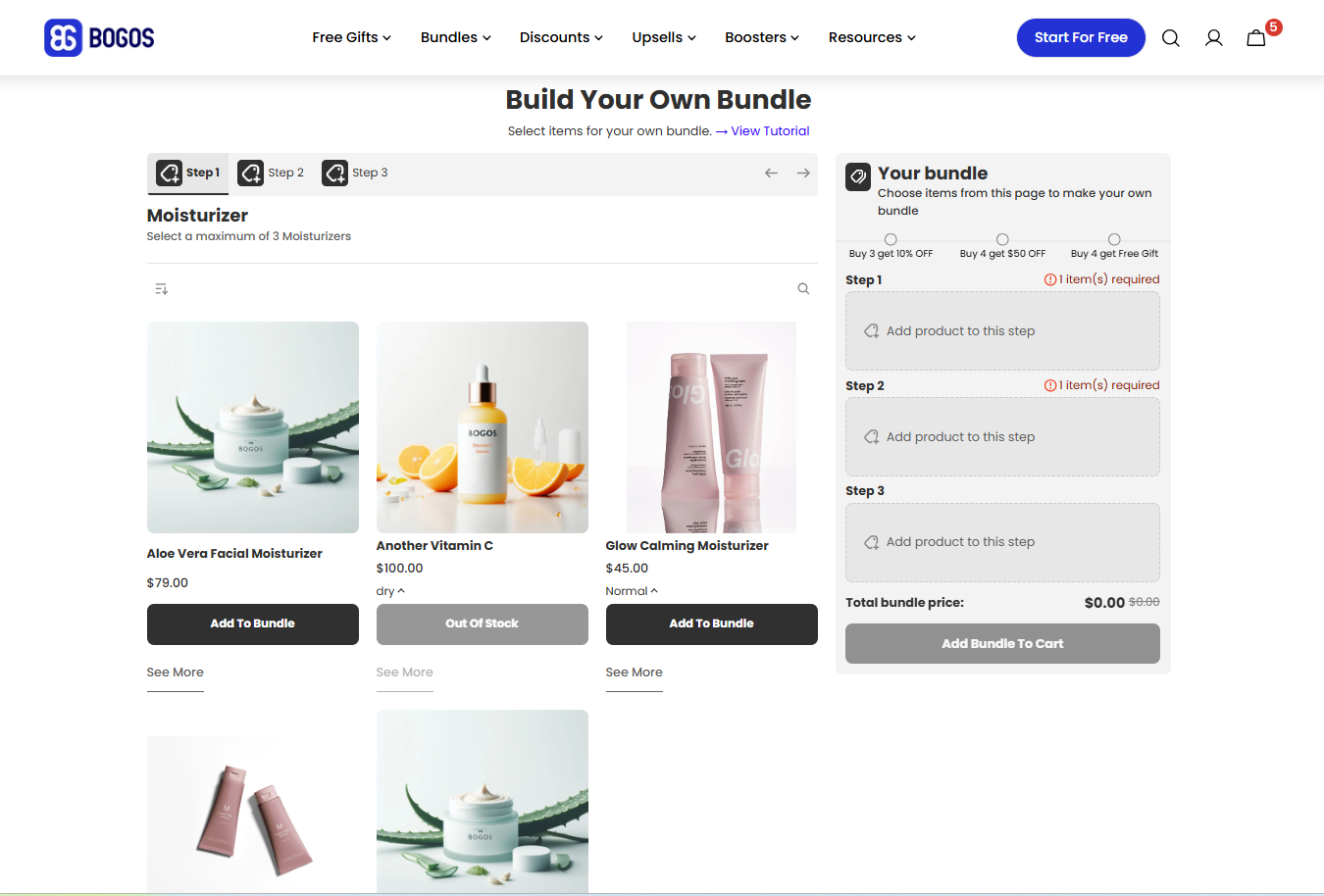
A Build Your Own Bundlewalks the customer through multiple steps, each offering a different category of products. The customer selects one or more items at each step to assemble a fully custom bundle.
Example: A gift box store offers “Build Your Gift Box” — Step 1: Choose a candle → Step 2: Choose a soap → Step 3: Choose a snack → all for $55.
How It Works
You define multiple categories or steps, each with its own set of eligible products. The customer progresses through each step, selects their item(s), and the bundle is complete once all steps are filled. The total price is either fixed or calculated based on selections.
This is the most interactive bundle type. It requires a bundle app that supports multi-step bundle builders with per-step product pools. Setup takes more effort than other types because you need to design the step flow, choose products for each step, and test the experience.
Build your own dedicated bundle page with a multi-step format
How It Differs from Mix & Match
The difference matters because it affects both the customer experience and when each type works best.
A Mix & Match Bundle pulls from a single pool of products. The customer picks any combination from that one pool — “choose any 5 snacks.” All products are interchangeable.
A Build Your Own Bundle pulls from multiple pools, one per step. The customer picks from a different category at each step — “choose a candle, then a soap, then a snack.” The products in step 1 are not interchangeable with step 2.
Use Mix & Match when all your bundled products are the same type. Use Build Your Own when the bundle combines different product categories into one package.
Pros
Highly personalized experience. Every customer gets exactly the combination they want, which increases perceived value and satisfaction.
Natural fit for multi-component products. If your product naturally has parts — like a gift box, meal kit, or custom kit — this structure mirrors how customers already think about it.
Strong cross-sell potential. Each step introduces a different product category, exposing customers to items they might not have found otherwise.
Creates a guided shopping experience. The step-by-step flow keeps the customer engaged and moving toward checkout rather than browsing aimlessly.
Cons
Most complex bundle type to set up. You need a bundle app with multi-step support, and you need to design the flow carefully. More steps mean more configuration.
Risk of drop-off. If there are too many steps or too many options per step, customers can get overwhelmed and abandon the builder before finishing.
Variable margins. The customer’s selections at each step determine the final cost of goods, making margin predictions harder.
Inventory complexity. Every possible combination of selections across all steps needs to be fulfillable. One out-of-stock item in one step can break the entire flow.
When to Use a Build Your Own Bundle
Build Your Own works best for products with a natural multi-component structure — gift boxes, subscription boxes, meal kits, custom kits, or “create your own” sets.
It’s also a strong fit for stores that want to offer a premium, interactive shopping experience. The step-by-step flow feels curated and intentional, which works well for gifting and higher-price-point products.
Avoid this type if your products don’t have natural category divisions. Forcing a multi-step builder on products that could just as easily be a Mix & Match adds complexity without adding value for the customer.
Tip: Keep your builder to 3–4 steps maximum. Each additional step increases the chance of drop-off. If you need more variety, offer more options within each step rather than adding more steps.
4. Frequently Bought Together
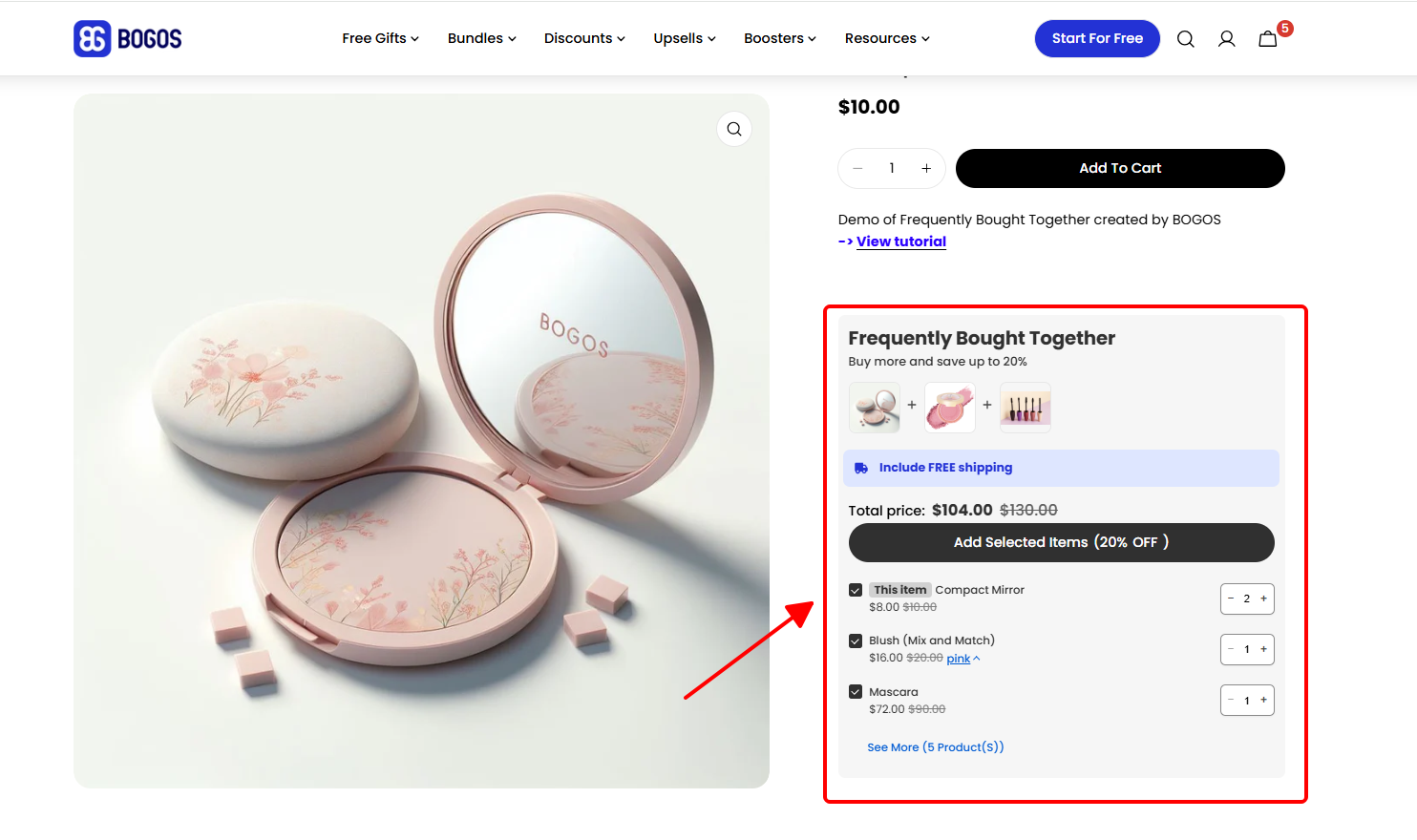
A Frequently Bought Together bundle is a product page recommendation that suggests complementary items other customers commonly buy alongside the product being viewed. The customer can add all suggested items to their cart in one click, usually at a small discount.
Example: A phone accessories store shows “Frequently Bought Together: Case + Screen Protector + Wireless Charger — Save 10% when you add all three” on every phone case product page.
How It Works
The bundle appears as a widget on the product page, typically below the main product details or in a sidebar. It displays 2–3 related products alongside the item the customer is already viewing, with a combined price showing the savings.
The customer can add all items to their cart with one click, or deselect items they don’t want. Product recommendations can be set manually (you choose which products to pair) or generated automatically based on order history data.
This requires a bundle or recommendation app — Shopify doesn’t include native “Frequently Bought Together” functionality.
Frequently Bought Together widget on product page
Pros
Feels natural, not pushy. The recommendation format feels like a helpful suggestion rather than a hard sell, which makes customers more receptive.
Very low friction. One-click add to cart means the customer doesn’t have to navigate to other product pages or build anything. The easier you make it, the more likely they are to add items.
Effective for incremental AOV lift. Even a modest 10–15% discount on added items can nudge customers to spend $15–$30 more per order.
Low maintenance. Once you set up the pairings (or let the app generate them from order data), the bundles run on autopilot. You don’t need to create dedicated bundle pages or manage complex configurations.
Cons
Limited placement. The bundle only appears on product pages. Customers who navigate directly to the cart or skip the product page entirely will never see the offer.
Effectiveness depends on product relevance. Poorly matched recommendations feel spammy and can actually reduce trust. If the suggested items don’t make sense with the main product, customers ignore them — or worse, question the store’s quality.
Modest AOV lift per transaction. Compared to a well-structured Fixed Bundle or Build Your Own, the per-order revenue increase is usually smaller because the discount is applied to 1–2 add-on items rather than a larger bundle.
Relies on the product page visit. For stores where a large percentage of traffic goes directly to collections or uses search-to-cart flows, fewer customers will see the recommendation widget.
When to Use Frequently Bought Together
This type works best when your products have clear accessory or complementary relationships — and when you want to increase AOV without changing the core shopping experience.
It’s a strong fit for electronics (phone + case + charger), fashion (top + pants + accessories for an outfit), home goods (pan + lid + utensil set), and any catalog where products naturally pair but customers might not think to buy them together.
Frequently Bought Together is also a good starting point for stores that are new to bundles. The setup is minimal, it runs in the background, and it doesn’t require you to design a bundle page or configure complex rules.
Tip: Manual pairing usually outperforms automated recommendations — especially on stores with limited order data. Start with 5–10 of your top products, manually pair each one with 2–3 complementary items, and let the results guide whether you expand to more products.
5. Volume Discount
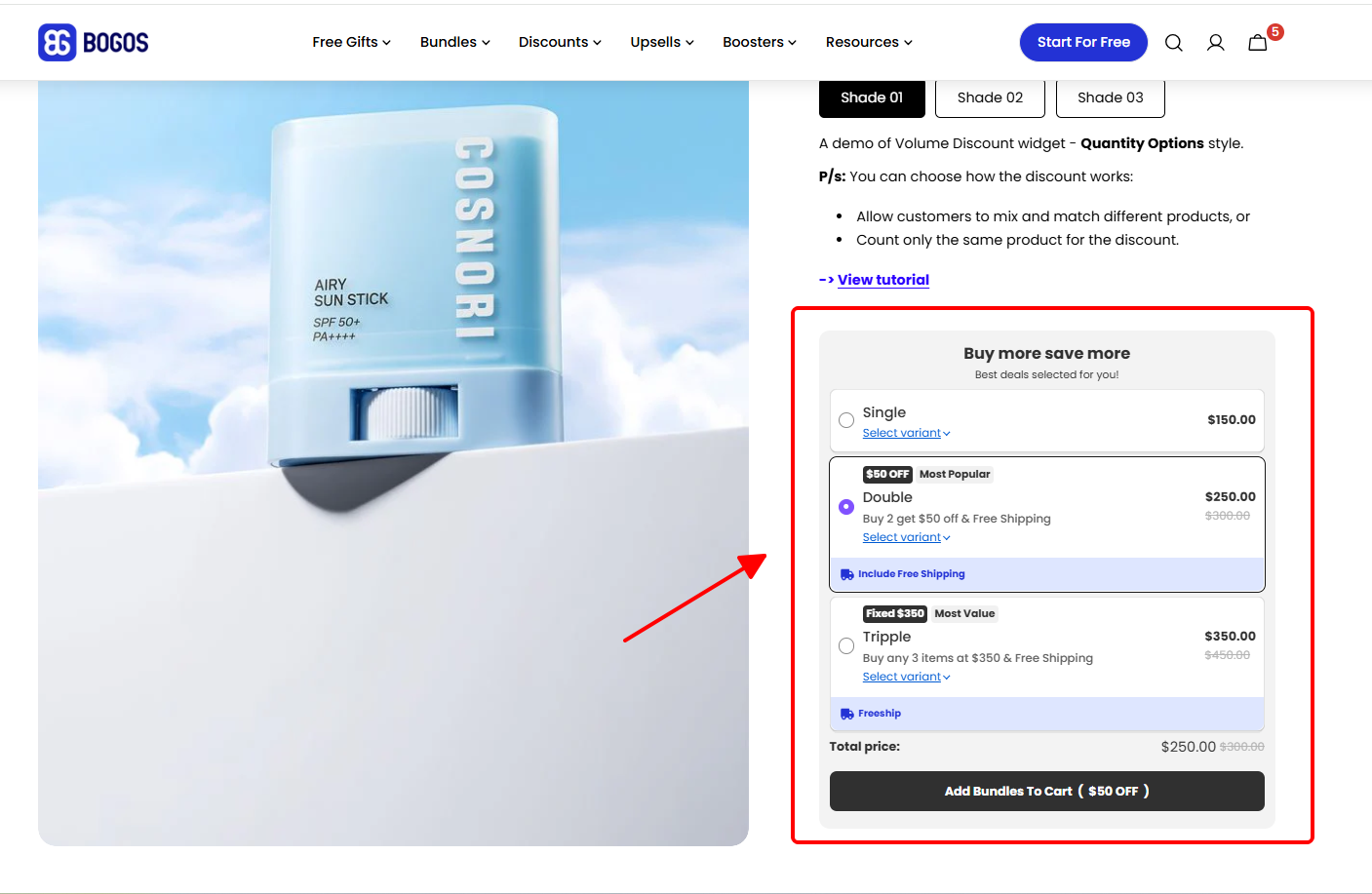
A Volume Discount is a tiered pricing structure where the discount per item increases as the customer buys more units. The more they buy, the more they save per unit.
Example: An apparel basics brand offers “Buy 2 tees, save 10% — Buy 3, save 15% — Buy 4+, save 20%.”
How It Works
You set discount tiers based on quantity. Each tier offers a progressively larger discount. The discount can apply to the same product (e.g., “buy 3 of this t-shirt”) or across a collection (e.g., “buy any 4 items from basics”).
On Shopify, basic Volume Discounts can be set up using Shopify’s native automatic discounts. More advanced setups — like collection-wide tiered discounts or visual progress bars — require a discount or bundle app.
The key to a Volume Discount is the tier structure. It needs to be simple enough for customers to understand in seconds and spaced in a way that encourages them to reach the next tier.
Volume discount widget on product page
Pros
Clear incentive to buy more. The tiered structure creates a natural “just one more” effect. A customer who added 2 items sees that adding a third gets them a bigger discount — and many will do it.
Customers self-select into higher tiers. You don’t need to push customers into a specific bundle. They decide how far up the tier ladder they want to go based on their own needs and budget.
Flexible application. Volume Discounts can apply to a single product, a product collection, or even store-wide. This makes them adaptable to many catalog structures.
Works well with urgency elements. Pairing Volume Discounts with cart-page progress bars (“Add 1 more to unlock 15% off”) creates a visual nudge that drives completion.
Cons
Tier spacing matters — and mistakes are costly. If the gap between tiers is too large, customers settle at the lowest tier. If the discounts escalate too quickly, you give away margin without a proportional increase in units.
Over-discounting risk at higher tiers. A customer buying 6 items at 25% off might cost you more in margin than the additional revenue is worth. Always calculate margin at every tier, not just the first.
Can cannibalize future purchases. For replenishable products (supplements, coffee, skincare), customers may stock up during the promotion and not return for weeks or months. This trades future revenue for present revenue.
Can feel complicated. More than 3 tiers confuses customers. Keep it to 2–3 tiers with clear, simple numbers.
When to Use a Volume Discount
Volume Discounts work best for products customers naturally buy in multiples — apparel basics, consumables, accessories, office supplies, or anything with high repeat-purchase potential.
They also work well when your goal is to increase units per order rather than cross-selling different products. If you want customers to buy more of the same thing (or more from the same collection), Volume Discounts are more effective than a Fixed Bundle.
Avoid Volume Discounts for high-ticket items customers only need one of (furniture, electronics, specialty equipment). A customer buying one $500 item has no reason to buy a second, no matter the discount.
Watch out: Design your tiers so the most popular tier is the one with the best margin for you, not just the biggest discount. Most customers will land on tier 2 (the middle tier). Make sure that tier is profitable.
Example: A fashion store runs “Buy any pair of jeans, get a belt for free” to cross-sell and clear excess belt inventory.
How It Works
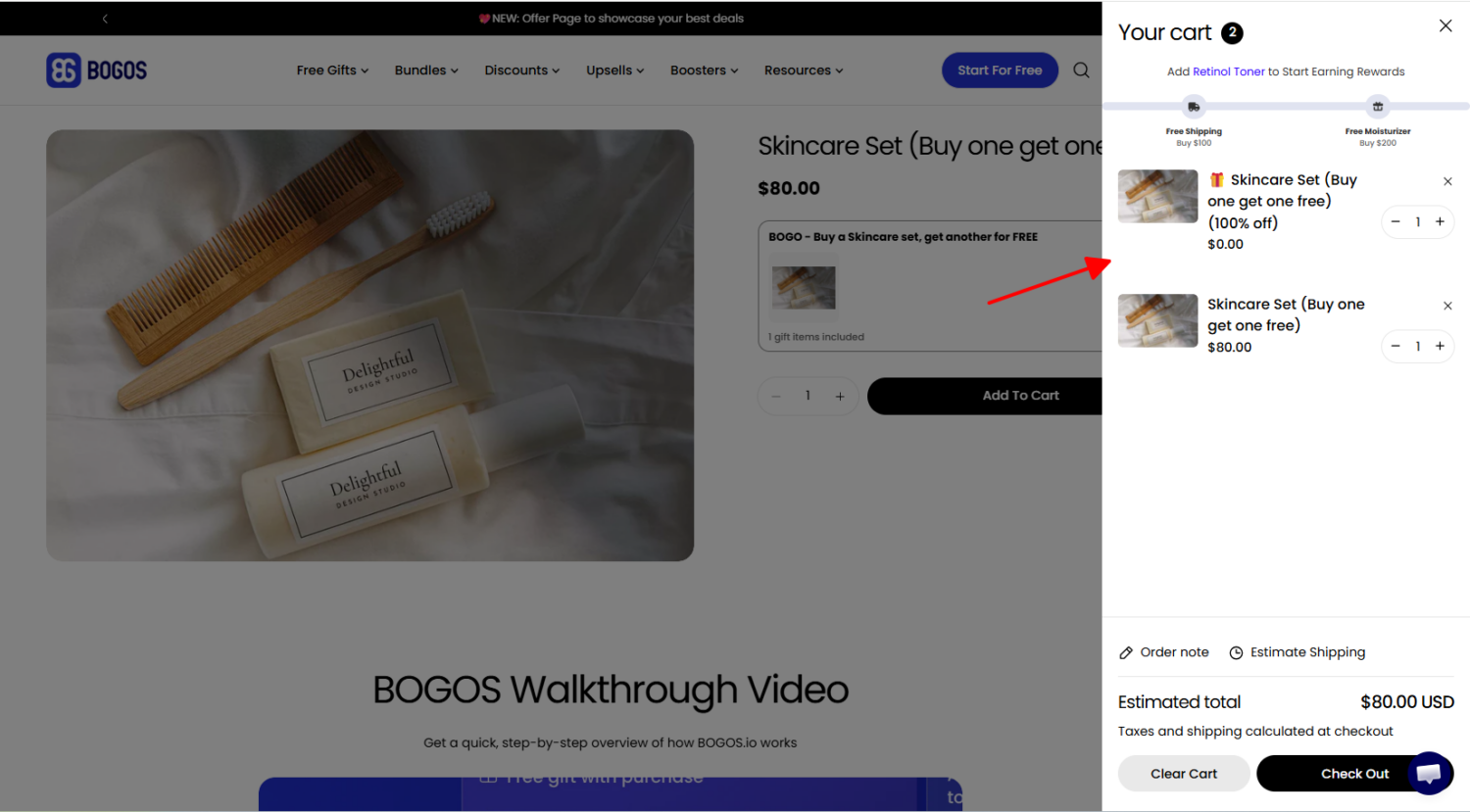
You define two things: the trigger (what the customer needs to buy) and the reward (what they get in return). The trigger can be a specific product, a product collection, or a minimum quantity. The reward can be a free item, a discounted item, or a percentage off a second product.
Shopify supports basic BXGY natively through automatic discounts. You can set up a “Buy X, Get Y” rule in the Shopify admin without any app. For more complex setups — like multi-tier BXGY (“Buy 2 get 1 free, buy 4 get 2 free”) or BXGY combined with other discounts — you’ll need a third-party app.
Buy one, get one (bogo)
Pros
Strong perceived value. The word “free” is one of the most powerful triggers in promotions. A “Get 1 Free” offer feels more valuable to customers than an equivalent percentage discount, even when the actual savings are the same.
Effective for moving slow inventory. Attach a slow-selling product as the “Y” (reward) item, and pair it with a product that already sells well. This clears stock without requiring a standalone markdown.
Cross-sell potential. BXGY doesn’t require the trigger and reward to be the same product. “Buy a jacket, get a scarf at 50% off” introduces the customer to a product they may not have considered.
Native Shopify support. Simple BXGY promotions work out of the box on Shopify. No app needed, no additional cost — just set it up in the admin under automatic discounts.
Cons
Margin risk on the free item. If the reward product has a high cost of goods, the “free” item eats directly into your profit. Always calculate margin on the combined purchase (trigger + reward), not just the trigger product.
Can attract deal-seekers. BOGO promotions tend to attract price-sensitive shoppers who may not return at full price. If your goal is long-term customer retention, monitor whether BOGO buyers come back for repeat purchases.
Complex multi-tier setups need an app. Anything beyond basic “Buy X, Get Y at Z% off” requires a third-party app, especially if you want multiple tiers or collection-based logic.
“Free” must feel genuinely valuable. If the reward product is low-quality, low-value, or something customers don’t want, the promotion backfires. Customers feel tricked rather than rewarded, which damages trust.
When to Use BOGO / BXGY
BOGO and BXGY work best for time-limited campaigns, inventory clearance, and cross-selling complementary products.
Use this type when you need to move slow-selling inventory by pairing it with a high-demand product, cross-sell related items (buy shoes → get socks discounted), create urgency around a limited-time offer, or maximize perceived value without deep discounting on the primary product.
BOGO is particularly effective as a campaign mechanic — it works well in email, ads, and on-site banners because “Get 1 Free” is easy to communicate and instantly compelling.
Watch out: “Buy 1 Get 1 Free” on the same product is effectively a 50% discount. Make sure your margin can absorb that. In many cases, “Buy 1 Get 1 at 50% off” (which is a 25% effective discount) achieves a similar conversion lift at half the margin cost.
Quick Comparison: Which Bundle Type Fits Your Store?
Use this table for a side-by-side view of all six bundle types. It covers the key factors that should influence your decision: what each type is best for, how it impacts AOV, how much margin control you retain, how complex the setup is, and how you implement it on Shopify.
Best For
AOV Impact
Margin Control
Setup Complexity
Shopify Implementation
Fixed Bundle
Curated kits, starter sets, themed collections
Moderate
High — predictable cost of goods
Low
Bundle app or single product listing
Mix & Match
Large same-category catalogs (snacks, beauty, socks)
Moderate to High
Medium — varies by customer selection
Medium
Bundle app required
Build Your Own
Multi-component products, gift boxes, meal kits
High
Medium — varies by step selections
High
Bundle app with multi-step support
Frequently Bought Together
Accessory and complementary cross-sells
Moderate
High — you control recommendations
Low
Bundle or recommendation app
Volume Discount
Consumables, basics, repeat-purchase products
High (quantity-driven)
Medium — tier-dependent
Low to Medium
Shopify native discount or app
BOGO / BXGY
Inventory clearance, time-limited campaigns
Moderate to High
Low to Medium — free item carries margin risk
Low to Medium
Shopify native (basic) or app for advanced logic
Most stores won’t use just one bundle type. The best approach is to match different types to different parts of your catalog and different business goals.
For example, a fashion store might use Fixed Bundles for seasonal outfit kits, Frequently Bought Together for accessory cross-sells on product pages, and BOGO for end-of-season inventory clearance. Each type handles a different job.
Start with the type that aligns with your most pressing goal — whether that’s increasing AOV, moving inventory, or encouraging product discovery. Test it, measure the results, and layer in additional bundle types as you learn what your customers respond to.
Conclusion
Not all bundles are created equal. Each type — Fixed, Mix & Match, Build Your Own, Frequently Bought Together, Volume Discount, and BOGO — serves a different purpose, attracts different purchase behavior, and carries different trade-offs on margin, complexity, and customer experience.
The key is matching the bundle structure to three things: your goal, your product catalog, and your margin tolerance. A skincare brand with 10 products and a focused catalog will get more out of Fixed Bundles than a gift shop with 200 SKUs that needs Build Your Own.
Start with one type. Set it up, run it for 2–4 weeks, and track the results — specifically AOV, conversion rate, and margin per order. Then use what you learn to decide whether to optimize that bundle or add a second type to cover another part of your catalog.