Allan Vu is a Digital Marketing expert and the driving force behind BOGOS’s blog content. With a deep understanding of eCommerce and Shopify promotions, he is passionate about helping merchants unlock the full potential of their stores.
At BOGOS, Allan creates valuable, practical content focused on strategies like Free Gifts, Buy X Get Y, product bundles, and upsell offers to empower Shopify sellers to grow their businesses effectively.
Known for his clear, insightful writing, Allan is dedicated to delivering actionable advice that makes a real difference for BOGOS’s readers.
Mix and match bundles let your customers pick their own products — instead of buying a pre-set package, they choose from a selection you define and get a bundled price. It’s one of the most effective bundle strategies for Shopify stores that sell consumables, variety packs, or products customers naturally want to combine.
This guide covers how mix and match bundles work on Shopify, two ways to create one (with and without an app), which products fit this strategy best, and how to use bundles to increase your average order value.
1. What Is a Mix and Match Bundle on Shopify?
A mix and match bundle is a promotion where customers select individual items from a defined product set (a specific collection, a hand-picked product list, or variant options) and purchase them together at a bundled price. Instead of buying a pre-built package, the customer builds their own.
This is different from a fixed bundle, where you decide exactly which products are included (e.g., “Summer Starter Kit: sunscreen + lip balm + tote bag”). In a fixed bundle, the customer has no choice over what’s inside. A mix and match bundle flips that – the customer picks, and you set the rules.
Common formats include:
“Pick any 3 for $75”: flat price for a set number of items from a collection
“Build your own box”: multi-step selection where customers pick items by category (e.g., step 1: choose a base, step 2: choose toppings)
“Choose from this collection”: customers browse a curated set and get a percentage discount when they bundle a qualifying quantity
The term “bundle builder” often refers to the front-end experience — the page or widget where customers make their selections. Some stores call it a “build your own” page, a “custom bundle” page, or simply a “mix and match” page. Regardless of the label, the mechanics are the same: a selection pool, quantity rules, and a pricing model.
Every mix and match bundle has three core components: a selection pool, quantity rules, and a pricing model. Understanding how these connect will help you set up an offer that works — technically and commercially.
The Bundle Structure
The selection pool is the set of products your customers can choose from. You might use a Shopify collection (e.g., “Build Your Own Snack Box” collection), a manually curated list of products, or variant options within a single product. The pool defines the boundaries — customers pick freely within it, but can’t add items outside it.
Quantity rules control how many items a customer must (or can) select. The simplest rule is a fixed count: “pick exactly 3.” But you can also set ranges (“pick 3 to 5”), minimums (“at least 2”), or category-based rules (“pick at least 1 from each category”). These rules prevent customers from gaming the discount by adding just one item, while also capping the bundle size to protect your margins.
Some bundle setups use a multi-step flow – step 1: pick your base product, step 2: pick your add-ons, step 3: review and confirm. This works well for stores with natural product hierarchies (e.g., a meal kit where you first choose a protein, then sides). A single-step layout, where all products appear on one page, is simpler and works best when every item in the pool is interchangeable.
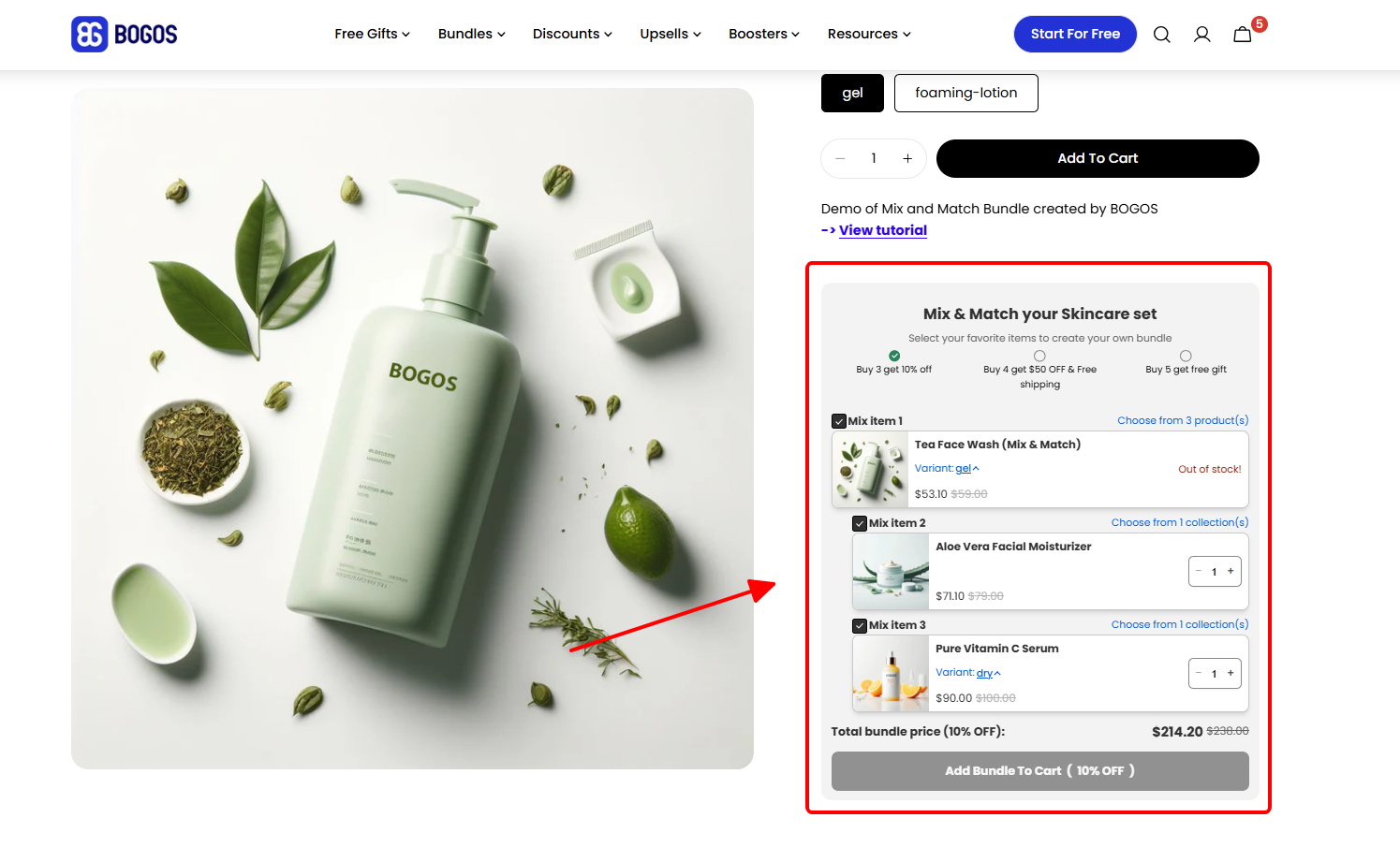
Before a customer adds the bundle to their cart, they should see a bundle summary — a preview showing their selected items, the quantity, and the final price. This reduces confusion at checkout and lowers cart abandonment. Without it, customers may not realize they’ve qualified for the bundle discount until they reach the payment page, which creates friction.
How Bundle Pricing Works
The pricing model determines how the discount is calculated. There are four common approaches, and the right one depends on your margins, product prices, and what motivates your customers.
Flat bundle price — “Any 3 for $75.” The customer pays one fixed price regardless of which items they pick. This is the simplest to communicate and creates the strongest perceived value. The trade-off is margin risk: if your product prices vary widely (say, $15 to $40), customers will pick the most expensive items, and your effective discount on those is much higher than intended.
Percentage discount — “Build a bundle, save 15%.” The discount scales with the cart value, so it works well when products in your selection pool have different price points. It’s also easier to maintain — you don’t need to recalculate a flat price every time you add new products. The downside is weaker messaging: “save 15%” feels less concrete than “$75 for 3.”
Tiered pricing — “3 for $75, 5 for $110.” This rewards customers who add more items by offering a better per-item price at higher tiers. Tiered pricing naturally pushes customers toward larger bundles, which increases average order value. However, it adds complexity to the offer — make sure the tiers are easy to understand at a glance.
Volume-based discount — “The more you add, the more you save.” Similar to tiered pricing, but the discount increases gradually with each additional item rather than jumping at specific thresholds. For example: 3 items = 10% off, 4 items = 15% off, 5 items = 20% off. This gives customers a reason to add “just one more,” but it can be harder to communicate clearly on a product page.
💡 How to choose: If your products are priced similarly (within a $5–10 range), a flat bundle price is the cleanest option. If prices vary, a percentage discount protects your margins. If your goal is to push larger orders, tiered pricing gives customers a reason to add more. →To learn how to set a bundle price without hurting your margin, read our guide here: How to Calculate Bundle Pricing to Protect Your Margin
3. How to Create a Mix and Match Bundle on Shopify
There are two ways to create a mix and match bundle on Shopify: without an app (using a collection and automatic discount) or with a dedicated bundle app.
Method 1: Create a Collection + Automatic Discount (No App)
The idea is simple: create a Shopify collection containing the products you want customers to mix and match, then apply an automatic discount that triggers when they add a qualifying number of items from that collection.
The collection gives you a dedicated URL (e.g., /collections/build-your-own-snack-box) where customers can browse and pick whatever they want. The automatic discount fires when conditions are met — for example, “buy any 3 from this collection, get 15% off.”
This method costs nothing and has no app dependency. But the biggest challenge is communication. There’s no bundle builder UI, no progress indicator, and no real-time pricing. Customers land on what looks like a standard collection page — unless you add messaging yourself (via the collection description, an announcement bar, or product descriptions), many won’t realize a bundle deal exists.
It’s a solid starting point for testing whether mix-and-match bundles work for your store. If you want the full step-by-step setup, we cover this approach in detail in our guide on: How to Do Product Bundles on Shopify Without an App.
Method 2: Use a Mix and Match Bundle App
A dedicated bundle app solves the communication gap by giving you a purpose-built bundle builder page — with step-by-step selection, a progress indicator (“2 of 3 selected”), real-time pricing updates, and a bundle summary before checkout.
Beyond the UX upgrade, apps also unlock pricing models that automatic discounts can’t handle — tiered pricing, volume-based discounts, and per-step rules. Most apps include analytics (bundle completion rate, most-picked items) so you can optimize the offer over time.
How we evaluated these apps:
Feature depth — does the app support multi-step bundle builders, collection-based selection, tiered/volume pricing, and bundle summary previews?
Pricing — is there a functional free plan, and are paid tiers reasonable for what you get?
Reviews and ratings — what do real merchants say about reliability, performance, and support quality?
Ease of use — can a non-technical merchant set up a mix and match bundle without developer help?
Here are three of the top-rated apps for creating mix and match bundles on Shopify:
Fast Bundle
BOGOS
BundleSuite
Best for
Diverse bundle formats with advanced customization
One of the strongest bundle apps on Shopify, with the widest variety of bundle types and advanced customization. The mix & match builder supports per-step quantity ranges, and the tiered discount system is highly flexible — you can mix percentage, fixed amount, cheapest item free, and free shipping within the same tier structure. Booster tools (progress bar, offer page) help promote bundles on your storefront. Starts at $19/month.
Originally one of the earliest free gift apps on Shopify (formerly Free Gifts by Secomapp), BOGOS has grown into a full promotion suite. For mix & match, it offers multi-step builders with a unique placement advantage: embed as a product page widget or use a dedicated bundle builder link anywhere on your store. Tiered discounts support mixed types per tier including free gift and free shipping add-ons. Includes booster tools (global offer block, progress bar, offer page) and advanced targeting rules. For stores that need advanced bundles alongside GWP, BOGO, and upsell campaigns, BOGOS handles it all in one app.
For advanced mix and match setups, BOGOS and Fast Bundle are the top two choices. Choose Fast Bundle if bundles are your primary focus, or BOGOS if you also run multiple promotion types.
A solid pick if your store only needs mix & match or BYOB bundles at a lower price point. Handles those two bundle types well with volume discounts and SEO-friendly bundle pages. The trade-offs: tiered discounts are less flexible (single discount type per tier), no booster tools, and fewer bundle/promotion types overall. A fair trade at $12.99/month for stores that don’t need the extras.
For a full comparison of all the top Shopify mix and match bundle apps — including detailed reviews, pros/cons, and feature breakdowns — see our review of The 8 Best Shopify Bundle apps.
4. Which Products and Businesses Work Best With Mix and Match Bundles?
Mix and match bundles aren’t a universal strategy. They work best when your catalog has interchangeable items that customers naturally want to combine — and when the economics support offering a bundled price.
Product characteristics that fit:
Consumables and replenishables — items customers buy repeatedly and want variety (coffee, snacks, skincare, supplements)
Items in a shared category with similar price points — so a flat bundle price doesn’t create margin problems
High-ticket, single-purchase products — customers don’t “mix and match” furniture or electronics. A cross-sell or upsell is usually better here.
Highly technical products — if the customer needs guided configuration (e.g., compatible PC parts), a curated bundle or product quiz is a better approach than an open selection pool.
Very low SKU count — if you have fewer than 6–8 items in the selection pool, the bundle feels restrictive. Customers want meaningful choice; a pool of 3 products isn’t really “mix and match.”
Products with wildly different margins — if your cheapest item is $5 and your most expensive is $50, a flat bundle price creates a margin problem. In this case, a percentage discount or tiered pricing is essential.
5. Tips to Increase AOV With Mix and Match Bundles
The biggest revenue lever of mix and match bundles is average order value (AOV). But the lift only happens if you structure the offer to nudge customers upward — not just give them a discount on what they’d already buy.
Here are five tactics that work.
#1 Set the Bundle Minimum Just Above Your Current AOV
If your average order is 2 items, make the bundle start at 3. The discount motivates the extra item, and the customer feels like they’re getting a deal rather than being upsold.
For example, if your store sells candles at $18 each and the average order is 1.8 candles (~$32), set the bundle at “any 3 for $45.” The customer saves $9 compared to buying 3 individually, and your AOV jumps from $32 to $45 — a 40% lift.
Check your Shopify analytics (Analytics → Reports → Average order value) before setting the threshold. A bundle minimum that’s too far above the current AOV feels like a stretch, and customers will ignore it.
#2 Use Tiered Pricing to Reward Bigger Bundles
A single-tier bundle gives customers one target. Tiered pricing gives them a reason to go further.
Instead of just “3 for $45,” add a second tier: “3 for $45, 5 for $65.” Customers who were planning to buy 3 see the next tier and think, “two more items for just $20 — that’s $10 each instead of $15.” The higher tier doesn’t need to be the most common outcome. Even if only 20–30% of customers choose it, the AOV impact is meaningful.
⚠️ Watch out: Tiered pricing only works if the tiers are easy to understand at a glance. More than 3 tiers creates decision fatigue. Stick with 2–3 tiers max.
#3 Pair Slow Movers With Bestsellers in the Selection Pool
Customers pick familiar items first, then browse the rest of the pool to fill the bundle. That browsing moment is where product discovery happens.
Include 2–3 slow-moving products alongside your bestsellers in the selection pool. Customers will add them to complete the bundle, moving stagnant inventory without needing a clearance sale. This also increases the perceived variety of the offer — a pool of 20 products feels more valuable than a pool of 8.
#4 Add a Progress Indicator
A visual progress bar (“2 of 3 selected — add 1 more!”) creates urgency and reduces drop-off. Customers see how close they are to completing the bundle, which makes them more likely to add that last item instead of abandoning the page.
If you’re using the collection + automatic discount method (no app), you won’t have a built-in progress indicator. That’s one of the main reasons merchants upgrade to a bundle app — the visual feedback loop makes a measurable difference in bundle completion rate.
#5 Test Bundle Size and Discount Depth
A 10% discount on 3 items might outperform a 20% discount on 5 if your customers don’t naturally buy in bulk. Start conservative — a smaller bundle minimum with a moderate discount — and measure the results.
Track three metrics over 2–4 weeks:
AOV before vs. after launching the bundle — the primary success metric
Bundle completion rate — what percentage of customers who start the bundle actually add it to cart
Margin per order — a high AOV doesn’t help if the discount eats your margin
If your completion rate is low but AOV is flat, the bundle minimum is probably too high. If AOV is up but margin is down, the discount is too deep. Adjust one variable at a time.
Mix and match bundles are simple in concept, but the details matter. Here are the most common mistakes merchants make — and what to do instead.
Setting bundle limits too loosely. If your bundle rule is “buy any 3 from this collection, get 20% off” but the collection includes sale items, customers can stack the bundle discount on top of already-reduced prices. The fix: exclude sale items from the bundle collection, or set explicit rules that prevent bundle discounts from applying to products already on sale.
Ignoring inventory sync. When a customer buys a bundle, each individual product’s inventory should decrement. If you’re using a bundle app, most handle this automatically. But if you’ve set up a manual collection + discount method, double-check that Shopify is tracking each product’s stock individually — not just the “bundle” as a unit. Overselling a popular item because the bundle didn’t reduce its count is a fulfillment headache.
Poor bundle page UX. Too many steps, unclear pricing, or no bundle summary preview will kill your completion rate. The most common UX mistake is not showing the total price in real time. If customers have to guess what they’ll pay, they’ll leave. Test your bundle flow end-to-end on both desktop and mobile before launching.
Not testing on mobile. Bundle builder pages with multi-step selection flows can break on small screens — buttons overlap, the progress bar disappears, or the bundle summary is hidden below the fold. Over half of Shopify traffic is mobile. If your bundle doesn’t work on a phone, you’re losing the majority of potential buyers.
Discount stacking conflicts. Shopify doesn’t combine automatic discounts with discount codes on the same order. If a customer applies a discount code and also qualifies for your bundle’s automatic discount, Shopify will apply only one (usually the larger one). That means the customer might not see the bundle discount at all. If you rely on discount codes for other promotions, test how they interact with your bundle discount before going live.
Tip: Before launching, run through the full purchase flow yourself — on mobile and desktop. Add items to the bundle, check the pricing at each step, apply a discount code, and verify the final checkout total. Five minutes of QA prevents the most common issues.
7. FAQs
Can I do bundles on Shopify?
Yes, you can. There are many Shopify apps that can help you create bundles. They allow you to provide product bundles, mix and match options, and discounts.
How do you create mix and match bundles in Shopify?
To create such bundles in Shopify, you will need to install a bundle app, e.g. Fast Bundle from the Shopify App Store. Configure the app to establish your bundle options and customize settings, then save and publish the bundles.
What is Bundle Builder in Shopify?
Bundle Builder is a Shopify bundle app. It allows you to create customizable bundles for your store. In other words, it can help you let customers build their own bundles by selecting items from a list of products.

![[2026] How To Do Shopify Mix And Match Bundle (With & Without App)](https://bogos.io/wp-content/uploads/2024/07/shopify-mix-and-match-bundle-the-ultimate-guide.jpg)