

Charlie Ngo
•
Last updated: 30 September, 2026
Shopify Spin the Wheel: 3 Ways to Add One + Best Apps
Shopify has no built-in spin the wheel, so you add one with an app, your email platform, or an...
![[2026] How to Set Up Tiered Discounts on Shopify (With & Without App)](https://bogos.io/wp-content/uploads/2024/06/shopify-tiered-pricing-2.jpg)
[2026] How to Set Up Tiered Discounts on Shopify (With & Without App)

Digital Marketing Specialist
Summarize this post with AI
A tiered discount is a promotion where the discount increases as the customer adds more to their cart. Buy 2, save 10%. Buy 4, save 20%. Spend $100, get free shipping. Spend $150, get free shipping plus a free gift. The structure varies, but the core mechanic is the same: reward customers for buying more, and give them a visible reason to reach the next level.
For Shopify merchants, tiered discounts are one of the most direct ways to lift average order value (AOV). Instead of offering a flat discount that applies equally whether someone buys one item or ten, tiers create a progression — each threshold gives the customer a reason to add one more product, hit a higher cart total, or unlock a better reward.
This guide walks through how tiered discounts work on Shopify, the four main formats you can use, and two methods to set them up: one using Shopify’s built-in discount engine (free, no app) and one using a dedicated app for more control. We also cover which apps handle tiered discounts best, real examples from live stores, and how to structure your tiers so they actually move your AOV in the right direction. Tiered discounts are also a strong format for peak sale events, so they feature in our Shopify Black Friday checklist.
Tiered discounts give customers a bigger reward the more they buy — “buy more, save more.” On Shopify, you can set them up two ways:
This guide covers both methods step by step, plus the best apps for tiered discounts and how to set thresholds that increase AOV without eroding your margins.
If you’re new to tiered pricing as a concept (what it is, how it works across industries, and why businesses use it) start with our guide on “Tiered Pricing Explained: What Is It, How It Benefits Your Business“.
Before you pick a setup method, decide which tiered discount format fits your products and your customers. There are four common formats — each works best for different store types and goals. Understanding the differences will help you choose the right setup method and avoid building an offer that doesn’t match how your customers actually shop.
Quantity-based tiers increase the discount based on how many units of the same product (or products from the same collection) a customer adds to their cart. The more units they buy, the bigger the discount.
This format works because the trigger is simple and intuitive: add more of the same thing, pay less per unit. Customers don’t need to do mental math across different products; they just see “buy more, save more” on one product and decide how many they want.
Common structures:
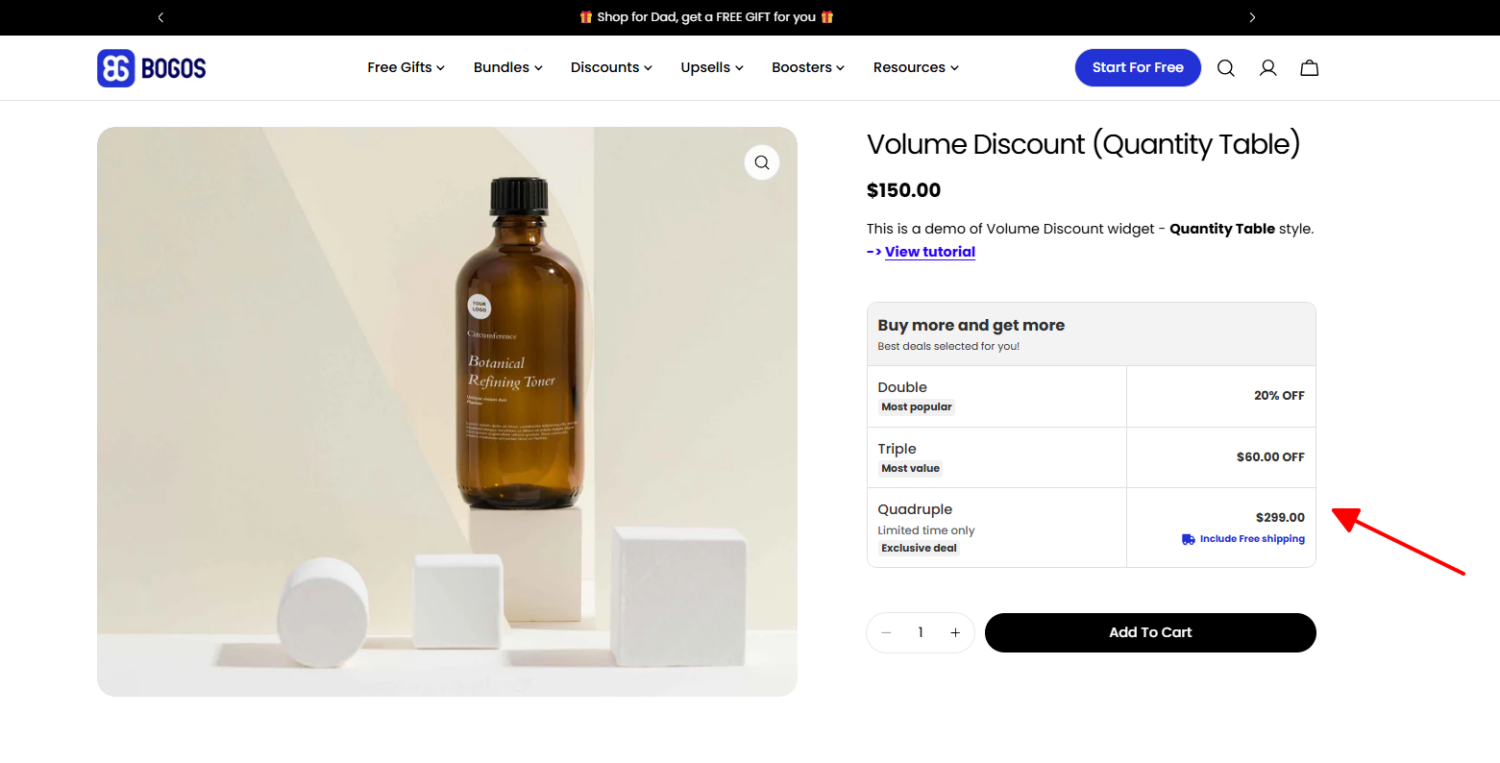
Best for: Consumables, basics, and replenishables (products customers naturally buy in multiples). Supplements, coffee, socks, candles, pet food.
Constraint: Quantity-based tiers work per product or per collection. They don’t apply across unrelated products unless you scope the discount to a shared collection. If your goal is to encourage customers to buy different products (not multiples of the same one), a spend-based or product-count tier is a better fit.
Spend-based tiers increase the discount based on the total cart value, not the quantity of any single product. The customer qualifies by hitting a dollar threshold, regardless of what they buy.
This format works well for stores with diverse catalogs where customers buy different products each visit. Instead of pushing multiples of one item, spend-based tiers encourage customers to add anything to reach the next threshold.
Common structures:
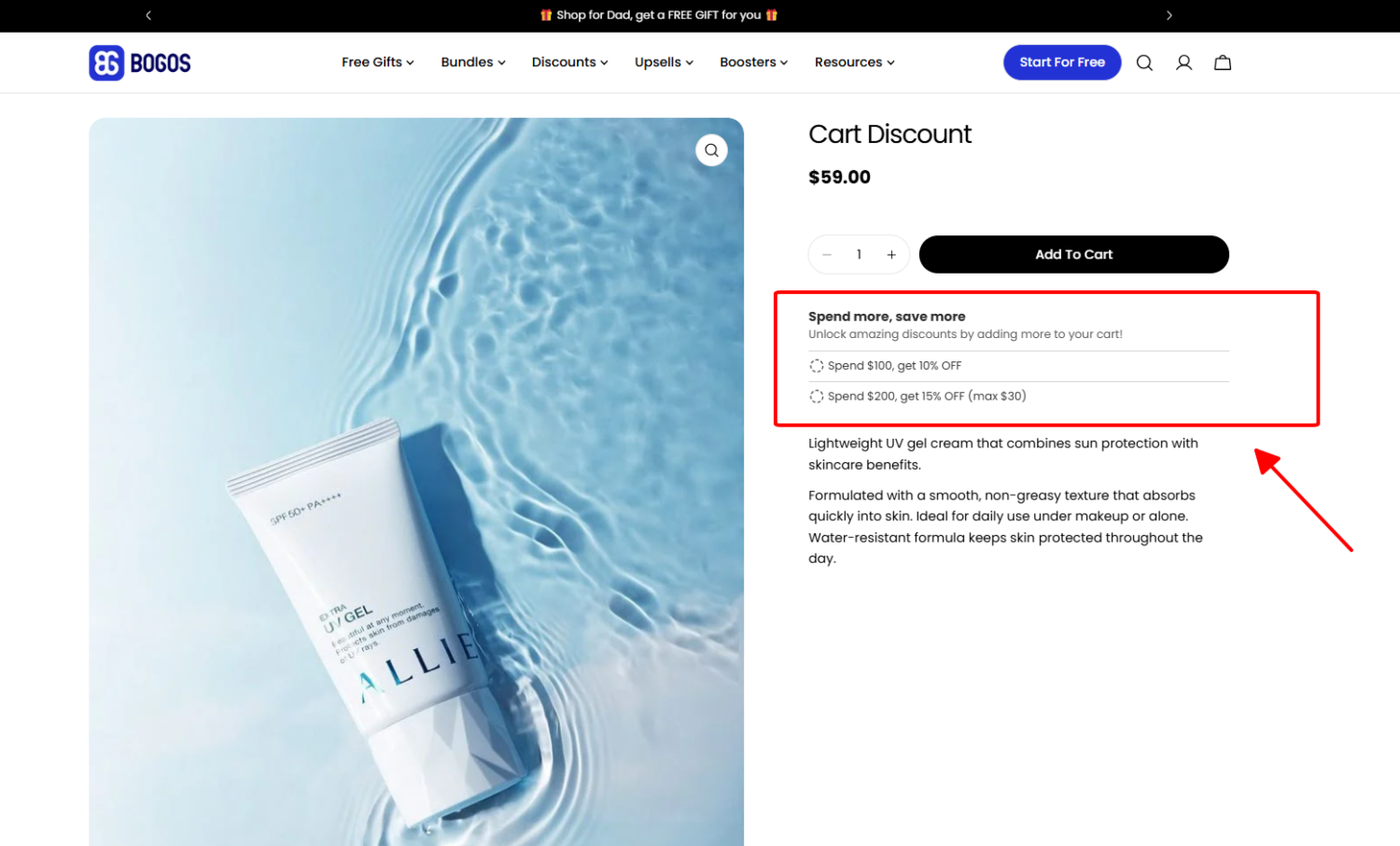
Best for: Stores with a wide product range and varied price points (home goods, fashion, beauty brands with multiple product categories).
Constraint: Set thresholds above your current AOV. If your average order is already $80 and your first tier kicks in at $75, you’re giving a discount on purchases customers would have made anyway. The first tier should require a stretch that is enough to incentivize one additional item, not reward the status quo.
Product-count tiers increase the discount based on the number of distinct products a customer selects from a defined set. Instead of buying multiples of one item, the customer picks different products from a collection or curated list.
This follows the same logic as “mix-and-match” or “build-your-own-bundle” offers; customers choose from a selection pool, and the discount scales with how many they pick. The difference is framing: a mix-and-match bundle is typically a single packaged offer on a dedicated page, while product-count tiers can apply more broadly across a collection.
Common structures:
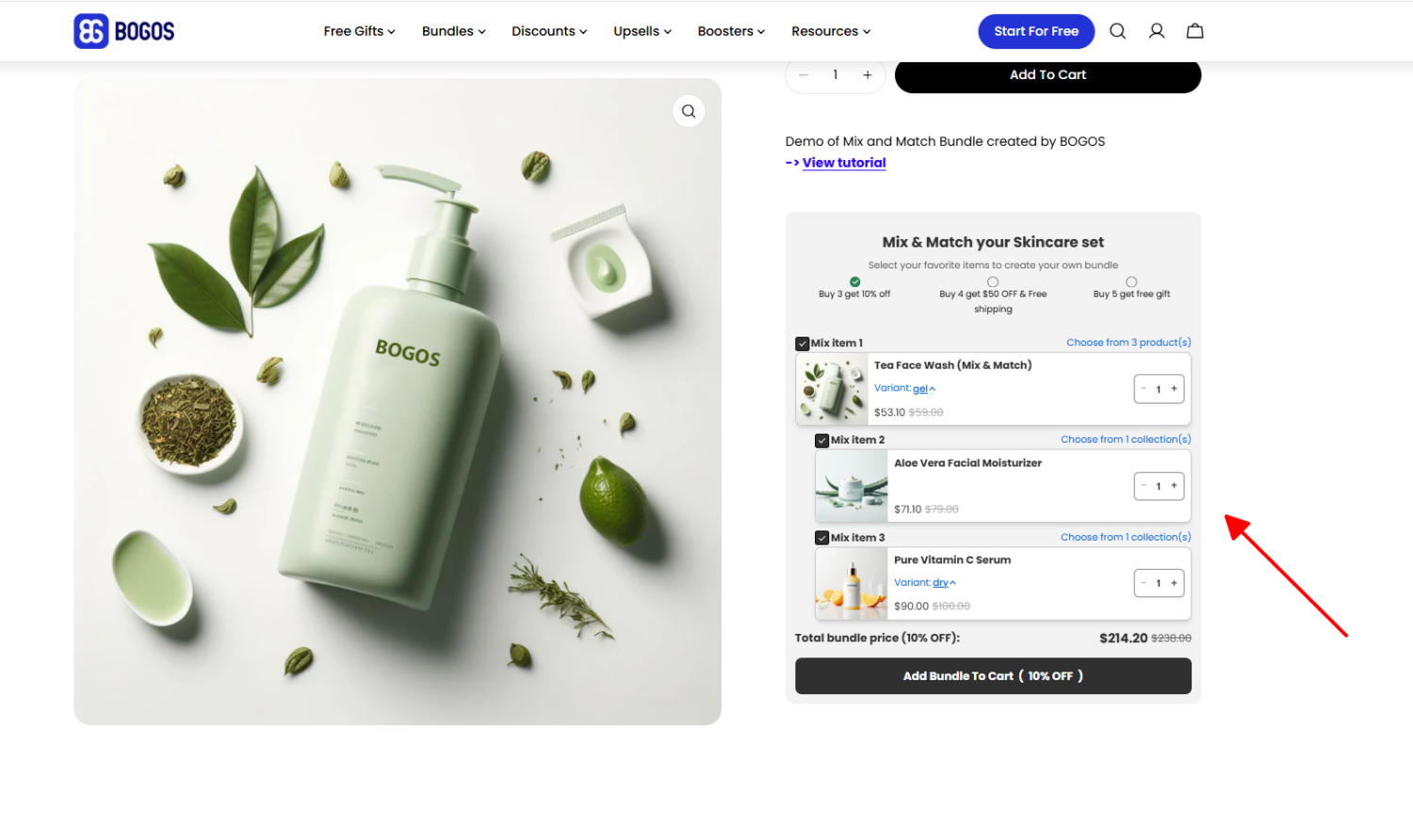
Best for: Stores that want to encourage cross-category exploration, like skincare routines, tea samplers, spice collections, or any catalog where customers benefit from trying multiple products.
Constraint: If you’re already running a mix-and-match bundle on the same collection, adding a separate product-count tier on top creates overlapping offers that confuse customers. Pick one format for each collection.
Instead of increasing a percentage or dollar discount at each tier, tiered rewards escalate the type of reward (free shipping, a free sample, a full-size bonus product) as the customer spends or buys more.
This format works well when the margin is tight, and a deeper percentage discount would cut too far into profit. A free gift has a lower actual cost to you (especially if it’s a sample or low-cost item) but high perceived value to the customer.
Common structures:
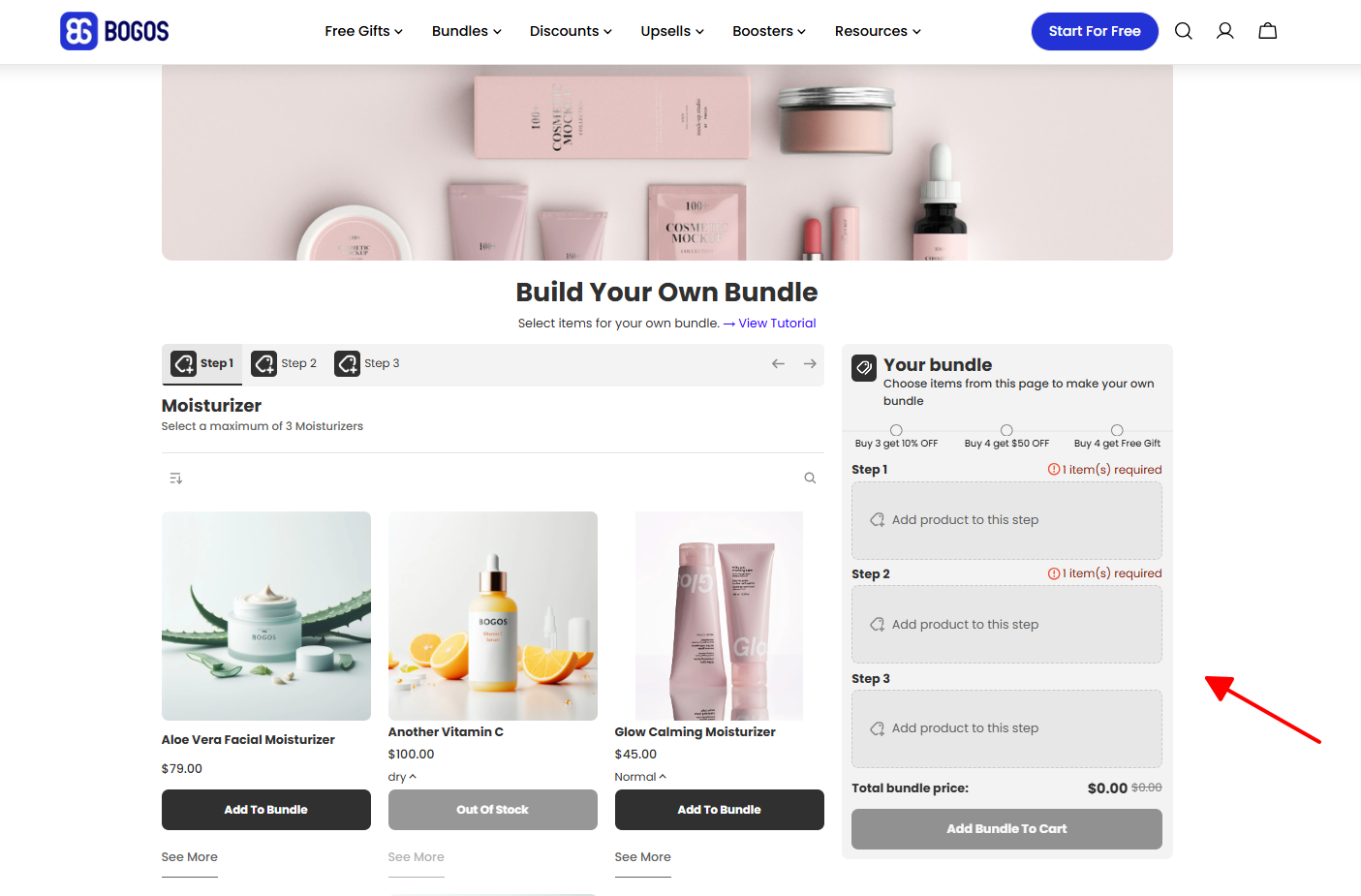
Best for: Beauty, wellness, food and beverage, or any category where you have low-cost items that work as gifts. Also effective for high-margin products where the gift cost is negligible relative to the order value.
Constraint: Tiered rewards are usually combined with a “mix-and-match” or “build-your-own-bundle” strategy, where the reward scales based on the quantity of items selected. Some apps let you combine multiple reward types within a single tier. For example, a percentage discount plus free shipping at Tier 2, or a percentage discount plus a free gift at Tier 3.
Shopify’s native discount engine supports basic tiered discounts without any app. The approach is straightforward: create separate automatic discounts for each tier, each with a different quantity or spend threshold. Shopify evaluates all active automatic discounts and applies the one that matches the customer’s cart. No app, no code, no monthly cost.
This method works for simple 2-3 tier setups, especially quantity-based and spend-based tiers. It won’t give you a customer-facing pricing table, a progress bar, or the ability to mix reward types per tier, but it’s the fastest way to test whether tiered discounts move the needle for your store.
Here’s how to create a 3-tier volume discount on a specific collection (the same process works for spend-based tiers — just swap the minimum quantity for a minimum purchase amount).
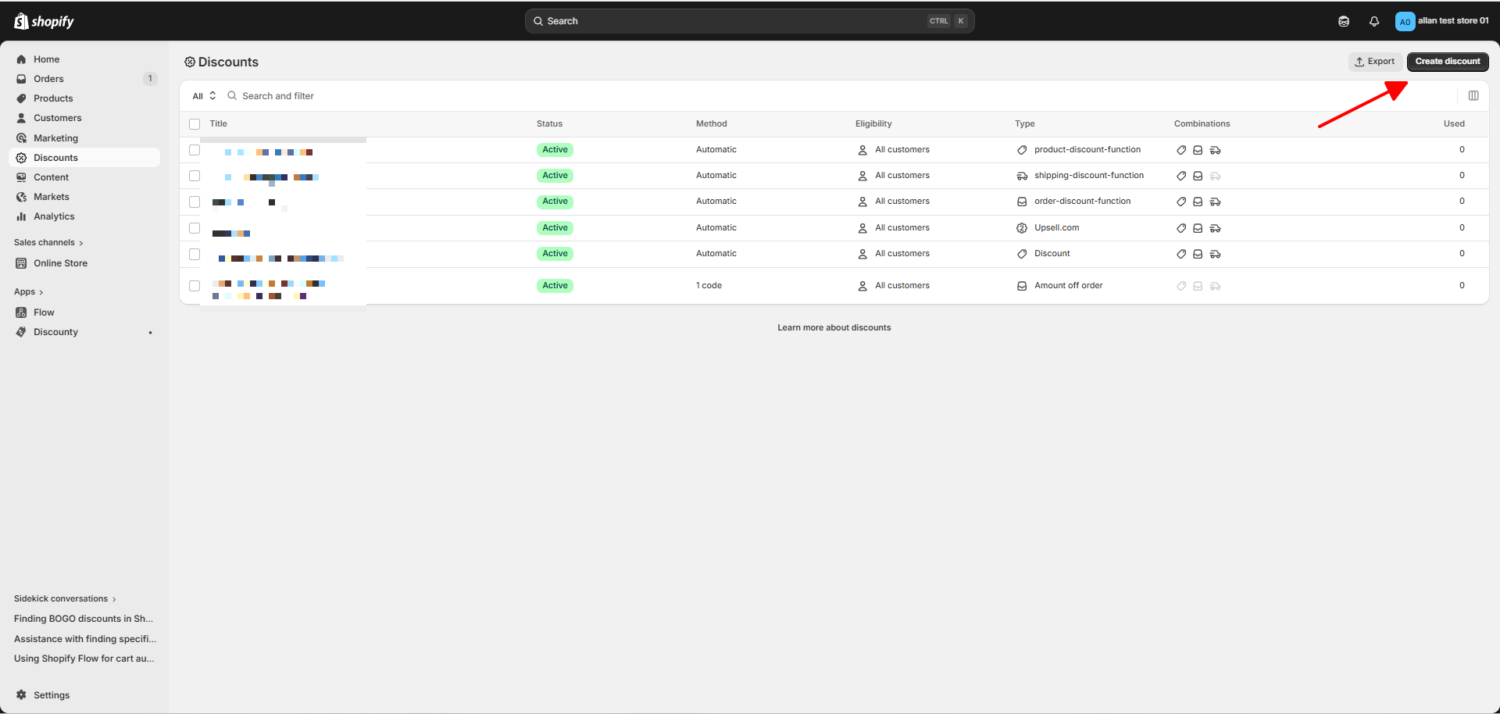
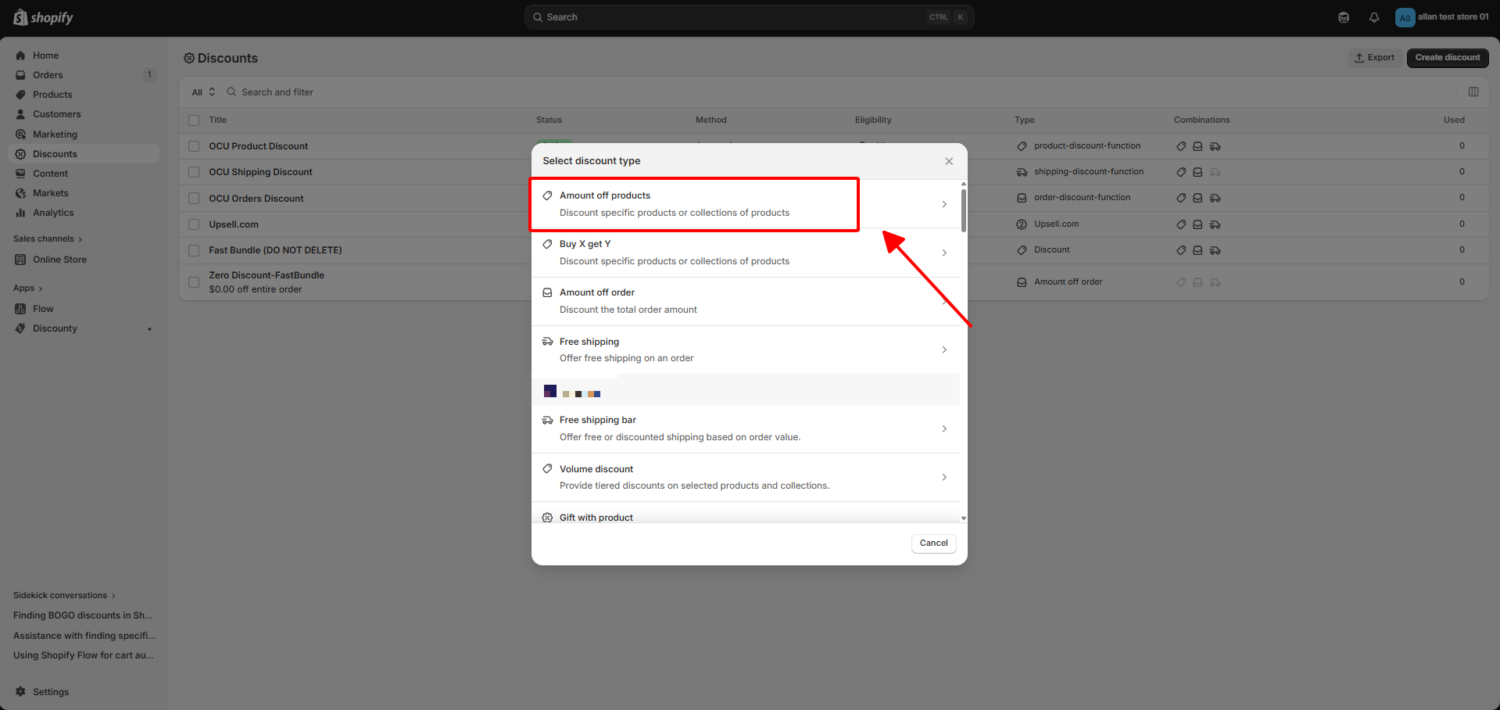
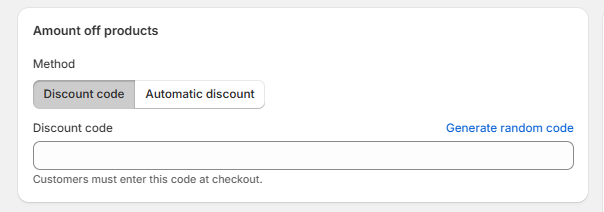
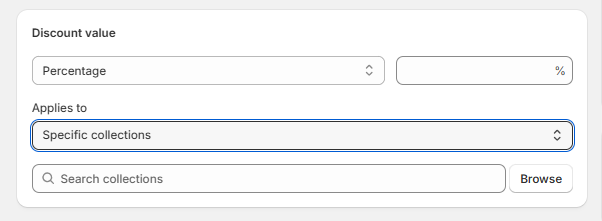
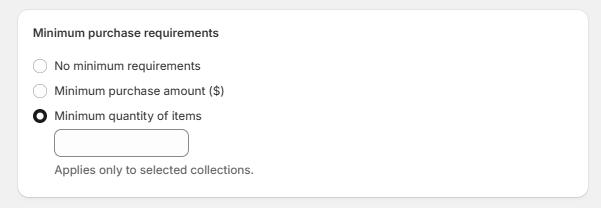
Example: You want a 3-tier volume discount on your coffee collection. Create three automatic discounts:
When a customer adds 4 bags to their cart, Shopify sees that both Tier 1 (2+ bags) and Tier 2 (4+ bags) qualify. It applies Tier 2 (15% off) because it’s the larger discount. Tier 3 doesn’t apply until the customer reaches 6 bags.
The native method covers the basics, but there are real constraints you should know before building your tiers:
⚠️ Watch out: If you run other automatic discounts alongside your tiers (e.g., a sitewide sale, a seasonal promotion), test how they interact. Shopify picks the largest qualifying product discount per line item, so a customer might get your sitewide discount instead of the tiered one if the sitewide offer happens to be larger for their specific cart.
The native method is a solid starting point for testing whether tiered discounts work for your store. If you see results and want to add a tier display, progress bar, mixed reward types, or audience targeting, the next sections cover the apps that fill those gaps and how to set them up.
A tiered discount app fills the gaps the native method leaves open. The most impactful upgrade is visibility: an app gives you a customer-facing tier display on product pages (so shoppers see all tiers at a glance), a progress bar in the cart (so they know how close they are to the next tier), and an offer page that lists all active tiered deals in one place.
Beyond visibility, apps unlock features the native discount engine can’t handle:
Here’s how three of the top-rated Shopify apps compare for tiered discounts specifically. For more detailed reviews, feature breakdowns, and additional app options, see our “Tiered Discounts Best Shopify Apps” guide.
How we evaluated: We focused on tiered discount capabilities, which tier types each app supports, the discount types available per tier, booster widgets (tier display, progress bar), targeting rules, and analytics. For a full breakdown of our evaluation process, read our explanation.
| Feature | BOGOS | Discounty | Fast Bundle |
|---|---|---|---|
| Best for | All-in-one promotions + tiered discounts | Quantity and spend-based tiered discounts with urgency tools | Product-count tiers and tiered rewards inside bundles |
| Rating | 5.0 ⭐ (3,370+ reviews) | 4.9 ⭐ (1,100+ reviews) | 5.0 ⭐ (2,200+ reviews) |
| Pricing | Free plan available; up to $109.99/month | Free plan available; from $9.90/month | Free to install; from $19/month |
| Tiered discount types | |||
| — Quantity-based tiers | ✅ | ✅ | ✅ |
| — Spend-based tiers | ✅ | ✅ | ❌ |
| — Product-count tiers | ✅ (with mix-and-match / bundle builder widget) | ✅ (no mix-and-match or bundle builder widget) | ✅ (with mix-and-match / bundle builder widget) |
| — Tiered rewards (free gift tiers) | ✅ | ❌ | ✅ |
| Discount types per tier | |||
| — Percentage off | ✅ | ✅ | ✅ |
| — Fixed amount off | ✅ | ✅ | ✅ |
| — Fixed price | ✅ | ✅ | ✅ |
| — Free gift | ✅ | ❌ | ❌ |
| — Free shipping | ✅ | ❌ | ✅ |
| Booster widgets | |||
| — Tier display / pricing table | ✅ | ✅ | ✅ |
| — Progress bar | ✅ | ❌ (free shipping progress bar only, not for tiered discounts) | ❌ |
| — Offer page | ✅ | ❌ | ✅ |
| — Countdown timer | ❌ | ✅ | ❌ |
| Advanced targeting | Geo, customer tags, order history, sales channel, magic links | Customer segments | ❌ |
| Analytics | ✅ Per-campaign performance, AOV impact | ✅ KPI dashboard | Basic |
| POS support | ✅ | ❌ | ✅ |
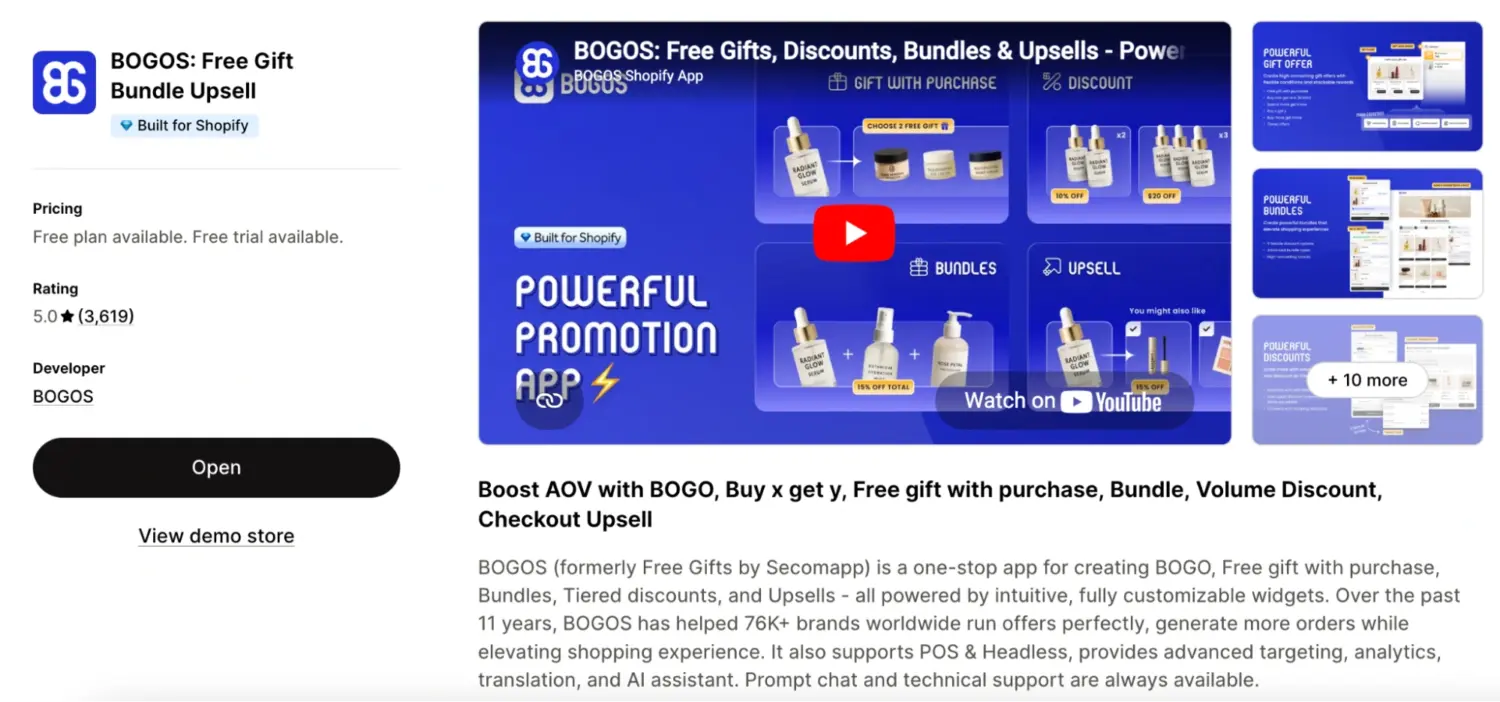
BOGOS covers tiered discounts alongside free gifts, BOGO, bundles, upsells, and volume discounts from one dashboard, so you don’t need separate apps as your promotion strategy grows. For tiered discounts, it supports all four tier types (quantity-based, spend-based, product-count, and tiered rewards) with full flexibility on discount types per tier: percentage off, fixed amount, fixed price, free gift, and free shipping can all be mixed within the same tiered structure.
The booster toolkit (tier display widget, progress bar, offer page, and global “Today’s Offers” block) handles the customer-facing visibility that native discounts lack. Advanced targeting lets you run different tiered offers for VIP customers, specific regions, or specific sales channels. The 5.0-star rating across 3,700+ reviews reflects consistently strong support and reliability.
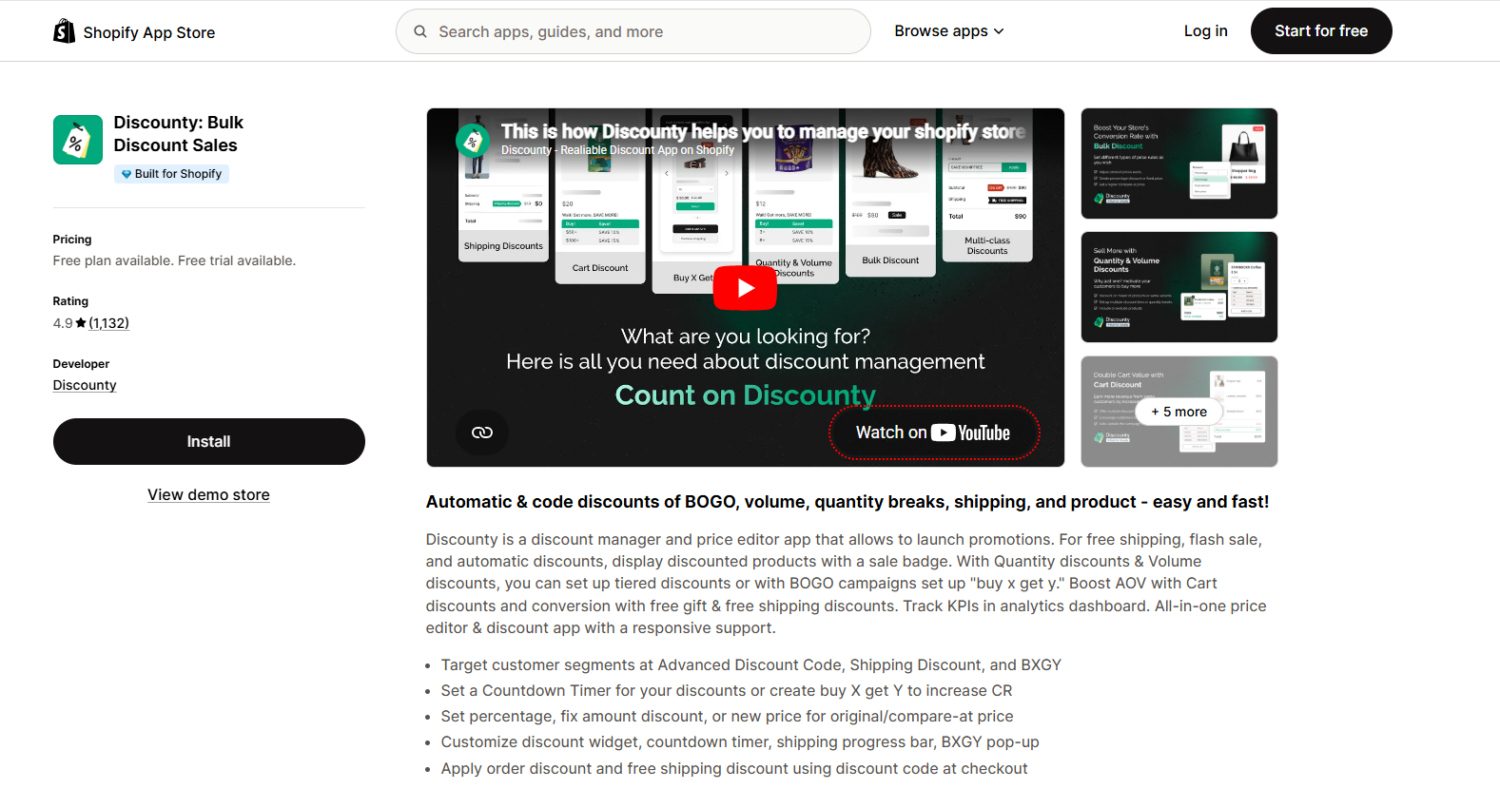
Discounty is a discount management and price editing app that handles quantity-based and spend-based tiered discounts well. It displays discounted prices directly on product pages with strike-through pricing, and includes a countdown timer that other tiered discount apps don’t offer.
The trade-offs: Discounty doesn’t support tiered rewards (no free gift or free shipping as a tier reward), the progress bar is limited to free shipping offers and doesn’t work within tiered discount campaigns, and product-count tiers don’t include a mix-and-match or bundle builder widget. If your tiered discounts are primarily “buy more units, save more” or “spend more, save more” with percentage or fixed-amount rewards, Discounty handles that at a lower price point.
Fast Bundle is a bundle-focused app that handles product-count tiers through its mix-and-match and bundle builder widgets; customers pick products from a defined set, and the discount scales with how many they select. It also supports tiered rewards with free shipping as a tier incentive. The app creates bundles as standalone products with their own product pages, which is good for SEO, and includes an offer page that lists all active bundle deals in one place.
The trade-offs: Fast Bundle doesn’t support spend-based tiers (cart value thresholds), doesn’t offer free gift as a discount type within tiers, has no progress bar, and has no advanced targeting rules. If your tiered discount strategy centers on product-count or quantity-based tiers inside bundle offers, Fast Bundle is purpose-built for that. If you also need spend-based tiers, free gift rewards, or audience targeting, BOGOS covers the full range.
The native method lets you test tiered discounts. Using an app lets you run them properly — with a tier display on product pages, a progress bar in the cart, mixed reward types, and targeting rules. Here’s how to set up a tiered discount in BOGOS.
Step-by-Step Setup in BOGOS
This walkthrough creates a 3-tier spend-based discount. The same flow applies to quantity-based tiers. If you want to apply product-count tiers and tiered rewards, choose “Mix-n-match” or “Bundle page.“
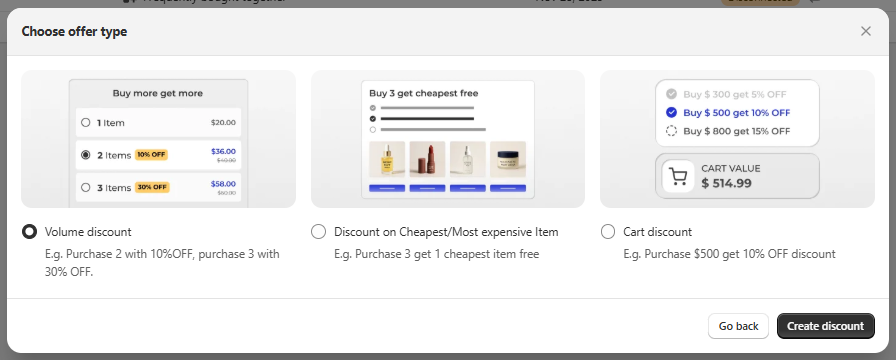
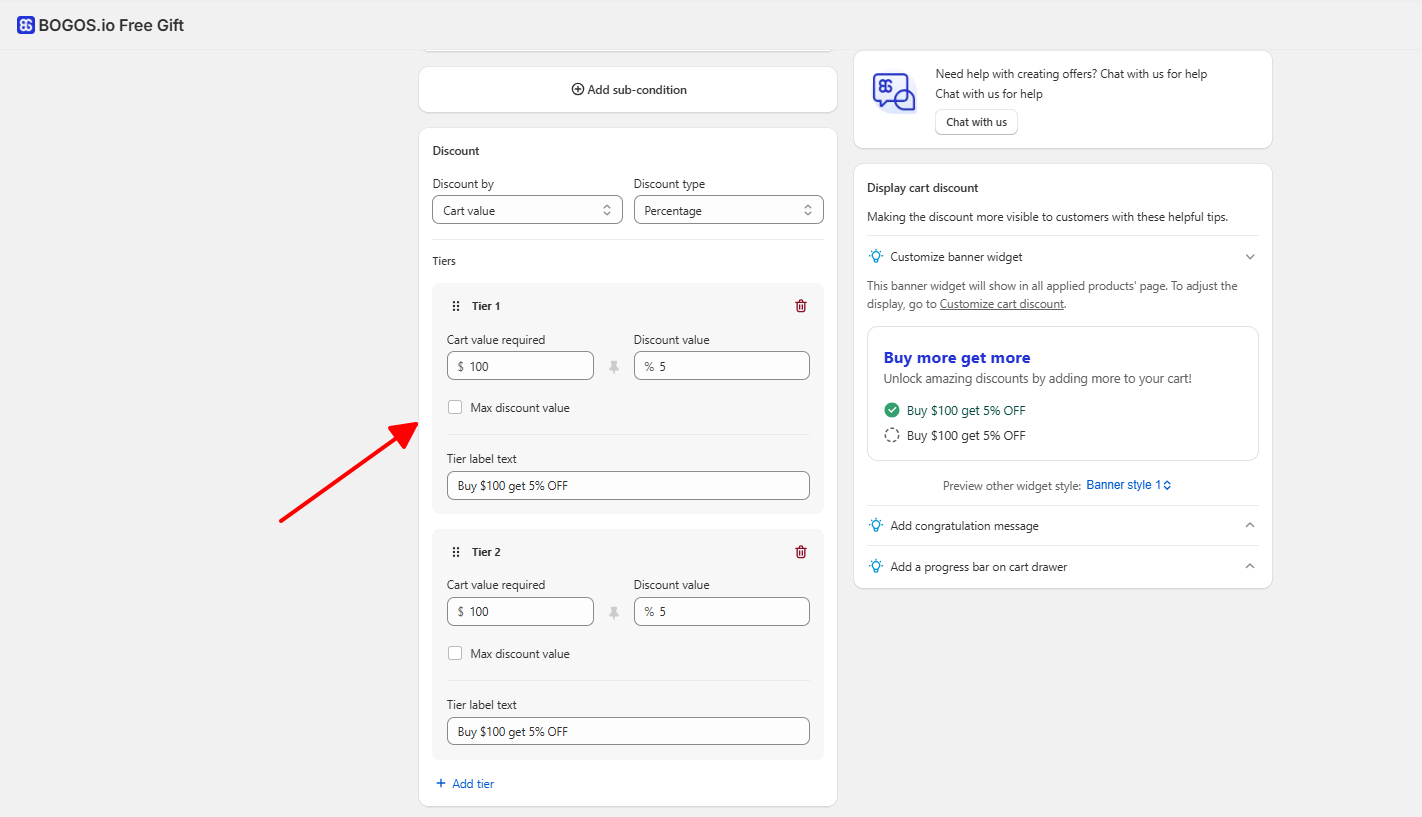
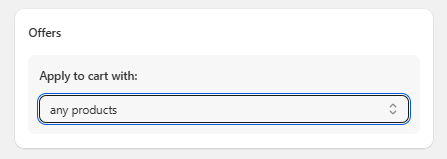
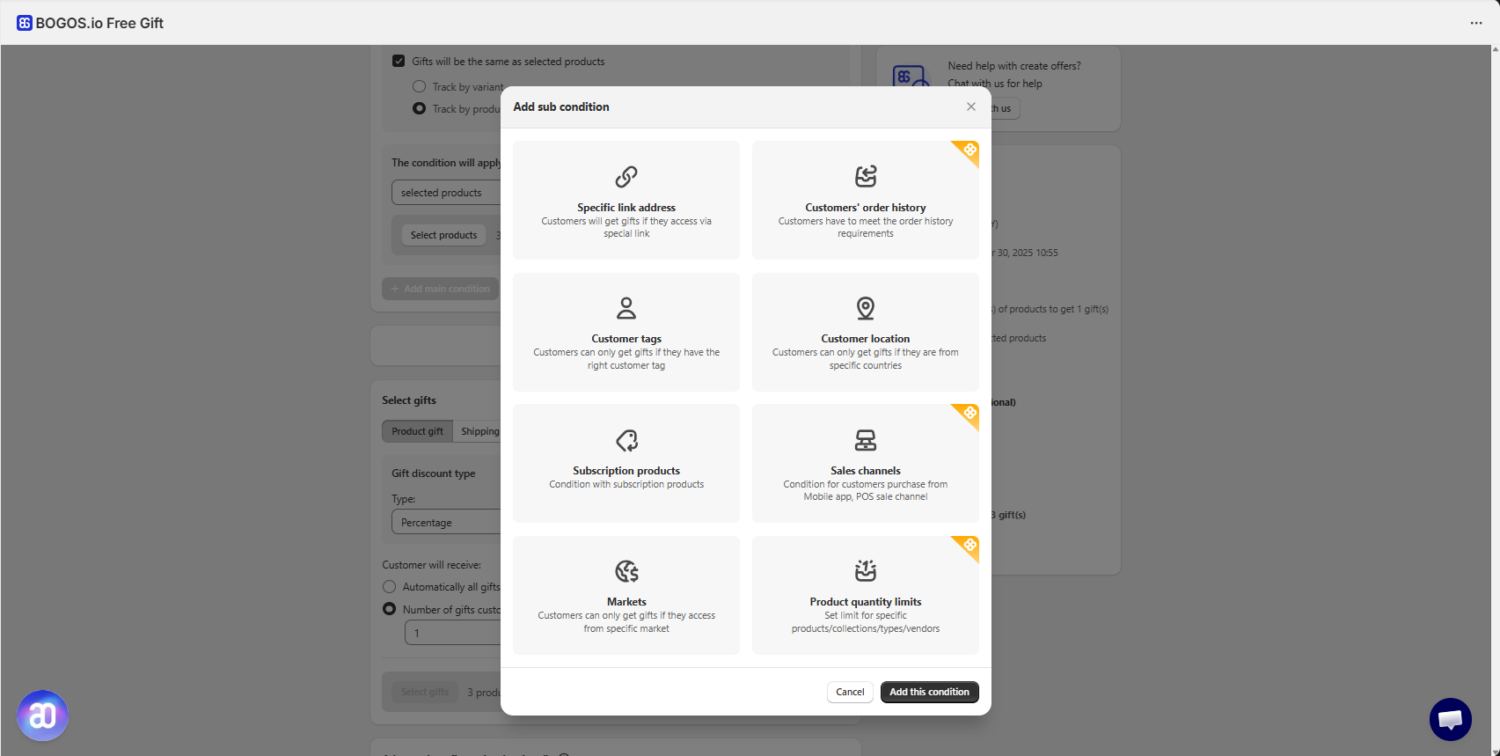
Example: You run a wellness brand and want to encourage larger orders. You set up three spend-based tiers:
On product pages, customers see a pricing table showing all three tiers. In the cart, a progress bar reads “You’re $38 away from 15% off + free shipping!” A customer who added $62 worth of products sees they’re close to Tier 2 and adds one more item to cross $100.
For stores that sell subscription products and want to apply tiered discounts to recurring orders, see our guide on [Tiered Discounts for Subscription Products].
Tiered discounts look different depending on what you sell and how your customers shop. Here are three real examples from e-commerce brands using different tiered formats.
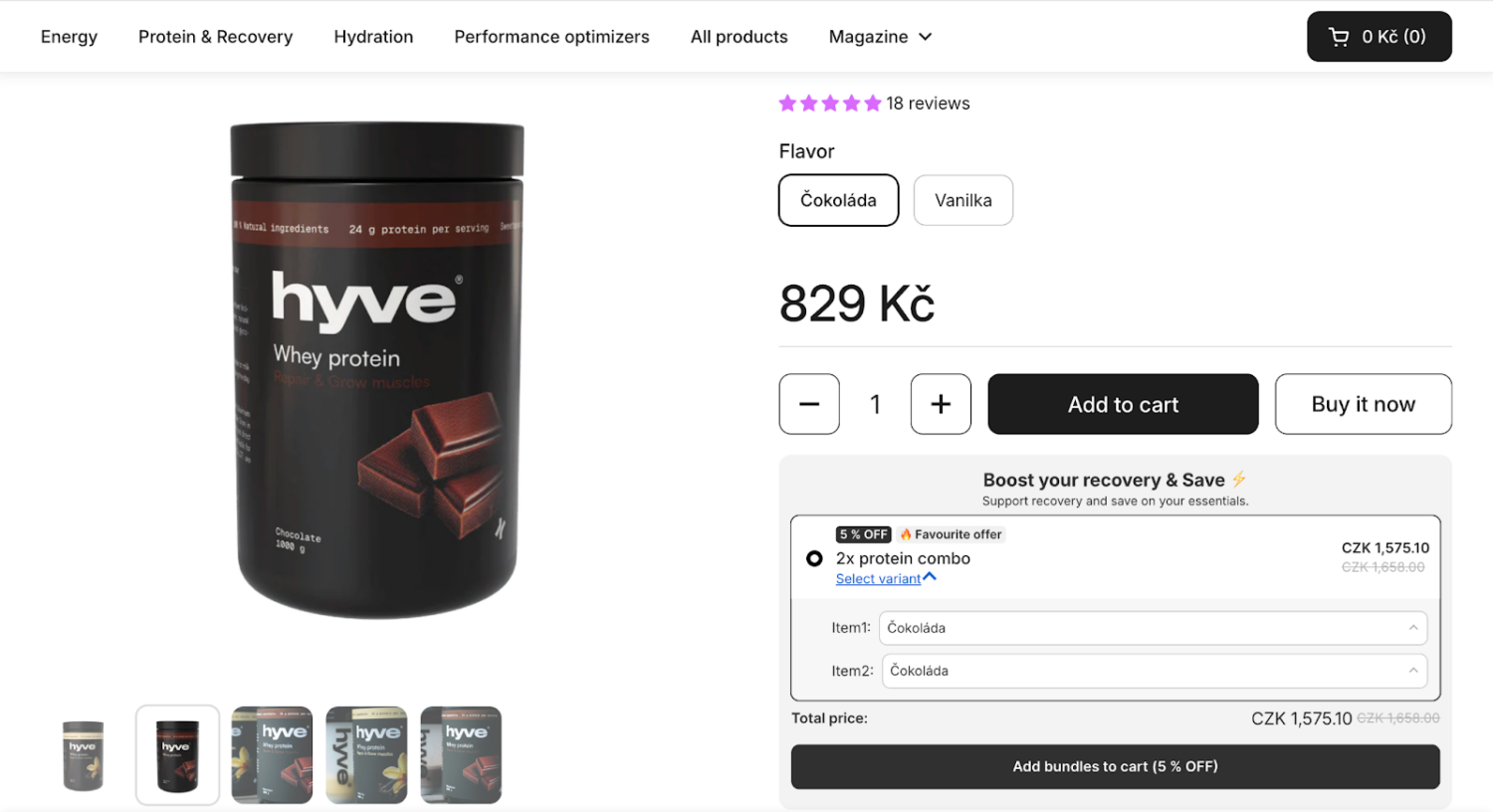
Hyve Nutrition, a Czech wellness brand, uses quantity-based tiers on their whey protein. A single tub sells at full price (829 CZK), while a 2-tub tier unlocks a 5% discount (1,575.10 CZK). The strategy isn’t just about increasing AOV.
For a supplement brand, selling one tub means a customer might use it for a month and stop. A 2-tub tier locks them into a 60-day usage cycle, building the habit that drives repeat purchases. The 5% discount is deliberately small because the real incentive is the per-serving savings that make the single tub feel expensive by comparison.
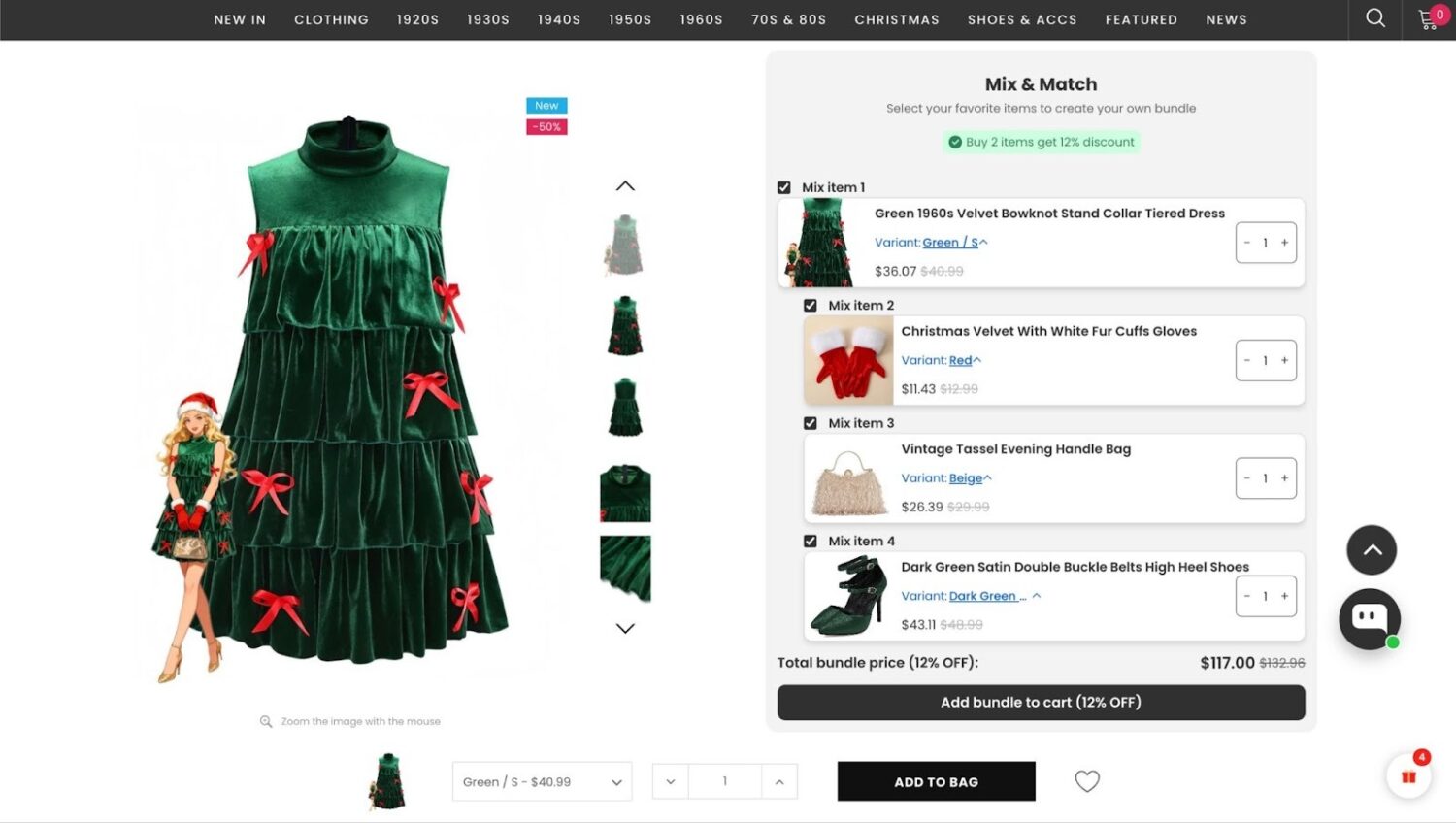
Retro Stage, a niche vintage fashion retailer, uses a product-count tier with mix-and-match logic. Any combination of 2 or more items triggers a flat 12% discount across the entire cart. A customer starting with a $40.99 dress can add a $12.99 pair of gloves to unlock the discount on both.
The tiered structure shifts the buying mindset from purchasing a “product” to investing in an “outfit.” The 12% discount is calibrated to grab attention (more noticeable than a standard 10%) without the margin erosion of a 20% cut. The high markups on lower-cost accessories effectively subsidize the discount on the higher-priced hero product.
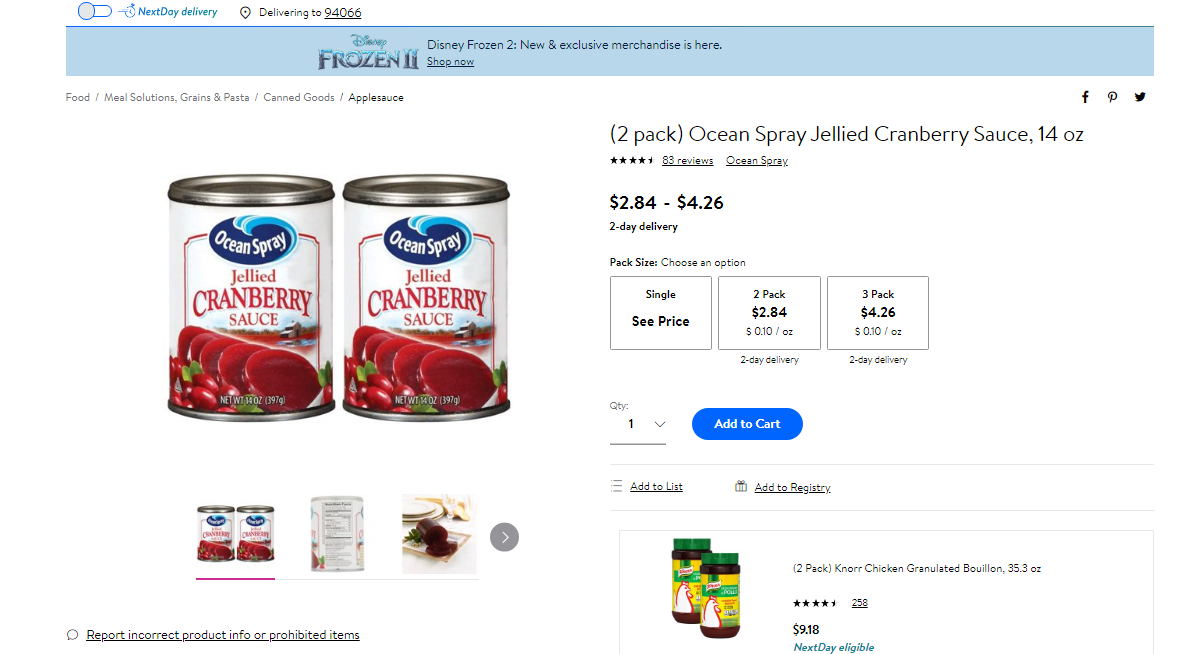
Ocean Spray uses volume-based tiers on their cranberry products, pricing single cans at a premium while offering 2-packs and 3-packs at a lower cost per unit. The logic is straightforward competitive blocking: if a customer has three cans in their pantry, they’re out of the market for competitor brands for months. The single-can price effectively acts as a “convenience tax,” while the multipack represents the true target price point. Margin percentage is lower on the bulk pack, but the increased sales velocity and reduced per-unit shipping costs more than compensate.
👉 For more real-life tiered discounts examples of Shopify brands: 10 Real-World Tiered Pricing Examples & Models for E-commerce Growth
The tier structure matters more than the discount depth. Set thresholds wrong and you either give away margin on purchases customers would have made anyway, or set the bar so high nobody reaches the second tier.
Here are the key principles to get right:
For a full step-by-step playbook on setting tier thresholds — including how to calculate the right gap between tiers, benchmark thresholds by industry, and measure AOV impact — read our guide on [How to Set Tier Thresholds That Actually Increase AOV].
Tiered discounts turn a flat promotion into a progression — each threshold gives customers a specific, visible reason to add more to their cart. For Shopify merchants, that translates directly to higher AOV when the tiers are set correctly.
The native method (stacked automatic discounts) is the fastest way to test the format: free, no app dependency, setup in under 10 minutes. The trade-off is visibility — customers won’t see your tiers unless they happen to add enough to trigger them.
An app like BOGOS solves the visibility problem with a tier display on product pages, a progress bar in the cart, and the flexibility to mix discount types and free gifts within the same tiered structure. If you’re serious about using tiered discounts as an ongoing strategy (not just a one-time test), the app path gives you the tools to optimize over time.
Whichever method you choose, the principles are the same: set the first tier just above your current AOV, keep tier gaps achievable, limit to 2-3 tiers, and always protect your margins. Start with a simple structure, measure for 2-4 weeks, then adjust based on real data.
Yes. You can create multiple automatic discounts in Shopify’s discount engine, each with a different quantity or spend threshold. Shopify applies the largest qualifying discount to each line item. This method is free and works for basic 2-3 tier setups. The main limitations are no customer-facing tier display, no progress bar, and no ability to auto-add free gifts.
Volume discounts are a type of tiered discount — specifically, quantity-based tiers applied to the same product (“buy 2, save 10%; buy 4, save 20%”). Tiered discounts is the broader category that also includes spend-based tiers (cart value thresholds), product-count tiers, and tiered rewards (escalating free gifts or free shipping).
Start with 2-3. Two tiers (a “good” deal and a “great” deal) is the simplest structure and often the most effective. Three tiers works well for stores with a wide AOV range. More than 3 tiers creates decision fatigue — customers see too many options and default to the lowest tier or ignore the offer entirely.
Not with Shopify’s native discount engine — every customer who meets the threshold gets the same tier. To target different customer segments with different tiered offers (e.g., deeper discounts for VIP customers, lower entry thresholds for new customers), you need an app with customer segment or tag-based targeting. BOGOS supports targeting by customer tags, segments, geolocation, order history, and sales channel.
It depends on your setup. Shopify’s native automatic discounts don’t natively integrate with subscription billing. Some tiered discount apps support subscription compatibility, but the implementation varies

Shopify has no built-in spin the wheel, so you add one with an app, your email platform, or an...
Most Shopify merchants run promotions, but few know how their setup compares to what’s actually working across hundreds of...
Adding live chat to a Shopify store is easy. Running it well is the part most guides skip. This...
